> Source: [sk88520](https://support.checkpoint.com/results/sk/sk88520)
# sk88520 - Best Practices - Identity Awareness Large Scale Deployment
| Property | Value |
|----------|-------|
| Solution ID | sk88520 |
| Date Created | 2012-12-02 |
| Last Modified | 2025-10-19 |
| Technical Level | General |
| Products | Security Gateway |
| Versions | R82, R81.20, R81.10 (EOS), R81 (EOS) |
## Solution
**Table of Contents:**
1. Background
2. Working with ADQuery / Identity Collector in a large-scale deployment
1. Introduction
2. Guidelines
3. Working with Identity Agent in a large scale deployment
1. Introduction
2. Increasing Keep-Alive Interval
3. Increasing Client and Security Gateway Tolerance
4. Complete List of Windows Registry Tweaks on Identity Agent Client
4. General Guidelines
1. Nested Groups
2. Disable User Updates during policy installation
5. Stability Fixes and Performance Enhancements
6. Identity Collector
7. MUH2 agent
8. Identity Broker
9. Documentation
10. Related solutions
Background {#Background}
------------------------
This solution provides best practices guidelines for deploying Identity Awareness in large-scale deployments that include either a large number of users (\>2,000), a large number of Domain Controllers (\>20), or multiple sites.
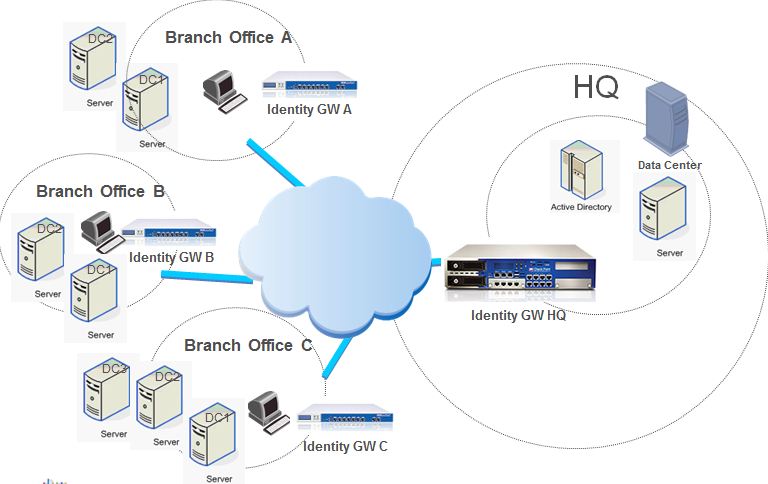
In the context of this solution, the following sample topology represents a typical deployment:
Identity Awareness supports up to 200,000 identities per Security Gateway since R80.10, or in R77.30 with Giraffe HF (see [sk120979](https://support.checkpoint.com/results/sk/sk120979)).
Before the large scale enhancements introduced in R80.10 and Giraffe HF, Identity Awareness supported up to 30,000 identities per Security Gateway.
Note that the number of supported Identity Agents per Security Gateway is 20,000.
Working with AD Query / Identity Collector in a large-scale deployment {#Working with ADQuery in a large scale deployment}
--------------------------------------------------------------------------------------------------------------------------
Both AD Query and Identity Collector are Check Point solutions to analyze Security Events logs which are generated on Microsoft Active Directory server and provide information aobut user/machine login.
### Introduction to Identity Collector
Check Point Identity Collector is a Windows-based application which collects information about identities and their associated IP addresses, and sends it to the Check Point Security Gateways for identity enforcement.
For more information about Identity Collector, see [Identity Awareness Clients Administration Guide](https://sc1.checkpoint.com/documents/Identity_Awareness_Clients_Admin_Guide/Default.htm) \> Identity Collector section.
### Identity Collector key benefits over standard AD Query
Reduces the load on the Security Gateway - the agent is doing the queries instead of the Security Gateway.Reduces the load on the DCs - the native Windows API used consumes less resources.The Identity Collector requires no administrator or administrator-like permissions. Only permission required is read-only access to the domain security logs.One Identity Collector can serve multiple Security Gateways, even from different CMA.
### Guidelines for working with Identity Collector
1. Identity Collector can work with up to 35 Microsoft Active Directories.
2. Identity Collector supports handling 1900 security events per second (comparing to AD Query which supports 800 per second).
### Introduction to AD Query {#ADQuery - Introduction}
AD Query is a clientless identity acquisition method.
When using AD Query, the Security Gateway connects to the Active Directory Domain Controllers using Windows Management Instrumentation (WMI), and subscribes to receive Security Event logs that are generated, by default, on the Domain Controllers, when users login. These Security Event logs are parsed by the Security Gateway to associate a user/machine to an IP address.
### Guidelines for working with AD Query {#ADQuery - Guidelines}
1. **Avoid a situation where a single Security Gateway works with too many Domain Controllers**
* A single Security Gateway can parse up to \~400 (on 4000-series appliances) or \~800 (on 12000-series and higher appliances) Security Event logs per second, querying either a single Domain Controller, or multiple Domain Controllers. When the Security Gateway receives too many Security Event logs per second, it may become overloaded, and PDPD process may utilize the CPU at a high level.
* Reducing the load on a Security Gateway
1. When an organization consists of multiple geographical sites, it is recommended to configure AD Query on each site, querying only the site's local Domain Controllers and sharing identities with other sites as necessary (for example, if users from Branch Office "B" need access to resources in Branch Office "A", then Identity Security Gateway "B" should share identities with Identity Security Gateway "A").
Identity Sharing is configured via the '`Get identities from other gateways`' option in Security Gateway properties - '`Identity Awareness`' pane.
Regarding the identity sharing method
* Push sharing method is the default when PDP and PEP processes run on the same gateway
* Pull sharing method is the default when PDP and PEP processes run on different gateways
2. In addition to taking into account geographic considerations, it is highly recommended to distribute the load of large sites between several Security Gateways on that site, configuring each Security Gateway to register to a different set of Domain Controllers based on the number of Security Event logs each Domain Controller generates.
This configuration procedure is detailed in the Identity Awareness Administration Guide ([R77](http://supportcontent.checkpoint.com/documentation_download?id=24805), [R80.10](https://sc1.checkpoint.com/documents/R80.10/WebAdminGuides/EN/CP_R80.10_IdentityAwareness_AdminGuide/html_frameset.htm)) - Chapter 3 'Identity Sources' - 'Specifying Domain Controllers per Security Gateway'.
**Use "Assume that only one user is connected per computer"**
1. When using the '`Assume that only one user is connected per computer`' option (Security Gateway properties - '`Identity Awareness`' pane - '`Active Directory Query`' - '`Settings...`'), it is important to exclude certain servers from AD Query.
Exchange Servers, Proxy Servers, DNS Servers or Terminal Servers/Citrix Servers generate a lot of AD Query traffic without substantial security value since no users actively login to those machines, and thus overload the Security Gateway.
For more information, refer to [sk86560 - High CPU utilization by PDPD daemon](http://supportcontent.checkpoint.com/solutions?id=sk86560).
2. In order to acquire identity information from Terminal Servers/Citrix Servers, use the *Terminal Servers Endpoint Identity Agent*.
### **Exclude Service Accounts**
* Service accounts are user accounts, and are created explicitly to provide security context for services running on Microsoft Windows Servers. Service accounts generate a substantial amount of Security Event logs, which lack real security value and overload Security Gateways with enabled AD Query / Identity Collector. It is highly recommended to exclude all known service accounts.
* ***For AD Query**:* Adding the service accounts to the `Excluded Users / Machines` list (Security Gateway properties - `Identity Awareness` pane - `Active Directory Query` - `Settings...` - `Advanced...`).
To get a list of suspected service accounts (which were identified for more than 10 different machines), please run on the Security Gateway the command: *adlog a control srv_accounts show*
* ***For Identity Collector:*** Using the Identity Collector Filters to exclude the service accounts. Please read more in R80.10 Identity Awareness Administration Guide.
To get a list of suspected service accounts (which were identified for more than 10 different machines), please run on the Security Gateway the command: *pdp idc service_accounts*
### **Use Captive Portal with** AD Query**/ Identity Collector**
Enhance usability by enabling Captive Portal along with AD Query and Identity Collector to acquire identities that are not acquired (for example, users that login to their computer while not connected to the organizational network). Kerberos Transparent Authentication can be used to spare users from having to re-enter their credentials.
Working with Identity Agent in a large-scale deployment {#Working with Identity Agent in a large scale deployment}
------------------------------------------------------------------------------------------------------------------
### Introduction to Identity Agent {#Identity Agent - Introduction}
There are two types of Identity Agents:
* *Endpoint Identity Agents* - dedicated client agents installed on users' computers that acquire and report identities to the Security Gateway.
* *Terminal Servers Endpoint Identity Agent* - an Endpoint Identity Agent installed on an application server that hosts Citrix/Terminal services. It identifies individual users whose source is the same IP address.
The standard behavior of the Identity Agent includes client authentication, followed by frequent keep-alive notifications sent to the Security Gateway.
Keep-alive messages serve the important role of letting the Security Gateway know that the client is still connected with the reported user. When keep-alive messages are not sent in a timely manner, the Security Gateway assumes that the client is no longer connected, and closes the session.
An unstable network or high utilization of the Identity Awareness daemon, such as during policy installation, might interfere with the Identity Awareness daemon's responsiveness for a short while, causing Identity Awareness clients to become disconnected and possible network outage due to the user sessions being disconnected.
To avoid Identity Awareness client disconnections in such situations, the Security Gateway and the Identity Awareness client can be configured to be more tolerant of various connection issues.
### Increasing Keep-Alive Interval {#Identity Agent - Increasing Keep-Alive Interval}
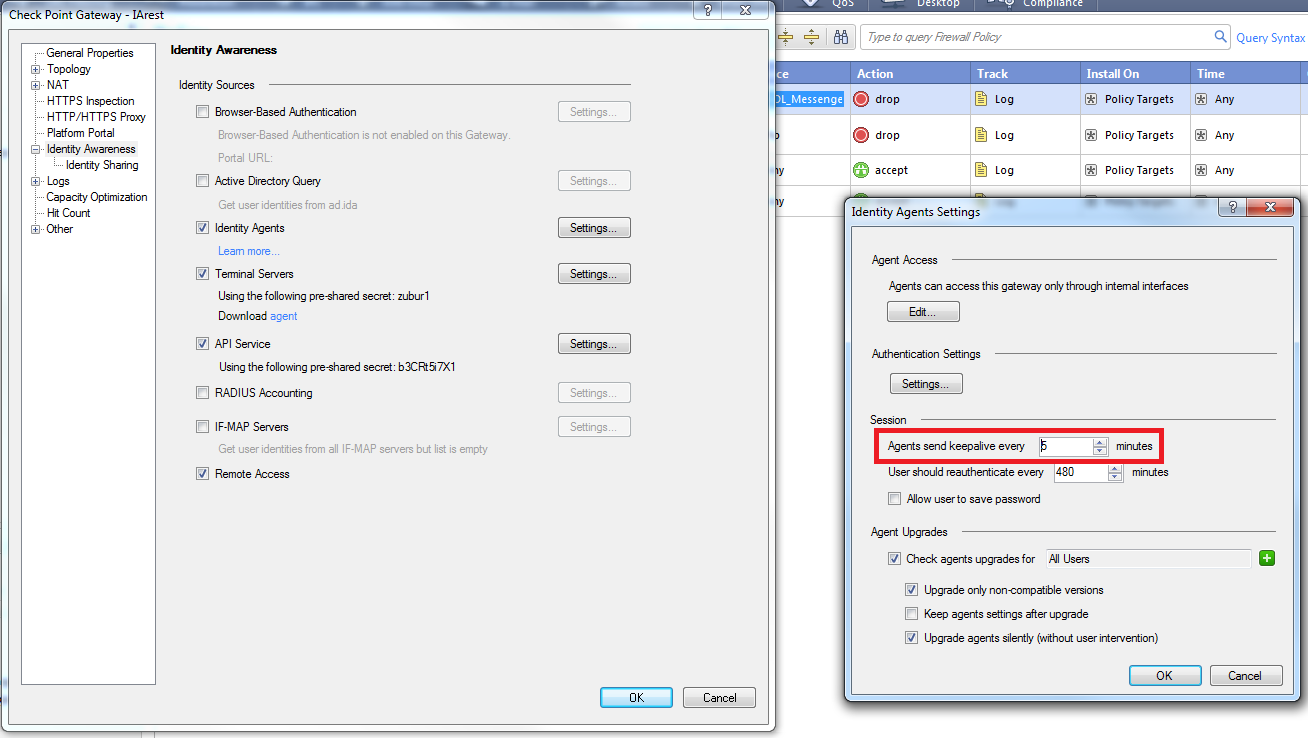
In large environments, the default value of 5 minutes between keep-alive messages can cause the number of open file descriptors on the Security Gateway to reach the default limit of 1024.
It is recommended to increase the interval between keep-alive messages to **10 minutes** . This can be configured in the SmartDashboard "Identity Agents Settings" menu:
[](https://sc1.checkpoint.com/sc/SolutionsStatics/sk88520/keep-alive.png "Click the image to see it in full size in a new tab/window")
If the number of open file descriptors still reaches the default limit on the Security Gateway, follow these steps:
**Note:** In cluster, perform these steps on all cluster members.
1. Connect to the command line on the Security Gateway (over SSH, or console).
2. Log in to Expert mode
3. Back up the current `/etc/initscript` start-up script:
**`[Expert@HostName]# cp /etc/initscript /etc/initscript_ORIGINAL`**
4. Edit the current `/etc/initscript` start-up script:
**`[Expert@HostName]# vi /etc/initscript`**
5. Add the following line in the beginning of the script:
**`ulimit -n `*LIMIT_for_FILE_DESCRIPTORS***
The `/etc/initscript` start-up script should look like this:
>
> ```
> #!/bin/sh
>
> ulimit -n LIMIT_for_FILE_DESCRIPTORS
>
> if [ -f /etc/sysconfig/enable_cores ]; then
> ulimit -c unlimited
> fi
>
> eval exec "$4"
>
> ```
6. Save the changes and exit from Vi editor.
7. Reboot the Security Gateway.
8. Verify that the new limit was set:
**`[Expert@HostName]# ulimit -n`**
### Increasing Client and Security Gateway Tolerance {#Identity Agent - Increasing Client and Security Gateway Tolerance}
* By default, on any connection error, the Identity Agent will try to connect one more time and will then disconnect and start over. When this happen, the Identity Agent will appear disconnected and will constantly attempt to re-connect.
It is possible to modify the number of attempts, so that a temporary connectivity shortage will not cause a client disconnection.
This property can be changed through the Windows registry key:
**`HKEY_LOCAL_MACHINE\SOFTWARE\CheckPoint\IA\ConnectionNumRetries`**
* For environment with large number of Identity Agent clients, it is recommended to implement an exponential back-off mechanism:
when connection errors occur, the client will extend the time between each connection attempt, in order to reduce the load from the Security Gateway.
To enable the exponential back-off mechanism, create the following registry key and set its value to 2:
**`HKEY_LOCAL_MACHINE\SOFTWARE\CheckPoint\IA\DelayFactorBetweenConnAttempts`**
* Additional required change is providing some grace time on the Security Gateway. Otherwise, the Identity Agent session might be deleted while the client is trying to connect to the Security Gateway.
For enabling the grace period on Security Gateway, run the following command in Expert mode (in cluster, run the command on all cluster members):
**Note:** [Contact Check Point Support](http://www.checkpoint.com/services/contact/index.html) to get a Hotfix package that adds this functionality.
**`[Expert@HostName]# pdp control nac_client_grace_period `*ADDITIONAL_GRACE_PERIOD_in_SECONDS***
It is important to set the grace time on the Security Gateway to be the accumulate time of retries time on the Identity Agent:
* If exponential back-off mechanism is disabled - each retry will be done every 10 seconds.
* If exponential back-off mechanism is enabled - the first retry will occur after 10 seconds, the seconds 30 seconds after the first, and so on and so forth.
Note: recommendation of Check Point Professional Services to customers in Large Scale environment is 15 minutes.
* If you experience an issue when many Identity Agents are disconnecting with "session expiration" error immediately after policy installation, you can increase the value of the parameter `nac_agent_expected_keep_alive_duration` in the SmartConsole \> Global Properties \> Advanced \> Advanced Configuration \> Identity Awareness to 60000 milliseconds. For details, refer to [sk183782](https://support.checkpoint.com/results/sk/sk183782).
**Note:** To increase the kernel table size for environment with more than 30k identities refer to [sk113833](https://supportcenter.checkpoint.com/supportcenter/portal?eventSubmit_doGoviewsolutiondetails=&solutionid=sk113833).
### Complete List of Windows Registry Tweaks on Identity Agent Client {#Identity Agent - Complete List of Windows Registry Tweaks on Identity Agent Client}
|--------------------------------------------------------------------------------------------------------------------------------------------------------------------|-------|-----------------|----------------------------------------------------------------------------------------------------------------------------------------------------------------------------------------------------------------------|
| Registry Key | Type | Default Value | Description |
| `HKEY_LOCAL_MACHINE\SOFTWARE\CheckPoint\IA\ConnectionNumRetries` For 64-bit machines: `HKEY_LOCAL_MACHINE\SOFTWARE\Wow6432Node\CheckPoint\IA\ConnectionNumRetries` | DWORD | 2 | Number of times to attempt connection before the agent assumes it is disconnected |
| `HKEY_LOCAL_MACHINE\SOFTWARE\CheckPoint\IA\DelayBetweenConnAttempts` | DWORD | 10000 | How much time to wait (in milliseconds) between connection failures |
| `HKEY_LOCAL_MACHINE\SOFTWARE\CheckPoint\IA\DelayFactorBetweenConnAttempts` | DWORD | 1 | Multiplication factor for the delay time between connection attempts |
| `HKEY_LOCAL_MACHINE\SOFTWARE\CheckPoint\IA\MaxDelayBetweenConnAttempts` | DWORD | 900000 (15 min) | The maximal delay time (in milliseconds) between connection failures - relevant **only** when the delay time is configured to increase between failures (e.g., if ***`DelayFactorBetweenConnAttempts`*** is enabled) |
| `HKEY_LOCAL_MACHINE\SOFTWARE\CheckPoint\IA\PDPCachedIPTimeoutInSeconds` | DWORD | 3600 (1 hr) | How long (in seconds) the IP address resolved by PDP will be considered as valid |
**Note** : after changing these parameters, Agent restart is *not* required.
General Guidelines {#General Guidelines}
----------------------------------------
**Note:** Do not use large groups of networks in source limits for Access roles objects, because this will slow down the PDPD significantly during login and users update.
### Nested Groups {#General Guidelines - Nested Groups}
Identity Awareness includes support for Nested Groups (refer to [sk66561 - Controlling LDAP Nested groups configuration in Identity Awareness](http://supportcontent.checkpoint.com/solutions?id=sk66561)).
However, enabling the feature may cause high load on CPU and unresponsiveness of the PDP daemon, as well as load on the Domain Controllers, particularly during policy installation.
Therefore, in such cases, it is recommended to disable the Nested Groups feature and not to use nested groups in access roles.
Alternatively, the depth of the Nested Groups feature should be configured to the lowest possible value and Access Roles should be respectively defined to match that depth.
### Disable User Updates during policy installation {#General Guidelines - Disable User Updates during policy installation}
Disabling User Updates during policy installation is possible starting in R77.10. This configuration *is no longer needed* in R77.30 with Giraffe Hotfix and R80.10.
During policy installation, a process of updating all users' Access Roles and their group affiliation is performed. For a large scale environment, it is recommended to disable these user group updates during policy installation.
Run the following command in Expert mode (in cluster, run the command on all cluster members):
**`[Expert@HostName]# pdp __reconf_update_all disable`**
Note: If user updates are disabled, it is recommended to set up a periodic update, which will run the CLI command **`pdp update all`**.
**Note:** Instead of disabling the updates, **starting from R80.10,** the rate can also be tuned via the "*pdp update update_rate xxxx* " command.
The default of 5000 updates per minute might be too heavy for some environments. In order to make the update more graceful for the AD controlers it can be lowered to 1000 queries per minute by running:
*pdp update update_rate set 1000*
Stability Fixes and Performance Enhancements {#Stability Fixes and Performance Enhancements}
--------------------------------------------------------------------------------------------
* [sk92420 - Identity Awareness R75.40 - Stability Fixes and Performance Enhancements](http://supportcontent.checkpoint.com/solutions?id=sk92420)
* [sk87700 - Identity Awareness R75.45 - Stability Fixes and Performance Enhancements](http://supportcontent.checkpoint.com/solutions?id=sk87700)
Identity Collector {#Identity Collector}
----------------------------------------
* [Identity Awareness Clients Administration Guide](https://sc1.checkpoint.com/documents/Identity_Awareness_Clients_Admin_Guide/Default.htm)
* [sk122157 - Identity Collector support on Scalable Platforms Appliances](https://supportcenter.checkpoint.com/supportcenter/portal?eventSubmit_doGoviewsolutiondetails=&solutionid=sk122157)
* [sk122686 - How to debug Identity Collector?](https://supportcenter.checkpoint.com/supportcenter/portal?eventSubmit_doGoviewsolutiondetails=&solutionid=sk122686)
* [sk123860 - How to configure Security Gateway with multiple Identity Collectors](https://supportcenter.checkpoint.com/supportcenter/portal?eventSubmit_doGoviewsolutiondetails=&solutionid=sk123860)
MUH2 agent {#MUH2 agent}
------------------------
MUH2 agent - Terminal Server Agent v2 with better scale.
For more information, see the [Identity Awareness Clients Administration Guide](https://sc1.checkpoint.com/documents/Identity_Awareness_Clients_Admin_Guide/Default.htm).
Identity Broker {#Identity Broker}
----------------------------------
Identity Broker is an identity sharing method between Policy Decision Points (PDP gateways). The Policy Decision Points can easily share identities across different management domains in a distributed environment with multiple Identity Awareness Security Gateways.
In a distributed environment with multiple Identity Awareness Security Gateways, you can use Identity Broker to propagate any received identity from one PDP Gateway to another. It helps to create a more scalable and robust sharing of hierarchy and topologies.
The Identity Broker is a Web-API based functional part of the PDP instance which adds a new communication channel between PDPs.
For more information, see the [Identity Awareness Clients Administration Guide](https://sc1.checkpoint.com/documents/Identity_Awareness_Clients_Admin_Guide/Default.htm).
Documentation {#Documentation}
------------------------------
* [Identity Awareness Administration Guide](https://supportcenter.checkpoint.com/supportcenter/portal?eventSubmit_doShowproductpage&productTab=documents&product=436) for the relevant version
* [Identity Awareness Clients Administration Guide](https://sc1.checkpoint.com/documents/Identity_Awareness_Clients_Admin_Guide/Default.htm)
Related solutions
-----------------
|-----------------------------------------------------------------------------------------------------------------------------------------------------------------------------------------------------------------------------------------|
| [sk60701 - Alternate IP Address for Identity Awareness communication channel](https://supportcenter.checkpoint.com/supportcenter/portal?eventSubmit_doGoviewsolutiondetails=&solutionid=sk60701) |
| [sk98561 - Ports Used by Identity Awareness](http://supportcontent.checkpoint.com/solutions?id=sk98561) |
| [sk86441 - ATRG: Identity Awareness](http://supportcontent.checkpoint.com/solutions?id=sk86441) |
| [sk113833 - "Table pdp_sessions entries limit (90000) reached" critical system alert messages in SmartView Tracker](https://supportcenter.checkpoint.com/supportcenter/portal?eventSubmit_doGoviewsolutiondetails=&solutionid=sk113833) |
| [sk99028 - Increase timeout between Identity Agent connection attempts](http://supportcontent.checkpoint.com/solutions?id=sk99028) |
| [sk93938 - Using Identity Awareness AD Query without Active Directory Administrator privileges on Windows Server 2008 and higher](http://supportcontent.checkpoint.com/solutions?id=sk93938) |
| [sk97187 - AD Query with multiple users on the same computer](http://supportcontent.checkpoint.com/solutions?id=sk97187) |
| [sk60301 - Identity Awareness AD Query](http://supportcontent.checkpoint.com/solutions?id=sk60301) |
| [sk99030 - Identity Agent is disconnected from Security Gateway, and it takes a long time to reconnect](http://supportcontent.checkpoint.com/solutions?id=sk99030) |
---
# Agent Instructions
This content is from the Check Point Support Center (https://support.checkpoint.com), the official knowledge base for Check Point cybersecurity products.
## Navigating This Knowledge Base
- **Complete index**: [llms.txt](https://support.checkpoint.com/llms.txt)
- **All SK articles**: [SecureKnowledge Sitemap](https://support.checkpoint.com/sitemaps/secureknowledge-sitemap-index.xml)
- **SK article URL pattern**: `https://support.checkpoint.com/results/sk/{skId}`
- **Markdown responses**: AI bot User-Agents automatically receive `text/markdown` content