> Source: [sk74120](https://support.checkpoint.com/results/sk/sk74120)
# sk74120 - Why Anti-Bot and Anti-Virus connections may be allowed even in Prevent mode
| Property | Value |
|----------|-------|
| Solution ID | sk74120 |
| Date Created | 2012-05-25 |
| Last Modified | 2025-01-15 |
| Technical Level | General |
| Products | Security Gateway |
| Versions | R82.10, R82, R81.20, R81.10 (EOS), R81 (EOS) |
## Solution
The Check Point Online Web Service is used by the Security Gateway for Resource classification. The responses are cached locally to optimize performance, but access to the cloud is required if the response is not cached. Resource classification mode determines if the connection is allowed or suspended while the Security Gateway queries the Check Point Online Web Service.
1. When the mode is "*hold* ", connections are blocked until classification is complete.
2. When the mode is "*background* ", connections are allowed, and after the classification is complete, a "Detect" log is generated. The log includes this description: "Connection was allowed because background classification mode was set". The response is cached and a following connection with the same classification will be detected / prevented according to the rulebase.
3. *Custom* - you can configure different settings depending on the service
**You can change the Resource classification mode in the Threat Prevention Profile:**
1. In SmartConsole, go to **Manage \& Settings** -\> **Blades** .
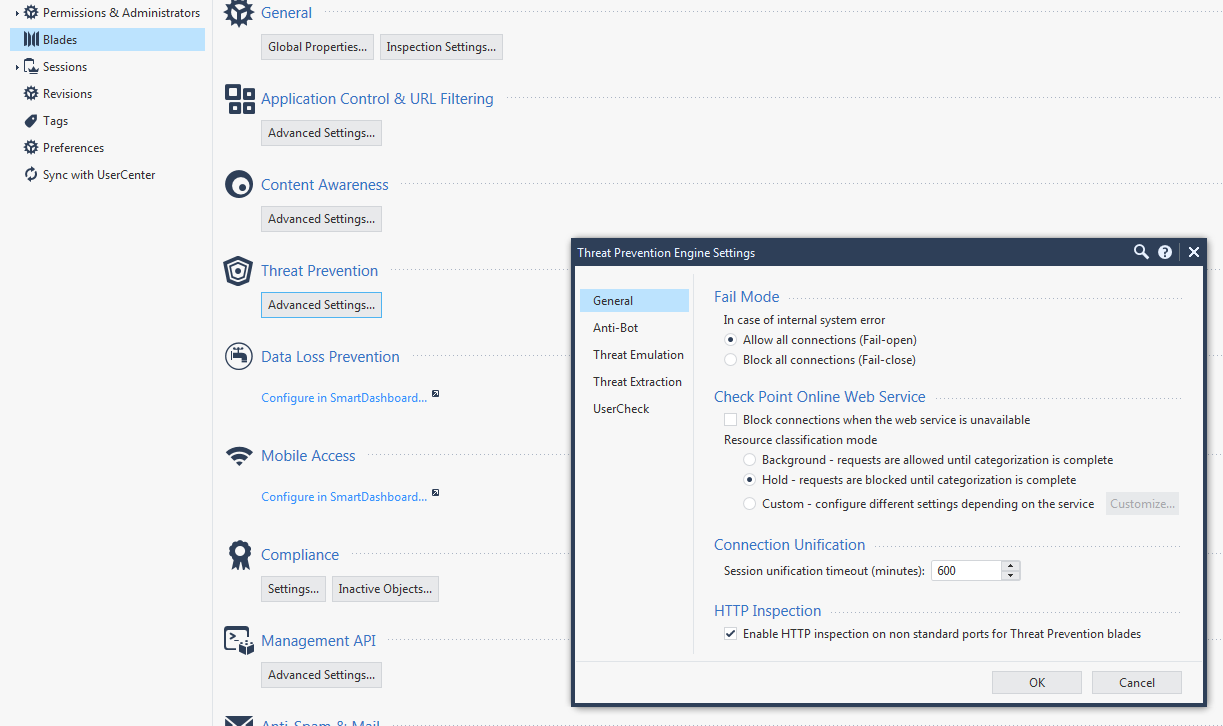
2. Go to**Threat Prevention** , and select **Advanced settings** .
3. In the **Threat Prevention Engine Settings** window that opens, go to the **General** tab \> **Check Point Online Web Service** \> **Resource classification mode** , and select one of these options:
* ***Background*** - When a connection cannot be categorized with a cached response, an uncategorized response is received. The connection is allowed, and in the background, the Check Point Online Web Service continues the categorization procedure. After the
classification is complete, a "Detect" log is generated. The log includes this
description: "Connection was allowed because background classification mode
was set". The response is cached locally for future requests (default).
This option reduces latency in the categorization process.
* ***Hold***- When a connection cannot be categorized with the cached responses, it remains blocked until the Check Point Online Web Service completes categorization..
* ***Custom*** - - Lets you set different modes for Anti-Virus, Anti-Bot and Zero Phishing. For example, click Customize to set Anti-Bot to Hold mode and Anti-Virus and Zero Phishing to Background mode.
4. Install the Threat Prevention policy.
When moving from *background* mode to *hold* mode*,* the Security Gateway holds the file and does not send it to the client browser. The Browser will show the file as still being downloaded, but the download will be stuck at some point. The gateway will continue the download only after the scanning is completed or if a timeout at the gateway has occurred.
If the file is malicious, the Security Gateway will stop sending the file.
**Note:** If the "Prevent" action is used in the Threat Prevention policy, then a file that Threat Emulation has already identified as malware in the past, is blocked. File is not sent to the destination even in the "Background" mode.
**Note** : Starting from R75.47 and R76, Anti-Bot Resource Classification mode for DNS is performed in the "background" on the Security Gateway. To learn more, see [sk92224 - Resource Categorization for Anti-Bot / Anti-Virus DNS Settings optimization.](http://supportcontent.checkpoint.com/solutions?id=sk92224)
---
# Agent Instructions
This content is from the Check Point Support Center (https://support.checkpoint.com), the official knowledge base for Check Point cybersecurity products.
## Navigating This Knowledge Base
- **Complete index**: [llms.txt](https://support.checkpoint.com/llms.txt)
- **All SK articles**: [SecureKnowledge Sitemap](https://support.checkpoint.com/sitemaps/secureknowledge-sitemap-index.xml)
- **SK article URL pattern**: `https://support.checkpoint.com/results/sk/{skId}`
- **Markdown responses**: AI bot User-Agents automatically receive `text/markdown` content