> Source: [sk64162](https://support.checkpoint.com/results/sk/sk64162)
# sk64162 - "Internal System Error occurred" log in SmartView Tracker when URL Filtering blocks HTTPS traffic while trying to categorize HTTPS resources
| Property | Value |
|----------|-------|
| Solution ID | sk64162 |
| Date Created | 2011-07-06 |
| Last Modified | 2024-06-25 |
| Technical Level | General |
| Products | Security Gateway |
| Versions | R81.20, R81.10 (EOS), R81 (EOS) |
## Symptoms
- * SmartView Tracker shows the following alert logs from Application Control \& URL Filtering blade for relevant HTTPS sites (depending on the Fail Mode configuration):
* `"Internal System Error, allowing request (as configured in engine settings) See sk64162 for more information."`
* `"Internal System Error, blocking request (as configured in engine settings) See sk64162 for more information."`
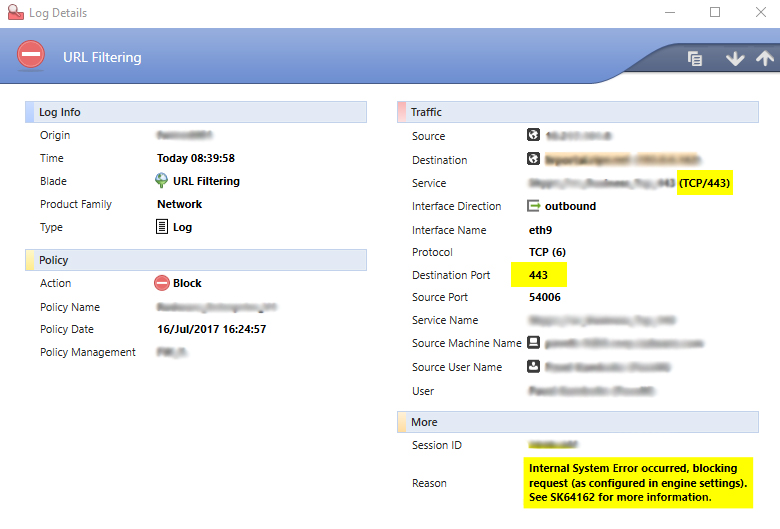
* Connections are blocked, or categorization is bypassed according to 'Fail Mode' configuration:
Application \& URL Filtering Engine Settings in '`Application & URL Filtering`' tab -\> '`Advanced`' -\> '`Engine Settings`' are:
* In the '`Fail Mode`' section - either '`Block all requests (Fail-close)`' or 'Fail-open' option is selected
* In the '`URL Filtering`' section - selected the '`Categorize HTTPS sites`' option
## Cause
An error caused by internal state prevents categorization of the resource referenced in the connection. Decision regarding enforcement of this connection depends on the 'Fail Mode' configuration.
## Solution
This article describes different scenarios when URL Filtering blocks HTTPS traffic with the "***Internal System Error occurred, blocking request (as configured in engine settings). See SK64162 for more information***" message in SmartView Tracker.
Each Scenario has additional details, mostly received from debug, its own cause and solution.
**Table of Contents**
* **Issues fixed in R80.10**
* **Scenarios with available Hotfixes**
* Scenario 1 - HTTP/HTTPS Traffic passing through 3rd party proxy is dropped with "*Internal System Error*"
* Scenario 2 - Random issues with HTTP web browsing
* Scenario 3 - "*Internal System Error occurred*" log for IDN HTTPS websites with HTTPS Categorization enabled
* Scenario 4 - HTTPS Inspection fails with "*Internal System Error occurred*" log from URL Filtering blade
* **Configuration Issues**
* Scenario 5 - URL Filtering blade does not work as expected on VSX Gateway
* Scenario 6 - Custom application traffic over HTTPS is dropped by Application Control blade
* Scenario 7 - Application Control policy fails to match rule with Access Role with "*Internal system error*"
The following issues were fixed in R80.10 or earlier: {#R80.10}
---------------------------------------------------------------
|----|----------------------------------------------------------------------------------------------------------------------------------------------------------------------------------------------------------------------------------------------------------------------------------------|-------------------------------------------------------------------------------------------------------------------------------------------------------------------------------------------------------------------------------------------------------------------------------------------------------------------------------------------------------------------------------------------------------------------------------------------------------------------------------------------------------------------------------------------------------------------------------------------------------------------------------------------------------------------------------------------------------------------------------------------------------------------------------------------------------------------------------------------------------------------------------------------------------------------------------------------------------------------------------------------------------------------------------------------------------------------------------------------------------------------------------------------------------------------------------------------------------------------------------------------------------------------------------------------------------------------------------------------------------------------------------------------------------------------------------------------------------------------------------------------------------------------------------------------------------------------------------------------------------------------------------------------------------------------------------------------------------------------------------------------------------------------------------------------------------------------------------------------------------------------------------------------------------------------------------------------------------------------------------------------------------------------------------------------------------------------------------------------------------------------------------------------------------------------------------------------------------------------------------------------------------------------------------------------------------------------------------------------------------------------------------------------------------------------------------------------------------------------------------------------------------------------------------------------------------------------------------------------------------------------------------------------------------------------------------------------------------------------------------------------------------------------------------------------|-------------------------------------------------------------------------------------------------------------------------------------------------------------------------------------------------------------------------------------------------------------------------------------------------------------------------------------------------------------------------------------------------------------------------------------------------------------------------------------------------------------------------------------------------------------------------------------------------------------------------------------------------------------------------------------------------------|
| # | Known Limitation | Additional Symptoms and Cause | Also fixed in |
| 1 | 01175524, 01356085 | Some web sites are not shown after adding 'Encrypts communications' category to Application Control and URL Filtering policy. **Show / Hide the Cause** **Cause** : 'Encrypts communications' category belongs to applications that encrypt or might encrypt their traffic (using SSL, SSH, or any other encryption protocol) like uTorrent, OpenSSH, Facebook, anonymizer websites, and more. 'Internal system error occurred' log indicates an issue handling connections in specific scenario when a Proxy is used. | |
| 2 | 01243786, 01244345, 01246244, 01246245, 01246246, 01269447, 01271870, 01271872, 01271874, 01295795, 01321333, 01351357, 01353017, 01382415, 01392050 | Output of *fw tab -t appi_connections -s* command on Security Gateway shows that the *appi_connections* kernel table has reached its limit. Note: This size is derived from the general fw connection table size.
**Cause** : When a connection is created, it is written both in the connections kernel table (id 8158) and the *appi_connections* kernel table (id 55). In some cases, when only URL Filtering is enabled, the connection may not be cleared from the *appi_connection* kernel table causing the table to reach the limit. When the limit is reached, new connections are not be marked for inspection and an engine failure is declared. | [Check Point R77.10](http://supportcontent.checkpoint.com/solutions?id=sk97617) |
| 3 | 01835506, 01849370, 01884821, 01886146, 01844696 | **Configuration** : The Anti-Virus, Application Control and URL Filtering blades are enabled and the Application Control rule base is configured to block "Malware / Malicious sites" with a UserCheck message. **Symptom** : When downloading an Eicar test file from eicar.org over HTTPS, UserCheck does not show the Block page. **Cause**: The Anti-Virus and Application Control Software Blades report the connection as malicious at the same time in the same session. | |
| 4 | 01191701, 02385877, 01200219, 01200218, 02539513, 01336383, 01284965, 02343378, 02346791 | RAD debug (per [sk92743](http://supportcontent.checkpoint.com/solutions?id=sk92743) - '`rad_admin rad debug on all`') shows: ``` ... rad_kernel_urlf_request_set_url: url is not valid - no dot character in it && not valid ipv6!; ... ... [ERROR]: rad_kernel_url_validator: url is not valid - no dot character in it && not valid ipv6!; ... [ERROR]: rad_kernel_url_normalizer_normalize: url is not valid, return;; ... [ERROR]: rad_kernel_malware_request_prepare: rad_kernel_url_normalizer_normalize failed; ```
**Cause**: URL Filtering does not detect sites that do not contain the dot character ('.') in the URL. The URL validation requires IPv4 URLs to include a dot. | [Check Point R77.10](https://supportcenter.checkpoint.com/supportcenter/portal?eventSubmit_doGoviewsolutiondetails=&solutionid=sk97617) [Jumbo HFA for R77](https://supportcenter.checkpoint.com/supportcenter/portal?eventSubmit_doGoviewsolutiondetails=&solutionid=sk96192) since *Take_1* [Jumbo HFA for R76SP.50](https://supportcenter.checkpoint.com/supportcenter/portal?eventSubmit_doGoviewsolutiondetails=&solutionid=sk117633) since *Take_16* |
| 5 | 01466938, 01495623, 01471486, 01495401, 01476226, 01661973, 01611419, 01474787, 01554277, 01462230, 01859469, 01474415 | Kernel debug ('`fw ctl debug -m WS all`' and '`fw ctl debug -m kiss all`') shows: ``` [SID: ...] {connection} appi_transaction_http_process_rb_match_result: MATCH on rule NNN (application: ..., action: ...); [SID: ...] {connection} appi_transaction_http_prepare_uc_match_data: uuid: ...; [SID: ...] ws_http_session_make_abs_url_ex: a non-default scheme was not found, URL is considered relative; [SID: ...] ws_http_session_make_abs_url_ex: found 'host:' header: 'PROBLEMATIC_URL'; [SID: ...] ws_http_session_make_abs_url_ex: url is not ipv6!; [SID: ...] ws_http_session_ext_log_header_get_ex: getting header X-Forwarded-For; [SID: ...] ws_http_session_ext_log_header_get_ex: getting header user-agent; [SID: ...] ws_global_policy_headers_htab_get: [ERROR]: kiss_htab_get() failed; [SID: ...] ws_global_policy_get_header_string: [ERROR]: ws_global_policy_headers_htab_get() failed; [SID: ...] ws_http_session_ext_log_header_get_ex: [ERROR]: ws_global_policy_get_header_string() failed; [SID: ...] ws_module_get_session_attribs: [ERROR]: failed to get 'User-Agent' header; [SID: ...] ws_module_get_attribs: [ERROR]: ws_module_get_session_attribs() failed; ``` **Cause**: The entry was not found in the kernel table. | [Check Point R77.30](http://supportcontent.checkpoint.com/solutions?id=sk104859) |
| 6 | 01430167, 01434195, 01434385, 01471225, 01480934, 01502668 | Application \& URL Filtering Engine settings are: * In the '`Fail Mode`' section - selected the '`Block all requests (Fail-close)`' option * In the '`URL Filtering`' section - selected the '`Categorize HTTPS sites`' option **Show / Hide the Cause** **Cause** : If a server in its response adds some additional data before the handshake, the Security Gateway may fail to match it as Server' "Hello" when "`Categorize HTTPS sites`" and "`Fail-close`" are enabled. | [Check Point R77.30](http://supportcontent.checkpoint.com/solutions?id=sk104859) |
| 7 | 01431893, 01433702, 01433786, 01434216, 01471298, 01480952, 01535820, 01535835, 01550599, 01554459, PRHF-125, PRHF-206, PRHF-535, PMTR-12335 | Application Control debug ('`fw ctl debug -m APPI all`') shows that Server's response is rejected: ``` {connection} appi_conn_container_htab_get_connection: [Source_IP:Source_Port - > Dest_IP:Dest_Port] ; {connection} appi_conn_notify_event_ex: handling parser context HTTP_RESPONSE_DATA ; {connection} appi_conn_handle_parser_event: found aspii context 184 for connection ... ; {connection} appi_conn_get_conn_transaction: getting connection transaction; {connection} appi_conn_get_conn_transaction: connection transaction found; {connection} appi_conn_notify_event_ex: EVENT END: < parser >; {policy} appi_cmi_handler_match_cb: conn returned: action [Accept]; ... {policy} appi_rad_uf_cmi_handler_match_cb: match on context or signature that is not the registered - won't be sent to RAD; {policy} appi_rad_uf_cmi_handler_match_cb: skip notify for context_id 184; {policy} appi_rad_uf_cmi_handler_match_cb: conn returned: action [Accept]; {urlf_ssl} appi_rad_uf_cmi_handler_server_response: buf len ...; {connection} appi_rad_uf_cmi_handler_get_cmi_opaque: app_conn_opq ...; {policy} appi_rad_uf_cmi_handler_get_cmi_opaque: opaque found ...; {urlf_ssl} [ERROR]: appi_rad_uf_cmi_handler_server_response: no hello done, failed; ``` **Show / Hide the Cause** **Cause** : When `Categorize HTTPS sites` feature is enabled (go to `Application & URL Filtering` tab - open `Advanced`' - click on '`Engine Settings`' - check the box '`Categorize HTTPS sites`'), the ***non-HTTPS*** traffic with SSL handshake (e.g., SFTP) causes "`Internal System Error`" because the Pattern Matcher does not recognize the "Hello" response of the Server. | [Check Point R77.30](http://supportcontent.checkpoint.com/solutions?id=sk104859) [Jumbo HFA for R77.20](http://supportcontent.checkpoint.com/solutions?id=sk101975) since *Take_16* [Jumbo HFA for R76SP.10](http://supportcontent.checkpoint.com/solutions?id=sk103121) since *Take_37 [Jumbo HFA for R80.10](https://supportcenter.checkpoint.com/supportcenter/portal?eventSubmit_doGoviewsolutiondetails=&solutionid=sk116380) since Take_142* [Check Point R80.20](https://supportcenter.checkpoint.com/supportcenter/portal?eventSubmit_doGoviewsolutiondetails=&solutionid=sk122485) |
| 8 | 02370555, 02391624 | With the URL Filtering blade enabled, when accessing a web server with short domain name (for example, an FQDN of less than 4 characters, for example the URL address *http://vb/* ), the user gets the "*Internal System Error occurred*" error. | |
| 9 | 01872944, 01874683, 01977434, 02188954, 01875566, 02182699, 02188956, 02021465, 02022477, 01881544, 01894400; 01907475, 01944831, 02386041, 02357623, 02467694, 02189862, 01919277, 02353010, 02189958, 02021467, 01912286, 02467666, 01919574, 01977453, 01912368, 02388533, 02310566 | * Users are unable to access HTTPS sites. * *"* `cmi_execute_ex: Failed to execute the pattern matcher!`;" in */var/log/messages* file on Security Gateway. * Kernel debug (`fw ctl debug -m APPI all`' + '`fw ctl debug -m NRB all`) during the issue shows that Security Gateway fails to execute the pattern matcher on the HTTPS site: ``` {connection} appi_conn_container_set_connection: [Source_IP:Source_Port -> Dest_IP:443] ; {connection} appi_conn_notify_event_ex: EVENT END: ; {policy} appi_cmi_handler_match_cb: conn returned: action [Accept]; ... ... {policy} appi_rad_uf_cmi_handler_match_cb: pm_match, ...; ... ... {policy} appi_rad_uf_cmi_handler_match_signature: SSL client hello; {urlf_ssl} appi_rad_uf_cmi_handler_match_ssl_client_hello: conn: dst Dest_IP, dport 1bb ; ... ... {urlf_ssl} appi_rad_uf_by_ssl_cn_cache_match: dest ip Source_IP_in_Hex dport 1bb; ... ... {policy,urlf_ssl} appi_rad_uf_cmi_handler_match_cb: call appi_user_cmi_handler_handle_url() with cn='My.Site.com' (16); {urlf_ssl} appi_user_cmi_handler_handle_url: url_https_normalized = 'https://My.Site.com' (24); ;cmi_execute_ex: Failed to execute the pattern matcher!; {urlf_ssl} \[ERROR\]: appi_user_cmi_handler_handle_url: appi_cmi_exec_from_app failed (via hook); {urlf_ssl} \[ERROR\]: appi_rad_uf_cmi_handler_match_cb: appi_user_cmi_handler_handle_url() failed; ```
**Show / Hide the Cause** **Cause** : An application was added to the Application \& URL Filtering database (in July 2015), which is not processed correctly by the Pattern Matcher when "*Categorize HTTPS sites*" option is enabled (In the "Application \& URL Filtering" tab \> expand "Advanced" \> Click "Engine Settings" \> Go to "URL Filtering"). | [Jumbo HFA for R77.30](http://supportcontent.checkpoint.com/solutions?id=sk106162) since Take_98 [Jumbo HFA for R77.20](http://supportcontent.checkpoint.com/solutions?id=sk101975) since Take_180 [Jumbo HFA for R76SP.30](https://supportcenter.checkpoint.com/supportcenter/portal?eventSubmit_doGoviewsolutiondetails=&solutionid=sk108901) since Take_58 |
| 10 | 01518127, 01556228 | * Access to web sites fails: * A blank page shows in the user's web browser * Multiple "`Internal System Error`" logs from Application Control / URL Filtering in SmartView Tracker or SmartLog * Kernel debug of NRB and APPI modules shows: ``` {session} nrb_column_ip_match: matching column Source IP (handle IP_ADDRESS_in_HEX); {session} nrb_column_ip_match: is_scope_src=0; {session} nrb_column_ip_get_is_identity_required: rule: (1) has role defined, need NAC, match_index: (1) ; {session} nrb_column_ip_match: data is not ready yet (0x38c); {session} nrb_rulebase_default_match: rulebase return match status 'POSSIBLE' ; {connection} appi_transaction_exe_rulebase: rulebase match returned: POSSIBLE; {connection} [ERROR]: appi_transaction_http_process_rb_match_result: invalid match status in this stage; {connection} [ERROR]: appi_transaction_exe_rulebase: transaction_process_rb_match_result_func failed; {session} nrb_handle_abs_destroy: called for IP_ADDRESS_in_HEX; {connection} [ERROR]: appi_transaction_http_exe_rulebase_event: appi_transaction_exe_rulebase failed; {connection} appi_transaction_http_exe_rulebase_event: END: new state: , result: [Accept], returned: FALSE; {connection} [ERROR]: appi_conn_handle_parser_event: transaction_execute_rulebase_func failed; {connection} [ERROR]: appi_conn_notify_event_ex: appi_conn_handle_parser_event failed; {connection} appi_conn_notify_event_ex: EVENT END: ; ``` **Show / Hide the Cause** **Cause** : A misconfiguration between the Proxy and the Security Gateway: * On the Security Gateway, the box "`Detect users behind http proxy using X Forward-For header`" was checked (Identity Awareness pane) * On the Proxy server - the "`X-Forwarded-For`" was disabled. When 'X-Forwarded-For' (XFF) is disabled on the Proxy, "`unknown`" is added to the 'X-Forward-For' HTTP Header. > *Example from Squid proxy:* > ``` > Via: 1.1 localhost (squid/3.1.19) > X-Forwarded-For: unknown > ``` Example scenario: 1. Enable the Identity Awareness blade and the Application Control blade on the Security Gateway. 2. Open Security Gateway properties, go to the **Identity Awareness** pane, select **Detect users behind http proxy using X Forward-For header**. 3. In the Application Control policy, add a rule with access role in the **Source**column. 4. Install the policy. 5. On the Proxy server, disable the 'X-Forward-For' HTTP Header (e.g., on Squid, use directive '`forwarded_for off`'). 6. On the Client, browse to a web site that should match the Application Control rule with Access rule. 7. SmartView Tracker / SmartLog shows multiple "`Internal System Error`" logs from Application Control / URL Filtering. | [Check Point R77.30](http://supportcontent.checkpoint.com/solutions?id=sk104859) [Check Point R77.20 for 600 / 1100 / 1200R Appliance](http://supportcontent.checkpoint.com/solutions?id=sk105379)
**Important Note** : The configuration of "*X-Forwarded-For*" (XFF) must be identical on both the Security Gateway and the Proxy Server. |
| 11 | 01842368, 02038367, 02049297, 01917498, 01875817, 02385802, 02538345 01412858, 01624690, 01517886, 01805004, 01560621, 01853655, 01610627, 01511792, 01769543, 01525328, 01639039, 01536626, 02411122, 02104025, 02038356 | * Kernel debug (of APPI and RAD_KERNEL modules) shows: ``` {policy,urlf_ssl} appi_rad_uf_cmi_handler_match_cb: call appi_user_cmi_handler_handle_url() with cn='' (0); ... ... ... {global} [ERROR]: rad_kernel_urlf_request_set_url: cp_lsubstring_search for path slash failed; {policy} [ERROR]: appi_rad_uf_cmi_handler_prepare_rad_request: rad_kernel_urlf_request_set_url() failed; {policy} [ERROR]: appi_rad_uf_cmi_handler_match_cb_handle_url: appi_rad_uf_cmi_handler_prepare_rad_request() failed; {global} rad_kernel_urlf_request_dtor: going to free original url buffer; {policy} [ERROR]: appi_rad_uf_cmi_handler_match_cb: appi_rad_uf_cmi_handler_match_cb_handle_url() failed; {global} appi_global_policy_get_fail_action: fail action is ACCEPT; ``` * HTTPS Inspection is disabled, but "*Categorize HTTPS sites*" is enabled.
**Cause**: The "Categorize HTTPS sites" feature examines the CN of the public certificate and makes categorization decisions accordingly. If the CN field in the HTTPS site's certificate is empty, that site cannot be categorized correctly because "Categorize HTTPS sites" feature is based on the CN. **Show / Hide the Code Improvement** **Code was improved in the following way:** |------------------------------------------|--------------------------------------------|--------------------------------------------------------------------------------------------------------------------------------------------------------------------------------------| | Status of Categorization by IP addresses | Value of relevant kernel parameter | Behavior of Security Gateway if the CN field in the HTTPS site's certificate is empty | | Enabled | appi_urlf_ssl_cn_allow_ip_categorization=1 | **Default** . If the CN field in the HTTPS site's certificate is empty, then Security Gateway ignores it and replaces it with site's IP address. Connection is allowed. | | Disabled | appi_urlf_ssl_cn_allow_ip_categorization=0 | If the CN field in the HTTPS site's certificate is empty, the Security Gateway is not able to categorize that site correctly. Connection is dropped, and the above log is generated. | **Note** : By default, Categorization by IP addresses is enabled (*appi_urlf_ssl_cn_allow_ip_categorization=1*) for these releases and higher: * R77.30 * Take_5 of R77.20 Jumbo Hotfix Accumulator * R76SP.30 for 61000 / 41000 * Take_67 of R76SP.10 Jumbo Hotfix Accumulator | [Jumbo HFA for R77.30](http://supportcontent.checkpoint.com/solutions?id=sk106162) since Take_98 [Jumbo HFA for R76SP.50](https://supportcenter.checkpoint.com/supportcenter/portal?eventSubmit_doGoviewsolutiondetails=&solutionid=sk117633) since Take_16 **Show / Hide the Workaround** **Available Workaround** : Disable HTTPS Categorization and enable HTTPS Inspection: 1. In SmartDashboard, go to *'Application \& URL Filtering'* tab. 2. Open *'Advanced'*. 3. Click on *'Engine Settings*'. 4. Clear the *'Categorize HTTPS'* box. 5. Open '*HTTPS Inspection'*. 6. Configure the relevant policy, enable HTTPS Inspection on the involved Security Gateway, etc. 7. Install the policy. |
| 12 | 01448602, 01715608, 01638657, 01926085, 01450281, 01449446, 01813264, 01712305, 01715606, 01969817, 01554272 | Issue happens only in R77.20 with HTTPS Inspection disabled. **Cause**: Conflict between 'Fail-close' mode and 'Categorize HTTPS sites' feature. **Show / Hide the Improvement** A kernel parameter was added to allow Categorization by IP addresses and not only by Fail Mode settings. Refer to the Configuration instructions below: |----------------------------------------------|------------------------------------------------------------------------------| | Kernel Parameter Value | Description | | *appi_urlf_ssl_cn_allow_ip_categorization=1* | Security Gateway allows categorization by IP addresses. This is the default. | | *appi_urlf_ssl_cn_allow_ip_categorization=0* | Security Gateway uses only Fail Mode settings. | | [Check Point R77.30](http://supportcontent.checkpoint.com/solutions?id=sk104859) [Check Point R76SP.30 for 61000 / 41000](http://supportcontent.checkpoint.com/solutions?id=sk108195) [Jumbo HFA for R77.20](http://supportcontent.checkpoint.com/solutions?id=sk101975) since *Take_5* [Jumbo HFA for R76SP.10](http://supportcontent.checkpoint.com/solutions?id=sk103121) since *Take_67* |
| 13 | 01175524, 01356085 | "*Internal system error occurred*" log in SmartView Tracker/SmartLog and some web sites are not shown after adding 'Encrypts communications' category to Application Control \& URL Filtering policy **Show / Hide the Cause** **Cause** : 'Encrypts communications' category belongs to applications that encrypt or might encrypt their traffic (using SSL, SSH, or any other encryption protocol) like uTorrent, OpenSSH, Facebook, anonymizer websites, and more. The 'Internal system error occurred' log shows there is an issue handling connections in the specific scenario if a Proxy is used. | [Check Point R80](https://supportcenter.checkpoint.com/supportcenter/portal?eventSubmit_doGoviewsolutiondetails=&solutionid=sk108623) **Show / Hide the Workaround** **Available Workaround** : Remove the 'Encrypts communications' category from the policy: 1. Open SmartDashboard 2. Go to Application \& URL Filtering tab -\> Policy 3. In the rule, right-click in the 'Applications/Sites' column 4. Click 'Add category' 5. Clear the 'Encrypts communications' checkbox 6. Click OK 7. Save and install the Security policy |
| 14 | 01362385, 01366990, 01377452, 01379645, 01396795, 01402500, 01404287, 01405849, 01414498 | Kernel debug ('`fw ctl debug -m APPI + error connection global policy`') shows: ``` {connection} [ERROR]: appi_transaction_conn_process_rb_match_result: invalid match status in this stage; {connection} [ERROR]: appi_transaction_exe_rulebase: transaction_process_rb_match_result_func failed; {session} nrb_handle_abs_destroy: called for ...; {connection} [ERROR]: appi_conn_check_can_exe_rb_flag: appi_transaction_exe_rulebase failed; {connection} [ERROR]: appi_conn_handle_parser_event: appi_conn_check_can_exe_rb_flag failed; {connection} [ERROR]: appi_conn_notify_event_ex: appi_conn_handle_parser_event failed; {policy} [ERROR]: appi_cmi_handler_match_cb: failed to handle 'PARSER_EVENT'; {global} appi_global_policy_get_fail_action: fail action is REJECT; ``` | [Check Point R77.20](https://supportcenter.checkpoint.com/supportcenter/portal?eventSubmit_doGoviewsolutiondetails=&solutionid=sk101208) |
Scenarios with available Hotfixes {#Other}
------------------------------------------
[Contact Check Point Support](https://www.checkpoint.com/support-services/contact-support/) to get a Hotfix for the issues listed below.
A Support Engineer will make sure the Hotfix is compatible with your environment before providing the Hotfix.
For faster resolution and verification, collect [CPinfo](https://supportcenter.checkpoint.com/supportcenter/portal?eventSubmit_doGoviewsolutiondetails=&solutionid=sk92739) files from the Security Management and Security Gateways involved in the case.
Show / Hide Hotfix installation instructions
Install a Hotfix on the **Security Gateway**.
**Note:** In a cluster environment, do this procedure on *all* members of the cluster.
1. Transfer the hotfix package to the Security Gateway (into some directory, for example, */some_path_to_fix/*).
2. Unpack the hotfix package:
```
[Expert@HostName]# cd /some_path_to_fix/
[Expert@HostName]# tar -zxvf fw1_wrapper_HOTFIX_NAME.tgz
```
3. Install the hotfix:
```
[Expert@HostName]# ./fw1_wrapper_HOTFIX_NAME
```
**Note:** The script stops all Check Point services (*cpstop* ). Read the output on the screen.
4. Reboot the Security Gateway.
### Scenario 1: HTTP/HTTPS Traffic passing through 3rd party proxy is dropped with an "Internal System Error" {#1}
> **Symptoms**:
>
> * HTTP/HTTPS Traffic that passes through a third-party proxy (before the firewall) is dropped with "*Internal System Error*".
>
> * WS module debug shows:
>
> ```
> {session} ... ws_http_session_get_header_value: got header:X-Forwarded-For len:7 value:unknown;
> {session} ... ws_http_session_get_x_forwarded_ip_from_string: x-forwarded-for header value: (len=7): unknown;
> {session} ... ws_http_session_get_x_forwarded_ip_from_string: [ERROR]: x-forwarded-for header with 'unknown' value found, cannot convert to IP.;
> {session} ... ws_http_session_ext_log_header_save: [ERROR]: ws_http_session_get_x_forwarded_ip_from_string() failed;
> {session} ... ws_http_session_ext_log_header_get_ex: [ERROR]: ws_http_session_ext_log_header_save() failed;
> {module} ... ws_module_get_session_attribs: [ERROR]: failed to get forwarded ip;
> {module} ... ws_module_get_attribs: [ERROR]: ws_module_get_session_attribs() failed
>
> ```
>
> **Known Limitation:**02335915
>
> **Cause** : Identity Awareness and Application control blades are enabled on the Security Gateway and the option **Detect users located behind http proxy using X Forwarded-For header** is enabled. The `X-Forwarded-For (XFF)` header in the HTTP flow contains the value 'unknown'. As the Security Gateway is unable to parse the 'unknown' value as IP, the traffic is dropped.
### Scenario 2: Random issues with HTTP web browsing. Traffic latency increases, and at some point web browsing stops working {#2}
> **Symptoms**:
>
> * SmartView Tracker shows multiple logs "*Internal System Error occurred*" for all HTTP traffic.
> * Restarting the RAD daemon (with '`rad_admin stop ; sleep 5 ; rad_admin start`' commands) resolves the issue until it occurs again.
>
> * Debug of the RAD daemon ('`rad_admin rad debug on all all`') during the issue shows (in *$FWDIR/log/rad.elg\**):
>
> *
>
> ```
> [rad_repository_container_data.h:XXX] CRadRepositoryContaineData::get: [INFO] enter to ...
> [rad_repository_container_data.h:XXX] CRadRepositoryContaineData::get: [MISC] list: free objects = 0, used XXX of XXX
> [rad_repository_container_data.h:XXX] CRadRepositoryContaineData::get: [ERROR] container is on its maximum capacity
> [rad_repository_container_data.h:XXX] CRadRepositoryContaineData::get: [INFO] exit from ..
> ```
>
> *
>
> ```
> [rad_http_request.cpp:XXX] CRadHttpRequest::getBuilder: [ERROR] unable to find builder 'malware+0'
> [rad_http_request.cpp:XXX] CRadHttpRequest::build: [ERROR] unable to find builder for 'malware+0'
> [rad_query.cpp:XXX] CRadQuery::build: [ERROR] failed to build http request from values map
> [rad_fetcher.cpp:XXX] CRadFetcher::fetch: [ERROR] error while build message for service 'urlf
> ```
>
> *
>
> ```
> [rad_http_request.cpp:XXX] CRadHttpRequest::getBuilder: [ERROR] unable to find builder 'categorization+0'
> [rad_http_request.cpp:XXX] CRadHttpRequest::build: [ERROR] unable to find builder for 'categorization+0'
> [rad_query.cpp:XXX] CRadQuery::build: [ERROR] failed to build http request from values map
> [rad_fetcher.cpp:XXX] CRadFetcher::fetch: [ERROR] error while build message for service 'appi
> ```
>
> **Known Limitation:**01612968 , 01640299 , 01652963 , 01662822 , 01670027 , 01674403 , 01675502
### Scenario 3: "Internal System Error occurred" log for IDN HTTPS websites with HTTPS Categorization enabled {#3}
> **Symptoms**:
>
> * "*Internal System Error occurred*" log in SmartDashboard while the client is trying to reach HTTPS websites with internationalized domain name (the name contain non-English characters)
> * Categorize HTTPS sites is **enabled** *(* SmartDashboard \> Application Control \& URL Filtering \> Advanced \> Engine Settings*)*
>
> * HTTPS Inspection is **disabled** *(* Security Gateway \> Properties \> HTTPS Inspection*)*
>
> **Known Limitation:**02525513
>
> **Cause** : The certificate Name (CN) of the certificate of the HTTPS site contains non-English characters. When the client is trying to reach the website with internationalized domain name (IDN), browsers converts the URL to a [Punycode](https://tools.ietf.org/html/rfc3492) with prefix of "xn--",
>
> *(e.g. **IDN:** ????.?? = **Punycode:** xn--f1ae4a2b.xn--p1ai).*
>
> Most of the HTTPS websites with such behavior provide the HTTPS certificate with the original URL in the CN (and not Punycode). HTTPS Categorization is not able to verify and categorize website if the CN contains non-English characters.
### Scenario 4: HTTPS Inspection fails occasionally with "Internal System Error occurred" log from URL Filtering blade {#4}
> **Symptoms**:
>
> * HTTPS Inspection fails occasionally and an `Internal System Error occurred` log is generated by the URL Filtering blade.
> * After enabling generation of core dump files per [sk92764](https://supportcenter.checkpoint.com/supportcenter/portal?eventSubmit_doGoviewsolutiondetails=&solutionid=sk92764) / [sk53363](https://supportcenter.checkpoint.com/supportcenter/portal?eventSubmit_doGoviewsolutiondetails=&solutionid=sk53363), core dump files for the *WSTLSD* process are generated in the */var/log/dump/usermode/* directory.
>
> **Known Limitations:**02497785, 01778991, 02555072, 02591749, 02648176
Configuration Issues {#Configuration Issues}
--------------------------------------------
### Scenario 5: URL Filtering blade does not work as expected on VSX Gateway {#5}
> **Symptoms**:
>
> * URL Filtering blade does not work as expected on a VSX Gateway. URL categories are not blocked as configured in the policy.
> * Random traffic is blocked by the URL Filtering blade with the following log: `Internal System Error occurred, allowing request (as configured in engine settings). See SK64162 for more information`
> * Connectivity tests based on [sk83520](http://supportcontent.checkpoint.com/solutions?id=sk83520) from VSX Gateway to Check Point servers fail.
>
> **Cause:**VSX Gateway (context of VS0) is not configured to reach the Internet.
> **Show / Hide the Solution**
> **Solution:**
>
> When configuring Virtual Systems to use the Application Control and URL Filtering Software Blades, you *must* configure the VSX Gateway to connect to the Application and URL Filtering Database. Make sure that the VSX Gateway (context of VS0) can connect to the Internet, because communication for updates and URL categories is only done from this Virtual System.
>
> Refer to *VSX Administration Guide* ([R77](http://supportcontent.checkpoint.com/documentation_download?id=24802), [R80.10](https://sc1.checkpoint.com/documents/R80.10/WebAdminGuides/EN/CP_R80.10_VSX_AdminGuide/130610.htm "Using Application & URL Filtering with VSX"), [R80.20](https://sc1.checkpoint.com/documents/R80.20_GA/WebAdminGuides/EN/CP_R80.20_VSX_AdminGuide/130610.htm "Using Application & URL Filtering with VSX"), [R80.30](https://sc1.checkpoint.com/documents/R80.30/WebAdminGuides/EN/CP_R80.30_VSX_AdminGuide/130610.htm "Using Application & URL Filtering with VSX"), [R80.40](https://sc1.checkpoint.com/documents/R80.40/WebAdminGuides/EN/CP_R80.40_VSX_AdminGuide/Content/Topics-VSXG/Configuring-Application-Control-or-URL-Filtering-on-VSX.htm "Using Application & URL Filtering with VSX"), [R81](https://sc1.checkpoint.com/documents/R81/WebAdminGuides/EN/CP_R81_VSX_AdminGuide/Topics-VSXG/Configuring-Application-Control-or-URL-Filtering-on-VSX.htm "Using Application & URL Filtering with VSX")) - Chapter 3 'Configuring VSX' - Using Application and URL Filtering with VSX.
### Scenario 6: Custom application traffic over HTTPS is dropped by the Application Control blade {#6}
> **Symptoms**:
>
> * With the HTTPS inspection blade disabled, custom application traffic is dropped with an error in the `fw ctl zdebug drop` debug output:
>
> `fw_log_drop_ex: Packet proto=6 S.S.S.S:60768 -> D.D.D.D:443 dropped by fwpslglue_chain Reason: PSL Reject: ASPII_MT;`
> * The `fw ctl debug -m APPI all` kernel debug shows:
>
> `appi_rad_uf_cmi_handler_match_signature: ssl version not supported;`
> ` appi_rad_uf_cmi_handler_match_signature: handling unsupported ssl version as fail close: dropping connection;`
> ` appi_rad_uf_cmi_handler_match_cb: cmi action is not accept=3; appi_rad_uf_cmi_handler_match_cb: ended; `
>
> * HTTPS (443) sites and servers are not accessible. In SmartDashboard, **Application \& URL Filtering** tab \> **Advanced** \> **Engine Settings** is configured as "Fail-Close". The Block log shows `Internal System Error occurred, blocking request (as configured in engine settings)`.
>
>
>
> * When **Categorize HTTPS sites** is disabled, traffic passes as expected.
>
> **Cause:**This custom application uses a non-RFC HTTPS implementation.
> **Show / Hide the Solution**
> **Solution:** To allow the non-RFC HTTPS traffic, set the value of the kernel parameter `appi_rad_uf_unsupported_ssl_ver_do_drop_conn` to 0 (zero). In such case, Security Gateway handles connections with unsupported SSL version as "Fail-Open".
>
> **Note:** In a cluster environment, do this procedure on *all* cluster members.
>
> * To check the current value of this kernel parameter, run:
>
> **[Expert@HostName]# fw ctl get int appi_rad_uf_unsupported_ssl_ver_do_drop_conn**
> * To disable this kernel parameter *on-the-fly* (the setting does not survive reboot), run:
>
> **`[Expert@HostName]# fw ctl set int appi_rad_uf_unsupported_ssl_ver_do_drop_conn 0`**
> * To disable this kernel parameter *permanently*:
>
> Follow [sk26202 - Changing the kernel global parameters for Check Point Security Gateway](http://supportcontent.checkpoint.com/solutions?id=sk26202).
> > For the Gaia OS (or SecurePlatform):
> > 1. Create the `$FWDIR/boot/modules/fwkern.conf` file (if it does not exist):
> >
> > **[Expert@HostName]# touch $FWDIR/boot/modules/fwkern.conf**
> > 2. Edit the `$FWDIR/boot/modules/fwkern.conf` file in the Vi editor:
> >
> > **[Expert@HostName]# vi $FWDIR/boot/modules/fwkern.conf**
> > 3. Add the following line (spaces and comments are not allowed):
> >
> > **`appi_rad_uf_unsupported_ssl_ver_do_drop_conn=0`**
> > 4. Save the changes and exit the Vi editor.
> >
> > 5. Check the contents of the *$FWDIR/boot/modules/fwkern.conf* file:
> >
> > **[Expert@HostName]# cat $FWDIR/boot/modules/fwkern.conf**
> > 6. Reboot the Security Gateway.
> >
> > 7. Verify that the new value was set:
> >
> > **[Expert@HostName]# fw ctl get int appi_rad_uf_unsupported_ssl_ver_do_drop_conn**
### Scenario 7: Application Control policy fails to match rule with Access Role and "Internal System Error occurred" message is displayed {#7}
> **Symptoms**:
>
> * Issue start after enabling and then disabling Identity Sharing.
>
> * Debug of *APPI + all, NRB + all* shows:
>
> ```
> {session} ... nrb_column_ip_identity_async_reply_cb: idapi async reply for column 'Source IP' (ret code 1);
> {session} ... nrb_column_ip_get_zone_rulenum_list: matching conn type 'Undefined';
> {session} ... nrb_column_ip_match: Async is required;
> {session} ... [ERROR]: nrb_rulebase_async_reply_callback: column 'Source IP' (1) match state is 1. returning error;
> {global} ... appi_global_policy_get_fail_action: fail action is REJECT;
> {policy} ... appi_transaction_rulebase_async_reply_callback: perform appi fail action [Reject];
>
> ```
>
> OR
>
> ```
> {session} ... nrb_column_ip_get_zone_rulenum_list: matching conn type 'Undefined';
> {session} ... nrb_column_ip_match: creating new identity handle;
> {session} ... nrb_column_ip_match: Async is required;
> {session} ... nrb_rulebase_default_match: column 'Source IP' (1) match state is NEED_ASYNC;
> {session} ... nrb_rulebase_default_match: rulebase return match status 'NEED_ASYNC' ;
> {connection} ... appi_transaction_exe_rulebase: rulebase match returned: NEED_ASYNC;
> {global} ... appi_global_policy_get_fail_action: fail action is REJECT;
> ```
>
> **Cause**: After Identity Sharing is enabled and then disabled, two tables are corrupted.
> **Show / Hide the Solution**
> **Solution**:
>
> **IMPORTANT:** If *Identity Sharing* is enabled on more than one Security Gateway, and *Identity Sharing* was removed only from one of the Security Gateways, do not empty the tables on all Security Gateways, but only on the Security Gateway where *Identity Sharing* was disabled.
>
> 1. Check if the following Identity Awareness tables are empty or have values. Run the command:
> *`[Expert@Home]# fw tab -t pep_networks_to_pdp_db -s -t pep_net_reg -s`*
> 2. If the tables contain values, empty them. Run:
> `[Expert@Home]# fw tab -t pep_networks_to_pdp_db -t pep_net_reg -t pep_reported_network_masks_db -x -y`
> 3. Install the policy.
>
> 4. Check the table sizes again to make sure they are empty. Run:
>
> *[Expert@Home]# fw tab -t pep_networks_to_pdp_db -s -t pep_net_reg -s*
*** ** * ** ***
If neither the Hotfix nor an upgrade to R80.10 or higher helped, [contact Check Point Support](http://www.checkpoint.com/support-services/contact-support/index.html) to troubleshoot the issue.
For faster resolution and verification, provide the following information:
* [CPinfo file](http://supportcontent.checkpoint.com/solutions?id=sk92739) from the involved Security Management Server / Domain Management Server
* [CPinfo file](http://supportcontent.checkpoint.com/solutions?id=sk92739) from the involved Security Gateway / Cluster members
* Screenshot and the complete text of the relevant log(s) from SmartView Tracker.
---
# Agent Instructions
This content is from the Check Point Support Center (https://support.checkpoint.com), the official knowledge base for Check Point cybersecurity products.
## Navigating This Knowledge Base
- **Complete index**: [llms.txt](https://support.checkpoint.com/llms.txt)
- **All SK articles**: [SecureKnowledge Sitemap](https://support.checkpoint.com/sitemaps/secureknowledge-sitemap-index.xml)
- **SK article URL pattern**: `https://support.checkpoint.com/results/sk/{skId}`
- **Markdown responses**: AI bot User-Agents automatically receive `text/markdown` content