> Source: [sk36425](https://support.checkpoint.com/results/sk/sk36425)
# sk36425 - IKE Main Mode negotiation fails with error "invalid id" when Check Point Security Gateway has ISP redundancy configured, and VPN peer is 3rd party
| Property | Value |
|----------|-------|
| Solution ID | sk36425 |
| Date Created | 2008-12-01 |
| Last Modified | 2019-05-30 |
| Technical Level | General |
## Symptoms
- IKE Main Mode negotiation fails with error "invalid id" when Check Point Security Gateway has ISP redundancy configured, and VPN peer is 3rd party.
## Cause
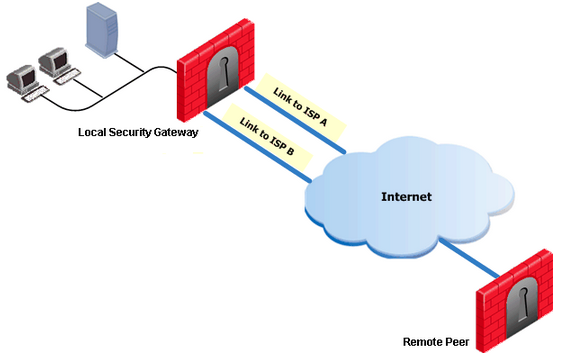
When ISP redundancy is enabled along with the "Apply settings to VPN traffic" property, the Check Point security Gateway will always send whatever IP address is configured on the "General" page of the gateway object, as the Main Mode ID to the peer. If this is IP address is different than the IP address that the peer initiated the tunnel to, then the peer may reject the Main Mode proposal with an "invalid ID" error.
## Solution
No fix is required; the system is functioning as designed.
Some 3rd party VPN peers may not allow a Main Mode ID that differs from the actual IP address, with which the VPN negotiation is taking place. If this is the case, then ISP redundancy for VPN traffic will not be compatible with the peer gateway.
With Check Point VPN peers, this can be allowed by configuring the IP address (sent during Main Mode) in the "Topology" section of the gateway object. However, some 3rd party VPN devices have no way of configuring this. You can configure the "General" page of the Check Point object with the IP address that the peer gateway expects, or turn off the "Apply settings to VPN traffic" property for ISP redundancy, and then configure the link selection page to use the required IP address.
---
# Agent Instructions
This content is from the Check Point Support Center (https://support.checkpoint.com), the official knowledge base for Check Point cybersecurity products.
## Navigating This Knowledge Base
- **Complete index**: [llms.txt](https://support.checkpoint.com/llms.txt)
- **All SK articles**: [SecureKnowledge Sitemap](https://support.checkpoint.com/sitemaps/secureknowledge-sitemap-index.xml)
- **SK article URL pattern**: `https://support.checkpoint.com/results/sk/{skId}`
- **Markdown responses**: AI bot User-Agents automatically receive `text/markdown` content