> Source: [sk25977](https://support.checkpoint.com/results/sk/sk25977)
# sk25977 - Connecting multiple clusters to the same network segment (same VLAN, same switch)
| Property | Value |
|----------|-------|
| Solution ID | sk25977 |
| Date Created | 2004-04-21 |
| Last Modified | 2023-05-07 |
| Technical Level | General |
| Products | Security Gateway |
| Versions | R82.10, R82, R81.20 |
## Symptoms
- * SmartView Tracker logs show "`cluster member detected a problem`".
* */var/log/messages* file on cluster member(s) shows:
* `kernel: CPHA: This is an illegal configuration. Each cluster should be connected to another set of switches/hubs.`
* `
routed[`*PID* `]: cpcl_cxl_runtime_status: HA mode not started`
`
routed[`*PID* `]: CXL status change: 1 --> 0, cprd exits`
`
routed[`*PID* `]: Exit routed[`*PID*`] version routed-...
`
* ClusterXL kernel debug ('`fw ctl debug -m cluster + stat pnote conf ccp`') shows:
`fwha_set_new_local_state: Old version HA machines exist around so prevent state change to READY;`
* Log on 3rd party switch shows flapping (moving) of MAC Address 0000.0000.fe00 between different ports.
*Example* :
`
HostName %L2FM-3-L2FM_MAC_FLAP_DISABLE_LEARN: Disabling learning in vlan 444 for 120s due to too many mac moves`
`
HostName %L2FM-4-L2FM_MAC_MOVE2: Mac 0000.0000.fe00 in vlan 444 has moved between Eth1/43 to Eth1/44`
`
HostName last message repeated 4 times`
`
HostName %L2FM-3-L2FM_MAC_FLAP_RE_ENABLE_LEARN: Re-enabling learning in vlan 444`
`
HostName %L2FM-4-L2FM_MAC_MOVE2: Mac 0000.0000.fe00 in vlan 444 has moved between Eth1/43 to Eth1/44
`
* Network latency may occur due to high CPU on the connected switch
## Cause
Multiple clusters are connected on the same subnet.
The Cluster Control Protocol (CCP) packets that are sent between the members of the same cluster, reach the neighbor cluster (connected to the same network) and "confuse" it.
## Solution
**Table of Contents:**
1. Introduction
1. CCP roles
2. CCP addresses
1. Delta Sync and Health Check packets
2. Forwarded packets
2. Important Notes
3. Instructions to change Source MAC Addresses
1. Gateway Mode - Gaia R77.30 - R80.30
1. Background
2. Problem Overview
3. Solution Description
4. Procedure for Gaia R77.30
5. Procedure for Gaia R80.10 - R80.30
6. Procedure for Gaia Scalable Platform R80.20SP, R80.30SP
2. Gateway Mode - Gaia R75.40-R77.20 / SecurePlatform / IPSO
1. Background
2. Problem Overview
3. Solution Description
4. Procedure
3. VSX Mode
1. Background
2. Problem Overview
3. Procedure for Gaia R77.30
4. Procedure for Gaia R80.10 - R80.30
4. Summary Table for clusters running Gaia R77.30 untill R80.10
4. Instructions to change Destination Multicast MAC Addresses
1. Background
2. Problem Overview
3. Solution Description
4. Procedure
5. Configuring Synchronization networks
6. Related documentation
7. Related solutions
(I) Introduction {#Introduction}
--------------------------------
The Cluster Control Protocol (CCP) is a proprietary Check Point protocol that runs between cluster members on UDP port 8116.
For complete explanation, refer to [sk93306 - ATRG: ClusterXL](https://supportcenter.checkpoint.com/supportcenter/portal?eventSubmit_doGoviewsolutiondetails=&solutionid=sk93306) - chapter "Cluster Control Protocol (CCP)".
**Notes:**
* **This article is no longer relevant to versions R80.40 and higher.**
* **This article is not relevant for Gaia Security Gateway with kernel version 3.10.**
### (I-1) Introduction - CCP roles {#Introduction - CCP roles}
CCP has the following roles:
* **State Synchronization** - cluster members exchange Delta Sync packets about the processed connections to keep the relevant kernel tables synchronized on all cluster members.
Notes:
* Each Delta Packet contains many pieces of information about different connections.
* This applies to ClusterXL, 3rd party cluster, and OPSec cluster.
* **Health checks** - cluster members exchange reports and query each other about their own states and the states of their cluster interfaces:
Note: This does *not* apply to 3rd party cluster / OPSec cluster.
* Health-status Reports
* Cluster-member Probing
* State-change Commands
* Querying for Cluster Membership
### (I-2) Introduction - CCP addresses {#Introduction - CCP addresses}
#### (I-2-A) Introduction - CCP addresses of Delta Sync packets and Health Check packets {#Introduction - CCP addresses - Delta Sync and Health Check packets}
This section describes the source and destination addresses of CCP packets in Layer 2, Layer 3, and Layer 4.
*
#### Layer 2
* **Source MAC address of CCP Delta Sync packets and CCP Health Check packets:**
**Note:** The same Source MAC address is used for all the Virtual Systems on the same cluster member.
> * In ClusterXL running Gaia R80.10
>
> |-----|-----|-----|-----|------------------------|-----------------------|
> | 1st | 2nd | 3rd | 4th | 5th | 6th |
> | 00 | 00 | 00 | 00 | Value of *`MAC magic`* | *ID_of_Source_Member* |
>
> Refer to section "(III-1-E) Change Source MAC Addresses - Gateway Mode - Gaia R80.10 - Procedure".
> * In ClusterXL running Gaia R77.30
>
> |-----|-----|-----|-----|------------------------------------------|-----------------------|
> | 1st | 2nd | 3rd | 4th | 5th | 6th |
> | 00 | 00 | 00 | 00 | Value derived from *`Cluster_Global_ID`* | *ID_of_Source_Member* |
>
> Refer to section "(III-1-D) Instructions to change Source MAC Addresses - Gateway Mode - Gaia R77.30"
> and section "(III-1-E) Change Source MAC Addresses - Gateway Mode - Gaia R80.10 - Procedure".
> * In ClusterXL running Gaia R75.40-R77.20 / SecurePlatform / IPSO
>
> |-----|-----|-----|-----|-----------------------------|-----------------------|
> | 1st | 2nd | 3rd | 4th | 5th | 6th |
> | 00 | 00 | 00 | 00 | Value of *`fwha_mac_magic`* | *ID_of_Source_Member* |
>
> Refer to section "(III-2-D) Instructions to change Source MAC Addresses - Gateway Mode - Gaia R75.40-R77.20 / SecurePlatform / IPSO".
> * In VSX cluster running Gaia R80.10:
>
> Note: Any VSX cluster works in High Availability mode.
>
> |-----|-----|-----|----------|------------------------|-----------------------|
> | 1st | 2nd | 3rd | 4th | 5th | 6th |
> | 00 | 00 | 00 | XXXXXXXX | Value of *`MAC magic`* | *ID_of_Source_Member* |
>
> where:
> * `XXXXXXXX` - either 00000000, or 8 least significant (right-most) bits of VSID (refer to section "(III-3) Instructions to change Source MAC Addresses - VSX Mode")
>
> In addition, refer to section "(III-1-E) Change Source MAC Addresses - Gateway Mode - Gaia R80.10 - Procedure".
> * In VSX cluster running Gaia R77.30:
>
> Note: Any VSX cluster works in High Availability mode.
>
> |-----|-----|----------|-----|------------------------------------------|-----------------------|
> | 1st | 2nd | 3rd | 4th | 5th | 6th |
> | 00 | 00 | XXXXXXXX | 00 | Value derived from *`Cluster_Global_ID`* | *ID_of_Source_Member* |
>
> where:
> * `XXXXXXXX` - either 00000000, or 8 least significant (right-most) bits of VSID (refer to section "(III-3) Instructions to change Source MAC Addresses - VSX Mode")
>
> In addition, refer to section "(III-1-D) Instructions to change Source MAC Addresses - Gateway Mode - Gaia R77.30".
> * In VSX cluster running Gaia R75.40VS,R76,R77,R77.10,R77.20 / SecurePlatform VSX NGX,R65,R67,R68 / IPSO VSX R65:
>
> Note: Any VSX cluster works in High Availability mode
>
> |-----|-----|-----|-----|-----------------------------|-----------------------|
> | 1st | 2nd | 3rd | 4th | 5th | 6th |
> | 00 | 00 | 00 | 00 | Value of *`fwha_mac_magic`* | *ID_of_Source_Member* |
>
>
>
> Refer to section "(III-2-D) Instructions to change Source MAC Addresses - Gateway Mode - Gaia R75.40-R77.20 / SecurePlatform / IPSO"
* **Destination MAC address of CCP Delta Sync packets and CCP Health Check packets:**
* In ClusterXL
|-------------------|--------------------------------------------------------------------------------------------------------------------------------------------------------------------------------------------------------------------------------------------------------------------------------------------------------------------------------------------------------------------------------------------------------------------------------------------------------------------------------------------------------------------------------------------------------------------------------------------------------------------------------------------------------------------------------------------------------------------------------------------------------------------------------------------------------------------------------------------------------------------------------------------------------------------------------------------------------------------------------------------------------------------------------------------------------------------------------------------------------------------------------------------------------------------------------------------------------------------------------------------------------------------------------------------------------------------------------------------------------------------------------------------------------------------------------------------------------------------------------------------------------------------------------------------------------------------------------------------------------------------------------------------------------------------------------------------------------------------------------------------------------------------------------------------------------------------------------------------------------------------------------------------------------------------------------------------------------------------------------------------|
| Value | Notes |
| 01:00:5e:YY:ZZ:WW | * when Virtual IP address is configured on these interfaces * when CCP is set to run in multicast mode (default mode; or set with command "`cphaconf set_ccp multicast`") * when sent over non-secured (non-sync) interface * *YY:ZZ:WW* = concatenation of 3 last octets (from the left) of Virtual IP address Algorithm for VIP address = "A"."B"."C"."D": * If 2nd octet "B" \< 127, then Final MAC = 01:00:5E:("B" hex):("C" hex):("D" hex) Example: If VIP = 192. 50.204.20, then Final MAC = 01:00:5E:("50" hex):("204" hex):("20" hex) = 01:00:5E:32:CC:14 * If 2nd octet "B" \> 127, then Final MAC = 01:00:5E:("B-128" hex):("C" hex):("D" hex) Example: If VIP = 192.168.204.20, then Final MAC = 01:00:5E:("168-128" hex):("204" hex):("20" hex) = 01:00:5E:28:CC:14 |
| 01:00:5e:YY:ZZ:WW | * when there is *no* Virtual IP address configured on this interface * when CCP is set to run in multicast mode (default mode; or set with command "`cphaconf set_ccp multicast`") * when sent over non-secured (non-sync) interface * *YY* = the 2nd octet (from the left) of the final calculated IP address after adding 250 to the interface's network address * *ZZ* = the 3rd octet (from the left) of the final calculated IP address after adding 250 to the interface's network address * *WW* = the 4th octet (from the left) of the final calculated IP address after adding 250 to the interface's network address Algorithm: 1. Calculate the interface's network address - perform logical AND between the interface's IP address and subnet mask 2. Add 250 to the calculated interface's network address 3. Convert the 2nd (*YY* ), 3rd (*ZZ* ) and 4th (*WW*) octets of the final calculated IP address from Dec to Hex format *Examples*: * Example #1 1. The interface's IP address and subnet mask are: 192.168.40.100 / 24 2. The interface's network address is: 192.168.40.100 AND 255.255.255.0 = 192.168.40.0 3. The final calculated IP address is: 192.168.40.0 + 250 = 11000000.10101000.00101000.01100000 + 00000000.00000000.00000000.11111010 = 11000000.10101000.00101000.11111010 = 192.168.40.250 4. The converted octets are: "168" dec = "A8" hex "40" dec = "28" hex "250" dec = "FA" hex 5. Hence, the Final MAC: 01:00:5E:A8:28:FA * Example #2 1. The interface's IP address and subnet mask are: 192.168.40.100 / 29 2. The interface's network address is: 192.168.40.100 AND 255.255.255.248 = 192.168.40.96 3. The final calculated IP address is: 192.168.40.96 + 250 = 11000000.10101000.00101000.01100000 + 00000000.00000000.00000000.11111010 = 00000000.00000000.00101001.01011010 = 192.168.41.90 4. The converted octets are: "168" dec = "A8" hex "41" dec = "29" hex "90" dec = "5A" hex 5. Hence, the Final MAC: 01:00:5E:A8:29:5A |
| FF:FF:FF:FF:FF:FF | * when CCP is set to run in broadcast mode (with command "`cphaconf set_ccp broadcast`") * when sent over secured (sync) interfaces |
* In VSX
|-------------------|---------------------------------------------------------------------------------------------------------------------------------------------------------------------------------------------------------------------------------------------------------------------------------------------------------------------------------------------------------------------------------------------------------------------------------------------------------------------------------------------------------------------------------------------------------------------------------------------------------------------------------------------------------------------------------------------------------------------------------------------------|
| Value | Notes |
| FF:FF:FF:FF:FF:FF | Refer to [sk36644](https://supportcenter.checkpoint.com/supportcenter/portal?eventSubmit_doGoviewsolutiondetails=&solutionid=sk36644). * VSX NGX / VSX NGX R65 / VSX NGX R67 / VSX NGX R68 - the only possible mode of CCP is *Broadcast*. * In R75.40VS / R76 - R80.30 in VSX mode: * CCP mode over Sync Network is *Broadcast* for all Virtual Systems * CCP mode over non-Sync Networks is *Multicast* * In VSLS configuration: When instances of Virtual Systems are *not* running on all cluster members (e.g., only 2 VSs were configured on a VSX cluster that has 4 cluster members), the Delta Sync packets generated by a Virtual System, are sent in *Unicast* only to those members that run the instance of same the Virtual System. |
Note: The reason for having *Multicast* and *Broadcast* destination MAC Addresses is quite simple. In first releases of Check Point ClusterXL, the only existing CCP mode was *Broadcast* . Since this might result in high network overhead, it was decided to change the destination MAC Address of CCP packets to Multicast, and make it the default behavior. For backward compatibility and cases where Multicast Layer 2 traffic is not allowed or not supported, the cluster administrator still has the option to use *Broadcast* mode.
*
#### Layer 3
> |------------------------|-----------------------------------|------------------------------------------------------------------------------------------------------------------------------------------------------------------------------------------------------------------------------------------------------------------------------------------------------------------------------------------------------------------------------------------------------------------------------------------------------------------------------------|
> | Address | Value | Notes |
> | Source IP address | 0.0.0.0 | The IP address of the CCP packet on the receiving cluster member is ignored and is not checked. It is possible to configure the cluster members to generate CCP packets with traditional destination multicast IP addresses (224.0.0.0 - 239.255.255.255) by setting the value of kernel parameter *fwha_ccp_use_mcast_base* to 1 (one) - refer to [sk115142](https://supportcenter.checkpoint.com/supportcenter/portal?eventSubmit_doGoviewsolutiondetails=&solutionid=sk115142). |
> | Destination IP address | broadcast address for this subnet | The IP address of the CCP packet on the receiving cluster member is ignored and is not checked. It is possible to configure the cluster members to generate CCP packets with traditional destination multicast IP addresses (224.0.0.0 - 239.255.255.255) by setting the value of kernel parameter *fwha_ccp_use_mcast_base* to 1 (one) - refer to [sk115142](https://supportcenter.checkpoint.com/supportcenter/portal?eventSubmit_doGoviewsolutiondetails=&solutionid=sk115142). |
*
#### Layer 4
> |------------------|----------|----------------------------------------------------------------------------------------------------|
> | Address | Value | Notes |
> | Source port | UDP 8116 | It is strongly recommended ***not*** to pass any other traffic on UDP port 8116 through ClusterXL. |
> | Destination port | UDP 8116 | It is strongly recommended ***not*** to pass any other traffic on UDP port 8116 through ClusterXL. |
#### (I-2-B) Introduction - CCP addresses of Forwarded packets {#Introduction - CCP addresses - Forwarded packets}
Note: For complete explanation about the Packet Forwarding in cluster, refer to [sk93306 - ATRG: ClusterXL](https://supportcenter.checkpoint.com/supportcenter/portal?eventSubmit_doGoviewsolutiondetails=&solutionid=sk93306) - chapter "ClusterXL Modes" - "Forwarding".
Packet Forwarding between cluster members is performed in the following way (so that the target cluster member can understand that this packet is intended to it):
* In **High Availability** mode:
The connection is forwarded over Synchronization Network as CCP packets.
Note: Refer to [sk95150 - When the Synchronization interfaces of three and more ClusterXL members are connected to the same switch, port flapping occurs on the switch](https://supportcenter.checkpoint.com/supportcenter/portal?eventSubmit_doGoviewsolutiondetails=&solutionid=sk95150).
Since the processed packet may be already decrypted, it must be sent over the secured interfaces.
On the receiving side, the machine will not pass this packet to the FireWall (the packet will not pass the inspection again), but instead the packet is passed directly to the IP stack of the operating system.
Note: The packet is dropped on the member that forwarded the packet (log is generated only if forwarding fails).
*
#### Layer 2
* **Source MAC address of forwarded packets:**
* In ClusterXL running Gaia R80.10
|-----|-----|-----|-----|----------------------------------|-----------------------|
| 1st | 2nd | 3rd | 4th | 5th | 6th |
| 00 | 00 | 00 | 00 | Value derived from *`MAC magic`* | *ID_of_Target_Member* |
Refer to section "(III-1-E) Change Source MAC Addresses - Gateway Mode - Gaia R80.10 - Procedure".
* In ClusterXL running Gaia R77.30
|-----|-----|-----|-----|------------------------------------------|-----------------------|
| 1st | 2nd | 3rd | 4th | 5th | 6th |
| 00 | 00 | 00 | 00 | Value derived from *`Cluster_Global_ID`* | *ID_of_Target_Member* |
Refer to section "(III-1-D) Instructions to change Source MAC Addresses - Gateway Mode - Gaia R77.30"
and section "(III-1-E) Change Source MAC Addresses - Gateway Mode - Gaia R80.10 - Procedure".
* In ClusterXL running Gaia R75.40-R77.20 / SecurePlatform / IPSO
|-----|-----|-----|-----|-------------------------------------|-----------------------|
| 1st | 2nd | 3rd | 4th | 5th | 6th |
| 00 | 00 | 00 | 00 | Value of *`fwha_mac_forward_magic`* | *ID_of_Target_Member* |
Refer to section "(III-2-D) Instructions to change Source MAC Addresses - Gateway Mode - Gaia R75.40-R77.20 / SecurePlatform / IPSO".
* In VSX cluster running Gaia R80.10:
Note: Any VSX cluster works in High Availability mode.
|-----|-----|-----|----------|------------------------|------------|
| 1st | 2nd | 3rd | 4th | 5th | 6th |
| 00 | 00 | 00 | XXXXXXXX | Value of *`MAC magic`* | *YYYZZZZZ* |
where:
* `XXXXXXXX` - either 00000000, or 8 least significant (right-most) bits of VSID (refer to section "(III-3) Instructions to change Source MAC Addresses - VSX Mode - Gaia R77.30 - R80.30")
* `YYY` - 3 least significant (right-most) bits of VSID
* `ZZZZZ` - ID of target cluster member
In addition, refer to section "(III-1-E) Change Source MAC Addresses - Gateway Mode - Gaia R80.10 - Procedure".
* In VSX cluster running Gaia R77.30:
Note: Any VSX cluster works in High Availability mode.
|-----|-----|----------|-----|------------------------------------------|------------|
| 1st | 2nd | 3rd | 4th | 5th | 6th |
| 00 | 00 | XXXXXXXX | 00 | Value derived from *`Cluster_Global_ID`* | *YYYZZZZZ* |
where:
* `XXXXXXXX` - either 00000000, or 8 least significant (right-most) bits of VSID (refer to section "(III-3) Instructions to change Source MAC Addresses - VSX Mode - Gaia R77.30 - R80.30")
* `YYY` - 3 least significant (right-most) bits of VSID
* `ZZZZZ` - ID of target cluster member
In addition, refer to section "(III-1-D) Instructions to change Source MAC Addresses - Gateway Mode - Gaia R77.30".
* In VSX cluster running Gaia R75.40VS,R76,R77,R77.10,R77.20 / SecurePlatform VSX NGX,R65,R67,R68 / IPSO VSX R65:
Note: Any VSX cluster works in High Availability mode
|-----|-----|-----|------------|-------------------------------------|------------|
| 1st | 2nd | 3rd | 4th | 5th | 6th |
| 00 | 00 | 00 | *NNNNNNNN* | Value of *`fwha_mac_forward_magic`* | *YYYZZZZZ* |
where:
* `NNNNNNNN` - 8 most significant (left-most) bits of VSID
* `YYY` - 3 least significant (right-most) bits of VSID
* `ZZZZZ` - ID of target cluster member
Refer to section "(III-2-D) Instructions to change Source MAC Addresses - Gateway Mode - Gaia R75.40-R77.20 / SecurePlatform / IPSO".
* **Destination MAC address of forwarded packets:**
> |-------------------------|---------------------------------------------------|
> | Address | Value |
> | Destination MAC address | MAC address of the Sync interface on peer member. |
*
#### Layer 3
> |------------------------|-----------------------------------------------------------------------------|
> | Address | Value |
> | Source IP address | IP address is the IP address of the host that sent the original packet. |
> | Destination IP address | IP address is the physical IP address of the cluster member on that subnet. |
*
#### Layer 4
> |------------------|----------|----------------------------------------------------------------------------------------------------|
> | Address | Value | Notes |
> | Source port | UDP 8116 | It is strongly recommended ***not*** to pass any other traffic on UDP port 8116 through ClusterXL. |
> | Destination port | UDP 8116 | It is strongly recommended ***not*** to pass any other traffic on UDP port 8116 through ClusterXL. |
* In **Load Sharing Multicast** mode:
The connection is *not* forwarded - it arrives to *all* cluster members, and each member decides whether it should process the packet or not (each cluster member applies the *Decision Function*, which is based on connection's unique hash).
Note: When the Sticky Decision Function (SDF) is used, refer to [sk95150 - When the Synchronization interfaces of three and more ClusterXL members are connected to the same switch, port flapping occurs on the switch](https://supportcenter.checkpoint.com/supportcenter/portal?eventSubmit_doGoviewsolutiondetails=&solutionid=sk95150).
* In **Load Sharing Unicast** (Pivot) mode:
The connection is forwarded over the *same* interface, on which it was received.
Note: The packet is dropped on the member that forwarded the packet (log is generated only if forwarding fails).
*
#### Layer 2
> |----------------------------------------|-----------------------------------------------------------------------------------------------------------------------------------------------------------------------------------------------------------------------------------------------------------------------------------------------------------------------------------------------------------------------------------------------------------------------------------------------------------------------------------------------------------------------------|
> | Address | Value |
> | Source MAC address of CCP packets | Layer 2 Source MAC address of the packet is inverted and combined in a special way with values of these kernel parameters: *fwha_mac_magic* and *fwha_mac_forward_magic* (in Gaia R77.30 and higher, the relevant values are derived from the *Cluster Global ID* ). Refer to [sk41898 - Connecting multiple clusters running in Load Sharing Unicast mode results in MAC Address flapping on switches](https://supportcenter.checkpoint.com/supportcenter/portal?eventSubmit_doGoviewsolutiondetails=&solutionid=sk41898). |
> | Destination MAC address of CCP packets | Layer 2 Destination MAC address of the packet is changed to the MAC address of the non-Pivot cluster member on the same subnet. |
*
#### Layer 3
> |------------------------|-----------------------------------------------------------------------------|
> | Address | Value |
> | Source IP address | IP address is the IP address of the host that sent the original packet. |
> | Destination IP address | IP address is the physical IP address of the cluster member on that subnet. |
*
#### Layer 4
> |------------------|----------|----------------------------------------------------------------------------------------------------|
> | Address | Value | Notes |
> | Source port | UDP 8116 | It is strongly recommended ***not*** to pass any other traffic on UDP port 8116 through ClusterXL. |
> | Destination port | UDP 8116 | It is strongly recommended ***not*** to pass any other traffic on UDP port 8116 through ClusterXL. |
(II) Important Notes {#Important Notes}
---------------------------------------
It is ***not*** recommended to connect interfaces of multiple clusters to the same network segment (same VLAN, same switch). A separate VLAN and/or switch is recommended for each cluster. A crossover link may be used for the sync (secured) interfaces.
If network topology requires connecting multiple clusters on the same network segment, then the following instructions ***must*** be followed:
* Change the **"Source MAC address"** of the Cluster Control Protocol - to enable communication between cluster members - for all ClusterXL modes (both High Availability and Load Sharing) and for VSX clusters.
Follow the instructions in "(III) Instructions to change Source MAC Addresses" section.
* Change the **"Destination MAC address"** of the Cluster Control Protocol - to enable communication between the cluster and machines outside the cluster - *only* for ClusterXL Load Sharing Multicast Mode clusters.
Follow the instructions in "(IV) Instructions to change Destination Multicast MAC Addresses" section.
* Configure **unique IP address** for **each** Synchronization interface on **each** cluster member.
Follow the instructions in "(V) Configuring Synchronization networks" section.
(III) Instructions to change Source MAC Addresses {#Instructions to change Source MAC Addresses}
------------------------------------------------------------------------------------------------
### (III-1) Change Source MAC Addresses - *Gateway Mode* - Gaia R77.30 - R80.30 {#Instructions to change Source MAC Addresses - Gateway Mode - Gaia R77.30 and above}
*
#### (III-1-A) Change Source MAC Addresses - Gateway Mode - Gaia R77.30 - R80.30 - Background {#Instructions to change Source MAC Addresses - Gateway Mode - Gaia R77.30 and above - Background}
Both High Availability and Load Sharing cluster members communicate with each other using the Cluster Control Protocol (CCP).
CCP packets are distinguished from ordinary network traffic based on a unique Source MAC address in CCP packets:
|-----|-----|-----|-----|------------------------------------------|-----------------------|
| 1st | 2nd | 3rd | 4th | 5th | 6th |
| 00 | 00 | 00 | 00 | Value derived from *`Cluster_Global_ID`* | *ID_of_Source_Member* |
If value of '`Cluster_Global_ID`' is not specified, then the default values for 5th byte of source MAC address in CCP packets are:
|--------------------------|-------|--------------------------|----------------------|
| Traffic Type | Value | Mode | Version |
| CCP traffic | 0xFE | ClusterXL - Gateway mode | Gaia R77.30 - R80.30 |
| CCP traffic | 0xFE | ClusterXL - VSX mode | Gaia R77.30 - R80.30 |
| Forwarding Layer traffic | 0xFD | ClusterXL - Gateway mode | Gaia R77.30 - R80.30 |
| Forwarding Layer traffic | 0xFD | ClusterXL - VSX mode | Gaia R77.30 - R80.30 |
| Forwarding Layer traffic |
*
#### (III-1-B) Change Source MAC Addresses - Gateway Mode - Gaia R77.30 - R80.30 - Problem Overview {#Instructions to change Source MAC Addresses - Gateway Mode - Gaia R77.30 and above - Problem Overview}
When more than one cluster is connected to the same VLAN / network segment, if CCP and Forwarding Layer traffic use *multicast*, this traffic reaches only the intended cluster.
If CCP and Forwarding Layer traffic (and in certain other cases) use *broadcast*, cluster traffic intended for one cluster is seen by all connected clusters, and is processed by the wrong cluster, which might cause traffic issues on the involved clusters.
*
#### (III-1-C) Change Source MAC Addresses - Gateway Mode - Gaia R77.30 - R80.30 - Solution Description {#Instructions to change Source MAC Addresses - Gateway Mode - Gaia R77.30 and above - Solution Description}
Change the Source MAC address of CCP packets on all clusters connected to the same VLAN / network segment to ensure that their CCP packets can be uniquely distinguished.
Configure the value of the Cluster Global ID parameter, which in turn will set the required value of 5th byte in Source MAC Address of CCP packets.
**Important Note:** On cluster members running **Gaia R77.30 - R80.30** , users should ***not*** modify the values of the kernel parameters '`fwha_mac_magic`' and '`fwha_mac_forward_magic`' (neither with '*fw ctl set int* ' command, nor via *$FWDIR/boot/modules/fwkern.conf* file). After an upgrade from lower version to R77.30 - R80.30, it is strongly recommended to remove the kernel parameters '`fwha_mac_magic`' and '`fwha_mac_forward_magic`' from the *$FWDIR/boot/modules/fwkern.conf*f file on all cluster members.
*
#### (III-1-D) Change Source MAC Addresses - Gateway Mode - Gaia R77.30 - Procedure {#Instructions to change Source MAC Addresses - Gateway Mode - Gaia R77.30 - Procedure}
Note: Instructions for cluster members running on Gaia R75.40-R77.20, on SecurePlatform, or on IPSO appear in the this section.
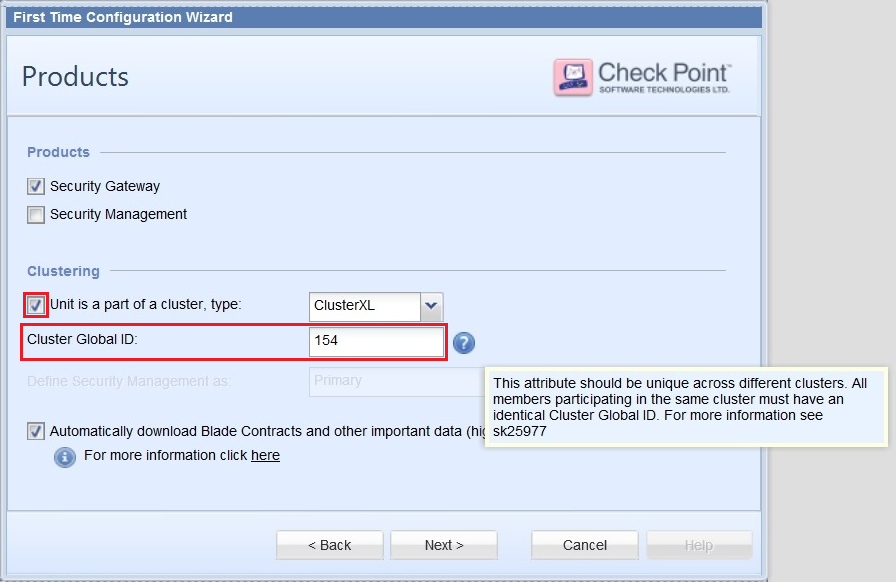
Starting in **Gaia R77.30** , the 5th byte of the Source MAC address in *all types* of CCP packets (CCP Delta Sync packets, CCP Health Check packets, forwarded packets) is derived from the value of ***Cluster Global ID***.
***Cluster Global ID* can be configured in the following ways (in Decimal format):**
Note: Cluster Global ID must be identical on all members of the same cluster and must be unique on different clusters.
1. In *First Time Configuration Wizard* (during the installation of cluster members)
*Example*:
[](https://sc1.checkpoint.com/sc/SolutionsStatics/sk25977/First_Time_Configuration_Wizard.png "Click the image to see it in full size in a new tab/window")
2. *Manually* after installing the cluster members:
**`[Expert@Member_HostName:0]# cphaconf cluster_id set `**
#### How to *check* the current value of *Cluster Global ID*:
> Run the following command on each cluster member:
>
> **`[Expert@Member_HostName:0]# cphaconf cluster_id get`**
> > *Example output* :
> >
> > ```
> > cphaconf cluster_id: 154
> > ```
> > Note: Output displays the value in Decimal format.
#### How to *change* the current value of *Cluster Global ID* (after installing the cluster members):
> Run the following command on each cluster member:
>
> **`[Expert@Member_HostName:0]# cphaconf cluster_id set `**
>
> Important Notes:
> * Accepted *decimal* values for *\* are from **1** to **254** (0 and 255 are *not* allowed)
> * Cluster Global ID must be *identical* on all members of the same cluster
> * Cluster Global ID must be *unique* on different clusters
> * In VSX mode, the same Cluster Global ID is automatically applied to CCP packets generated by all Virtual Systems
> * This command sets the value of Cluster Global ID *permanently* - the configured value is automatically and immediately inserted into the ***$FW_BOOT_DIR/ha_boot.conf*** file
> * When the cluster member boots, the value of the Cluster Global ID is read from the *$FW_BOOT_DIR/ha_boot.conf* file, and the 5th byte of the Source MAC address is set accordingly in *all types* of CCP packets (CCP Delta Sync packets, CCP Health Check packets, forwarded packets)
**Important Notes:**
* Setting the value of *Cluster Global ID* with ***cphaconf cluster_id set \*** command ***and also*** setting the value of kernel parameter ***fwha_mac_magic*** with ***fw ctl set int*** command will cause an inconsistency (order, in which the commands were issued, does *not* matter):
* the relevant value in the Check Point kernel will be the one configured with '`fw ctl set int`' command
* the value saved in the *$FW_BOOT_DIR/ha_boot.conf* file will be the one configured with '`cphaconf cluster_id set`' command
In this case, the following warning will be displayed when the user runs the '`cphaconf cluster_id get`' command:
**`cphaconf cluster_id: WARNING: different values for cluster_id: kernel `*VALUE_1*` ha_boot.conf: `*VALUE_2***
* ***$FWDIR/boot/modules/fwkern.conf*** file has *precedence* over the ***$FW_BOOT_DIR/ha_boot.conf*** file - this means that if the value of kernel parameter ***fwha_mac_magic*** / ***fwha_mac_forward_magic*** is set in the *$FWDIR/boot/modules/fwkern.conf* file when the cluster member boots, that value will override the value set in the *$FW_BOOT_DIR/ha_boot.conf* file.
* After an upgrade from lower version to R77.30 - R80.30, it is strongly recommended to remove the kernel parameters '`fwha_mac_magic`' and '`fwha_mac_forward_magic`' from the *$FWDIR/boot/modules/fwkern.conf* file on all cluster members.
* If Cluster Global ID has to be changed on the cluster with minimal impact on the traffic, then follow this action plan:
* In High Availability / Load Sharing Unicast mode:
> 1. Stop the cluster on the Standby / Non-Pivot member:
> `[Expert@HostName:0]# cphastop`
> 2. Confirm the cluster state on both members:
> `[Expert@HostName:0]# cphaprob state`
> 3. Change the Cluster Global ID value on the Active / Pivot member:
> `[Expert@HostName:0]# cphaconf cluster_id set `
> 4. Change the Cluster Global ID value on the Standby / Non-Pivot member:
> Manually edit the `$FW_BOOT_DIR/ha_boot.conf` file to contain the same configuration as the `$FW_BOOT_DIR/ha_boot.conf` file on the Active / Pivot member.
> 5. Reboot the Standby / Non-Pivot member.
> 6. Confirm the cluster state on both members: `[Expert@HostName:0]# cphaprob state`
* In Load Sharing Multicast mode:
> 1. Schedule a maintenance window for the time when there is a minimal amount of traffic passing through the cluster
> 2. Select one of the members to be stopped / rebooted
> 3. Follow the above action plan for High Availability / Load Sharing Unicast mode
*
#### (III-1-E) Change Source MAC Addresses - Gateway Mode - Gaia R80.10 until R80.30 - Procedure {#Instructions to change Source MAC Addresses - Gateway Mode - Gaia R80.10 - Procedure}
Starting in **Gaia R80.10** , the 5th byte of the Source MAC address (MAC magic) in *all types* of CCP packets (CCP Delta Sync packets, CCP Health Check packets, forwarded packets) is assigned automatically.
During the initial configuration of the cluster members, they apply the following algorithm to set the MAC magic value:
1. Try to set the 5th byte of the Source MAC address to 1.
If CCP packets with such value in the 5th byte of the Source MAC address are detected, then select the next value.
2. Try to set the 5th byte of the Source MAC address to 2.
If CCP packets with such value in the 5th byte of the Source MAC address are detected, then select the next value.
3. And so on and so forth, until an unused value is detected (it takes up to \~30 seconds).
Note: All members of the same cluster will set the same value.
#### How to *check* the current value of *MAC magic*:
> Run the following command on each cluster member:
>
> **`[Expert@Member_HostName:0]# cphaprob mmagic`**
> > *Example outputs* :
> >
> > |---------------------------------------------------------------------------------------------------------------------------------------------|-------------------------------------------------------------------------------------------------------------------------------------------|
> > | ``` Configuration mode: Automatic Configuration phase: Stable MAC magic: 1 MAC forward magic: 254 Used MAC magic values: None. ``` | ``` Configuration mode: Manual Configuration phase: Stable MAC magic: 100 MAC forward magic: 99 Used MAC magic values: None. ``` |
#### How to *change* the current value of *MAC magic* (after installing the cluster members):
> Refer to [R80.10 ClusterXL Administration Guide](http://downloads.checkpoint.com/dc/download.htm?ID=54804):
> chapter "Advanced Features and Procedure" -
> section "Working with VLANS and Clusters" -
> sub-section "Connecting Several Clusters on the Same VLAN" -
> sub-sub-section "Changes to the Source MAC Address" -
> paragraph "Duplicate Source Cluster MAC Addresses: the Solution"
>
> Follow these steps:
> 1. Close all SmartConsole windows.
>
> Verify by running the "*cpstat mg* " command on Security Management Server / in the context of *each* Domain Management Server.
> 2. Connect with [GuiDBedit Tool](https://supportcenter.checkpoint.com/supportcenter/portal?eventSubmit_doGoviewsolutiondetails=&solutionid=sk13009) to Security Management Server / Domain Management Server.
>
> 3. In the upper left pane, go to ***Table*** - ***Network Objects*** - ***network_objects***.
>
> 4. In the upper right pane, select the relevant R80.10 Cluster object.
>
> 5. Press CTRL+F (or go to ***Search*** menu - ***Find*** ) - paste ***cluster_magic*** - click on ***Find Next***.
>
> 6. In the lower pane, right-click on the ***cluster_magic*** - select ***Edit...*** - delete the current value - enter the desired value - click on ***OK***.
>
> * To work in **manual mode** (only is instructed so by [Check Point Support](http://www.checkpoint.com/support-services/contact-support/index.html)), enter a value between 1 and 253.
>
> Enter a unique value for each cluster in the domain.
> * To work in **automatic mode** (recommended), enter 254.
>
> "254" is the default value and should be already set.
> If duplicate Source MAC addresses of CCP packets appear on the network even though automatic mode is set, then enter unique values for each cluster (manual mode).
> 7. Save the changes: go to ***File*** menu - click on ***Save All***.
>
> 8. Close the GuiDBedit Tool.
>
> 9. Connect with SmartDashboard to Security Management Server / Domain Management Server.
>
> 10. Install the policy onto the relevant Security Gateway / Cluster object.
>
> 11. Verify the *MAC magic* value on each R80.10 cluster member:
>
> **`[Expert@Member_HostName:0]# cphaprob mmagic`**
> > *Example output* :
> >
> > ```
> > Configuration mode: Manual
> > Configuration phase: Stable
> >
> > MAC magic: 100
> > MAC forward magic: 254
> >
> > Used MAC magic values: None.
> > ```
**Important Notes:**
* Setting the value of *MAC magic* using the [GuiDBedit Tool](https://supportcenter.checkpoint.com/supportcenter/portal?eventSubmit_doGoviewsolutiondetails=&solutionid=sk13009) ***and also*** setting the value of kernel parameter ***fwha_mac_magic*** with ***fw ctl set int*** command will cause an inconsistency (order, in which the commands were issued, does *not* matter):
* the relevant value in the Check Point kernel will be the one configured with '`fw ctl set int`' command
* the value saved in the *$FW_BOOT_DIR/ha_boot.conf* file will be the one configured with [GuiDBedit Tool](https://supportcenter.checkpoint.com/supportcenter/portal?eventSubmit_doGoviewsolutiondetails=&solutionid=sk13009)
* ***$FWDIR/boot/modules/fwkern.conf*** file has *precedence* over the ***$FW_BOOT_DIR/ha_boot.conf*** file - this means that if the value of kernel parameter ***fwha_mac_magic*** / ***fwha_mac_forward_magic*** is set in the *$FWDIR/boot/modules/fwkern.conf* file when the cluster member boots, that value will override the value set in the *$FW_BOOT_DIR/ha_boot.conf* file.
* After an upgrade from lower version to R77.30 - R80.30, it is strongly recommended to remove the kernel parameters '`fwha_mac_magic`' and '`fwha_mac_forward_magic`' from the *$FWDIR/boot/modules/fwkern.conf* file on all cluster members.
*
#### (III-1-F) Change Source MAC Addresses - Gateway \& VSX Mode - Gaia Scalable Platform R80.20SP, R80.30SP - Procedure {#Instructions to change Source MAC Addresses - Scalable Platform- Procedure}
1. Choose a new value for the mac magic
2. Edit the file /etc/smodb.json with the new value
`"group_id" : 2,`
`
"lb_amount" : 2,`
`
`**"mac_magic" : 11,**
`
"max_groups" : 2,`
3. Reboot all Security Group members simultaneously
* Requires a maintenance window with full outage (cluster members with different MAC magic cannot communicate)
### (III-2) Change Source MAC Addresses - *Gateway Mode* - Gaia R75.40-R77.20 / SecurePlatform / IPSO {#Instructions to change Source MAC Addresses - Gateway Mode - Gaia R75.40-R77.20 / SecurePlatform / IPSO}
Instructions for cluster members running on ***Gaia R77.30 - R80.30*** , appear in this section.
Instructions for ***VSX*** clusters running on ***Gaia R77.30 - R80.30*** , appear in this section.
*
#### (III-2-A) Change Source MAC Addresses - Gateway Mode - Gaia R75.40-R77.20 / SecurePlatform / IPSO - Background {#Instructions to change Source MAC Addresses - Gateway Mode - Gaia R75.40-R77.20 / SecurePlatform / IPSO - Background}
Both High Availability and Load Sharing cluster members communicate with each other using the Cluster Control Protocol (CCP).
CCP packets are distinguished from ordinary network traffic based on a unique Source MAC address in CCP packets:
|-----|-----|-----|-----|-----------------------------|-----------------------|
| 1st | 2nd | 3rd | 4th | 5th | 6th |
| 00 | 00 | 00 | 00 | Value of *`fwha_mac_magic`* | *ID_of_Source_Member* |
The default values of kernel parameter '`fwha_mac_magic`' are:
|--------------------------|-------|--------------------------|-----------------------------------------------------------------------------|
| Traffic Type | Value | Mode | Version |
| CCP traffic | 0xFE | ClusterXL - Gateway mode | All versions |
| CCP traffic | 0xFE | ClusterXL - VSX mode | R75.40VS / R76 - R80.30 |
| CCP traffic | 0xF6 | VSX cluster | VSX NGX / VSX NGX Scalability Pack, VSX NGX R65 / VSX NGX R67 / VSX NGX R68 |
| Forwarding Layer traffic | 0xFD | ClusterXL - Gateway mode | All versions |
| Forwarding Layer traffic | 0xFD | ClusterXL - VSX mode | R75.40VS / R76 - R80.30 |
| Forwarding Layer traffic | 0xF5 | VSX cluster | VSX NGX / VSX NGX Scalability Pack, VSX NGX R65 / VSX NGX R67 / VSX NGX R68 |
*
#### (III-2-B) Change Source MAC Addresses - Gateway Mode - Gaia R75.40-R77.20 / SecurePlatform / IPSO - Problem Overview {#Instructions to change Source MAC Addresses - Gateway Mode - Gaia R75.40-R77.20 / SecurePlatform / IPSO - Problem Overview}
How the CCP packets generated by one cluster reach other clusters connected to the same VLAN / network segment:
* If CCP mode is set to *multicast* , then the CCP packets (CCP Delta Sync packets, CCP Health Check packets, forwarded packets) reach only the *intended cluster* (because of unique destination MAC address).
* If CCP mode is set to *broadcast* , then the CCP packets (CCP Delta Sync packets, CCP Health Check packets, forwarded packets) reach *all clusters* (because of broadcast destination MAC address).
If CCP packets are processed by the wrong cluster, it might cause traffic issues on the involved clusters (e.g., when a member notifies about a change in its state).
*
#### (III-2-C) Change Source MAC Addresses - Gateway Mode - Gaia R75.40-R77.20 / SecurePlatform / IPSO - Solution Description {#Instructions to change Source MAC Addresses - Gateway Mode - Gaia R75.40-R77.20 / SecurePlatform / IPSO - Solution Description}
Change the Source MAC address of CCP packets on all clusters connected to the same VLAN / network segment to ensure that their CCP packets can be uniquely distinguished.
Configure unique values of the following global kernel parameters on each cluster, which in turn will set the required value of 5th byte in Source MAC Address of CCP packets:
* **`fwha_mac_magic`** (CCP traffic)
* **`fwha_mac_forward_magic`** (Forwarding Layer traffic)
**Important Note:** On cluster running **Gaia R77.30 - R80.30** , users should ***not*** modify the values of these kernel parameters (neither with '*fw ctl set int* ' command, nor via *$FWDIR/boot/modules/fwkern.conf* file). ***New procedure*** must be used (described here) that will automatically set the value of 5th byte in Source MAC Address of CCP packets.
*
#### (III-2-D) Change Source MAC Addresses - Gateway Mode - Gaia R75.40-R77.20 / SecurePlatform / IPSO - Procedure {#Instructions to change Source MAC Addresses - Gateway Mode - Gaia R75.40-R77.20 / SecurePlatform / IPSO - Procedure}
**Very important** : When working with multiple clusters, make sure to set different values on different cluster (values should be identical for all members of the same cluster). To avoid confusion, do not use the value `0x00` or `0xFF`.
**Note:** When SecureXL is enabled on ClusterXL Load Sharing Multicast Mode, it is recommended that the chosen values (for all members of the same cluster) be consecutive, with the lower one being even (e.g., `0x10` and `0x11`, or `0xBE` and `0xBF`).
* **To check the current values of these parameters, run on each cluster member:**
:
```
[Expert@HostName:0]# fw ctl get int fwha_mac_magic
[Expert@HostName:0]# fw ctl get int fwha_mac_forward_magic
```
**Note** : The numbers will be shown in *Decimal* format.
* **To set the desired values of these parameters *on-the-fly*, run on each cluster member:**
:
```
[Expert@HostName:0]# fw ctl set int fwha_mac_magic VALUE_1
[Expert@HostName:0]# fw ctl set int fwha_mac_forward_magic VALUE_2
```
**Note** : *VALUE_1* and *VALUE_2* have to be given in Decimal format.
> *Example*:
>
> ```
> [Expert@HostName:0]# fw ctl set int fwha_mac_magic 57
> [Expert@HostName:0]# fw ctl set int fwha_mac_forward_magic 56
> ```
* **To set the desired values of these parameters *permanently* on each cluster member:**
: Refer to [sk26202 - Changing the kernel global parameters for Check Point Security Gateway](https://supportcenter.checkpoint.com/supportcenter/portal?eventSubmit_doGoviewsolutiondetails=&solutionid=sk26202).
**Note** : *VALUE_1* and *VALUE_2* have to be given in Decimal format. If the values are *not* accepted after reboot, then set them in Hexadecimal format (like 0x*YY* and 0x*ZZ* ). For Gaia / SecurePlatform OS:
> 1. Create the `$FWDIR/boot/modules/fwkern.conf` file (if it does not already exit):
>
> ```
> [Expert@HostName:0]# touch $FWDIR/boot/modules/fwkern.conf
> ```
>
> 2. Edit the `$FWDIR/boot/modules/fwkern.conf` file in Vi editor:
>
> ```
> [Expert@HostName:0]# vi $FWDIR/boot/modules/fwkern.conf
> ```
>
> 3. Add the following line (spaces are not allowed):
>
> ```
> fwha_mac_magic=VALUE
> fwha_mac_forward_magic=VALUE
> ```
>
> 4. Save the changes and exit from Vi editor.
>
> 5. Check the contents of the `$FWDIR/boot/modules/fwkern.conf` file:
>
> ```
> [Expert@HostName:0]# cat $FWDIR/boot/modules/fwkern.conf
> ```
>
> 6. Reboot each cluster member.
**Note:** If **`fwha_mac_magic`** and **`fwha_mac_forward_magic`** have to be changed on the cluster with minimal impact on the traffic, then follow this action plan:
* In High Availability / Load Sharing Unicast mode:
> 1. Stop the cluster on the Standby / Non-Pivot member:
> `[Expert@HostName:0]# cphastop`
> 2. Confirm the cluster state on both members:
> `[Expert@HostName:0]# cphaprob state`
> 3. Change the values of these kernel parameters on the Active / Pivot member:
> 1. Set the new values *on-the-fly* :
> `[Expert@HostName:0]# fw ctl set int fwha_mac_magic `
> `[Expert@HostName:0]# fw ctl set int fwha_mac_forward_magic `
> Note: The *NEW_VALUE_1* and *NEW_VALUE_2* have to be given in Decimal format.
> 2. Set the new values *permanently* per [sk26202](https://supportcenter.checkpoint.com/supportcenter/portal?eventSubmit_doGoviewsolutiondetails=&solutionid=sk26202):
> On Gaia / SecurePlatform OS, add the required lines into *$FWDIR/boot/modules/fwkern.conf* file:
> `fwha_mac_magic=`
> `fwha_mac_forward_magic=`
> Note: The *NEW_VALUE_1* and *NEW_VALUE_2* have to be given in Decimal format. If the values are *not* accepted after reboot, then set them in Hexadecimal format (like 0x*YY* and 0x*ZZ*).
> 4. Change the values of these kernel parameters on the Standby / Non-Pivot member:
> 1. Set the new values *on-the-fly* :
> `[Expert@HostName:0]# fw ctl set int fwha_mac_magic `
> `[Expert@HostName:0]# fw ctl set int fwha_mac_forward_magic `
> Note: The *NEW_VALUE_1* and *NEW_VALUE_2* have to be given in Decimal format.
> 2. Set the new values *permanently* per [sk26202](https://supportcenter.checkpoint.com/supportcenter/portal?eventSubmit_doGoviewsolutiondetails=&solutionid=sk26202):
> On Gaia / SecurePlatform OS, add the required lines into *$FWDIR/boot/modules/fwkern.conf* file:
> `fwha_mac_magic=`
> `fwha_mac_forward_magic=`
> Note: The *NEW_VALUE_1* and *NEW_VALUE_2* have to be given in Decimal format. If the values are *not* accepted after reboot, then set them in Hexadecimal format (like 0x*YY* and 0x*ZZ*).
> 5. Start the cluster on the Standby / Non-Pivot member:
> `[Expert@HostName:0]# cphastart`
> 6. Confirm the cluster state on both members: `[Expert@HostName:0]# cphaprob state`
* In Load Sharing Multicast mode:
> 1. Schedule a maintenance window for the time when there is a minimal amount of traffic passing through the cluster
> 2. Select one of the members to be stopped / rebooted
> 3. Follow the above action plan for High Availability / Load Sharing Unicast mode
### (III-3) Change Source MAC Addresses - *VSX Mode* - Gaia R77.30 - R80.30 {#Instructions to change Source MAC Addresses - VSX Mode}
*
#### (III-3-A) Change Source MAC Addresses - VSX Mode - Background {#Instructions to change Source MAC Addresses - VSX Mode - Background}
VSX cluster members (any VSX cluster works in High Availability mode) communicate with each other using the Cluster Control Protocol (CCP).
CCP packets are distinguished from ordinary network traffic based on a unique Source MAC address in CCP packets:
|-----|-----|-----|-----|------------------------------------------|-----------------------|
| 1st | 2nd | 3rd | 4th | 5th | 6th |
| 00 | 00 | 00 | 00 | Value derived from *`Cluster_Global_ID`* | *ID_of_Source_Member* |
Note: For explanation about the '`Cluster_Global_ID`', refer to section "(III-1-A) Change Source MAC Addresses - Gateway Mode - Gaia R77.30 - R80.30 - Background".
*
#### (III-3-B) Change Source MAC Addresses - VSX Mode - Problem Overview {#Instructions to change Source MAC Addresses - VSX Mode - Problem Overview}
By default, the source MAC address of all CCP packets generated by the Virtual Systems on the same VSX cluster member is identical.
When several Virtual Systems configured on a VSX cluster member are connected via different physical interfaces (of VSX cluster member) to the same switch, the switch receives CCP packets (generated by the Virtual Systems) on different switch ports with the same source MAC address. As a result, these switch ports might flap.
Example topology:
* VS1 is connected to physical interface eth1, which is connected to port gigabitethernet 1/1 on the switch
* VS2 is connected to physical interface eth2, which is connected to port gigabitethernet 1/2 on the same switch
*
#### (III-3-C) Change Source MAC Addresses - VSX Mode - Procedure for Gaia R77.30 {#Instructions to change Source MAC Addresses - VSX Mode - Procedure R77.30}
In **VSX R77.30**, source MAC address of CCP packets generated by the Virtual Systems on the same VSX cluster member can be set to a unique value. This will prevent ports flapping on the switch.
The value of the ***3rd byte*** of the source MAC address in CCP packets can be set to 8 least significant (right-most) bits of the Virtual System's ID. As a result, source MAC address in CCP packets generated by the Virtual Systems on the same VSX cluster member becomes:
|-----|-----|----------|-----|------------------------------------------|-----------------------|
| 1st | 2nd | 3rd | 4th | 5th | 6th |
| 00 | 00 | XXXXXXXX | 00 | Value derived from *`Cluster_Global_ID`* | *ID_of_Source_Member* |
On *each* VSX cluster member, permanently set the value of kernel parameter ***fwha_add_vsid_to_ccp_mac*** to **1** (one).
* To check the current value of a kernel parameter:
***\[Expert@HostName:0\]# fw ctl get int fwha_add_vsid_to_ccp_mac***
* To set the desired value for a kernel parameter *permanently* (per [sk26202 - Changing the kernel global parameters for Check Point Security Gateway](https://supportcenter.checkpoint.com/supportcenter/portal?eventSubmit_doGoviewsolutiondetails=&solutionid=sk26202)):
1. Create the *$FWDIR/boot/modules/fwkern.conf* file (if it does not already exit):
***\[Expert@HostName:0\]# touch $FWDIR/boot/modules/fwkern.conf***
2. Edit the *$FWDIR/boot/modules/fwkern.conf* file in Vi editor:
***\[Expert@HostName:0\]# vi $FWDIR/boot/modules/fwkern.conf***
3. Add the following line (spaces are not allowed):
***fwha_add_vsid_to_ccp_mac=1***
4. Save the changes and exit from Vi editor.
5. Check the contents of the *$FWDIR/boot/modules/fwkern.conf* file:
***\[Expert@HostName:0\]# cat $FWDIR/boot/modules/fwkern.conf***
6. Reboot the VSX cluster member.
*
#### (III-3-D) Change Source MAC Addresses - VSX Mode - Procedure for Gaia R80.10 {#Instructions to change Source MAC Addresses - VSX Mode - Procedure R80.10}
**Note:** In versions R80.20 and higher this is the default setting.
In **VSX R80.10**, source MAC address of CCP packets generated by the Virtual Systems on the same VSX cluster member can be set to a unique value. This will prevent ports flapping on the switch.
The value of the ***4th byte*** of the source MAC address in CCP packets can be set to 8 least significant (right-most) bits of the Virtual System's ID. As a result, source MAC address in CCP packets generated by the Virtual Systems on the same VSX cluster member becomes:
|-----|-----|-----|----------|------------------------------------------|-----------------------|
| 1st | 2nd | 3rd | 4th | 5th | 6th |
| 00 | 00 | 00 | XXXXXXXX | Value derived from *`Cluster_Global_ID`* | *ID_of_Source_Member* |
On *each* VSX cluster member, permanently set the value of kernel parameter ***fwha_add_vsid_to_ccp_mac*** to **1** (one).
* To check the current value of a kernel parameter:
***\[Expert@HostName:0\]# fw ctl get int fwha_add_vsid_to_ccp_mac***
* To set the desired value for a kernel parameter *permanently* (per [sk26202 - Changing the kernel global parameters for Check Point Security Gateway](http://supportcontent.checkpoint.com/solutions?id=sk26202)):
1. Create the *$FWDIR/boot/modules/fwkern.conf* file (if it does not already exit):
***\[Expert@HostName:0\]# touch $FWDIR/boot/modules/fwkern.conf***
2. Edit the *$FWDIR/boot/modules/fwkern.conf* file in Vi editor:
***\[Expert@HostName:0\]# vi $FWDIR/boot/modules/fwkern.conf***
3. Add the following line (spaces are not allowed):
***fwha_add_vsid_to_ccp_mac=1***
4. Save the changes and exit from Vi editor.
5. Check the contents of the *$FWDIR/boot/modules/fwkern.conf* file:
***\[Expert@HostName:0\]# cat $FWDIR/boot/modules/fwkern.conf***
6. Reboot the VSX cluster member.
### (III-4) Summary Table for clusters running Gaia R77.30 untill R80.10 {#Instructions to change Source MAC Addresses - Summary Table - Gaia R77.30 and above}
|-----------------------------------------------------|--------------------------------|---------------------------------------|-----------------------------------------|
| How many clusters are connected on the same subnet? | Gateway Mode, or VSX Mode? | Should configure "Cluster Global ID"? | Should enable "VSID in CCP source MAC"? |
| Two and more clusters | Gateway Mode only | Yes | No |
| Two and more clusters | Gateway Mode and/or VSX Mode | Yes | Yes |
| Single cluster | Gateway Mode only | Yes ^\*^ | No |
| Single cluster | VSX Mode with 2 or more VSs | Yes | Yes |
| Single cluster | VSX Mode with 1 Virtual System | Yes ^\*^ | No |
\* **Note:** It is recommended to always assign a unique Cluster Global ID to each configured cluster.
(IV) Instructions to change Destination Multicast MAC Addresses {#Instructions to change Destination Multicast MAC Addresses}
-----------------------------------------------------------------------------------------------------------------------------
*
### (IV-1) Destination Multicast MAC Addresses - Background {#Instructions to change Destination Multicast MAC Addresses - Background}
This change is relevant *only* for ClusterXL Load Sharing *Multicast* Mode clusters.
When a machine that is outside the cluster wishes to communicate with the cluster, it sends an ARP Request for the cluster Virtual IP address. The cluster sends an ARP Reply with a multicast MAC address (because this is ClusterXL LS *Multicast* Mode), even though the cluster Virtual IP address is a unicast address.
This Destination multicast MAC address of the cluster is based on the unicast IP address of the cluster. The upper three bytes of the Destination MAC address are `01:00:5E`, and they identify a Multicast MAC in the standard way. The lower three bytes of the Destination MAC address are the same as the lower three bytes of the IP address.
*
### (IV-2) Destination Multicast MAC Addresses - Problem Overview (duplicate Destination cluster MAC Addresses) {#Instructions to change Destination Multicast MAC Addresses - Problem Overview}
When several clusters are connected to the same VLAN / network segment, the last three bytes of the IP addresses of the cluster interfaces connected to the same VLAN *must* be different on each cluster.
If the last three bytes of the clusters' IP addresses on the same VLAN / network segment are identical, then communication from outside the cluster that is intended for one of the clusters will reach all clusters, which will cause traffic issues on all involved clusters.
*Example*:
* Acceptable configuration:
* VIP of Cluster_A = 10.*0.10.11*
* VIP of Cluster_B = 10.*0.10.12*
* Problematic configuration:
* VIP of Cluster_A = 10.*0.10.11*
* VIP of Cluster_B = 20.*0.10.11*
*
### (IV-3) Destination Multicast MAC Addresses - Solution Description {#Instructions to change Destination Multicast MAC Addresses - Solution Description}
The best solution is to change the last three bytes of the IP address of the cluster interfaces (on all involved clusters) that share the same last three bytes of their IP addresses.
If the IP address of the clusters' interfaces cannot be changed, then the automatically generated multicast MAC address of the involved clusters *must* be changed to a user-defined multicast MAC address (unique on each involved cluster).
*
### (IV-4) Destination Multicast MAC Addresses - Procedure {#Instructions to change Destination Multicast MAC Addresses - Procedure}
1. In SmartDashboard, open cluster object.
2. Go to the *ClusterXL* page / *ClusterXL and VRRP* - select *Load Sharing* - select *Multicast Mode*.
3. Go to the *Topology* pane - click on *Edit...* button.
4. Select the VIP interface that is connected to same network segment as other cluster(s) - click on *Edit...* button at the bottom.
5. In the *Interface Properties* window, go to *General* tab - click on *Advanced...* button.
6. Select *User defined* - carefully type the new user-defined MAC address.
It must be of the form *01:00:5e:XY:YY:YY* , where:
* *X* is between 0 and 7
* *Y* is between 0 and F (Hex)
7. Click on *OK* button to apply the changes.
8. Install the Security Policy onto the cluster.
(V) Configuring Synchronization networks {#Configuring Synchronization networks}
--------------------------------------------------------------------------------
The following instructions ***must*** be followed (even of this is a single cluster on this network segment):
* The IP addresses assigned to Synchronization interfaces on each member in the same cluster must be unique.
* The IP addresses assigned to Synchronization interfaces on different clusters must be unique.
*Example of Synchronization interfaces for 2 clusters*:
* Cluster 1
* Member "A" - 192.168.10.11
* Member "B" - 192.168.10.12
* Cluster 2
* Member "C" - 192.168.20.31
* Member "D" - 192.168.20.32
(VI) Related documentation {#Related documentation}
---------------------------------------------------
* ClusterXL Administration Guide ([R55](http://downloads.checkpoint.com/dc/download.htm?ID=5677), [R60](http://downloads.checkpoint.com/dc/download.htm?ID=5509), [R61](http://downloads.checkpoint.com/dc/download.htm?ID=6355), [R62](http://downloads.checkpoint.com/dc/download.htm?ID=6824), [R65](http://downloads.checkpoint.com/dc/download.htm?ID=7240), [R70](http://downloads.checkpoint.com/dc/download.htm?ID=8714), [R70.1](http://downloads.checkpoint.com/dc/download.htm?ID=10068), [R71](http://downloads.checkpoint.com/dc/download.htm?ID=10641), [R75](http://downloads.checkpoint.com/dc/download.htm?ID=11659), [R75.20](http://downloads.checkpoint.com/dc/download.htm?ID=12265), [R75.40](http://downloads.checkpoint.com/dc/download.htm?ID=13090), [R75.40VS](http://downloads.checkpoint.com/dc/download.htm?ID=16221), [R76](http://downloads.checkpoint.com/dc/download.htm?ID=22910), [R77](http://downloads.checkpoint.com/dc/download.htm?ID=24800), [R80.10](https://sc1.checkpoint.com/documents/R80.10/WebAdminGuides/EN/CP_R80.10_ClusterXL_AdminGuide/html_frameset.htm), [R80.20](https://sc1.checkpoint.com/documents/R80.20_GA/WebAdminGuides/EN/CP_R80.20_ClusterXL_AdminGuide/html_frameset.htm), [R80.30](https://sc1.checkpoint.com/documents/R80.30/WebAdminGuides/EN/CP_R80.30_ClusterXL_AdminGuide/html_frameset.htm)).
* Command Line Interface Reference Guide ([R55](http://downloads.checkpoint.com/dc/download.htm?ID=5678), [R60](http://downloads.checkpoint.com/dc/download.htm?ID=5518), [R61](http://downloads.checkpoint.com/dc/download.htm?ID=6354), [R62](http://downloads.checkpoint.com/dc/download.htm?ID=6836), [R65](http://downloads.checkpoint.com/dc/download.htm?ID=7239), [R70](http://downloads.checkpoint.com/dc/download.htm?ID=8713), [R71](http://downloads.checkpoint.com/dc/download.htm?ID=10324), [R75](http://downloads.checkpoint.com/dc/download.htm?ID=11657), [R75.20](http://downloads.checkpoint.com/dc/download.htm?ID=12264), [R75.40](http://downloads.checkpoint.com/dc/download.htm?ID=13944), [R75.40VS](http://downloads.checkpoint.com/dc/download.htm?ID=16262), [R76](http://downloads.checkpoint.com/dc/download.htm?ID=22909), [R77](http://downloads.checkpoint.com/dc/download.htm?ID=24833), [R80.20](https://sc1.checkpoint.com/documents/R80.20_GA/WebAdminGuides/EN/CP_R80.20_CLI_ReferenceGuide/html_frameset.htm), [R80.30](https://sc1.checkpoint.com/documents/R80.30/WebAdminGuides/EN/CP_R80.30_CLI_ReferenceGuide/html_frameset.htm)).
* Gaia Administration Guide ([R75.40](http://downloads.checkpoint.com/dc/download.htm?ID=13241), [R75.40VS](http://downloads.checkpoint.com/dc/download.htm?ID=16244), [R76](http://downloads.checkpoint.com/dc/download.htm?ID=22928), [R77,](http://downloads.checkpoint.com/dc/download.htm?ID=24828) [R80.10](https://sc1.checkpoint.com/documents/R80.10/WebAdminGuides/EN/CP_R80.10_Gaia_AdminGuide/html_frameset.htm), [R80.20](https://sc1.checkpoint.com/documents/R80.20_GA/WebAdminGuides/EN/CP_R80.20_Gaia_AdminGuide/html_frameset.htm), [R80.30](https://sc1.checkpoint.com/documents/R80.30/WebAdminGuides/EN/CP_R80.30_Gaia_AdminGuide/html_frameset.htm)).
* SecurePlatform Administration Guide ([R65](http://downloads.checkpoint.com/dc/download.htm?ID=7255), [R70](http://downloads.checkpoint.com/dc/download.htm?ID=8744), [R71](http://downloads.checkpoint.com/dc/download.htm?ID=10313), [R75](http://downloads.checkpoint.com/dc/download.htm?ID=11666), [R75.20](http://downloads.checkpoint.com/dc/download.htm?ID=12276), [R75.40](http://downloads.checkpoint.com/dc/download.htm?ID=13952), [R75.40VS](http://downloads.checkpoint.com/dc/download.htm?ID=16243), [R76](http://downloads.checkpoint.com/dc/download.htm?ID=22919), [R77](http://downloads.checkpoint.com/dc/download.htm?ID=24810)).
* Release Notes ([R70](http://downloads.checkpoint.com/dc/download.htm?ID=8712), [R70.10](http://downloads.checkpoint.com/dc/download.htm?ID=10067), [R70.20](http://downloads.checkpoint.com/dc/download.htm?ID=10515), [R70.30](http://downloads.checkpoint.com/dc/download.htm?ID=10694), [R70.40](http://downloads.checkpoint.com/dc/download.htm?ID=10770), [R70.50](http://downloads.checkpoint.com/dc/download.htm?ID=12742), [R71](http://downloads.checkpoint.com/dc/download.htm?ID=10330), [R71.10](http://downloads.checkpoint.com/dc/download.htm?ID=10909), [R71.20](http://downloads.checkpoint.com/dc/download.htm?ID=11238), [R71.30](http://downloads.checkpoint.com/dc/download.htm?ID=11714), [R71.40](http://downloads.checkpoint.com/dc/download.htm?ID=11894), [R71.45](http://downloads.checkpoint.com/dc/download.htm?ID=12271), [R71.50](http://downloads.checkpoint.com/dc/download.htm?ID=12639), [R75](http://downloads.checkpoint.com/dc/download.htm?ID=11647), [R75.10](http://downloads.checkpoint.com/dc/download.htm?ID=12081), [R75.20](http://downloads.checkpoint.com/dc/download.htm?ID=12414), [R75.30](http://downloads.checkpoint.com/dc/download.htm?ID=12964), [R75.40](http://downloads.checkpoint.com/dc/download.htm?ID=13079), [R75.40VS](http://downloads.checkpoint.com/dc/download.htm?ID=16421), [R75.45](http://downloads.checkpoint.com/dc/download.htm?ID=18381), [R75.46](http://downloads.checkpoint.com/dc/download.htm?ID=23394), [R75.47](http://downloads.checkpoint.com/dc/download.htm?ID=25460), [R76](http://downloads.checkpoint.com/dc/download.htm?ID=22933), [R77](http://downloads.checkpoint.com/dc/download.htm?ID=24827), [R77.10](http://downloads.checkpoint.com/dc/download.htm?ID=30257), [R77.20](http://downloads.checkpoint.com/dc/download.htm?ID=31853), [R77.30](http://downloads.checkpoint.com/dc/download.htm?ID=40107), [R80.10](https://sc1.checkpoint.com/documents/R80.10/WebAdminGuides/EN/CP_R80.10_ReleaseNotes/html_frameset.htm), [R80.20](https://sc1.checkpoint.com/documents/R80.20_GA/WebAdminGuides/EN/CP_R80.20_RN/html_frameset.htm), [R80.30](https://sc1.checkpoint.com/documents/R80.30/WebAdminGuides/EN/CP_R80.30_RN/html_frameset.htm)).
(VII) Related solutions {#Related solutions}
--------------------------------------------
* [sk121953 - Cluster_ID of 1 causes VRRP Master/Master state](https://supportcenter.checkpoint.com/supportcenter/portal?eventSubmit_doGoviewsolutiondetails=&solutionid=sk121953)
* [sk109737 - Status of Virtual Systems is "Active!" and "Down" after configuring Cluster Global ID](https://supportcenter.checkpoint.com/supportcenter/portal?eventSubmit_doGoviewsolutiondetails=&solutionid=sk109737)
* [sk92804 - Sync Redundancy in ClusterXL](https://supportcenter.checkpoint.com/supportcenter/portal?eventSubmit_doGoviewsolutiondetails=&solutionid=sk92804)
* [sk66527 - Recommended configuration for ClusterXL](https://supportcenter.checkpoint.com/supportcenter/portal?eventSubmit_doGoviewsolutiondetails=&solutionid=sk66527)
* [sk93306 - ATRG: ClusterXL R6x and R7x](https://supportcenter.checkpoint.com/supportcenter/portal?eventSubmit_doGoviewsolutiondetails=&solutionid=sk93306)
* [sk56202 - How to troubleshoot failovers in ClusterXL](https://supportcenter.checkpoint.com/supportcenter/portal?eventSubmit_doGoviewsolutiondetails=&solutionid=sk56202)
* [sk62570 - How to troubleshoot failovers in ClusterXL - Advanced](https://supportcenter.checkpoint.com/supportcenter/portal?eventSubmit_doGoviewsolutiondetails=&solutionid=sk62570)
* [sk92826 - ClusterXL VLAN monitoring](https://supportcenter.checkpoint.com/supportcenter/portal?eventSubmit_doGoviewsolutiondetails=&solutionid=sk92826)
* [sk61323 - Monitoring of VLAN interfaces in ClusterXL](https://supportcenter.checkpoint.com/supportcenter/portal?eventSubmit_doGoviewsolutiondetails=&solutionid=sk61323)
* [sk92784 - Configuring VLAN Monitoring on ClusterXL for specific VLAN interface](https://supportcenter.checkpoint.com/supportcenter/portal?eventSubmit_doGoviewsolutiondetails=&solutionid=sk92784)
* [sk95150 - When the Synchronization interfaces of three and more ClusterXL members are connected to the same switch, port flapping occurs on the switch](https://supportcenter.checkpoint.com/supportcenter/portal?eventSubmit_doGoviewsolutiondetails=&solutionid=sk95150)
* [sk41898 - Connecting multiple clusters running in Load Sharing Unicast mode results in MAC Address flapping on switches](https://supportcenter.checkpoint.com/supportcenter/portal?eventSubmit_doGoviewsolutiondetails=&solutionid=sk41898)
* [sk35462 - Abnormal behavior of cluster members during failover when 'Monitor all VLAN' feature is enabled](https://supportcenter.checkpoint.com/supportcenter/portal?eventSubmit_doGoviewsolutiondetails=&solutionid=sk35462)
* [sk95218 - Disconnected monitored VLAN can cause ClusterXL upgrade failure](https://supportcenter.checkpoint.com/supportcenter/portal?eventSubmit_doGoviewsolutiondetails=&solutionid=sk95218)
* [sk106912 - VSX cluster member is "Down" due to Critical Device "Instances" in "problem" state](https://supportcenter.checkpoint.com/supportcenter/portal?eventSubmit_doGoviewsolutiondetails=&solutionid=sk106912)
* [sk106651 - Switch log shows that Check Point MAC Address 0000.0000.XXXX is flapping between ports on the same VLAN](https://supportcenter.checkpoint.com/supportcenter/portal?eventSubmit_doGoviewsolutiondetails=&solutionid=sk106651)
* [sk115142 - Switch drops Check Point CCP packets when CCP is working in multicast mode](https://supportcenter.checkpoint.com/supportcenter/portal?eventSubmit_doGoviewsolutiondetails=&solutionid=sk115142)
* [sk106713 - VRRP cluster flapping when multiple VRRP clusters are connected to the same network segment](https://supportcenter.checkpoint.com/supportcenter/portal?eventSubmit_doGoviewsolutiondetails=&solutionid=sk106713)
* [sk26202 - Changing the kernel global parameters for Check Point Security Gateway](https://supportcenter.checkpoint.com/supportcenter/portal?eventSubmit_doGoviewsolutiondetails=&solutionid=sk26202)
---
# Agent Instructions
This content is from the Check Point Support Center (https://support.checkpoint.com), the official knowledge base for Check Point cybersecurity products.
## Navigating This Knowledge Base
- **Complete index**: [llms.txt](https://support.checkpoint.com/llms.txt)
- **All SK articles**: [SecureKnowledge Sitemap](https://support.checkpoint.com/sitemaps/secureknowledge-sitemap-index.xml)
- **SK article URL pattern**: `https://support.checkpoint.com/results/sk/{skId}`
- **Markdown responses**: AI bot User-Agents automatically receive `text/markdown` content