> Source: [sk183124](https://support.checkpoint.com/results/sk/sk183124)
# sk183124 - Cannot access ClusterXL Standby member through Bridge interface
| Property | Value |
|----------|-------|
| Solution ID | sk183124 |
| Date Created | 2025-02-21 |
| Last Modified | 2025-08-04 |
| Technical Level | General |
| Products | Security Gateway |
| Versions | R82, R81.20, R81.10 (EOS), R81 (EOS) |
## Symptoms
- * In an Active/Standby Bridge Mode ClusterXL deployment with two members, if the Management (Mgmt) interface is behind a Bridge interface:
* Traffic to the Security Gateway's Mgmt interface passes through the Active member's bridge interface and the Standby member is unreachable
* The Standby member cannot access external resources through the Bridge interface (for example, signature updates).
* Traffic originating from the Security Gateway (for example, updating IPS, Anti-Bot, or Anti-Virus signatures) follows the same path.
* For example:
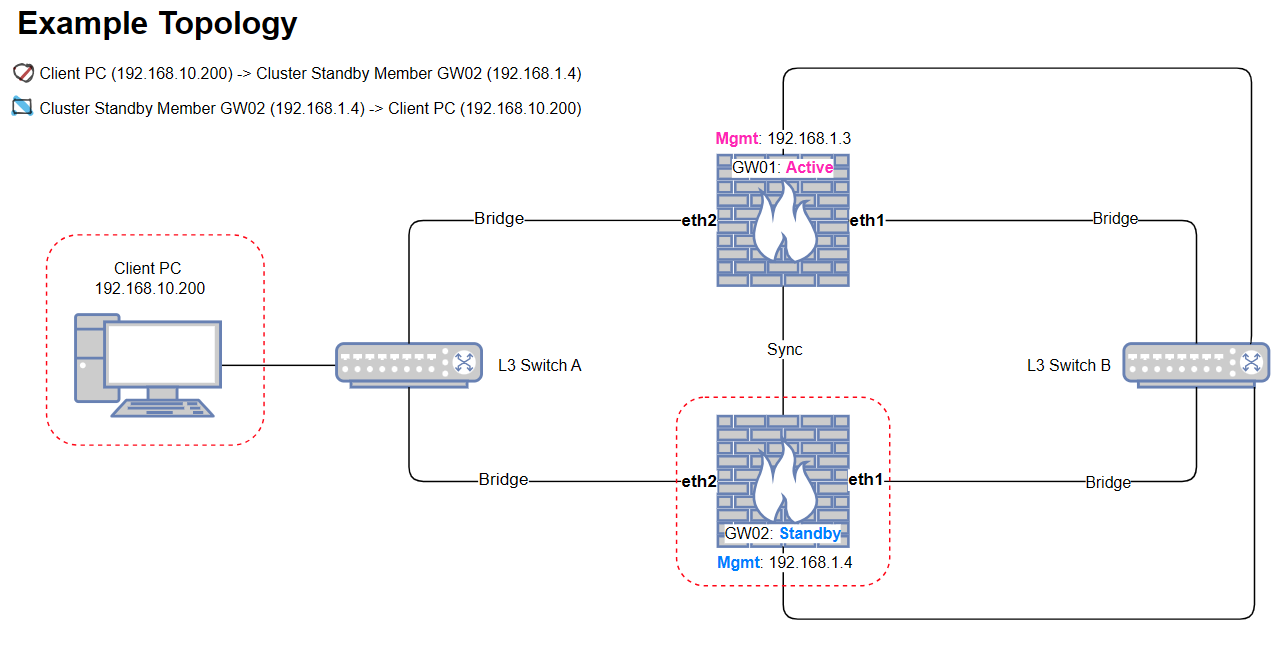
* Packet capture with [cppcap](https://support.checkpoint.com/results/sk/sk141412) on the Active member shows that packets sent from a client PC (in the example, 192.168.10.200) to the Standby member's Mgmt interface (in the
example, 192.168.1.4) arrive on one of the bridge slave interfaces (eth2) but are not forwarded through the other bridged slave interface (eth1).
Example packet capture command and output:
`[Expert@HostName:0]# cppcap -f "host 192.168.10.200"`
`23:43:17.542796 In [eth2] 192.168.10.200 > 192.168.1.4 IPP 1`
* Running "`fw ctl zdebug + drop`" on the Active member shows these drop messages for traffic from the Standby member:
`dropped by fw_cluster_ttl_anti_spoofing Reason: ttl check drop;`
`dropped by fw_handle_first_packet Reason: fwconn_key_init_links (INBOUND) failed;`
* Gaia Portal, SSH cannot be accessed, ICMP request to the Standby member management interface is dropped with reason message "*fw_cluster_ttl_anti_spoofing Reason: ttl check drop* " while The Management port of the Active member is accessible.
Configuring the kernel parameters as per [sk105899](https://support.checkpoint.com/results/sk/sk105899) does not resolve the issue.
## Cause
The current ClusterXL design does not support this traffic flow. Here is the brief diagram of the traffic flow that also applies for traffic initiates from the Standby member:

## Solution
This problem was fixed. The fix is included in:
* [Jumbo Hotfix Accumulator for R82](https://sc1.checkpoint.com/documents/Jumbo_HFA/R82/Default.htm) starting from Take 36
* [Jumbo Hotfix Accumulator for R81.20](https://sc1.checkpoint.com/documents/Jumbo_HFA/R81.20/Default.htm) starting from Take 111
* [Jumbo Hotfix Accumulator for R81.10](https://sc1.checkpoint.com/documents/Jumbo_HFA/R81.10/Default.htm) starting from Take 177
If you choose not to upgrade, Check Point can supply a **Hotfix** . [Contact Check Point Support](https://www.checkpoint.com/support-services/contact-support/) to get a Hotfix for this issue.
A Support Engineer will make sure the Hotfix is compatible with your environment before providing the Hotfix.
For faster resolution and verification, please collect [CPinfo files](http://supportcontent.checkpoint.com/solutions?id=sk92739) from the Security Management Server and Security Gateways involved in the case.
**Hotfix configuration instructions:**
Refer to [sk168597 - How to install a Hotfix](https://supportcenter.checkpoint.com/supportcenter/portal?eventSubmit_doGoviewsolutiondetails=&solutionid=sk168597).
**Note:** If the Cluster Virtual IP is enabled on the Management interface and the specific traffic (for example, updating IPS, Anti-Bot, or Anti-Virus signatures) initiated by the Security Gateway needs to go through the bridge interface, to make it work, follow [sk43807: Anti-Virus / URL Filtering / IPS update fails on the Standby member of ClusterXL in High Availability mode](https://support.checkpoint.com/results/sk/sk43807) or [sk34180: Outgoing connections from cluster members are sent with cluster Virtual IP address instead of member's Physical IP address](https://support.checkpoint.com/results/sk/sk34180) to make the cluster member uses it's physical IP address for initiating the traffic.
**Step 1: Apply the required kernel parameters on each Cluster Member.**
1. Connect to the command line on the Security Gateway / each Cluster Member.
2. Log in to the Expert mode.
3. Back up the current *fwkern.conf* and *simkern.conf* files.
`[Expert@HostName:0]# cp -v $FWDIR/boot/modules/fwkern.conf{,_ORIGINAL}`
`[Expert@HostName:0]# cp -v $PPKDIR/conf/simkern.conf{,_ORIGINAL}`
4. Add these kernel parameters to the *fwkern.conf* file.
**Note:** Spaces and comments are not allowed.
`[Expert@HostName:0]# vi $FWDIR/boot/modules/fwkern.conf`
`fwha_silent_standby_mode=1`
`fw_local_interface_anti_spoofing=0`
`fw_antispoofing_enabled=0`
`fwx_bridge_use_routing=2`
`fwx_bridge_reroute_enabled=1`
5. Add this kernel parameter (spaces and comments are not allowed) to the *simkern.conf* file.
**Note:** Spaces and comments are not allowed.
`[Expert@HostName:0]# vi $PPKDIR/conf/simkern.conf`
`sim_anti_spoofing_enabled=0`
6. Reboot the Security Gateway / Cluster Member.
**Step 2: Disable Extended Cluster Anti-Spoofing.**
1. Open SmartConsole.
2. Navigate to Cluster **Object Properties** \> **Network Management** \> **Advanced**.
3. Uncheck the option `Enabled Extended Cluster Anti-Spoofing`.

4. Install the Access Control policy.
5. Test traffic to confirm the resolution.
---
# Agent Instructions
This content is from the Check Point Support Center (https://support.checkpoint.com), the official knowledge base for Check Point cybersecurity products.
## Navigating This Knowledge Base
- **Complete index**: [llms.txt](https://support.checkpoint.com/llms.txt)
- **All SK articles**: [SecureKnowledge Sitemap](https://support.checkpoint.com/sitemaps/secureknowledge-sitemap-index.xml)
- **SK article URL pattern**: `https://support.checkpoint.com/results/sk/{skId}`
- **Markdown responses**: AI bot User-Agents automatically receive `text/markdown` content