> Source: [sk181209](https://support.checkpoint.com/results/sk/sk181209)
# sk181209 - SmartView reports show "No data found" in some widgets
| Property | Value |
|----------|-------|
| Solution ID | sk181209 |
| Date Created | 2023-07-05 |
| Last Modified | 2026-06-16 |
| Technical Level | General |
| Products | Security Management Server |
| Versions | R81.20, R81.10 (EOS), R81 (EOS) |
| OS | Gaia |
## Symptoms
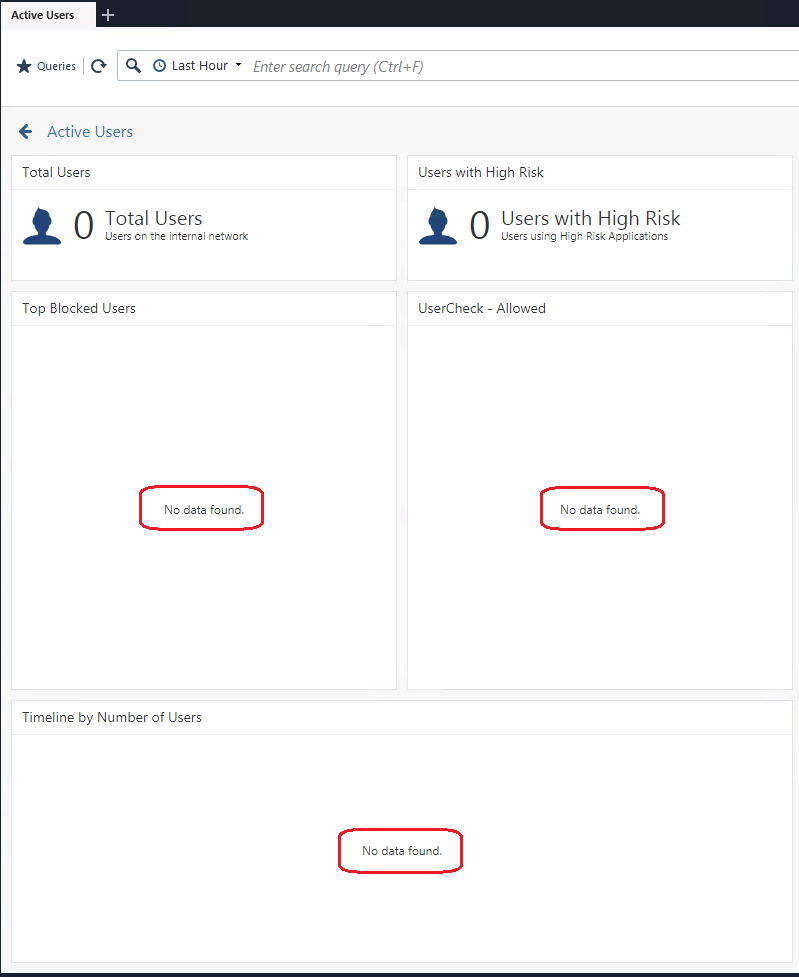
- SmartView reports show the message "`No data found`" in some widgets.
Example:
## Cause
Log Indexer fails to extract the data because of long lines in the `$INDEXERDIR/data/FetchedFiles` file.
## Solution
This problem was fixed. The fix is included starting from:
* [Check Point Quantum R82](https://support.checkpoint.com/results/sk/sk181127)
* [Jumbo Hotfix Accumulator for R81.20](https://sc1.checkpoint.com/documents/Jumbo_HFA/R81.20/Default.htm) starting from Take 101
* [Jumbo Hotfix Accumulator for R81.10](https://sc1.checkpoint.com/documents/Jumbo_HFA/R81.10/Default.htm) starting from Take 177
Check Point recommends to always upgrade to the most recent version.
If you choose not to upgrade:
1. Close all SmartConsole windows that are connected to the SmartEvent Server / Management Server that stores the traffic log files.
2. [Download this script](https://support.checkpoint.com/results/download/128498) to your computer.
3. Copy this script from your computer to the SmartEvent Server / Management Server that stores the traffic log files (to some directory, for example, `/var/log/`).
4. Connect to the command line on the SmartEvent Server / Management Server that stores the traffic log files.
5. Log in to the Expert mode.
6. Back up the current *FetchedFiles* file:
`cp -v $INDEXERDIR/data/FetchedFiles{,_BKP}`
7. Go to the directory, where you uploaded the script:
`cd //`
8. Assign the relevant permissions to the script:
`chmod -v 777 clearFetchedFiles.py`
9. Run the script:
* On a SmartEvent Server / Security Management Server:
`python3 clearFetchedFiles.py`
* On a Multi-Domain Security Management Server:
`python3 clearFetchedFiles.py ... `
**Note!**
* If you do not specify any Domain, then the script automatically runs for all Domain and for the Global Indexer.
* Make sure you run the script from the MDS level and not from the domain level, run: mdsenv
and only then go to the directory with the script to execute it.
10. The script output will show by how much it decreased the size of the `$INDEXERDIR/data/FetchedFiles` file.
* If the file size did **not** decrease, then either the long line entries in the file are less than 30 days old, or there are no long line entries.
* If the long line entries in the file are less than 30 days old, then you can modify the age threshold in the script:
1. Edit the script:
`vi clearFetchedFiles.py`
2. In Line 10, in the variable "`timedelta(30)`", change the value from 30 to a smaller integer number.
3. Save the changes in the file and exit Vi editor.
4. Run the script again:
* On a SmartEvent Server / Security Management Server:
`python3 clearFetchedFiles.py`
* On a Multi-Domain Security Management Server:
`python3 clearFetchedFiles.py ... `
---
# Agent Instructions
This content is from the Check Point Support Center (https://support.checkpoint.com), the official knowledge base for Check Point cybersecurity products.
## Navigating This Knowledge Base
- **Complete index**: [llms.txt](https://support.checkpoint.com/llms.txt)
- **All SK articles**: [SecureKnowledge Sitemap](https://support.checkpoint.com/sitemaps/secureknowledge-sitemap-index.xml)
- **SK article URL pattern**: `https://support.checkpoint.com/results/sk/{skId}`
- **Markdown responses**: AI bot User-Agents automatically receive `text/markdown` content