> Source: [sk180651](https://support.checkpoint.com/results/sk/sk180651)
# sk180651 - How to use Spark Management API in Check Point Portal
| Property | Value |
|----------|-------|
| Solution ID | sk180651 |
| Date Created | 2023-02-22 |
| Last Modified | 2025-03-18 |
| Technical Level | General |
| Products | Spark Management |
| Versions | Cloud |
| Platform | 1570R, 1500, 1600, 1800 |
## Solution
Introduction
------------
Traditionally, on-premises Management Servers (Security Management Servers or Multi-Domain Servers) manage Quantum Spark Gateways. It is now possible to use cloud-based Smart-1 Cloud Management Servers to manage these gateways. This service is part of the Infinity Portal.
To use Infinity Portal, you must establish a trusted relationship with the Quantum Spark appliance using API keys. The instructions below outline the necessary steps.
Quantum Spark Management API Overview
-------------------------------------
Quantum Spark Management is available through Infinity Portal, Check Point's centralized platform for security services.
All Spark Management APIs, except user-related APIs, are supported and available within Infinity Portal.
**Important**: Before making any API calls, you must authenticate.
### Authentication Instructions
**Create Client ID and Secret Key (One-Time Operation):**
1. In Infinity Portal, log in to **Tenant**.
2. In the lower left corner, click **Global Settings** \> **API Keys**.
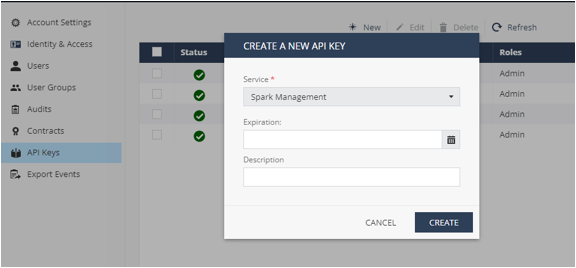
3. Create a new API key for the **Spark Management** service**.**
4. Save the Client ID and Secret Key securely for future API access.
**Generate an Authentication Token**
For each API request, you must authenticate using a token. This token is generated by sending a request with your Client ID and Access Key.
* The response will contain a token. The token is valid for 15 minutes and is required for API operations in Quantum Spark Management.
* The Infinity Portal Server Base URL depends on the tenant's data residency.
**Check the Data Residency for a Tenant**
1. Go to **Global Settings** \> **Account Settings**.
2. Identify the correct Infinity Portal Base URL from the list below:
|--------------------|------------------------------------------------------------------------------------------------------------|
| **Data Residency** | **Infinity Portal Base URL** |
| USA | [https://cloudinfra-gw-us.portal.checkpoint.com](https://cloudinfra-gw-us.portal.checkpoint.com /app/smp/) |
| Ireland (EU) | [https://cloudinfra-gw.portal.checkpoint.com](https://cloudinfra-gw.portal.checkpoint.com/app/smp/) |
| India | [https://cloudinfra-gw.in.portal.checkpoint.com](https://cloudinfra-gw.in.portal.checkpoint.com/app/smp/) |
**API Request to Generate Authentication Token**
Send an HTTP request to:
`/auth/external`
Click [here](https://app.swaggerhub.com/apis-docs/Check-Point/infinity-portal-api/1.0.0#/User%20Control/post_auth_external) for documentation about this API.
Click [here](https://app.swaggerhub.com/apis-docs/Check-Point/infinity-portal-api/1.0.0)for documentation about other Infinity Portal APIs.
The response will contain a token. The token is valid for 15 minutes and is required for API operations in Quantum Spark Management.
**Example**:
**Request** :
`curl --location -g --request POST '{{baseUrl}}/auth/external' \`
`--header 'Content-Type: application/json' \`
`--data-raw '{`
` "clientId": "",`
` "accessKey": "',`
` 'csrf' : '3fa85f64-5717-4562-b3fc-2c963f66afa6',`
` 'expires' : 'Tue, 08 Jun 2021 13:55:56 GMT',`
` 'expiresIn' : 300`
` }`
`}`
**Making API Calls**
For API calls to the Quantum Spark Management application in Infinity Portal, note these differences:
* Instead of the `x-chkp-sid` header, place the received authentication token in the header under Authorization key.
* The token must follow the keyword `Bearer`.
Example of an API header:
`Authorization Bearer [ReceivedToken]`
* Session management endpoints `login `and `logout `are deprecated.
* APIs to the Quantum Spark Management are in this format: ``**/app/smp/**`path/to/resource`
For example, a request and response for the `createGateway` API:
**Request**
`curl --location --request POST 'https://{{InfinityPortalServerBaseUrl}}/app/smp/SMC/api/v1/create-gateway' `
`--header 'Content-Type: application/json' `
`--header 'Authorization: Bearer ' `
`--data-raw '{`
` "gateway" : {`
` "name" : "myGateway",`
` "plan" : "Initial-Plan"`
` }`
`}'`
**Response**
`{`
` "errorCode":"NO_ERROR",`
` "message":"SMP REST API create-gateway: Successfully created gateway 'myGateway'"`
`}`
### Related Documentation
* [Spark Management API documentation](https://sc1.checkpoint.com/documents/latest/SmpAPIs/#introduction~v1%20)
* For more information about the Quantum Spark Management application in Infinity Portal refer to: [sk180467](https://supportcenter.checkpoint.com/supportcenter/portal?eventSubmit_doGoviewsolutiondetails=&solutionid=sk180467).
---
# Agent Instructions
This content is from the Check Point Support Center (https://support.checkpoint.com), the official knowledge base for Check Point cybersecurity products.
## Navigating This Knowledge Base
- **Complete index**: [llms.txt](https://support.checkpoint.com/llms.txt)
- **All SK articles**: [SecureKnowledge Sitemap](https://support.checkpoint.com/sitemaps/secureknowledge-sitemap-index.xml)
- **SK article URL pattern**: `https://support.checkpoint.com/results/sk/{skId}`
- **Markdown responses**: AI bot User-Agents automatically receive `text/markdown` content