> Source: [sk180520](https://support.checkpoint.com/results/sk/sk180520)
# sk180520 - Check Point Firewall 19000 and 29000 Appliances
| Property | Value |
|----------|-------|
| Solution ID | sk180520 |
| Date Created | 2023-01-16 |
| Last Modified | 2026-09-09 |
| Technical Level | General |
| Products | Hardware |
| Versions | Not Version-Specific |
| OS | Gaia |
| Platform | 19000, 29000 |
## Solution
**Introduction \| Key Features \| Notes \| Downloads \| Installation Instructions \| Known Limitations \| Documentation \| Revision History**
Visit [Check Point CheckMates Community](https://community.checkpoint.com/) to ask questions or start a discussion and get our experts assistance.
Introduction to Check Point Check Point Firewall 19000 and 29000 Appliances {#Introduction}
-------------------------------------------------------------------------------------------
|------------------------------------|-----------------|
| Security Appliance | In this article |
| 19100 Base/Plus Security Appliance | 19100 |
| 19200 Base/Plus Security Appliance | 19200 |
| 29100 Base/Plus Security Appliance | 29100 |
| 29200 Base/Plus Security Appliance | 29200 |
|------------------------------------------------------------------------------------------------------------|------------------------------------------------------------------------------------------------------------------------|
| 19100 / 19200 | 29100 / 29200 |
| 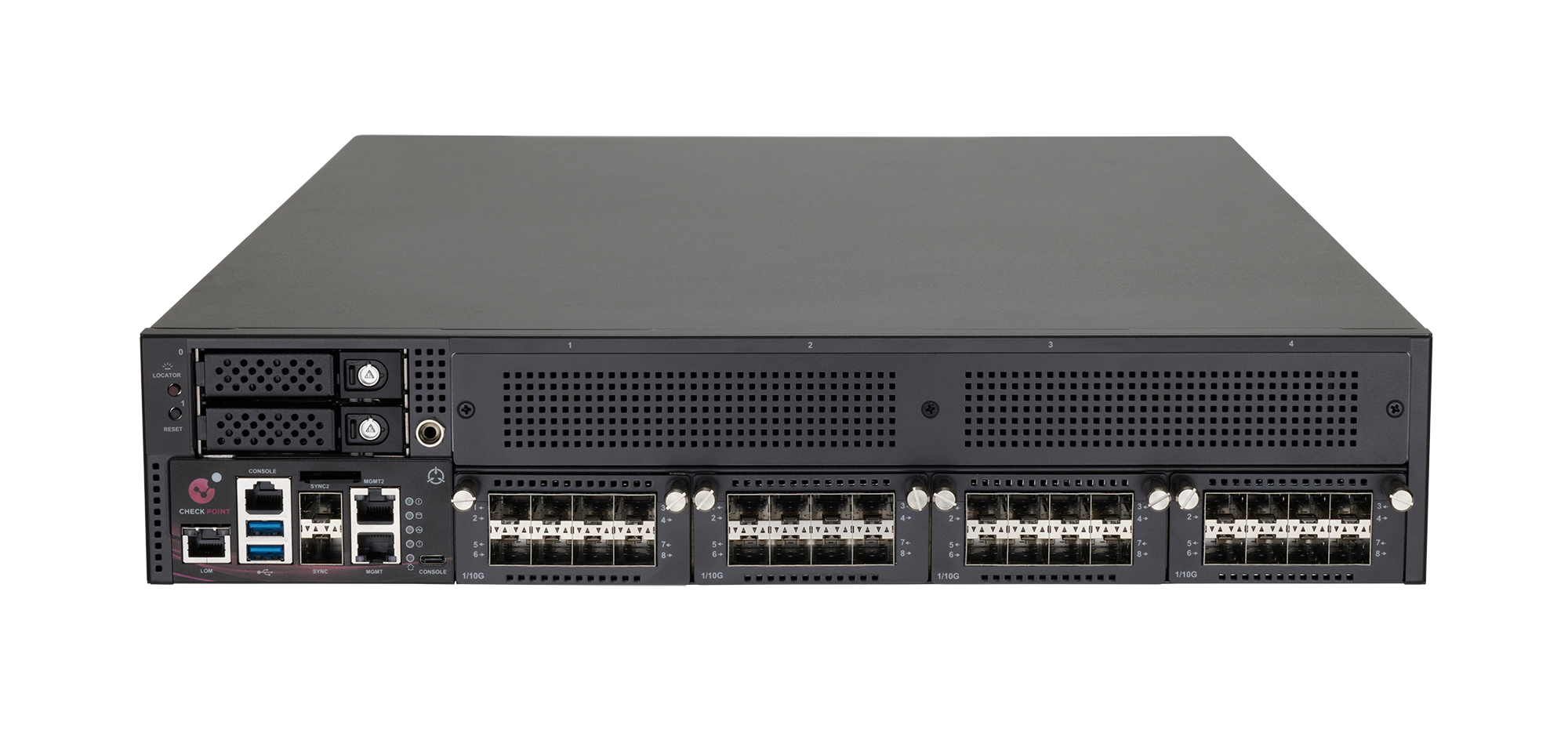 |  |
Check Point Appliances pioneer Gen V Cyber Security equipped with Intel's latest multi-core technologies, increased encrypted traffic inspection performance, and lightning-fast networking technologies - all optimized to provide the highest security effectiveness and performance for mid to large size enterprise security networks.
Check Point Check Point Firewall 19100 / 19200 / 29100 / 29200 appliances provide hyper-fast network security to Data Centers and large enterprises. These appliances enable large enterprises and Data Centers to deploy network security that performs at the speed of business to accelerate large file transfers, provide low latency for high frequency applications, and dynamically scale as their business grows.
Check Point 19100 / 19200 / 29100 / 29200 Next Generation Firewalls combine the most comprehensive protections with Data Center grade security and hardware to maximize uptime and performance for securing large enterprise and Data Center environments. Strengthening Check Point Infinity Architecture, the new 19200 / 29100 / 29200 appliances deliver consolidation and security across any network, cloud, and mobile environment with full threat visibility and control.
All new Check Point Appliances are Maestro-optimized which enables superior performance in the Maestro Hyperscale Orchestrator system.
The Check Point 19100 / 19200 / 29100 / 29200 appliances come with a first-year subscription to the full SandBlast Prevention suite.
Key Features {#Key Features}
----------------------------
* High Gen V Sandblast performance, up to 63.5 Gbps
* Power efficient design
* Firewall performance at a line-rate
* Ultra-low latency
* Modular platforms supporting up to 128 virtual CPU cores
* Redundant storage devices and AC power supplies
* Wide variety of network interfaces, ranging from 1 GbE copper and fiber 1 GbE to 100 GbE interfaces
* Hyperscale-ready enabling enterprise protection with up to 1 terabit/sec of Threat Prevention Performance
Notes {#Notes}
--------------
* By default, Check Point Firewall Appliances 19200, 29100, and 29200 run SecureXL in the User Space (UPPAK) Mode:
* When the appliance runs the R82 Image.
* When the appliance runs the dedicated R81.20 Factory Image.
* When the appliance runs the R81.20 Jumbo Hotfix Take 38 and higher.
* By default, Check Point Firewall Appliance 19100 runs SecureXL in the User Space (UPPAK) Mode:
* When the appliance runs the R82 Image.
* When the appliance runs the dedicated R81.20 Factory Image.
* When the appliance runs the R81.20 Jumbo Hotfix Take 54 and higher.
* For instructions to change the SecureXL mode between UPPAK and KPPAK, see the [LightSpeed 10/25/40/100G QSFP28 Ports Administration Guide](https://sc1.checkpoint.com/documents/Appliances/100G_Ports_AdminGuide/Default.htm) \> Chapter "Configuring SecureXL".
* Starting in R82.10, SecureXL supports only UPPAK mode.
* Check Point Firewall Appliances (19200, 29100, and 29200) do not support R81.20 Jumbo Hotfix Take 26 and lower.
* Check Point Firewall Appliances (19100) do not support R81.20 Jumbo Hotfix Take 53 and lower.
* To manage Check Point Firewall appliances that run an R81.20 version with an R81.10 Management Server, you must install the R81.10 Jumbo Hotfix on the R81.10 Management Server. See the **Downloads** \> **Jumbo Hotfix Support** section for details.
* To manage Check Point Firewall appliances that run an R81.20 version with an R81 Management Server, you must install the R81 Jumbo Hotfix on the R81 Management Server. See the **Downloads** **\> Jumbo Hotfix Support** section for details.
Downloads {#Downloads}
----------------------
To download these packages, you will need to have a [Software Subscription or Active Support plan](https://www.checkpoint.com/support-services/support-plans/).
* **Image for Check Point Firewall Appliances (19100, 19200, 29100, and 29200 operating as Security Gateways):**
|-----------------------------------------------------|--------------------------------------------------------------------------------------------------------------------------|
| **Image** | **Link** |
| R82.20 | See [sk185039](https://support.checkpoint.com/results/sk/sk185039) |
| R82.10 | See [sk183506](https://support.checkpoint.com/results/sk/sk183506) |
| R82 | See [sk181127](https://support.checkpoint.com/results/sk/sk181127) |
| R81.20 Take 722 for Check Point Firewall Appliances | [](https://support.checkpoint.com/results/download/133248) (ISO) |
**Important Notes:**
* Effective 03 June 2024, the dedicated R81.20 image was replaced from Take 719 to Take 722 to protect against CVE-2024-24919 (see [sk182336](https://support.checkpoint.com/results/sk/sk182336)).
* To install this ISO image, you must use the ISOmorphic build 207 or higher (see [sk65205](https://support.checkpoint.com/results/sk/sk65205)).
* **Image for Check Point Firewall Appliances (19100, 19200, 29100, and 29200 operating in a Maestro configuration):**
|----------------------------------------------------------------|--------------------------------------------------------------------------------------------------------------------------|
| **Image** | **Link** |
| R82.20 | See [sk185039](https://support.checkpoint.com/results/sk/sk185039) |
| R82.10 | See [sk183506](https://support.checkpoint.com/results/sk/sk183506) |
| R82 | See [sk181127](https://support.checkpoint.com/results/sk/sk181127) |
| R81.20 Take 722 for Check Point Firewall Appliances in Maestro | [](https://support.checkpoint.com/results/download/133249) (ISO) |
**Important Notes:**
* Effective 03 June 2024, the dedicated R81.20 image was replaced from Take 719 to Take 722 to protect against CVE-2024-24919 (see [sk182336](https://support.checkpoint.com/results/sk/sk182336)).
* To install this ISO image, you must use the ISOmorphic build 207 or higher (see [sk65205](https://support.checkpoint.com/results/sk/sk65205)).
* **Jumbo Hotfix Support for Check Point Firewall Appliances (19100, 19200, 29100, and 29200):**
|------------------------------------------------------------------------------------------------------------------------------------------------------------------------------------------------------------------------------------------------------------------------------------------------------------------------------|----------------------------------------------------------------------------------------------------------------------------------------------------------------------------------------------------------|
| **Package** | **Link** |
| R81.20 Jumbo Hotfix Take **65** or higher for: 1. Check Point Firewall Appliances 19100, 19200, 29100, 29200 ^(1)^ 2. Check Point Firewall Appliances 19100, 19200, 29100, 29200 in Maestro ^(2)^ 3. R81.20 Management Server to manage **ALL** 19000 and 29000 Check Point Firewall Appliances (19100, 19200, 29100, 29200) | See [R81.20 Jumbo Hotfix Accumulator](https://sc1.checkpoint.com/documents/Jumbo_HFA/R81.20/Default.htm) |
| R81.10 Jumbo Hotfix Take **131** or higher for: * R81.10 Management Server to manage Check Point Firewall Appliances 19000 and 29000 that run R81.20 (Requires R81.10 SmartConsole Build 420 or higher) | See [R81.10 Jumbo Hotfix Accumulator](https://sc1.checkpoint.com/documents/Jumbo_HFA/R81.10/Default.htm) and [R81.10 SmartConsole](https://sc1.checkpoint.com/documents/Jumbo_HFA/R81.10_SC/Default.htm) |
| R81 Jumbo Hotfix Take **99** or higher for: * R81 Management Server to manage Check Point Firewall Appliances 19000 and 29000 that run R81.20 (Requires R81 SmartConsole Build 568 or higher) | See [R81 Jumbo Hotfix Accumulator](https://sc1.checkpoint.com/documents/Jumbo_HFA/R81/Default.htm) and [R81 SmartConsole](https://sc1.checkpoint.com/documents/Jumbo_HFA/R81_SC/Default.htm) |
Notes:
1. 19100, 19200, 29100, and 29200 Check Point Firewall appliances can run directly with the dedicated R81.20 ISO. To get the latest fixes and enhancements, install the R81.20 Jumbo Hotfix - the listed Take or higher.
2. 19100, 19200, 29100, and 29200 Check Point Firewall appliances in Maestro can run directly with the dedicated R81.20 ISO. To get the latest fixes and enhancements, install the R81.20 Jumbo Hotfix - the listed Take or higher.
3. Effective 03 June 2024, the minimum supported R81.20 Jumbo Hotfix Take was changed from Take 38 and Take 54 to Take 65 to protect against CVE-2024-24919 (see [sk182336](https://support.checkpoint.com/results/sk/sk182336)).
4. To support SecureXL in the UPPAK mode (see [sk179432](https://support.checkpoint.com/results/sk/sk179432) ) on 19000 and 29000 models:
* In the Maestro configuration, you must install the R81.20 Jumbo Hotfix Accumulator, Take 89 and higher.
* In the Security Gateway configuration, you must install the R81.20 Jumbo Hotfix Accumulator, Take 65 and higher.
* **USB Type-C Console Driver:**
To connect to the command line interface, you can use a USB Type-C console port.
To use it, download and install the [USB Type-C console driver for 19000 and 29000 Appliances](https://support.checkpoint.com/results/download/91464) on the console client computer.
Known Limitations {#Known_Limitations}
--------------------------------------
|------------------------------------------------|----------------------------------------------------------------------------------------------------------------------------------------------------------------------------------------------------------------------------------------------------------------------------------------------------------------------------------------------------------------------------------------------------------------------------------------------------------------------------------------------------------------------------------------------------------------------|
| **ID** | **Description** |
| GWAPP-1149, GWAPP-1150, GWAPP-1162, ACCHA-3165 | Link may not come up automatically in the 2-Port 40G/100G NIC, 4-Port 10G/25G NIC, and 10G/25G Sync port. See [sk181487](https://support.checkpoint.com/results/sk/sk181487). |
| - | If you change the configuration of one 100G Card port (link up/down, MTU, and so on), it causes the link to go down and then up on the other 100G Card port. Therefore, schedule a maintenance window to make the required changes in the configuration of the 100G Ports. |
| - | Strict guidelines exist for NIC slot population in 29000 Appliances. See [sk181465](https://support.checkpoint.com/results/sk/sk181465). |
| - | In the Maestro configuration, SecureXL in User Space (UPPAK) mode is supported starting: * [R82.10](https://support.checkpoint.com/results/sk/sk183506) * [Jumbo Hotfix Accumulator for R81.20](https://sc1.checkpoint.com/documents/Jumbo_HFA/R81.20/Default.htm) starting from Take 96 (see [sk183821](https://support.checkpoint.com/results/sk/sk183821)) * [Jumbo Hotfix Accumulator for R81.10](https://sc1.checkpoint.com/documents/Jumbo_HFA/R81.10/Default.htm) starting from Take 173 (see [sk183821](https://support.checkpoint.com/results/sk/sk183821)) |
| PMTR-104982 | UPPAK mode is not supported with SD-WAN. Note - SecureXL KPPAK mode is supported. Resolved in the? [R81.20 Jumbo Hotfix Accumulator, Take 96?](https://sc1.checkpoint.com/documents/Jumbo_HFA/R81.20/Default.htm). |
For limitations that are related to hardware acceleration, see [LightSpeed 10/25/40/100G QSFP28 Ports Administration Guide](https://sc1.checkpoint.com/documents/Appliances/100G_Ports_AdminGuide/Default.htm).
Documentation {#Documentation}
------------------------------
|----------------------------------------------------------------------------------------------------------------------------------------------------------------------------------------------------------------------|
| **19100, 19200, 29100, and 29200 Appliances** |
| [Check Point 19000 and 29000 Appliances Getting Started Guide (English)](https://sc1.checkpoint.com/documents/Appliances/GSG_19000_29000/EN/Default.htm) |
| [Check Point 19000 and 29000 Appliances Getting Started Guide (Spanish)](https://sc1.checkpoint.com/documents/Appliances/GSG_19000_29000/ES/Default.htm) |
| [Check Point 19000 and 29000 Appliances Getting Started Guide (Russian)](https://sc1.checkpoint.com/documents/Appliances/GSG_19000_29000/RU/Default.htm) |
| [Check Point 19000 and 29000 Appliances Getting Started Guide (Chinese - Traditional)](https://sc1.checkpoint.com/documents/Appliances/GSG_19000_29000/zh-TW/Default.htm) |
| [Check Point 19000 and 29000 Appliances Getting Started Guide (Chinese - Simplified)](https://sc1.checkpoint.com/documents/Appliances/GSG_19000_29000/zh-CN/Default.htm) |
| [Check Point 19000 and 29000 Appliances Quick Start Guide](https://sc1.checkpoint.com/documents/Appliances/PDF/CP_19000_29000_QSG_21.2.24.pdf) |
| [Check Point Appliances Rack Mounting Guide](https://sc1.checkpoint.com/documents/Appliances/Rails/Default.htm) |
| [Check Point Appliances Installing and Removing Storage Devices](https://sc1.checkpoint.com/documents/Appliances/FRU_Storage_Devices/Default.htm) |
| [Check Point Appliances Installing and Removing Fans](https://sc1.checkpoint.com/documents/Appliances/FRU_Fans/Default.htm) |
| [Check Point Appliances Installing and Removing AC Power Supply Units](https://sc1.checkpoint.com/documents/Appliances/FRU_AC_PSU/Default.htm) |
| [Check Point Appliances Installing and Removing DC Power Supply Units](https://sc1.checkpoint.com/documents/Appliances/FRU_DC_PSU/Default.htm) |
| [Check Point Appliances Installing and Removing Memory](https://sc1.checkpoint.com/documents/Appliances/FRU_Memory/Default.htm) |
| [Check Point Appliances Installing and Removing LOM Cards](https://sc1.checkpoint.com/documents/Appliances/FRU_LOM_Cards/Default.htm) |
| [Check Point Appliances Installing and Removing Expansion Line Cards](https://sc1.checkpoint.com/documents/Appliances/FRU_Line_Cards/Default.htm) |
| [Check Point Appliances Installing and Removing Transceivers and DAC Cables](https://sc1.checkpoint.com/documents/Appliances/FRU_Transceivers/Default.htm) |
| [LightSpeed 10/25/40/100G QSFP28 Ports Administration Guide](https://sc1.checkpoint.com/documents/Appliances/100G_Ports_AdminGuide/Default.htm) |
| [Lights Out Management (LOM) HTML5-based Card Administration Guide](https://sc1.checkpoint.com/documents/Appliances/LOM_HTML5_Card_AdminGuide/Default.htm) |
| [R81.20 Gaia Administration Guide](https://sc1.checkpoint.com/documents/R81.20/WebAdminGuides/EN/CP_R81.20_Gaia_AdminGuide/Default.htm) |
| [R81.20 Performance Tuning Administration Guide](https://sc1.checkpoint.com/documents/R81.20/WebAdminGuides/EN/CP_R81.20_PerformanceTuning_AdminGuide/Default.htm) |
| [sk179432 - Software Releases for LightSpeed Appliances QLS250 / QLS450 / QLS650 / QLS800 / MLS200 / MLS400 and Check Point Firewall Appliances 19000 and 29000](https://support.checkpoint.com/results/sk/sk179432) |
{#limitationTable}
Revision History {#Revision History}
------------------------------------
Show / Hide this section
|------------------|-----------------------------------------------------------------------------------------------------------------------------------------------------------------------------------------------------------------------------------------------------------------------------------------------------------------------------------------------------------------------------|
| Date | Description |
| 09 Sep 2026 | Updated the Downloads section with links to the R82.20 Home Page to download the R82.20 ISO |
| 29 Dec 2025 | Updated the Downloads section with links to the R82.10 Home Page to download the R82.10 ISO |
| 16 Feb 2025 | Limitation "SecureXL UPPAK mode is not supported with SD-WAN." was resolved in the? R81.20 Jumbo Hotfix Accumulator, Take 96?. |
| 02 Dec 2024 | Updated the Documentation section with a link to Installing and Removing DC Power Supply Units |
| 21 Oct 2024 | Updated the Downloads section with links to the R82 Home Page to download the R82 ISO |
| 09 Oct 2024 | Added the note about the support for SecureXL in the UPPAK mode |
| 09 June 2024 | Updated the Notes and Downloads sections: * Added R81 Jumbo Hotfix take details for an R81 Management Server to manage Check Point Firewall Appliances 19000 and 29000 that run R81.20 |
| 03 June 2024 | Updated the Downloads section: * The R81.20 images were replaced to protect against CVE-2024-24919 (see [sk182336](https://support.checkpoint.com/results/sk/sk182336)) * The minimum supported R81.20 Jumbo Hotfix was changed from Take 38 and Take 54 to Take 65 to protect against CVE-2024-24919 (see [sk182336](https://support.checkpoint.com/results/sk/sk182336)). |
| 16 April 2024 | Updated the Notes and Downloads sections |
| 15 April 2024 | Updated the Downloads section |
| 08 April 2024 | Updated the Notes section Updated the support for 19100 in the R81.20 Jumbo Hotfix Take 54 |
| 11 March 2024 | Updated the Known Limitations section |
| 29 February 2024 | Updated the Known Limitations section |
| 21 February 2024 | Updated with 19100 appliance information |
| 24 January 2024 | Added link to Check Point Firewall 19000 and 29000 Getting Started Guide Chinese - Simplified |
| 15 January 2024 | Added a note that installation of the R81.10 Jumbo Hotfix on an R81.10 Management Server is required to manage Check Point Firewall appliances |
| 04 January 2024 | Added Check Point Firewall19000 and 29000 Getting Started Guide links (Spanish, Russian, Chinese - Traditional) |
| 23 November 2023 | Added the Maestro ISO |
| 29 October 2023 | Added link to sk179432 and improved formatting |
| 24 October 2023 | Added the ISOmorphic build 207 |
| 23 October 2023 | First release of this article |
---
# Agent Instructions
This content is from the Check Point Support Center (https://support.checkpoint.com), the official knowledge base for Check Point cybersecurity products.
## Navigating This Knowledge Base
- **Complete index**: [llms.txt](https://support.checkpoint.com/llms.txt)
- **All SK articles**: [SecureKnowledge Sitemap](https://support.checkpoint.com/sitemaps/secureknowledge-sitemap-index.xml)
- **SK article URL pattern**: `https://support.checkpoint.com/results/sk/{skId}`
- **Markdown responses**: AI bot User-Agents automatically receive `text/markdown` content