> Source: [sk179464](https://support.checkpoint.com/results/sk/sk179464)
# sk179464 - Cloud Firewall for AWS - Cloud WAN Overview and Integration
| Property | Value |
|----------|-------|
| Solution ID | sk179464 |
| Date Created | 2022-06-09 |
| Last Modified | 2026-03-29 |
| Technical Level | General |
| Products | Cloud Firewall |
| Versions | R81.20, R82 |
| OS | Gaia |
| Platform | AWS |
## Solution
### AWS Cloud WAN and Cloud Firewall Integration Overview
AWS Cloud WAN is a managed wide-area network (WAN) service that simplifies the connection and routing of data centers, remote offices, and cloud applications over the AWS global network. It allows customers to build and manage their WAN using centralized network policies, eliminating the complexity of integrating multiple networking, security, and third-party services.
A key feature of Cloud WAN is Service Insertion, which enhances network security by allowing seamless integration of AWS and third-party services - such as Check Point Cloud Firewall (formerly known as CloudGuard Network) - into the network. This integration is managed centrally via policy documents, making it easy to steer traffic between VPCs or between VPCs and on-premises environments. Policies can be configured with simple statements or through an intuitive UI, enabling rapid deployment and management.
Cloud WAN also provides a centralized control plane for directing traffic across the AWS global infrastructure, supporting geographically distributed use cases with high performance, scalability, and security - all within minutes.
Check Point Cloud Firewall integrates with AWS Cloud WAN via the Service Insertion feature and leverages the existing Gateway Load Balancer (GWLB) integration. This combined solution simplifies and strengthens network security enforcement across AWS environments, particularly in multi-region deployments.
### Cloud WAN Feature Details
Cloud WAN is a good selection for customers who want to operate in multiple regions, provide connectivity between sites through AWS's backbone, or prefer AWS-managed routing and automation.
The policy language in Cloud WAN makes it simple to manage security policies between connectivity methods across regions in one declarative document.
Cloud WAN operates primarily on layer 3 (routing) security. Cloud WAN uses policy to send selective traffic through a certain attachment where a firewall is (VPC or TGW Connect) or use attachment-level tags to determine which segment an attachment must map to - new or existing. For Check Point customers, integration with Cloud WAN offers a simpler L3 insertion of firewalls through the Security Insertion feature.
* **AWS Network Manager** - The user interface in the AWS Management Console and related APIs to manage your global network centrally.
* **Global Network** - A private network that acts as the root-level container for your network objects. A global network can contain both Transit Gateways and a Core Network.
* **Cloud WAN Core Network** - The core network acts as a routing and connectivity backbone for your global network and is managed by AWS. The core network spans one or more AWS regions.
* **Core Network Edge (CNE)** - The Core network edge (CNE) acts as a regional connection point for Cloud WAN. The CNEs can have single or multiple network segments that act as isolated routing domains and support network isolation as well as multi-tenancy.
* **Core Network Attachments** - Attachments are how VPCs, VPNs, and SD-WAN (Connect) appliances connect to a core network.
* **Network Function Group** - A network function group refers to network or security functions such as NAT, firewalls, IDS, IPS, DLP that are deployed as part of the global Cloud WAN network. These functions are delivered using third-party network and security
appliances deployed in VPCs or on-premises networks. They can also be delivered via native AWS services such as ANFW or GWLB. Network Function Group consist of Core network attachments that connect to the VPCs or on-prem networks hosting the network or security infrastructure delivering these network functions.
* **Core Network Segments** - Segments are isolated layer 3 boundaries that attachments associate with for routing purposes. Service insertion feature allows you to insert network functions for traffic traversing across segments or within the same segment.
* **Cloud WAN Policy**- The Cloud WAN policy document is a JSON document that allows you to specify your Network function groups and the desired service insertion behavior for traffic in your core network.
You can find the latest ***Cloud WAN documentation*** **[HERE](https://docs.aws.amazon.com/vpc/latest/cloudwan/what-is-cloudwan.html)**
### Prerequisites
* **In-depth knowledge of AWS Cloud WAN** design, installation, and configuration
* **In-depth knowledge of Cloud Firewall's integration with AWS Gateway Load Balancer (GWLB)**
* [Cloud Firewall for AWS Gateway Load Balancer Security VPC for Transit Gateway Deployment Guide](https://sc1.checkpoint.com/documents/IaaS/WebAdminGuides/EN/CP_CloudGuard_Network_for_AWS_Gateway_Load_Balancer_ASG/Default.htm "CloudGuard Network for AWS Gateway Load Balancer Security VPC for Transit Gateway Deployment Guide")
* [AWS Supported Regions and Pricing](https://aws.amazon.com/cloud-wan/pricing/)
* **Check Point Security Management Server** or **Smart-1 Cloud** (R81.20 or higher)
* **Supported Versions:** [R81.20](https://support.checkpoint.com/results/sk/sk173903)
* **Licensing:** BYOL and PAYG
* Supported BYOL SKUs:
* CPSG-VSEC-VEN-BUN-NGTP
* CPSG-VSEC-VEN-BUN-NGTX
* **Supported traffic flows:**
* East/West
* Egress
* Ingress
### Deployment Steps
1. **Deploy Cloud Firewall for AWS GWLB CFT** in the desired regions in their own VPC (**NOTE:** Cloud Firewall is *not* required to be deployed in every Cloud WAN region).
2. **Create AWS Global Network**

3. **Create the Cloud WAN Core Network**


4. **Create relevant workload VPCs** or note which existing VPCs will participate in the Cloud WAN architecture.
5. Once the Core Network is in the **AVAILABLE** state

6. **Create Attachments**
* An attachment needs to be created for every VPC in every region (workload and Network Function Group)
* Use tags that will reflect the Segments you create in the next step
* Example: Key and Value for the Production Segment could be simply **Prod**
* If the attachment is for a Network Function Group containing the Cloud Firewall GWLB VPC make sure to select **Appliance mode support**


7. **Create Segments**
To enforce security inspection from all sources, make sure to select the **Isolated Attachments**checkbox:

8. **Create NFG(s)**

9. **Add Service Insertion Segment Actions**

10. **Associate the attachments to Segments/NFG(s) using Attachment policies**

11. **Create and execute the AWS Cloud WAN Policy**


### Deployment Templates
|---------------------------------------------------------------------------------------------------------------------------------------------------------------------------------|----------------------------------------------------------------------------------------------------------------------------------------------------------------------------------------------------------------------------------------------------------------------------------------------------------------------------------------------|-------------|---------------------------------------------------------------------------------------------------------------------------------------------------------------------------------------------------------------------------------------------------------------------|
| **Description** | **Notes** | **Version** | **Direct CFT Launch** |
| **Deploys and configures an AWS Cloud WAN Global Network and an AWS Auto Scaling group configured for Gateway Load Balancer in a Centralized Security VPC for Transit Gateway** | **This CFT deploys:** * An AWS Cloud WAN Global Network and Core Network with 3 segments, basic policy and a Security VPC with Gateway Load Balancer * Cloud Firewall Gateway Auto Scaling Group * An optional Security Management Server * AWS Gateway Load Balancer Endpoints and NAT Gateways for each AZ, in a **new** VPC for Cloud WAN | R81.20 R82 | [](https://console.aws.amazon.com/cloudformation/home#/stacks/create/review?templateURL=https://cgi-cfts.s3.amazonaws.com/gwlb/gwlb-wan-global-network-master.yaml) |
| **Deploys and configures an AWS Cloud WAN Global Network and an AWS Auto Scaling group configured for Gateway Load Balancer in a Centralized Security VPC for Transit Gateway** | **This CFT deploys:** * An AWS Cloud WAN Global Network and Core Network with 3 segments, basic policy and a Gateway Load Balancer * Cloud Firewall Gateway Auto Scaling Group * An optional Security Management Server * AWS Gateway Load Balancer Endpoints, and NAT Gateways for each AZ, in an **existing** VPC for Cloud WAN | R81.20 R82 | [](https://console.aws.amazon.com/cloudformation/home#/stacks/create/review?templateURL=https://cgi-cfts.s3.amazonaws.com/gwlb/gwlb-wan-global-network.yaml) |
|---------------------------------------------------------------------------------------------------------------------------------|--------------------------------------------------------------------------------------------------------------------------------------------------------------------------------------------------------------------------------------------------------------------------------------------------------------|-------------|-------------------------------------------------------------------------------------------------------------------------------------------------------------------------------------------------------------------------------------------------------------------|
| **Description** | **Notes** | **Version** | **Direct CFT Launch** |
| **Deploys and configures an AWS Auto Scaling group configured for Gateway Load Balancer and Cloud WAN Core network attachment** | **This CFT deploys:** * AWS Gateway Load Balancer * Cloud Firewall Gateway Auto Scaling Group * An optional Security Management Server * AWS Gateway Load Balancer Endpoints and NAT Gateways for each AZ, in a **new** VPC for Cloud WAN, and attaches the VPC to an existing Cloud WAN Core Network. | R81.20 R82 | [](https://console.aws.amazon.com/cloudformation/home#/stacks/create/review?templateURL=https://cgi-cfts.s3.amazonaws.com/gwlb/gwlb-wan-security-vpc-master.yaml) |
| **Deploys and configures an AWS Auto Scaling group configured for Gateway Load Balancer and Cloud WAN Core network attachment** | **This CFT deploys:** * AWS Gateway Load Balancer * Cloud Firewall Gateway Auto Scaling Group * An optional Security Management Server * AWS Gateway Load Balancer Endpoints and NAT Gateways for each AZ, in an **existing** VPC for Cloud WAN, and attaches the VPC to an existing Cloud WAN Core Network. | R81.20 R82 | [](https://console.aws.amazon.com/cloudformation/home#/stacks/create/review?templateURL=https://cgi-cfts.s3.amazonaws.com/gwlb/gwlb-wan-security-vpc.yaml) |
### Reference Architecture
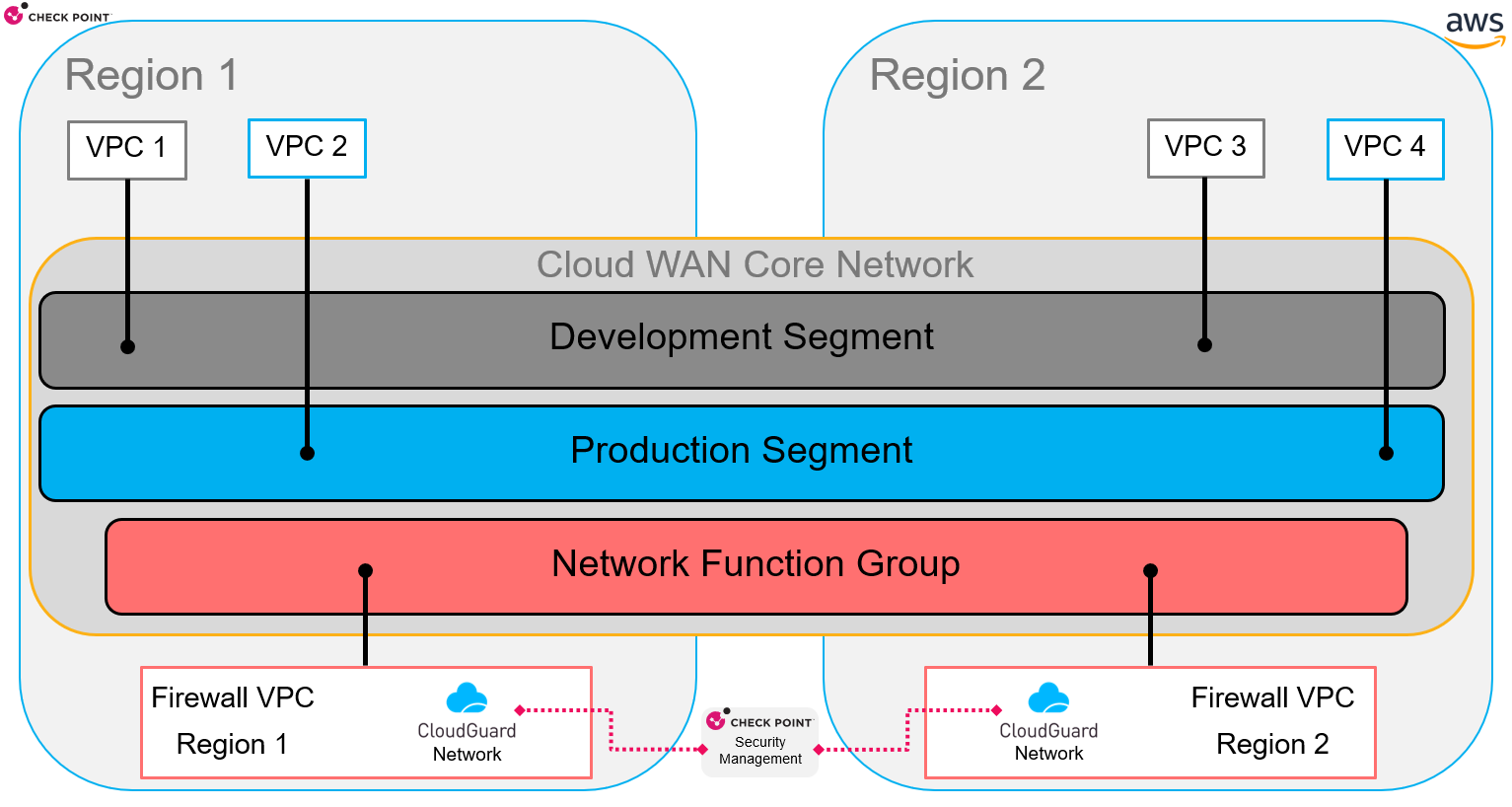
* Use one security VPC for each region to prevent cross-region charges.
* The region's CGNS GWLB/ASG pool inspects the inbound traffic without traversing through the Cloud WAN segments.
* Outbound traffic egresses from the same region the traffic originated from.
### Example Cloud WAN Policy (json format)
* 2 Regions
* 2 Segments (Development and Production)
* 1 Network Function Group
* All traffic regardless of Source/Destination is being inspected by Cloud Firewall
Show / Hide th? json Example
`{`
` "version": "2021.12",`
` "core-network-configuration": {`
` "vpn-ecmp-support": true,`
` "asn-ranges": [`
` "64512-64534"`
` ],`
` "edge-locations": [`
` {`
` "location": "us-east-1"`
` },`
` {`
` "location": "us-west-2"`
` }`
` ]`
` },`
` "segments": [`
` {`
` "name": "development",`
` "require-attachment-acceptance": false,`
` "isolate-attachments": true`
` },`
` {`
` "name": "production",`
` "require-attachment-acceptance": false,`
` "isolate-attachments": true`
` }`
` ],`
` "network-function-groups": [`
` {`
` "name": "nfgchkp",`
` "require-attachment-acceptance": false`
` }`
` ],`
` "segment-actions": [`
` {`
` "action": "send-via",`
` "segment": "development",`
` "mode": "single-hop",`
` "when-sent-to": {`
` "segments": [`
` "production"`
` ]`
` },`
` "via": {`
` "network-function-groups": [`
` "nfgchkp"`
` ]`
` }`
` },`
` {`
` "action": "send-via",`
` "segment": "production",`
` "mode": "single-hop",`
` "when-sent-to": {`
` "segments": [`
` "development"`
` ]`
` },`
` "via": {`
` "network-function-groups": [`
` "nfgchkp"`
` ]`
` }`
` },`
` {`
` "action": "send-to",`
` "segment": "development",`
` "via": {`
` "network-function-groups": [`
` "nfgchkp"`
` ]`
` }`
` },`
` {`
` "action": "send-to",`
` "segment": "production",`
` "via": {`
` "network-function-groups": [`
` "nfgchkp"`
` ]`
` }`
` },`
` {`
` "action": "send-via",`
` "segment": "development",`
` "mode": "single-hop",`
` "via": {`
` "network-function-groups": [`
` "nfgchkp"`
` ]`
` }`
` },`
` {`
` "action": "send-via",`
` "segment": "production",`
` "mode": "single-hop",`
` "via": {`
` "network-function-groups": [`
` "nfgchkp"`
` ]`
` }`
` }`
` ],`
` "attachment-policies": [`
` {`
` "rule-number": 100,`
` "condition-logic": "or",`
` "conditions": [`
` {`
` "type": "tag-value",`
` "operator": "equals",`
` "key": "Name",`
` "value": "attachment-northern-virginia-nfg"`
` }`
` ],`
` "action": {`
` "add-to-network-function-group": "nfgchkp"`
` }`
` },`
` {`
` "rule-number": 101,`
` "condition-logic": "or",`
` "conditions": [`
` {`
` "type": "tag-value",`
` "operator": "equals",`
` "key": "dev",`
` "value": "dev"`
` }`
` ],`
` "action": {`
` "association-method": "constant",`
` "segment": "development"`
` }`
` },`
` {`
` "rule-number": 102,`
` "condition-logic": "or",`
` "conditions": [`
` {`
` "type": "tag-value",`
` "operator": "equals",`
` "key": "prod",`
` "value": "prod"`
` }`
` ],`
` "action": {`
` "association-method": "constant",`
` "segment": "production"`
` }`
` },`
` {`
` "rule-number": 103,`
` "condition-logic": "or",`
` "conditions": [`
` {`
` "type": "tag-value",`
` "operator": "equals",`
` "key": "Name",`
` "value": "attachment-oregon-nfg"`
` }`
` ],`
` "action": {`
` "add-to-network-function-group": "nfgchkp"`
` }`
` }`
` ]`
`}`
### Additional Information
* Maximum bandwidth for each VPC attachment: Up to **50 Gbps**
* MTU:
* Cloud WAN core network supports an MTU of **8500 bytes** for traffic between VPCs.
* Traffic over VPN connections can have an MTU of **1500 bytes**.
* Packets larger than 8500 bytes that arrive at the core network are dropped.
* AWS GWLB itself supports packets up to **8500 bytes** ([https://docs.aws.amazon.com/elasticloadbalancing/latest/gateway/introduction.html](AWS%20GWLB%20itself%20supports%20packets%20up%20to%208500%20bytes%20(https:/docs.aws.amazon.com/elasticloadbalancing/latest/gateway/introduction.html)))
---
# Agent Instructions
This content is from the Check Point Support Center (https://support.checkpoint.com), the official knowledge base for Check Point cybersecurity products.
## Navigating This Knowledge Base
- **Complete index**: [llms.txt](https://support.checkpoint.com/llms.txt)
- **All SK articles**: [SecureKnowledge Sitemap](https://support.checkpoint.com/sitemaps/secureknowledge-sitemap-index.xml)
- **SK article URL pattern**: `https://support.checkpoint.com/results/sk/{skId}`
- **Markdown responses**: AI bot User-Agents automatically receive `text/markdown` content