> Source: [sk178566](https://support.checkpoint.com/results/sk/sk178566)
# sk178566 - Skyline Deployment
| Property | Value |
|----------|-------|
| Solution ID | sk178566 |
| Date Created | 2022-03-29 |
| Last Modified | 2026-07-09 |
| Technical Level | General |
| Products | Security Gateway, Security Management Server, Multi-Domain Security Management Server, Spark Firewall (Locally Managed), Scalable Platforms |
| Versions | R82.10, R82, R81.20, R81.10 (EOS), R82.10, R82, R81.20, R82.10, R81.10.X, R81 (EOS), R82.10, R82, R81.20, R81.10 (EOS), R81 (EOS), R81.10 (EOS), R81 (EOS), R81 (EOS), R81.10 (EOS), R81.20, R82 |
| OS | Gaia |
## Solution
> **Introduction \| Requirements \| Downloads
> Known Limitations \| Documentation \| Revision History**
>
>
>
> Click Here to Show the Entire Article
>
>
>
> Introduction {#Introduction}
> ----------------------------
>
> Skyline quickly and efficiently monitors your Check Point servers with industry-standard software and protocols (OpenTelemetry, Prometheus, and Grafana).
>
> Skyline provides an OpenTelemetry CPView Agent service. The OpenTelemetry CPView Agent runs on a Check Point server to collect and export health metrics from the Check Point CPView tool to an external location.
>
> For the Skyline Administration Guide, click [here](https://sc1.checkpoint.com/documents/Appliances/Skyline/Content/Topics-AG/Introduction.htm).
>
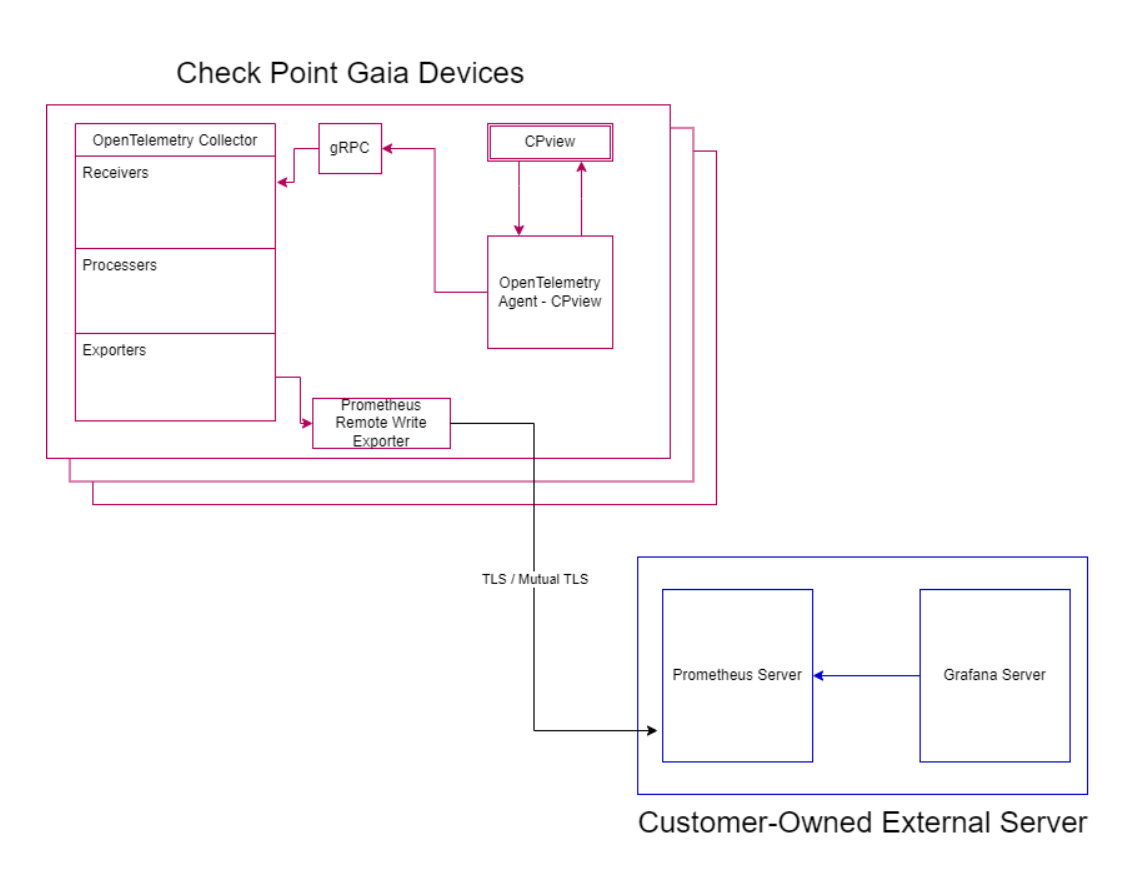
> The Skyline architecture includes three primary components:
>
> |------------------------------------------------------|-----------------------------------------------------------------------------------------------------------------------------------------------------------------------------------------------------------------------------------------------------------------------------------------------------------------------------------------------|
> | Component | Description |
> | **OpenTelemetry Agent (OpenTelemetry CPView Agent)** | Runs on Check Point servers. A service that queries CPView at defined intervals, collects the metrics, and exports them to an OpenTelemetry Collector. |
> | **OpenTelemetry Collector** | Runs on Check Point servers. An open-source service that receives metrics from multiple Agents and exports them to an external endpoint (a different OpenTelemetry Collector or a Prometheus Remote-Write). |
> | **Storage Location** | Third-party software that runs on an external server. The Prometheus Server receives data from the OpenTelemetry Collector, saves it in a Timeseries Database, and visualizes the data with visualization tools like Grafana, or any other supported monitoring tool (see the "Skyline Administration Guide" in the "Documentation" section). |
>
> **Logical Diagram:**
> > 
>
> Requirements {#Requirements}
> ----------------------------
>
> > Show / Hide this section
> >
> > |------------------------------------------------------------------------------------------------------------|------------------------------------------------------------------------------------------------------------------------------------------------------------------------------------------------------------------------------------------------------------------------------------------------------------------------------------------------------------------------------------------------------------------------------------------------------------------------------------------------------------------------------------------------------------------------------------------------------------------------------------------------------------------------------------------------------------------------------------------------------------------------------------------------------------------------------|
> > | Server | Description |
> > | Check Point R80.40 and higher (for Security Gateways, Management Servers, Log Servers, SmartEvent Servers) | Skyline is supported starting these versions: * [Check Point Quantum R82](https://support.checkpoint.com/results/sk/sk181127) * [Jumbo Hotfix Accumulator for R81.20](https://sc1.checkpoint.com/documents/Jumbo_HFA/R81.20/Default.htm) - Take 8 * [Jumbo Hotfix Accumulator for R81.10](https://sc1.checkpoint.com/documents/Jumbo_HFA/R81.10/Default.htm) - Take 79 * [Jumbo Hotfix Accumulator for R81](https://sc1.checkpoint.com/documents/Jumbo_HFA/R81/Default.htm) - Take 77 * [Jumbo Hotfix Accumulator for R80.40](https://sc1.checkpoint.com/documents/Jumbo_HFA/R80.40/Default.htm) - Take 190 **Notes**: * When enabled, the Skyline agent consumes approximately 50MB of RAM. * The Jumbo Hotfix Accumulator Takes mentioned above are the minimal required Takes. Best Practice - Use the Recommended Takes. |
> > | Check Point Quantum Spark R81.10.08 and higher | On Quantum Spark appliances, Skyline is available at the Early Availability (EA) level. **Notes**: * When you enable Skyline for the first time, the appliance must be able to reach Check Point online servers to download the required package. Best Practice - Allow the appliance to reach Check Point online servers after the initial setup to check for package updates on a daily basis and to download important updates when available. * When enabled, the Skyline agent consumes approximately 50MB of RAM. |
> > | External Server | Runs this software to analyze the collected data: * **Prometheus Server** A third-party software that collects, stores, and queries metrics with a dedicated Timeseries Database. The Prometheus Server exposes a Remote Write endpoint to which data can be pushed and stores the data in its local database. Check Point supports Prometheus version 2.37.1 and higher. * **Grafana Server** A third-party software that connects to multiple data sources/databases (such as Prometheus) and visualizes the data, builds graphs, dashboards, and alerts. Check Point supports Grafana version 9 and higher. |
>
> Downloads {#Downloads}
> ----------------------
>
> > Show / Hide this section
> >
> > |---------------------------------------------------------------------------------------------------|---------------------------------------------------------------------------------------------------------------------------|------------------------------------|
> > | Package Name | Download Link | Prerequisite |
> > | **Grafana Dashboards** for Security Gateways, Management Servers, Log Servers, SmartEvent Servers | [](https://support.checkpoint.com/results/download/122554) (TAR) | Skyline GA |
> > | **Grafana Dashboard** for a Quantum Spark Appliance | [](https://support.checkpoint.com/results/download/132503) (JSON) | Quantum Spark R81.10.08 and higher |
> > | Sample JSON Payload File (no TLS) for Check Point **OpenTelemetry Collector** | [](https://support.checkpoint.com/results/download/126333) (JSON) | Skyline GA |
> > | Sample JSON Payload File (with TLS) for Check Point **OpenTelemetry Collector** | [](https://support.checkpoint.com/results/download/126334) (JSON) | Skyline GA |
> >
> > To share and examine Grafana dashboards for Skyline, visit the [CheckMates ToolBox](https://community.checkpoint.com/t5/Telemetry/bd-p/Telemetry) (category: Telemetry).
>
> Known Limitations {#Known Limitations}
> --------------------------------------
>
> > |-------------|-----------------------------------------------------------------------------------------------------------------------------------------------------------------------------------------------------------------------------------------------------------------------------------------------------------------------------------------------|
> > | ID | Description |
> > | PMTR-86000 | Skyline deployment on a VSX Gateway / VSX Cluster with many Virtual Systems may increase the load on CPU cores. |
> > | PMTR-86000 | Skyline deployment on Quantum Spark Appliances with Gaia Embedded OS is not supported in versions lower than R81.10.08 (applies to the Locally Managed Mode and the Centrally Managed Mode). |
> > | PMTR-86000 | When you enable the Management Data Plane Separation (MDPS, [sk138672](https://support.checkpoint.com/results/sk/sk138672)), the Data plane manages the Skyline process and allocates resources to it. (The Skyline can query both the Data plane and the Management plane.) |
> > | PMTR-125381 | The metrics "System \> CPU \> Top" (`connection.top.cpu.XXX`) return data only for CoreXL Firewall instances 0, 1, and 2. |
> > | - | Check Point OpenTelemetry Collector supports only the base sigv4 authentication from AWS (OAuth 2.0 is not supported). See this [CheckMates thread](https://community.checkpoint.com/t5/OpenTelemetry-Skyline/Skyline-and-Azure-managed-prometheus/m-p/209732#M346). |
> > | - | Not all metrics appear in the Dynatrace monitoring tool. This is a known limitation caused by the incompatibility between Dynatrace and the OpenTelemetry's metrics format. For more information, refer to the [Dynatrace documentation](https://docs.dynatrace.com/docs/extend-dynatrace/opentelemetry/getting-started/metrics/limitations). |
> > | CPDIAG-2760 | The Skyline metric "`hardware.model`" is not supported for Security Groups on Quantum Maestro and Scalable Chassis. |
> > | CPDIAG-3588 | In Scalable Platforms, the Image Auto-Cloning feature does not clone the Skyline configuration from the SMO Security Group Member. After you add a new Security Group Member to the Security Group, you must configure the Skyline settings manually. |
>
> Documentation {#Documentation}
> ------------------------------
>
> > |------------------------------------------------------------------------------------------------------------------------------------------------------------------------------|
> > | **Guides** |
> > | [Skyline Administration Guide](https://sc1.checkpoint.com/documents/Appliances/Skyline/Default.htm) |
> > | [Prometheus](https://prometheus.io/docs/introduction/overview/) |
> > | [Grafana](https://grafana.com/docs/grafana/latest/introduction/) |
> > | **Related Configuration SecureKnowledge Articles** |
> > | [sk180630 - How to create basic alerts in Grafana for Skyline](https://support.checkpoint.com/results/sk/sk180630) |
> > | [sk179870 - Skyline Troubleshooting and FAQ](https://support.checkpoint.com/results/sk/sk179870) |
> > | [sk180522 - OpenTelemetry Collector (CPotelcol) Release Updates](https://support.checkpoint.com/results/sk/sk180522) |
> > | [sk181615 - OpenTelemetry Agent (OtlpAgent) Release Updates](https://support.checkpoint.com/results/sk/sk181615) |
> > | [sk180521 - OpenTelemetry CPviewExporter Release Updates](https://support.checkpoint.com/results/sk/sk180521) |
> > | **Related Troubleshooting SecureKnowledge Articles** |
> > | [sk180748 - Skyline does not show information](https://support.checkpoint.com/results/sk/sk180748) |
> > | [sk181444 - Skyline dashboard does not show all data](https://support.checkpoint.com/results/sk/sk181444) |
> > | [sk180311 - Using an SSL certificate with Skyline fails with "Exception: Invalid format for the exporter CA public key"](https://support.checkpoint.com/results/sk/sk180311) |
> > | [sk180850 - Skyline stops reporting data to the Prometheus Server after an update of the AutoUpdater Tool](https://support.checkpoint.com/results/sk/sk180850) |
> > | [sk181006 - "asg diag verify" command shows "Database inconsistent"](https://support.checkpoint.com/results/sk/sk181006) |
> > | [sk182194 - "asg diag verify" command shows "Configuration file Failed Database inconsistent"](https://support.checkpoint.com/results/sk/sk182194) |
> > | [sk97443 - Check Point Monitoring, Debug and Support Tools](https://support.checkpoint.com/results/sk/sk97443) |
> > | [sk182222 - Grafana dashboard does not report metrics for the standby cluster member](https://support.checkpoint.com/results/sk/sk182222) |
> > | [sk182401 - CPView does not export information to Skyline after the deletion of a VS](https://support.checkpoint.com/results/sk/sk182401) |
> > | [sk182526 - Maestro Security Group Member goes into a boot loop when Skyline is disabled](https://support.checkpoint.com/results/sk/sk182526) |
>
> Revision History {#Revision History}
> ------------------------------------
>
> Show / Hide revision history
> >
> > |--------------|--------------------------------------------------------------------------------------------------------------------------------------------------------------------------------------------------------------------------------------------------------------------------------------------------------------------------------------------------------------------------------------------------------------------------------------------------------------------------------------|
> > | Date | Description |
> > | 16 Mar 2026 | Added known limitation PMTR-125381. |
> > | 16 Sep 2025 | Added known limitation CPDIAG-3588. |
> > | 21 June 2024 | Added the link to: * [sk181615 - OpenTelemetry Agent (OtlpAgent) Release Updates](https://support.checkpoint.com/results/sk/sk181615) |
> > | 01 May 2024 | * Updated this article with the content for Quantum Spark appliances that work in the Locally Managed mode (sections "Downloads"). * Renamed the "Skyline Metrics Repository" to the "Skyline Administration Guide". * Moved all configuration instructions to the Skyline Administration Guide.[](https://support.checkpoint.com/results/sk/sk181863) |
> > | 24 Apr 2024 | Added links to: * [sk180521 - OpenTelemetry CPviewExporter Release Updates](https://support.checkpoint.com/results/sk/sk180521) * [sk180522 - CPotelcol (OpenTelemetry Collector) Release Updates](https://support.checkpoint.com/results/sk/sk180522) |
> > | 27 Sep 2023 | Updated Sections in "Setup and Configuration": * Section D: Configure the OpenTelemetry Collector on the Check Point Server. * Section E: Configure OpenTelemetry Collector to work with Amazon Web Services (AWS) Managed Prometheus on the Check Point Server. Added New Sections in "Setup and Configuration": * Section F: Configure OpenTelemetry Collector to work with multiple Export Targets. * Section G: Configure and Filter OpenTelemetry Collector's exported metrics. |
> > | 31 July 2022 | Improved formatting of this article. |
> > | 03 Apr 2023 | Added new section: "Configure OpenTelemetry Collector to work with Amazon Web Services (AWS) Managed Prometheus on the Check Point Server". |
> > | 07 Mar 2023 | Added support for R81.20. |
> > | 28 Dec 2022 | Added sample payload files to the "Downloads" section. |
> > | 24 Oct 2022 | First draft of documentation for General Availability (GA) release. |
> > | 20 June 2022 | Updated the section "Downloads" \> Skyline Packages for Check Point Servers are now available for download again. |
> > | 19 June 2022 | Updated the section "Downloads" \> Skyline Packages for Check Point Servers are temporarily unavailable for download. |
> > | 12 June 2022 | Updated the section "Downloads" \> column "Prerequisite". |
> > | 06 June 2022 | Updated the list of supported Check Point servers to include Management Servers and Log Servers as well. |
> > | 29 May 2022 | Updated the section "Configure the OpenTelemetry Collector on the Security Gateway / each Cluster Member" \> The "`prometheusremotewrite`" section \> instructions for disabling TLS encryption. |
> > | 15 May 2022 | Resolved Issues: * When you run the command for the current request ("`cpview -m`"), you get the last request data. With this fix, the "`cpview -m`" command returns the latest data. * Metrics do not show data. Added: * SD-WAN Metric content and CPView updates * Data revisions (on the OpenTelemetry Protocol side) * Partial diagnostics (on the CPView side) * New Grafana dashboards * Certificate extension for one year |
> > | 19 Apr 2022 | Updated the section "Configure the external server - Prometheus and Graphana" \> "To secure Prometheus and OpenTelemetry Collector connection using TLS Encryption". |
> > | 05 Apr 2022 | First release of this article. |
---
# Agent Instructions
This content is from the Check Point Support Center (https://support.checkpoint.com), the official knowledge base for Check Point cybersecurity products.
## Navigating This Knowledge Base
- **Complete index**: [llms.txt](https://support.checkpoint.com/llms.txt)
- **All SK articles**: [SecureKnowledge Sitemap](https://support.checkpoint.com/sitemaps/secureknowledge-sitemap-index.xml)
- **SK article URL pattern**: `https://support.checkpoint.com/results/sk/{skId}`
- **Markdown responses**: AI bot User-Agents automatically receive `text/markdown` content