> Source: [sk174912](https://support.checkpoint.com/results/sk/sk174912)
# sk174912 - Cannot query specific groups directly when defining Access Roles
| Property | Value |
|----------|-------|
| Solution ID | sk174912 |
| Date Created | 2021-08-09 |
| Last Modified | 2026-07-28 |
| Technical Level | Advanced |
| Products | Security Gateway, SmartConsole |
| Versions | R82.10, R82, R81.20, R81.10 (EOS), R82.10, R82, R81.20, R81.10 (EOS) |
## Symptoms
- * The user cannot query specific groups directly when defining Access Roles.
* This message comes into view in R80.40 SmartConsole in the AD users picker when the user adds an Access Role with a search string for a specific Active Directory group:
"`Partial results, due to your directory server limitations (Error 1) See sk113136`"
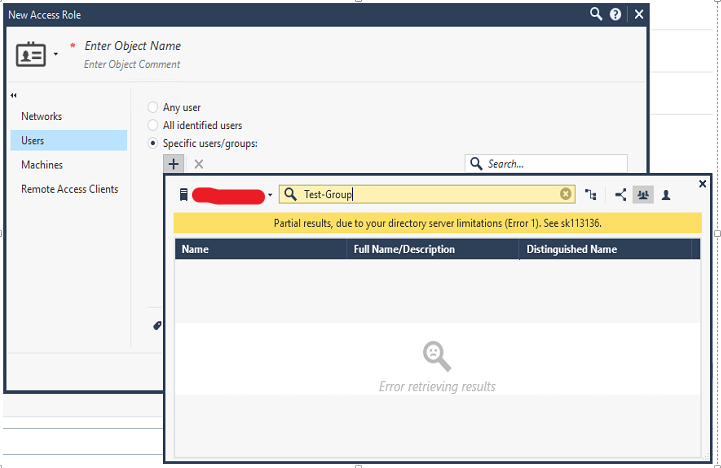
* Some existing AD groups do not appear in the pick list.
## Cause
According to [sk113136](https://supportcenter.checkpoint.com/supportcenter/portal?eventSubmit_doGoviewsolutiondetails=&solutionid=sk113136) the definition of Error 1 is:
"1 = AD server refuses to perform the Virtual List sorting."
Consult the AD Administrator to make sure Virtual List sorting is enabled on the AD server. If sorting is enabled, the root cause is this:
On the SmartConsole host, *UICommon.dll.config* has these default settings:
``
``
## Solution
This solution requires authentication. Please log in to view the full solution.
---
# Agent Instructions
This content is from the Check Point Support Center (https://support.checkpoint.com), the official knowledge base for Check Point cybersecurity products.
## Navigating This Knowledge Base
- **Complete index**: [llms.txt](https://support.checkpoint.com/llms.txt)
- **All SK articles**: [SecureKnowledge Sitemap](https://support.checkpoint.com/sitemaps/secureknowledge-sitemap-index.xml)
- **SK article URL pattern**: `https://support.checkpoint.com/results/sk/{skId}`
- **Markdown responses**: AI bot User-Agents automatically receive `text/markdown` content