> Source: [sk174447](https://support.checkpoint.com/results/sk/sk174447)
# sk174447 - Cloud Firewall for AWS Gateway Load Balancer Architecture Options
| Property | Value |
|----------|-------|
| Solution ID | sk174447 |
| Date Created | 2021-07-15 |
| Last Modified | 2026-06-09 |
| Technical Level | General |
| Products | Cloud Firewall |
| Versions | R82.10, R81.20, R82 |
| OS | Gaia |
| Platform | AWS |
## Solution
[AWS Gateway Load Balancer (GWLB)](https://aws.amazon.com/elasticloadbalancing/gateway-load-balancer/) is a type of Elastic Load Balancer intended to simplify the insertion of network appliances into VPC Traffic flows while providing dynamic capacity scaling and HA for appliance failure or maintenance activities. Check Point Cloud Firewall (formerly CloudGuard Network Security) appliances are deployed in an Auto Scaling Group (ASG) targeted by the GWLB Target Group (TG).
GWLB encapsulates the initial source IP Addresses with a GENEVE header to preserve the source IP while performing the Load Balancing operations. Cloud Firewall listens for GENEVE, removes the header, and processes traffic through our standard inspection mechanisms. When Cloud Firewall arrives at a policy decision to allow the traffic, Cloud Firewall re-encapsulates with GENEVE and forwards the packet back to GWLB. Check Point's CME handles auto-scaling group management to automatically add or remove Cloud Firewall Gateways from SMS on scale-out or in operations. [Review AWS Blog's for a detailed description of AWS GWLB GENEVE operations.](https://aws.amazon.com/blogs/networking-and-content-delivery/integrate-your-custom-logic-or-appliance-with-aws-gateway-load-balancer/)
The related [Gateway Load Balancer Endpoint (GWLBe)](https://docs.aws.amazon.com/vpc/latest/privatelink/vpce-gateway-load-balancer.html) allows inspection of Inbound, Outbound, and/or East-West traffic based on its placement and use as a next-hop in AWS VPC routing tables. Behind the Scenes, GWLBe uses AWS Private Link to forward all the received traffic to it's parent GWLB for inspection by Cloud Firewall. This allows a simple-to-understand per-hop Route Table (RT) behavior to be applied to packets as they are redirected to the Security VPC for inspection at Cloud Firewall.
This article list the relevant AWS blog posts on GWLB to learn more and detail use cases and caveats of different AWS Architectures featuring GWLB.
**Table of Contents**
* Notes
* Known Limitations and Issues
* Prerequisites
* Licensing Considerations
* Reference Architectures
* Security VPC (Standalone)
* Security VPC + TGW
* Security VPC + Internet VPC + TGW
* CME Considerations and Tagging Requirements
* NLV/ALB vs GWLBe deployment location for Inbound traffic inspection
* GWLB Failure Scenarios and AZ Considerations
* SMS/MDS Management of Cloud Firewall in GWLB ASG
* Check Point GWLB CloudFormation Template Nesting
* Troubleshooting and Cloud Firewall Traffic Capture
Notes {#Notes}
--------------
* Refer to [AWS's Blog posts on GWLB](https://aws.amazon.com/blogs/networking-and-content-delivery/category/networking-content-delivery/elastic-load-balancing/gateway-load-balancer/)for more details of GWLB behavior and configuration.
* There are details about failover and flow symmetry in [AWS Best Practices for GWLB Deployment](https://aws.amazon.com/blogs/networking-and-content-delivery/best-practices-for-deploying-gateway-load-balancer/)
* For **R81.20** and higher Check Point versions, Gateway Load Balancer (GWLB) and Gateway images are unified. They use the same Product AMI in the AWS Marketplace:
* [Cloud Firewall with Threat Prevention \& SandBlast BYOL](https://aws.amazon.com/marketplace/pp/prodview-eqq52wje3qy5e?sr=0-1&ref_=beagle&applicationId=AWSMPContessa)
* [Cloud Firewall with Threat Prevention (PAYG - NGTP)](https://aws.amazon.com/marketplace/pp/prodview-3xp7nph2367yc?sr=0-4&ref_=beagle&applicationId=AWSMPContessa)
* [Cloud Firewall with Threat Prevention and SandBlast (PAYG - NGTX)](https://aws.amazon.com/marketplace/pp/prodview-yuljxgbs6os5w?sr=0-9&ref_=beagle&applicationId=AWSMPContessa)
* [CME must be updated to Take 138 or higher](https://supportcenter.checkpoint.com/supportcenter/portal?eventSubmit_doGoviewsolutiondetails=&solutionid=sk157492&partition=Advanced&product=CloudGuard) to support Cloud Firewall with GWLB.
* Check Point's Deployment Guides and Cloud Formation Templates (CFT) for GWLB architectures can be found in [sk111013](https://supportcenter.checkpoint.com/supportcenter/portal?eventSubmit_doGoviewsolutiondetails=&solutionid=sk111013) and are described below.
* For purposes of this article, traffic flows are defined as:
* Northbound/egress/outbound -- traffic from an AWS VPC to the Public Internet
* Southbound/ingress/inbound -- traffic from the Public Internet destined for an AWS ALB/NLB or an EC2 instance
* East-West -- traffic between 2 AWS VPCs or between an AWS VPC and an on premises data center connected to AWS and terminating in an AWS Transit Gateway (TGW) (methods vary and can include a combination of DirectConnect (DX), CHKP VPN Termination, VPN Gateway (VGW) termination, or other 3rd party VPN connections)
|-----------------------------------|-----------------------------------------------------------------------------------------------------|------------------------------------------------------------------------------------------------------------------------------------------------------------------------------|--------------------------------------------------------------------------------|-----------------------------------------------------------------------------------------------------------------|
| Description | Note | CFT | Use Cases | CME |
| Security VPC Standalone | AWS refers to this as a "Distributed Deployment" with GWLBe outside of the Security VPC | [](https://cgi-cfts.s3.amazonaws.com/gwlb/gwlb-master.yaml) | Egress Internet Traffic via EIP Ingress Internet Traffic via EIP on EC2 or ELB | Manages Cloud Firewall ASG Creates Objects and rules for inbound/outbound traffic in VPC's tagged appropriately |
| Security VPC + TGW | AWS Refers to this as a "Centralized Deployment" with GWLBe inside the Security VPC | [](https://cgi-cfts.s3.amazonaws.com/gwlb/tgw-gwlb-master.yaml) | Egress Internet Traffic via NATGW
E/W Traffic | Manages Cloud Firewall ASG |
| Security VPC + Internet VPC + TGW | AWS "Centralized" Deployment w/ Security VPC (GWLB + GWLBe) \& Internet VPC (NATGW \& optional ALB) | [](https://github.com/CheckPointSW-Community/CloudGuard-NS-AWS-GWLB) | Egress Internet Traffic via NATGW Ingress Internet Traffic via ALB E/W Traffic | Manages Cloud Firewall ASG |
Known Limitations and Issues {#Known Limitations and Issues}
------------------------------------------------------------
1. Cloud Firewall Gateways used with GWLB are in bridge mode and therefore cannot support VPN.
2. Because of GWLB's inherent hashing and failover mechanisms, Cloud Firewall Gateways used with GWLB do not share FW State tables or flow state information.
3. AWS GWLB is not able to handle SSL termination or SSL proxy. For SSL traffic termination in AWS, the use of an ALB is recommended, and its architecture caveats are discussed in this article. Alternatively, Cloud Firewall supports HTTPS Inspection features described below.
4. Cloud Firewall Gateways used with GWLB are in bridge mode and therefore cannot support the "Use this gateway as an HTTP/HTTPS Proxy" in Non-Transparent Mode.
Prerequisites {#Prerequisites}
------------------------------
Before proceeding, you should have a solid understanding of Cloud Concepts such as VPC's, Routing, Security Groups, and Transit Gateway.
Check Point's Cloud Formation templates deploy a Security VPC and optionally an Internet VPC. We do not deploy AWS Transit Gateway or any customer VPC's, so they must be deployed and configured to work with a Security VPC. Throughout this article, we will point out additional configurations necessary outside of the CFT's Check Point provides.
Licensing Considerations {#Licensing Considerations}
----------------------------------------------------
When choosing a licensing option for Cloud Firewall w/ GWLB, it's important to note that you cannot mix licensing options or EC2 Instances sizes in an AWS ASG.
|------------------------|------------------------------------------------------------------------------------------------------------------------------------------------------------------------------------|-----------------------------------------------------------------------------------------------------------------------------------------------------------------------------------------------------------------------------------------------------------------------------------------------------------------------------------------------------------------------------------------------------------------------------------------------------------------------------------|----------------------------------------------|
| Licensing Option | License Management | Scaling Events | Includes |
| BYOL | Paid up front to Check Point and managed via SMS/MDS | Must have sufficient licenses available on CHKP manager to handle increased instances during a scaling event | Blades and features per Check Point Contract |
| PAYG PAYG w/ Sandblast | AWS manages licenses and customers pay via AWS MP. Option to choose an annual license, which is paid up front, or on-demand/per-hour billed monthly with your regular AWS invoice. | Annual licenses will be applied first up to the quantity of annual licenses available in the AWS Marketplace account. Any EC2 instances launched with cores exceeding the available annual licenses will be billed at the hourly rate. With PAYG, you can pay a reduced rate for your steady state Cloud Firewall instances and only pay overage charges during a scale up event. You can purchase additional annual licenses at any time, and they will go into use immediately. | Premium Check Point Support |
Reference Architectures {#Reference Architectures}
--------------------------------------------------
1.
### [Security VPC Standalone (Distributed GWLBe architecture)](https://console.aws.amazon.com/cloudformation/home#/stacks/create/review?templateURL=https://cgi-cfts.s3.amazonaws.com/gwlb/gwlb-master.yaml) {#Security VPC Standalone}
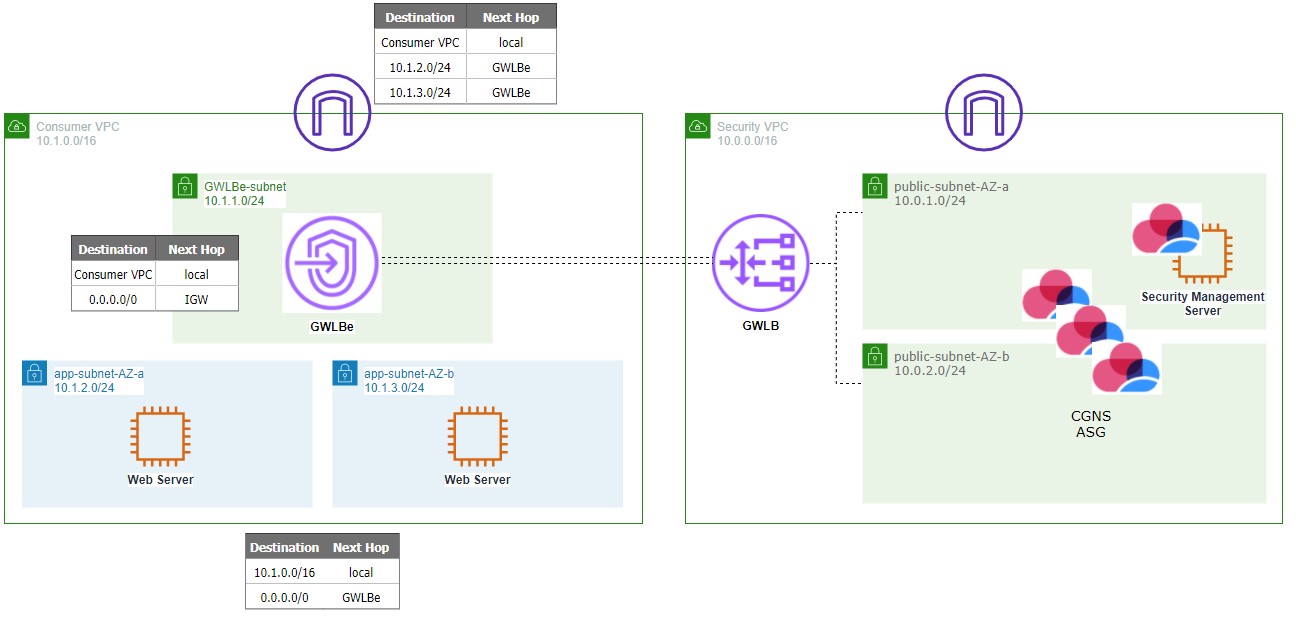
1. **Use case:** Outbound and/or Inbound traffic in any VPC with a GWLBe deployed into it
2. **Best for:** Small deployments with a limited number of VPC's (due to the fact that each GWLBe adds per/hour AWS costs) and/or Centralized deployments with only a few VPC's requiring Inbound traffic inspection
3. **Requirements outside of CHKP provided CFT**
1. Outbound:App subnet VPC Route tables (RT) with 0.0.0.0/0 --\> GWLBe
2. Inbound: Ingress VPC Routing IGW (RT attached to IGW) redirecting inbound traffic from the Internet VPC to the GWLBe
4. **Optional Modifications:**
* IGW can redirect traffic to GWLBe or ALB/NLB first. For pros/cons of NLB/ALB vs GWLBe location regarding Inbound traffic please see the referenced section below.
2.
### [Security VPC + TGW (Centralized GWLBe architecture)](https://console.aws.amazon.com/cloudformation/home#/stacks/create/review?templateURL=https://cgi-cfts.s3.amazonaws.com/gwlb/tgw-gwlb-master.yaml) {#Security VPC + TGW}

1. **Use case:** East-West Traffic and Oubound Internet traffic
2. **Best for:**AWS environments with a large number of VPC's using TGW as a central routing mechanism and a requirement for E/W traffic inspection
3. **Requirements outside of CHKP CFT:**
1. Add TGW attachments and ingress TGW RT for Security VPC
2. Modify egress TGW RT pointing to Security VPC attachment
3. Add RT entries in Security VPC for any Spoke VPC CIDR blocks to:
* GWLBe subnet RT
* NATGW subnet RT
4. **Optional Modifications:**
1. If Outbound traffic is not required, NATGW can be eliminated
2. The GWLBe and GWLB/Cloud Firewall Subnets can be combined to reduce the amount of inventory and/or IP address spaced used
3. GWLBe can be placed in Spoke VPCs to combined a GWLB centralized \& Distributed model and achieve Inbound traffic inspection with all the caveats of Architecture 1
4. DX/VGW can be attached to TGW and routes propagated to TGW egress RT. In essence, this treats the DX (on Prem) or VGW (IPSec Attached) traffic like another spoke.
5. Further, a Cloud Firewall dedicated VPN Cluster can be attached to TGW as another VPC spoke for VPN capabilities while still using the GWLB ASG for all traffic inspection.
3.
### [Security VPC + Internet VPC + TGW (Centralized GWLBe architecture)](https://github.com/CheckPointSW-Community/CloudGuard-NS-AWS-GWLB) {#Security VPC + Internet VPC + TGW}
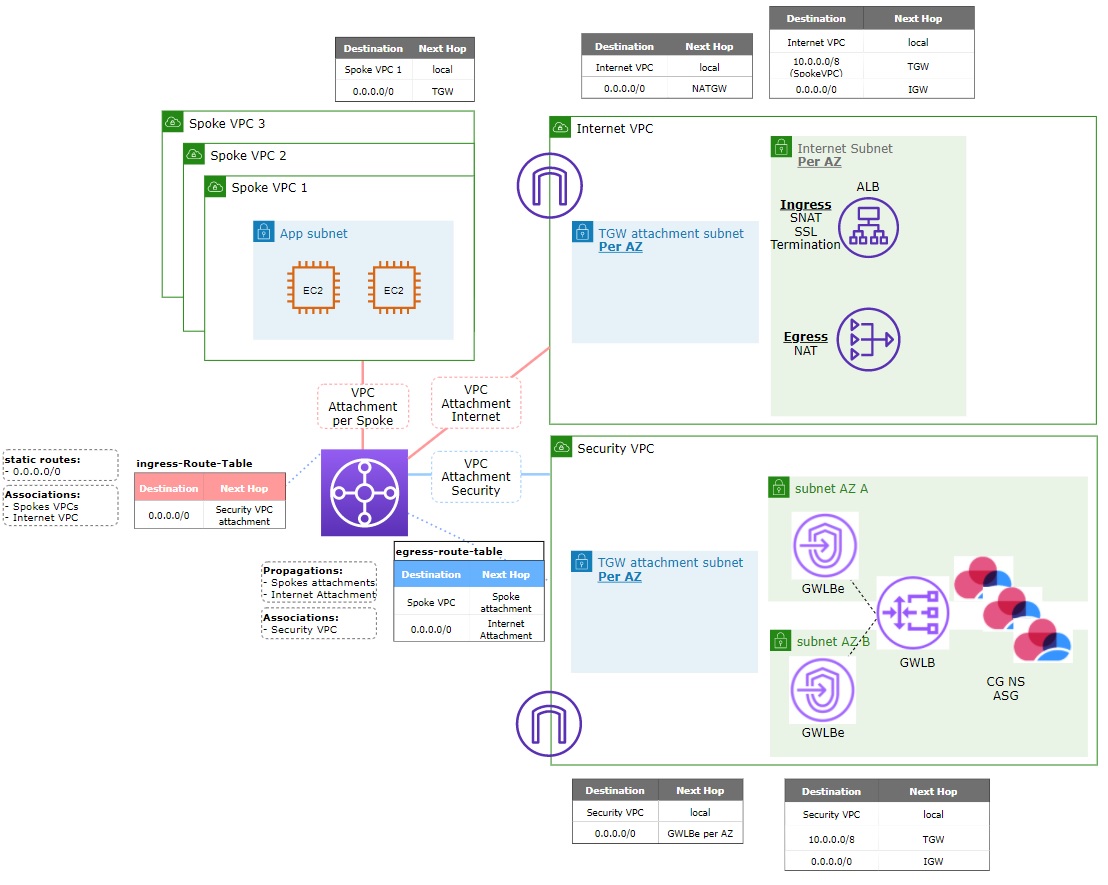
1. **Use Case:** East-West, Outbound, and Inbound traffic inspection
2. **Best for:**Environments with a large number of VPC's TGW as a central routing mechanism, and Inbound inspection with an application infrastructure featuring ALBs for SSL Termination
3. **Requirements outside of CHKP CFT** :
* This CFT Includes a Lambda Script to create TGW attachments. Including the TGW ID in this deployment will create TGW attachments and omitting the TGW ID will skip this step
* This Deployment requires storing the CFT's and lambda.zip file in your own S3 bucket and specifying the bucket as part of deployment
4. **Optional Modifications**
1. NATGW can be removed for environments with no Outbound traffic
2. NATGW can be moved into Security VPC, but then Spoke VPC routes will need to be manually added to GWLB subnet RT
3. Depending on how Cloud Firewall is managed (SMS/MDS via Internet/on-prem/AWS DX/etc) the Security VPC GWLB RT may need to be modified. Please see the section below titled "SMS/MDS Management of Cloud Firewall in GWLB ASG" for details on routing with this subnet.
4. DX/VGW can be attached to TGW and routes propagated to TGW egress RT. In essence, this treats the DX (on Prem) or VGW (IPSec Attached) traffic like another spoke.
5. Further, a Cloud Firewall dedicated VPN Cluster can be attached to TGW as another VPC spoke for VPN capabilities while still using the GWLB ASG for all traffic inspection.
4.
### Additional architecture possibilities
For more architecture examples and traffic flows, refer to: **[Cloud Firewall - Integration with AWS Gateway Load Balancer](https://checkpoint.awsworkshop.io/)** workshop.
The AWS components involved in the architectures can generally be moved around to suit individual customer requirements. As long as the per-hop behaviors allow a full bi-directional end-to-end traffic flow for all your use cases, feel free to relocate AWS components as necessary. Please work with your AWS account team to validate any concerns you may have with a specific architecture.
CME Considerations \& Tagging requirements {#CME Considerations}
----------------------------------------------------------------
CME Must be updated to [Take 138 or higher](https://supportcenter.checkpoint.com/supportcenter/portal?eventSubmit_doGoviewsolutiondetails=&solutionid=sk157492). For installing CME on a freshly deployed SMS instance in AWS, you may need to uninstall the CPUSE CME Take 83 version first.
1. From Clish type: *installer uninstall\*to view installed CPUSE packages, and select the package for CME Take 83
2. Enter Expert mode and follow the directions on [sk157492](https://supportcenter.checkpoint.com/supportcenter/portal?eventSubmit_doGoviewsolutiondetails=&solutionid=sk157492) for installing CME in online mode. Once installed properly with autoupdater cli, CME will automatically update as new takes are released
Tagging: CME looks for tags on the GWLB and ASG to discovery scale-in and scale-out events. Be sure there are **NO EXTRA x-chkp tags** on the instances. Tags included on the ASG should be enabled for **Tag new instances** so they are added to any newly spawned instanced
|-------------|---------------------|---------------------------------------------------------------------------------------------------------------------------------|
| Instance | Key | Value |
| GWLB | **x-chkp-tags** | **management=** \**:template=** \**:ip-address=**\ |
| GWLB
| **x-chkp-topology** | **internal** |
| ASG | **x-chkp-tags** | **management=** *\* **:template=** *\**:ip-address=**\* |
| ASG | **x-chkp-topology** | **internal** |
CME Requirements:
1. Ensure CME is provisioned with proper AWS permissions (an IAM role applied to EC2 Instance for Security Management Server in the cloud or credentials for an on premises Security Management Server)
2. Setup the CME template on the Security Management Server per the [GWLB Auto Scaling Group Deployment Guide](https://sc1.checkpoint.com/documents/IaaS/WebAdminGuides/EN/CP_CloudGuard_Network_for_AWS_Gateway_Load_Balancer_ASG/Content/Topics-AWS-GWLB-ASG-DG/Deploying-GWLB-Security-VPC-for-Transit-Gateway.htm)
3. Ensure controller and template names are identical
NLB/ALB vs GWLBe deployment Location for Inbound traffic inspection \& HTTPS Inspection considerations {#NLB/ALB vs GWLBe deployment Location for Inbound traffic inspection}
-----------------------------------------------------------------------------------------------------------------------------------------------------------------------------
For Inbound traffic inspection, choose an architecture that supports your specific requirements and application architecture. The table below indicates architectural choices to handle SSL termination on AWS Elastic Load Balancers,
In addition, Cloud Firewall supports HTTPS Inspection with GWLB and can handle SSL decryption itself if properly sized and setup with proper certificate infrastructure. See [sk108202 regarding Best Practices for HTTPS Inspection](https://supportcenter.checkpoint.com/supportcenter/portal?eventSubmit_doGoviewsolutiondetails=&solutionid=sk108202&partition=Basic&product=HTTPS)
|-------------------------------|---------------------------------------------|-----------------------------------------------------------------------------------------------------|-------------------------------------------------------------------------------------------|-------------------------------------------------------------------------------|
| | GWLB Architecture supported | Traffic Path | Pro | Con |
| IGW -\> GWLBe -\> ALB -\> App | Distributed only | IGW -\> GWLBe -\> GWLB -\> Cloud Firewall -\> GWLB -\> GWLBe -\> ALB -\> App | Traffic inspected at Cloud Firewall will have original Internet SRC IP | TLS/SSL traffic being Inspected will be encrypted |
| IGW -\> ALB -\> GWLBe | Centralized w/ TGW and an Internet VPC only | IGW -\> ALB (SNAT) -\> TGW -\> GWLBe -\> GWLB -\> Cloud Firewall -\> GWLB -\> GWLBe -\> TGW -\> App | TLS/SSL traffic being Inspected will be decrypted (due to SSL Termination on inbound ALB) | Traffic inspected at Cloud Firewall will have SNAT IP address assigned by ALB |
GWLB Failure Scenarios and AZ Considerations {#GWLB Failure Scenarios and AZ Considerations}
--------------------------------------------------------------------------------------------
By Default, AWS attempts to keep a zonal affinity for traffic, meaning that traffic sourced in an AZ maintains that AZ at each hop.
To remedy this behavior and to provide maximum HA coverage for the Cloud Firewall Auto Scaling Group, Check Point recommends enabling Cross Zone Load Balancing on GWLB. This feature allows GWLB to distribute traffic across all targets in all enabled AZ's to provide greatest HA coverage. As described in [AWS's blog post](https://aws.amazon.com/blogs/networking-and-content-delivery/scaling-network-traffic-inspection-using-aws-gateway-load-balancer/), this feature will result in incurring inter-AZ data transfer charges. Check Point's CloudFormation deployments for GWLB enable Cross AZ load balancing by default.
Furthermore, enterprises may choose to deploy the application VPC's with a mismatch of AZ's from the AZ's available in the Security VPC based on their individual requirements. To solve for a mismatch of AZ's between application VPC's and Security VPC, we must enable TGW Appliance Mode on the TGW attachment for the Security VPC. TGW appliance mode for GWLB is described in this [AWS Blog post](https://aws.amazon.com/blogs/networking-and-content-delivery/centralized-inspection-architecture-with-aws-gateway-load-balancer-and-aws-transit-gateway/), and is enabled by default in Check Point's Cloud Formation Template for Deployment #3 Security VPC with Centralized GWLBe architecture and Internet VPC. The Lambda function code for enabling TGW Appliance mode can be re-used/extended to include automatic Spoke VPC attachment and route propagation.
AWS CLI Commands for TGW appliance mode
* **describe:** aws ec2 describe-transit-gateway-vpc-attachments
* **set:** aws ec2 modify-transit-gateway-vpc-attachment --transit-gateway-attachment-id tgw-attach-xyz--options ApplianceModeSupport="enable"
Security Management/Multi-Domain Management of Cloud Firewall in GWLB ASG {#SMS/MDS Managemend of CGNS in GWLB ASG}
-------------------------------------------------------------------------------------------------------------------
Depending on location of your Security Management Server/Multi-Domain Management, you may need to adjust Route Tables for the ***public subnets hosting Cloud Firewall instances*** . The other Route tables created in reference architectures (GWLBE, Internet, TGW Attachment) impact customer/application/workload traffic flow via GWLB.
Check Point management traffic falls outside of the Gateway Load Balancer traffic flow as it follows the VPC CIDR block (local) routing in the Security VPC. As such, as soon as traffic destined for a Cloud Firewall Instance enters the Security VPC, it will take local VPC routing hop and be delivered directly to Cloud Firewall Instances (bypassing GWLBe/GWLB). The Cloud Firewall internal routing table defaults all traffic back to the subnet default route, and at this point, the ***Cloud Firewall** **Public subnet routing table*** would need a route back to SMS/MDS CIDR/IP range. This same route would be needed for client reachability to the Cloud Firewall instance for features like User Check/etc.
Check Point GWLB CloudFormation Template Nesting {#Check Point GWLB CloudFormation Template Nesting}
----------------------------------------------------------------------------------------------------
1. *Tgw-gwlb-master.yaml*
* Purpose: Create VPCs. **Start here to create new VPC's**for Security and/or Internet
* Launches:
1. *VPC.yaml*
* Purpose: create VPC w/ public and private subnets
2. *Tgw-gwlb.yaml*
* Purpose: create AWS components in Sec VPC (GWLBe, NATGW, IGW, RT + entries). **Start here to re-use existing VPC's**for Security and/or Internet
* Launches:
1. *gwlb.yaml*
* Purpose: create GWLB -- adds GWLB template to userdata
* Launches:
1. *autoscale-gwlb.yaml*
* Purpose: create ASG, TG, HC, Roles, etc
* Launches:
1. *amis-gwlb.yaml*
* Purpose: lookup current AMI list
2. *management-gwlb.yaml* (optional)
* Purpose: deploy mgmt server
2. *tgw-attach.yaml* (optional and only included in Architecture #3)
* Purpose: Create and invoke a Lambda function to create TGW attachments for Security and Internet VPC
Troubleshooting and Cloud Firewall Traffic Capture {#Troubleshooting and CGNS Traffic Capture}
----------------------------------------------------------------------------------------------
Tcpdump packet capture done on eth0 will show traffic encapsulated with GENEVE. Viewing the pcap files in Wireshark will show the inner packet IP headers/etc. You can notice each packet shows up in the capture two times. One time as it enters Cloud Firewall from GWLB before inspection and another time as Cloud Firewall returns the packet to GWLB after inspection (provided Cloud Firewall policy inspection results in allowing the traffic).

### Support for Cloud Firewall with AWS Gateway Load Balancer
For advanced scenarios beyond the solution described in this article, please reach out to your AWS
Solutions Architect/Partner Team, your Check Point Account Team, and/or check the [Check Point Support Center](https://supportcenter.checkpoint.com/supportcenter/portal?eventSubmit_doHome=&js_peid=null).
To get support with an existing Cloud Firewall Deployment [open a Service Request on Checkpoint.com](https://help.checkpoint.com/s/create-new-sr).
---
# Agent Instructions
This content is from the Check Point Support Center (https://support.checkpoint.com), the official knowledge base for Check Point cybersecurity products.
## Navigating This Knowledge Base
- **Complete index**: [llms.txt](https://support.checkpoint.com/llms.txt)
- **All SK articles**: [SecureKnowledge Sitemap](https://support.checkpoint.com/sitemaps/secureknowledge-sitemap-index.xml)
- **SK article URL pattern**: `https://support.checkpoint.com/results/sk/{skId}`
- **Markdown responses**: AI bot User-Agents automatically receive `text/markdown` content