> Source: [sk171559](https://support.checkpoint.com/results/sk/sk171559)
# sk171559 - Deploying a Secure Internet Configuration for Azure Stack Hub
| Property | Value |
|----------|-------|
| Solution ID | sk171559 |
| Date Created | 2021-01-20 |
| Last Modified | 2021-12-16 |
| Technical Level | General |
| Products | Security Gateway, Cloud Firewall |
| Versions | R81 (EOS) |
| OS | Gaia |
## Solution
Introduction
------------
This guide is for customers who deploy Azure Stack Hub in an Azure-connected deployment model. As a security best practice, customers should deny access to the Internet from Azure Stack Hub Hosts, except to allowed ports and URLs for outbound communication.
[List of current Azure Stack Hub outbound ports and URL](https://docs.microsoft.com/en-us/azure-stack/operator/azure-stack-integrate-endpoints?view=azs-2005)
**Notes:**
1. Check Point URL Filtering Software Blade is required.
2. Traffic from Azure Stack Hub hosts to Azure Endpoint does not support SSL interception. If SSL interception is enabled on the Check Point Security Gateway, bypass inspection of the required outbound ports and URL"
1. Refer to [sk163595 - HTTPS Inspection bypass list object for bypass inspections](https://supportcenter.checkpoint.com/supportcenter/portal?eventSubmit_doGoviewsolutiondetails=&solutionid=sk163595).
2. For a URL with sub directories, you must create it as `aka.ms` and not as `aka.ms/azurestackautomaticupdate`.
Check Point Security Gateway Placement:
---------------------------------------
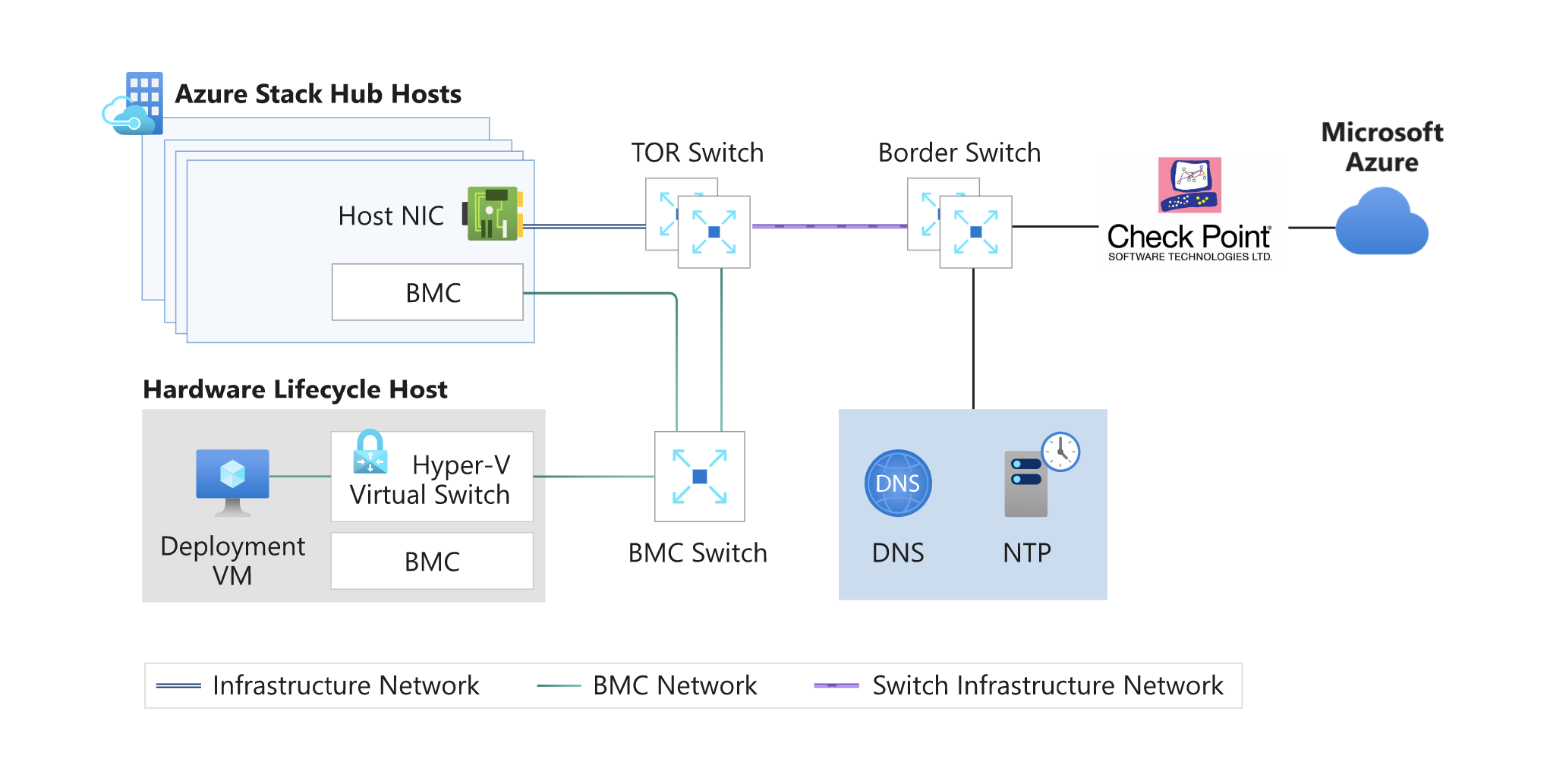
Configuration of the Check Point Security Gateway:
--------------------------------------------------
1. Log into Smart Console.
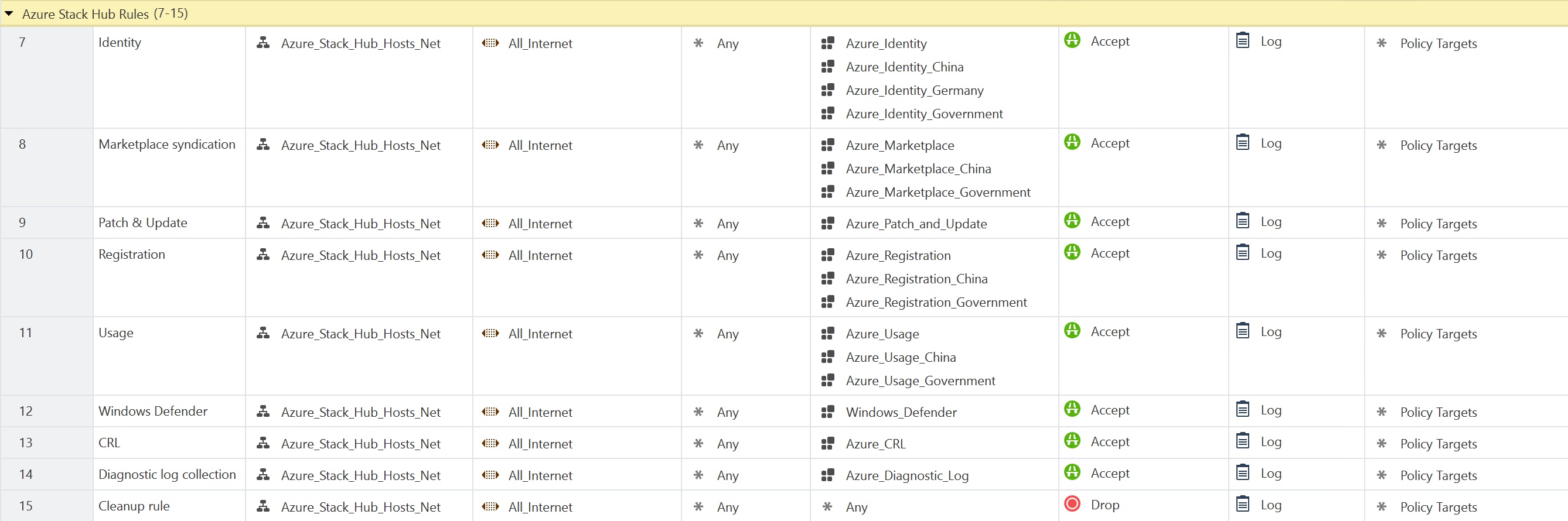
2. Create rules according to the latest list of current outbound ports and URLs.
* Create a new Security Gateway rule:
* **Source**: Azure Stack Hub Hosts. This can be a simple group or subnet.
* **Destination**: All_Internet object. This will lock down access from Services and Applications.
* **Services \& Application**: Create each URL from the list of current outbound ports and URLs.
* **Action** = Accept
* **Track** = Log
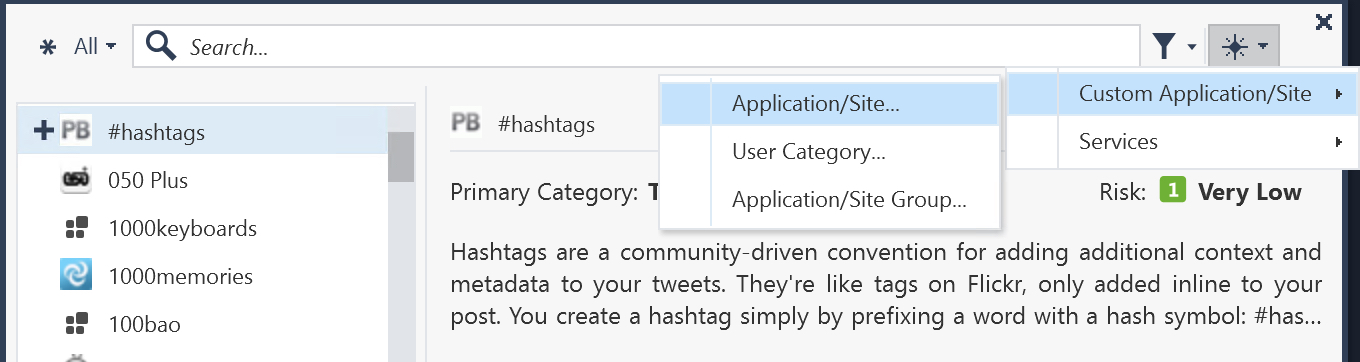
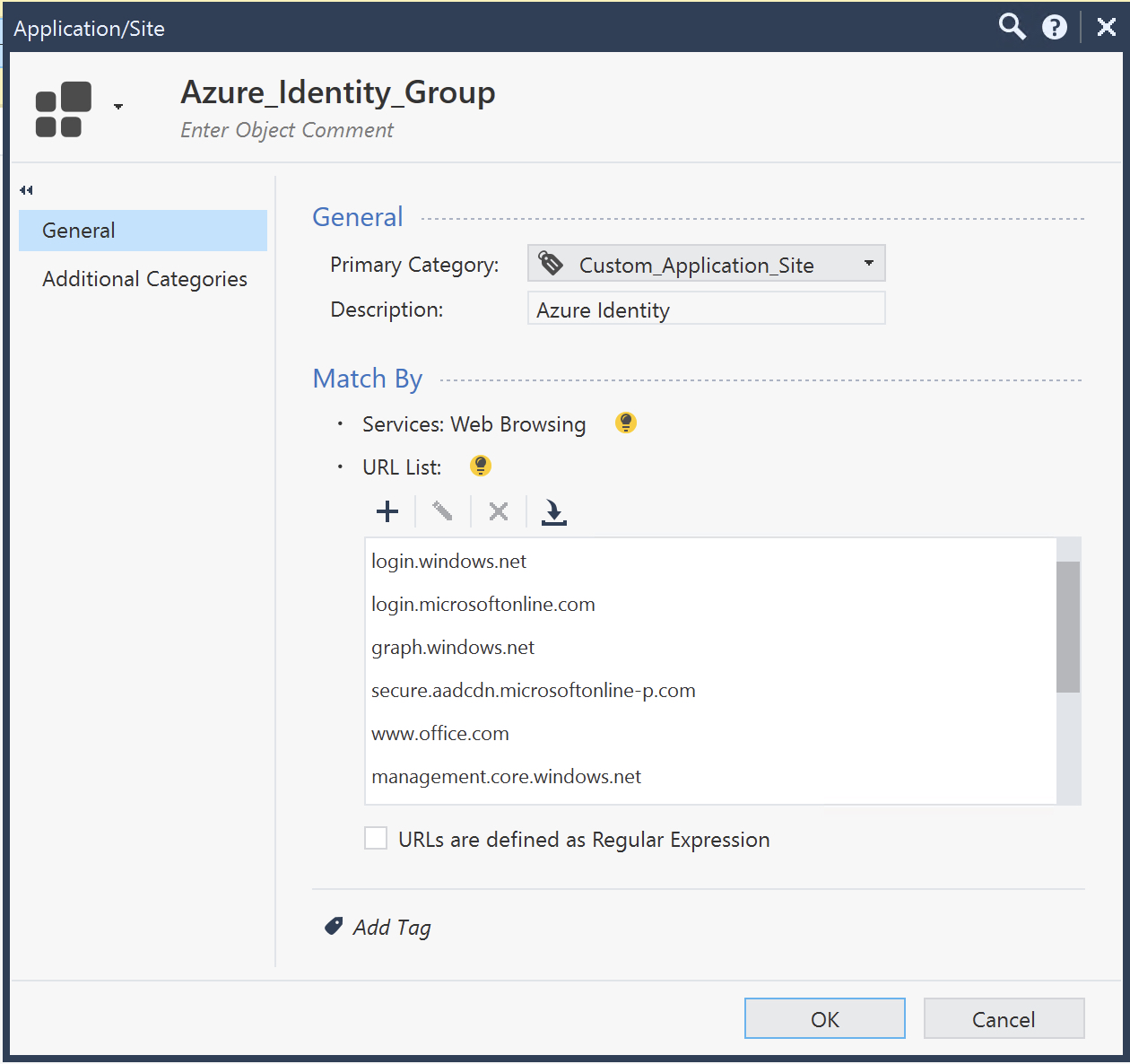
* Create a new Application/Site group and populate it with the list of current URLs.
Click the **+** button to create a new Service \& Application Group:

Custom Application/Site -\> Application/Site:
Application Group example. Add each respective URL:
* Repeat the process for each rule:
3. Install Policy.
****You can also use the following script to create application groups:****
Show / Hide this section
#!/bin/bash
. /etc/init.d/functions
. /opt/CPshared/5.0/tmp/.CPprofile.sh
vUSERNAME="\"
vPASSWORD="\"
#Login
mgmt_cli login user $vUSERNAME password $vPASSWORD \> id.txt
#Identity Group
mgmt_cli add application-site name Azure_Identity primary-category "Custom_Application_Site" url-list.1 login.windows.net urls-defined-as-regular-expression false --format json -s id.txt
mgmt_cli set application-site name Azure_Identity primary-category "Custom_Application_Site" url-list.add login.microsoftonline.com urls-defined-as-regular-expression false --format json -s id.txt
mgmt_cli set application-site name Azure_Identity primary-category "Custom_Application_Site" url-list.add graph.windows.net urls-defined-as-regular-expression false --format json -s id.txt
mgmt_cli set application-site name Azure_Identity primary-category "Custom_Application_Site" url-list.add secure.aadcdn.microsoftonline-p.com urls-defined-as-regular-expression false --format json -s id.txt
mgmt_cli set application-site name Azure_Identity primary-category "Custom_Application_Site" url-list.add www.office.com urls-defined-as-regular-expression false --format json -s id.txt
mgmt_cli set application-site name Azure_Identity primary-category "Custom_Application_Site" url-list.add management.core.windows.net urls-defined-as-regular-expression false --format json -s id.txt
mgmt_cli set application-site name Azure_Identity primary-category "Custom_Application_Site" url-list.add management.azure.com urls-defined-as-regular-expression false --format json -s id.txt
mgmt_cli set application-site name Azure_Identity primary-category "Custom_Application_Site" url-list.add \*.msftauth.net urls-defined-as-regular-expression false --format json -s id.txt
mgmt_cli set application-site name Azure_Identity primary-category "Custom_Application_Site" url-list.add \*.msauth.net urls-defined-as-regular-expression false --format json -s id.txt
mgmt_cli set application-site name Azure_Identity primary-category "Custom_Application_Site" url-list.add \*.msocdn.com urls-defined-as-regular-expression false --format json -s id.txt
#Identity Government Group
mgmt_cli add application-site name Azure_Identity_Government primary-category "Custom_Application_Site" url-list.1 login.microsoftonline.us urls-defined-as-regular-expression false --format json -s id.txt
mgmt_cli set application-site name Azure_Identity_Government primary-category "Custom_Application_Site" url-list.add graph.windows.net urls-defined-as-regular-expression false --format json -s id.txt
#Identity China 21Vianet
mgmt_cli add application-site name Azure_Identity_China primary-category "Custom_Application_Site" url-list.1 login.chinacloudapi.cn urls-defined-as-regular-expression false --format json -s id.txt
mgmt_cli set application-site name Azure_Identity_China primary-category "Custom_Application_Site" url-list.add graph.chinacloudapi.cn urls-defined-as-regular-expression false --format json -s id.txt
#Identity Germany
mgmt_cli add application-site name Azure_Identity_Germany primary-category "Custom_Application_Site" url-list.1 login.chinacloudapi.cn urls-defined-as-regular-expression false --format json -s id.txt
mgmt_cli set application-site name Azure_Identity_Germany primary-category "Custom_Application_Site" url-list.add graph.chinacloudapi.cn urls-defined-as-regular-expression false --format json -s id.txt
#Marketplace Group
mgmt_cli add application-site name Azure_Marketplace primary-category "Custom_Application_Site" url-list.1 management.azure.com urls-defined-as-regular-expression false --format json -s id.txt
mgmt_cli set application-site name Azure_Marketplace primary-category "Custom_Application_Site" url-list.add \*.blob.core.windows.net urls-defined-as-regular-expression false --format json -s id.txt
mgmt_cli set application-site name Azure_Marketplace primary-category "Custom_Application_Site" url-list.add \*.azureedge.net urls-defined-as-regular-expression false --format json -s id.txt
#Marketplace Government
mgmt_cli add application-site name Azure_Marketplace_Government primary-category "Custom_Application_Site" url-list.1 management.usgovcloudapi.net urls-defined-as-regular-expression false --format json -s id.txt
mgmt_cli set application-site name Azure_Marketplace_Government primary-category "Custom_Application_Site" url-list.add \*.blob.core.usgovcloudapi.net urls-defined-as-regular-expression false --format json -s id.txt
#Marketplace China 21Vianet
mgmt_cli add application-site name Azure_Marketplace_China primary-category "Custom_Application_Site" url-list.1 management.chinacloudapi.cn urls-defined-as-regular-expression false --format json -s id.txt
mgmt_cli set application-site name Azure_Marketplace_China primary-category "Custom_Application_Site" url-list.add \*.blob.core.chinacloudapi.cn urls-defined-as-regular-expression false --format json -s id.txt
#Patch and Update
mgmt_cli add application-site name Azure_Patch_and_Update primary-category "Custom_Application_Site" url-list.1 \*.azureedge.net urls-defined-as-regular-expression false --format json -s id.txt
mgmt_cli set application-site name Azure_Patch_and_Update primary-category "Custom_Application_Site" url-list.add aka.ms urls-defined-as-regular-expression false --format json -s id.txt
#Registration
mgmt_cli add application-site name Azure_Registration primary-category "Custom_Application_Site" url-list.1 management.azure.com urls-defined-as-regular-expression false --format json -s id.txt
#Registration Government
mgmt_cli add application-site name Azure_Registration_Government primary-category "Custom_Application_Site" url-list.1 management.usgovcloudapi.net urls-defined-as-regular-expression false --format json -s id.txt
#Registration China 21Vianet
mgmt_cli add application-site name Azure_Registration_China primary-category "Custom_Application_Site" url-list.1 management.chinacloudapi.cn urls-defined-as-regular-expression false --format json -s id.txt
#Usage
mgmt_cli add application-site name Azure_Usage primary-category "Custom_Application_Site" url-list.1 \*.trafficmanager.net urls-defined-as-regular-expression false --format json -s id.txt
#Usage Government
mgmt_cli add application-site name Azure_Usage_Government primary-category "Custom_Application_Site" url-list.1 \*.usgovtrafficmanager.net urls-defined-as-regular-expression false --format json -s id.txt
#Usage China 21Vianet
mgmt_cli add application-site name Azure_Usage_China primary-category "Custom_Application_Site" url-list.1 \*.trafficmanager.cn urls-defined-as-regular-expression false --format json -s id.txt
#Windows Defender
mgmt_cli add application-site name Windows_Defender primary-category "Custom_Application_Site" url-list.1 \*.wdcp.microsoft.com urls-defined-as-regular-expression false --format json -s id.txt
mgmt_cli set application-site name Windows_Defender primary-category "Custom_Application_Site" url-list.add \*.wdcpalt.microsoft.com urls-defined-as-regular-expression false --format json -s id.txt
mgmt_cli set application-site name Windows_Defender primary-category "Custom_Application_Site" url-list.add \*.wd.microsoft.com urls-defined-as-regular-expression false --format json -s id.txt
mgmt_cli set application-site name Windows_Defender primary-category "Custom_Application_Site" url-list.add \*.update.microsoft.com urls-defined-as-regular-expression false --format json -s id.txt
mgmt_cli set application-site name Windows_Defender primary-category "Custom_Application_Site" url-list.add \*.download.microsoft.com urls-defined-as-regular-expression false --format json -s id.txt
#CRL
mgmt_cli add application-site name Azure_CRL primary-category "Custom_Application_Site" url-list.1 crl.microsoft.com urls-defined-as-regular-expression false --format json -s id.txt
mgmt_cli set application-site name Azure_CRL primary-category "Custom_Application_Site" url-list.add mscrl.microsoft.com urls-defined-as-regular-expression false --format json -s id.txt
mgmt_cli set application-site name Azure_CRL primary-category "Custom_Application_Site" url-list.add www.microsoft.com urls-defined-as-regular-expression false --format json -s id.txt
#Diagnostic log collection
mgmt_cli add application-site name Azure_Diagnostic_Log primary-category "Custom_Application_Site" url-list.1 \*.blob.core.windows.net urls-defined-as-regular-expression false --format json -s id.txt
mgmt_cli set application-site name Azure_Diagnostic_Log primary-category "Custom_Application_Site" url-list.add azsdiagprdlocalwestus02.blob.core.windows.net urls-defined-as-regular-expression false --format json -s id.txt
mgmt_cli set application-site name Azure_Diagnostic_Log primary-category "Custom_Application_Site" url-list.add azsdiagprdwestusfrontend.westus.cloudapp.azure.com urls-defined-as-regular-expression false --format json -s id.txt
#Publish
mgmt_cli publish -s id.txt
#Logout
mgmt_cli logout -s id.txt
rm -f id.txt
echo "all done"
---
# Agent Instructions
This content is from the Check Point Support Center (https://support.checkpoint.com), the official knowledge base for Check Point cybersecurity products.
## Navigating This Knowledge Base
- **Complete index**: [llms.txt](https://support.checkpoint.com/llms.txt)
- **All SK articles**: [SecureKnowledge Sitemap](https://support.checkpoint.com/sitemaps/secureknowledge-sitemap-index.xml)
- **SK article URL pattern**: `https://support.checkpoint.com/results/sk/{skId}`
- **Markdown responses**: AI bot User-Agents automatically receive `text/markdown` content