> Source: [sk171422](https://support.checkpoint.com/results/sk/sk171422)
# sk171422 - SmartConsole connecting to a different Management server versions
| Property | Value |
|----------|-------|
| Solution ID | sk171422 |
| Date Created | 2021-01-11 |
| Last Modified | 2021-03-17 |
| Technical Level | General |
| Products | SmartConsole |
| Versions | R81 (EOS) |
| OS | Windows |
## Symptoms
- * When a user connects to incompatible SmartConsole client, login attempt may fail with "`Authentication to server failed`" error.
* After pressing "Launch", SmartConsole asks for a password.
## Solution
A new feature was added to
* **[R81 SmartConsole](https://supportcenter.checkpoint.com/supportcenter/portal?eventSubmit_doGoviewsolutiondetails=&solutionid=sk170116) starting from Build 549**
* **[R80.40 SmartConsole](https://supportcenter.checkpoint.com/supportcenter/portal?eventSubmit_doGoviewsolutiondetails=&solutionid=sk165473) starting from Build 422**
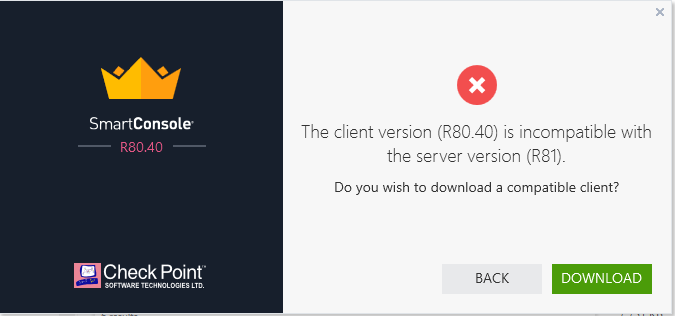
After upgrade, when the user connects to a Management server with a version different to the SmartConsole version, the correct SmartConsole version installed on user's computer will be launched automatically.
If the correct SmartConsole version is not already installed, the user will be able to download the correct installation package.
---
# Agent Instructions
This content is from the Check Point Support Center (https://support.checkpoint.com), the official knowledge base for Check Point cybersecurity products.
## Navigating This Knowledge Base
- **Complete index**: [llms.txt](https://support.checkpoint.com/llms.txt)
- **All SK articles**: [SecureKnowledge Sitemap](https://support.checkpoint.com/sitemaps/secureknowledge-sitemap-index.xml)
- **SK article URL pattern**: `https://support.checkpoint.com/results/sk/{skId}`
- **Markdown responses**: AI bot User-Agents automatically receive `text/markdown` content