> Source: [sk171292](https://support.checkpoint.com/results/sk/sk171292)
# sk171292 - How to find out the Endpoint Security Client versions in use
| Property | Value |
|----------|-------|
| Solution ID | sk171292 |
| Date Created | 2020-12-29 |
| Last Modified | 2020-12-29 |
| Technical Level | General |
| Products | Endpoint Security |
| Versions | R81 (EOS) |
## Solution
To view the Endpoint Security Client versions currently in use in the organization, use the Reporting tab on the Endpoint Management Server.
**Using SmartEndpoint:**
Navigate to 'Reporting tab \> Software Deployment \> Versions In Use', and select "Endpoint Security Client Versions".
**For example:**

**Using Web Management:**
Under 'Overview \> Operational Overview', you will see the "SandBlast Agent Version" widgets.
You may click on the version of interest to see a list of computers using that version.
**For example:**
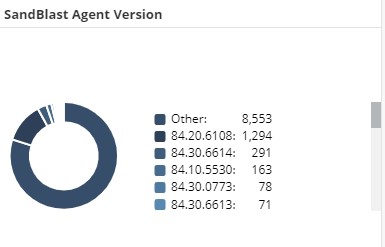
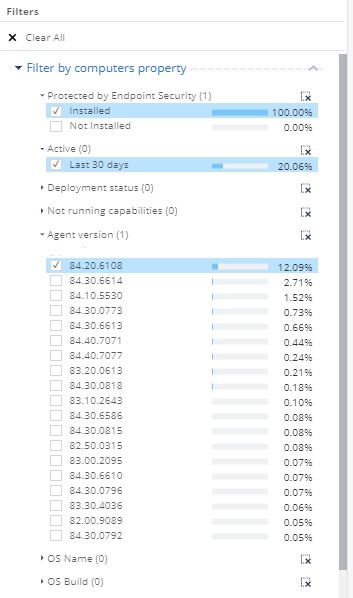
Alternatively, navigate to the Computer Management tab and use the "Agent Version" filter on the right-side panel.
**Note:** Use in conjunction with the "Installed" and "Active" filters to filter out computers not in use anymore.
**For example:**
For Standalone Remote Access VPN clients, refer to [sk171278](https://supportcenter.checkpoint.com/supportcenter/portal?eventSubmit_doGoviewsolutiondetails=&solutionid=sk171278).
---
# Agent Instructions
This content is from the Check Point Support Center (https://support.checkpoint.com), the official knowledge base for Check Point cybersecurity products.
## Navigating This Knowledge Base
- **Complete index**: [llms.txt](https://support.checkpoint.com/llms.txt)
- **All SK articles**: [SecureKnowledge Sitemap](https://support.checkpoint.com/sitemaps/secureknowledge-sitemap-index.xml)
- **SK article URL pattern**: `https://support.checkpoint.com/results/sk/{skId}`
- **Markdown responses**: AI bot User-Agents automatically receive `text/markdown` content