> Source: [sk170300](https://support.checkpoint.com/results/sk/sk170300)
# sk170300 - Policy installation fails with "Error code: 0-2000091"
| Property | Value |
|----------|-------|
| Solution ID | sk170300 |
| Date Created | 2020-11-03 |
| Last Modified | 2022-01-19 |
| Technical Level | General |
| Products | Security Gateway |
| Versions | R81 (EOS) |
| OS | Gaia |
## Symptoms
- * Policy installation fails with the following reason:
` Policy: Standard`
` Status: Failed`
` - Policy installation failed on gateway. If the problem persists contact Check Point support (Error code: 0-2000091).`
* Debug shows that the PM compilation has reached some internal maximal limit.:
`kiss_dfa_block_add: can't add more blocks: max small blocks reached (1);`
* Kernel debug shows:
`Adding range to ffffc200191d4260 - first:68(D), last:68(D), positive: 1;`
`kiss_pmascii_range_add_range: Adding range to ffffc200191d4260 - first:85(U),`
`last:85(U), positive: 1;`
`kiss_dfa_state_alloc_and_init: adding dfa block with 949 states;`
`kiss_dfa_block_add: can't add more blocks: max small blocks reached (1);`
`kiss_pm_compile_add_array_handle: kiss_tier2_compile failed;`
## Cause
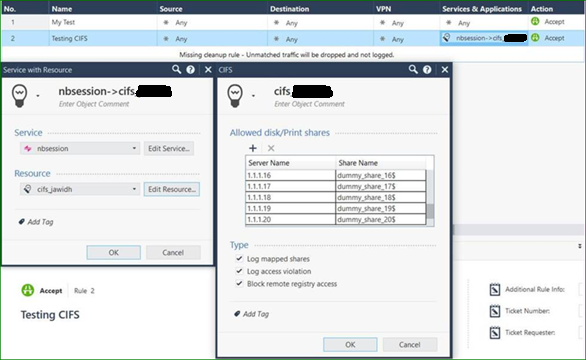
Policy installation fails when the number of objects in the CIFS resources is equal to or exceeds 20 objects.
## Solution
This problem was fixed. The fix is included in:
* [Jumbo Hotfix Accumulator for R81](https://supportcenter.checkpoint.com/supportcenter/portal?eventSubmit_doGoviewsolutiondetails=&solutionid=sk170114) starting from Take 34
* [Jumbo Hotfix Accumulator for R80.40](https://supportcenter.checkpoint.com/supportcenter/portal?eventSubmit_doGoviewsolutiondetails=&solutionid=sk165456) starting from Take 150
* [Jumbo Hotfix Accumulator for R80.30](https://supportcenter.checkpoint.com/supportcenter/portal?eventSubmit_doGoviewsolutiondetails=&solutionid=sk153152) starting from Take 241
* [Jumbo Hotfix Accumulator for R80.20](https://supportcenter.checkpoint.com/supportcenter/portal?eventSubmit_doGoviewsolutiondetails=&solutionid=sk137592) starting from Take 203
If you choose not to upgrade, Check Point can supply a **Hotfix** . [Contact Check Point Support](https://www.checkpoint.com/support-services/contact-support/) to get a Hotfix for this issue.
A Support Engineer will make sure the Hotfix is compatible with your environment before providing the Hotfix.
For faster resolution and verification, please collect [CPinfo files](http://supportcontent.checkpoint.com/solutions?id=sk92739) from the Security Management Server and Security Gateways involved in the case.
**Hotfix installation instructions:**
Refer to [sk168597 - How to install a Hotfix](https://supportcenter.checkpoint.com/supportcenter/portal?eventSubmit_doGoviewsolutiondetails=&solutionid=sk168597).
---
# Agent Instructions
This content is from the Check Point Support Center (https://support.checkpoint.com), the official knowledge base for Check Point cybersecurity products.
## Navigating This Knowledge Base
- **Complete index**: [llms.txt](https://support.checkpoint.com/llms.txt)
- **All SK articles**: [SecureKnowledge Sitemap](https://support.checkpoint.com/sitemaps/secureknowledge-sitemap-index.xml)
- **SK article URL pattern**: `https://support.checkpoint.com/results/sk/{skId}`
- **Markdown responses**: AI bot User-Agents automatically receive `text/markdown` content