> Source: [sk168353](https://support.checkpoint.com/results/sk/sk168353)
# sk168353 - Mobile Access Portal Clients Release Updates
| Property | Value |
|----------|-------|
| Solution ID | sk168353 |
| Date Created | 2020-07-31 |
| Last Modified | 2026-03-18 |
| Technical Level | General |
| Products | Security Gateway |
| Versions | R82.10, R82, R81.20, R81.10 (EOS), R81 (EOS) |
## Solution
**Introduction \| Availability \| Portal Agent \| Compliance Scanner \| Secure Workspace**
Introduction {#Introduction}
----------------------------
The Check Point Mobile Access Portal offers a variety of on-demand client technologies, including Compliance Scan and Secure Workspace. Use the Mobile Access Portal Agent to download and invoke the technologies.
The Mobile Access Portal Clients package is installed automatically on all relevant Check Point devices when Automatic Update downloads are enabled (see [sk175504](https://support.checkpoint.com/results/sk/sk175504), section 2-B).
If Automatic Updates are disabled, you must first manually install the latest [AutoUpdater](https://support.checkpoint.com/results/sk/sk165653) Take and then install the Mobile Access Portal Clients package manually using the steps below.
**Important:** This article does not replace [sk113410](https://support.checkpoint.com/results/sk/sk113410). The Portal Agent package supports only R80.40 and higher Security Gateways. For R80.10, R80.20, or R80.30 Security Gateway, install a hotfix from [sk113410](https://support.checkpoint.com/results/sk/sk113410) to work with the Mobile Access Portal from a supported browser.
Availability {#Availability}
----------------------------
|------------------------|-----------|--------------------|--------------|----------------------------------------------------------------------------------------------------------------------------------------------------------------------------------------------------|
| Client | Version | Update | Release Date | Package Download |
| **Portal Agent** | 800007049 | Update 5 - Take 20 | Sep 22, 2023 | [](https://supportcenter.checkpoint.com/supportcenter/portal?action=portlets.DCFileAction&eventSubmit_doGetdcdetails=&fileid=129548) (TAR) |
| **Compliance Scanner** | 100001169 | Update 2 - Take 10 | Aug 15, 2022 | [](https://supportcenter.checkpoint.com/supportcenter/portal?action=portlets.DCFileAction&eventSubmit_doGetdcdetails=&fileid=124212) (TAR) |
| **Secure Workspace** | 409800141 | Update 1 - Take 14 | Sep 29, 2020 | [](https://supportcenter.checkpoint.com/supportcenter/portal?action=portlets.DCFileAction&eventSubmit_doGetdcdetails=&fileid=109364) (TAR) |
**To check what Take is currently installed** , run this command: `# cpinfo -y cpupdates`
Show / Hide Example
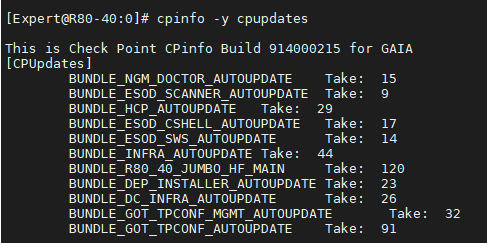
This output shows that these Portal Clients updates are installed:
* Compliance Scanner Take 9 (BUNDLE_ESOD_SCANNER_AUTOUPDATE)
* Portal Agent Take 17 (BUNDLE_ESOD_CSHELL_AUTOUPDATE)
* Secure Workspace Take 14 (BUNDLE_ESOD_SWS_AUTOUPDATE)
Portal Agent {#Portal Agent}
----------------------------
Show / Hide section
The Mobile Access Portal Agent downloads and operates on-demand Mobile Access Portal clients, such as SSL Network Extender, Compliance Scan and Secure Workspace.
### Pre-conditions {#Toggle_Portal_Agent}
* Install this package on Security Gateways running R80.20 and higher with the Mobile Access blade enabled.
* Install the latest Take of [AutoUpdater](https://support.checkpoint.com/results/sk/sk165653).
* This package cannot be installed on Scalable Platforms.
* This package cannot be installed together with MABDA hotfix ([sk113410](https://support.checkpoint.com/results/sk/sk113410))
### Manual installation
1. Make sure that your environment meets the pre-conditions.
2. To download the package, go to the Package Download link in the Availability section.
Copy this package to the `/home/admin` directory on the Security Gateway.
3. Connect to the Security Gateway via SSH and run this command:
`# autoupdatercli install /home/admin/`
4. On the Scalable Platform Security Group:
`g_all autoupdatercli install `
**Note** : The installation does not require **`cpstop; cpstart`** or a reboot. Once installed, no further action is required, the update will be applied immediately.
### Revert update
To revert update of the Portal Agent, connect to the Security Gateway via SSH and run this command:
`# autoupdatercli revert esod_cshell`
### Disable update
To disable automatic Portal Agent update, connect to the Security Gateway via SSH and run the following command:
`# autoupdatercli disable esod_cshell`
### List of Resolved Issues per Update for Mobile Access Portal Agent
|--------------------|-----------------------------------------------------------------------------------------------------------------------------------------------------------------------------------------------------------------------------------------------------------------------|
| ID | Description |
| **Update 5 - Take 20 (September 22, 2023)** ||
| MACL-1076 | Enhancement: Added version into /id handler. |
| MACL-1081 | Enhancement: CShell now shows some information in browser. |
| MACL-1079 | Byte ordering (endianness) is detected erroneously. |
| MACL-1075 | Multiple vulnerabilities in CShell.jar. |
| **Update 4 - Take 19 (April 3, 2023)** ||
| MACL-1038 | Enhancement: Integrated support of websockets into portal scripts and CShell. |
| **Update 3 - Take 18 (November 17, 2022)** ||
| MACL-1026 | Enhancement: Make Portal Agent (CShell) now works with openJDK 11, 17, 18, 19 and Oracle JDK 18. |
| MACL-983 | CShell may not detect macOS BigSur and macOS Monterey versions correctly. |
| MACL-1006 | "*You need to install Java to use the Mobile Access Agent* " ([sk109125](https://support.checkpoint.com/results/sk/sk109125)) message is shown during the installation of Check Point Mobile Access Agent although Java is already installed but cannot not detected. |
| **Update 2 - Take 17 (October 18, 2021)** ||
| MACL-913 | CShell sends request to the host before user confirms to trust it. |
| MACL-964 | SNX runs Native Applications from arbitrary locations. |
| **Update 1 - Take 13 (September 29, 2020)** ||
| MACL-900 | In some scenarios, users cannot reconnect to SNX after Active cluster member change. |
| PMTR-53528 | In some scenarios, SNX tunnel may unexpectedly disconnect. |
| MACL-882, MACL-884 | ESOD Scanner update may not be correct. |
| PMTR-53112 | Certificate installation on Firefox may fail. |
{#limitations-Table}
Compliance Scanner {#Compliance Scanner}
----------------------------------------
Show / Hide section
The Check Point Endpoint Security On Demand scanner scans the endpoint machine to see if it complies with the endpoint compliance policy. If the endpoint is compliant, the user can access the portal.
### Pre-conditions {#Toggle_Compliance_Scanner}
* Install this package on Security Gateways running R80.10 and higher with the Mobile Access blade enabled.
* Install the latest Take of [AutoUpdater](https://support.checkpoint.com/results/sk/sk165653).
* Package cannot be installed on Scalable platforms.
### Manual installation
1. Make sure that your environment meets the pre-conditions
2. To download the package, go to the Package Download link in the Availability section.
Copy this package to the `/home/admin` directory on the Security gateway.
3. Connect to the Security Gateway via SSH and run the following command:
`# autoupdatercli install /home/admin/`
**Note** : The installation does not require **`cpstop; cpstart`** or a reboot. Once installed, no further action is required, the update will be applied immediately.
### Revert update
To revert update of Compliance Scanner, connect to the Security Gateway via SSH and run this command:
`# autoupdatercli revert esod_compliance_scanner`
### Disable update
To disable automatic Compliance Scanner update, connect to the Security Gateway via SSH and run this command:
`# autoupdatercli disable esod_compliance_scanner`
### List of Resolved Issues per Update for Compliance Scanner
|------------|--------------------------------------------------------------------------------------|
| ID | Description |
| **Update 2 - Take 10 (August 15, 2022)** ||
| EPS-30124 | Compliance check fails because of Anti-Virus "Cylance Protect". |
| EPS-32506 | CrowdStrike is missing in Compliance (Windows). |
| EPS-33950 | Compliance blade shows machine is not complaint when Anti-Virus is actually running. |
| EPS-37041 | Harmony Endpoint: compliance check fails for CrowdStrike. |
| EPS-43954 | Compliance blade does not detect E2 Anti-Malware signature updates. |
| MACL-962 | \<6-0002553831\> Compliance blade reports incorrect Anti-Malware Update values. |
| MACL-966 | Enhancement: Added detection of Kaspersky on RedOS. |
| MACL-984 | ESOD does not detect Bitdefender Endpoint Security Tools as an active antivirus. |
| MACL-986 | ESOD does not detect Zone Alarm Next Gen Antivirus. |
| MACL-1018 | ESOD does not detect Sophos Antivirus version 2.20.13. |
| MACL-1023 | ESOD compliance scanner cannot detect Bitdefender Total Security Build 26.0.18.75. |
| MACL-1024 | ESOD does not properly detect Check Point EPS as antispyware. |
| **Update 1 - Take 9 (September 29, 2020)** ||
| PMTR-56705 | **NEW:** Added support of New Mobile Access Portal UI. |
| MACL-854 | **NEW:**Added support of Trend Micro Maximum Security. |
{#limitations-Table}
Secure Workspace {#Secure Workspace}
------------------------------------
Show / Hide section
Secure Workspace is the Check Point proprietary virtual desktop that enables data protection during user-sessions, and enables cache wiping after the sessions end. It protects all session-specific data accumulated on the client side.
### Pre-conditions {#Toggle_Secure_Workspace}
* Install this package on Security Gateways running R80.10 and higher with the Mobile Access blade enabled.
* Install the latest Take of [AutoUpdater](https://supportcenter.checkpoint.com/supportcenter/portal?eventSubmit_doGoviewsolutiondetails=&solutionid=sk165653).
* Package cannot be installed on Scalable platforms.
### Manual installation
1. Make sure that your environment meets the pre-conditions
2. To download the package, go to the Package Download link in the Availability section.
Copy this package to the `/home/admin` directory on the Security gateway.
3. Connect to the Security Gateway via SSH and run this command:
`# autoupdatercli install /home/admin/`
**Note** : The installation does not require **`cpstop; cpstart`** or a reboot. Once installed, no further action is required, the update will be applied immediately.
### Revert update
To revert update of Secure Workspace, connect to the Security Gateway via SSH and run this command:
`# autoupdatercli revert esod_secure_workspace`
### Disable update
To disable automatic Secure Workspace update, connect to the Security Gateway via SSH and run this command:
`# autoupdatercli disable esod_secure_workspace`
### List of Resolved Issues per Update for Secure Workspace
|------------|---------------------------------------------------------------------|
| ID | Description |
| **Update 1 - Take 14 - (September 29, 2020)** ||
| PMTR-53429 | **NEW:** Added R81 support in Secure Workspace (SWS) update script. |
| PRHF-1295 | Allow Server-to-Client to work with external service. |
| MACL-880 | Virtualize the #ISW.FS# folder. |
{#limitations-Table}
---
# Agent Instructions
This content is from the Check Point Support Center (https://support.checkpoint.com), the official knowledge base for Check Point cybersecurity products.
## Navigating This Knowledge Base
- **Complete index**: [llms.txt](https://support.checkpoint.com/llms.txt)
- **All SK articles**: [SecureKnowledge Sitemap](https://support.checkpoint.com/sitemaps/secureknowledge-sitemap-index.xml)
- **SK article URL pattern**: `https://support.checkpoint.com/results/sk/{skId}`
- **Markdown responses**: AI bot User-Agents automatically receive `text/markdown` content