> Source: [sk164917](https://support.checkpoint.com/results/sk/sk164917)
# sk164917 - SmartConsole shows "No license" and "Contract is expired" for IPS, Application Control and URL Filtering blades in VSX
| Property | Value |
|----------|-------|
| Solution ID | sk164917 |
| Date Created | 2020-01-29 |
| Last Modified | 2023-09-04 |
| Technical Level | General |
| Products | Security Gateway |
| Versions | R82.10, R82, R81.20 |
| OS | Gaia |
## Symptoms
- * On VS0 users see:
```
cat $FWDIR/ips/update/ips_status.C
:app_subscription_expiration_date ("Sat Jul 29 00:00:00 2021")
:app_subscription_enforcement_status (valid)
:app_subscription_status (valid)
:app_subscription_description ("Contract is up to date.")
```
* On the problematic VS users see:
```
cat $FWDIR/ips/update/ips_status.C
:app_subscription_expiration_date ("Thu Jan 1 00:59:59 1970")
:app_subscription_status (expired)
:app_subscription_enforcement_status (expired)
:app_subscription_description ("Contract is expired.")
```
* SmartConsole shows "NO license" on IPS blade. 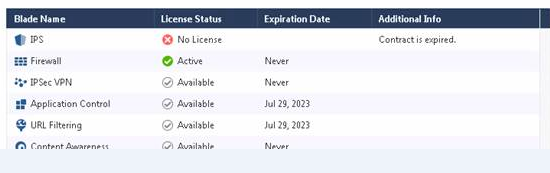
## Cause
Contract file last modified time attribute synchronization issue between VS0 and Virtual Systems.
## Solution
This problem was fixed. The fix is included in:
* [Check Point R81](https://supportcenter.checkpoint.com/supportcenter/portal?eventSubmit_doGoviewsolutiondetails=&solutionid=sk166715)
* [Jumbo Hotfix Accumulator for R80.40](https://supportcenter.checkpoint.com/supportcenter/portal?eventSubmit_doGoviewsolutiondetails=&solutionid=sk165456) since Take 25
* [Jumbo Hotfix Accumulator for R80.30](https://supportcenter.checkpoint.com/supportcenter/portal?eventSubmit_doGoviewsolutiondetails=&solutionid=sk153152) since Take 210
* [Jumbo Hotfix Accumulator for R80.20](https://supportcenter.checkpoint.com/supportcenter/portal?eventSubmit_doGoviewsolutiondetails=&solutionid=sk137592) since Take 160
If you choose not to upgrade, run the following commands on all affected VS's:
* *# vsenv VS_ID*
* *# cp -P $CPDIR/conf/cp.contract $CPDIR/conf/cp.contract.org*
* *# touch -h $CPDIR/conf/cp.contract (-h does not work for R80.30)*
* *For R80.30, do the following command to copy the contract manually from VSX to VS*
* *cp /opt/CPshrd-R80.30/conf/cp.contract /opt/CPshrd-R80.30/CTX/CTX00002/conf/cp.contract( replace CTX00002 with your respected VS)*
Note: The uppercase P- preserve the specified attributes (default: mode, ownership, timestamps)
Wait for 5-10 minutes and check SmartMonitor. License status should be fully updated now.
**Note:** If you apply a new contract file, then you will need to re-apply this workaround.
---
# Agent Instructions
This content is from the Check Point Support Center (https://support.checkpoint.com), the official knowledge base for Check Point cybersecurity products.
## Navigating This Knowledge Base
- **Complete index**: [llms.txt](https://support.checkpoint.com/llms.txt)
- **All SK articles**: [SecureKnowledge Sitemap](https://support.checkpoint.com/sitemaps/secureknowledge-sitemap-index.xml)
- **SK article URL pattern**: `https://support.checkpoint.com/results/sk/{skId}`
- **Markdown responses**: AI bot User-Agents automatically receive `text/markdown` content