> Source: [sk164852](https://support.checkpoint.com/results/sk/sk164852)
# sk164852 - No logs written on Security Gateway while connection has established
| Property | Value |
|----------|-------|
| Solution ID | sk164852 |
| Date Created | 2020-01-23 |
| Last Modified | 2022-10-26 |
| Technical Level | General |
| Products | Security Gateway, Security Management Server |
| Versions | R82.10, R82, R81.20, R82.20 |
| OS | Gaia |
## Symptoms
- * Logs are not being saved on the security gateway or written to the log server without an apparent trigger - fwd is up on both gateway and log server.
*
```
in fwd.elg:
calling srv_disconnected_cb for 'LS_Hostname', conn = (nil), conn->closed = 1, conn->state != LSTATE_CONNECTED = 1
[FWD PID]@Host[DATE TIME] srv_disconnected: change 'LS_IP' status to Status ERROR description: Log-Server Disconnected
[FWD PID]@Host[DATE TIME] log_connected: change 'LS_IP' status to Status OK description: Log-Server Connected
in cplog_debug.elg (From R80.20):
[FWD PID]@Host[DATE TIME] srv_disconnected: Reducing s_nActiveRemoteServerCount by one: connect_fail now: 0
[FWD PID]@Host[DATE TIME] set_new_server_status: setting new status: NOT_ACTIVE for IP: LS_IP
[FWD PID]@Host[DATE TIME] set_new_server_status: setting new status: CONNECTED for IP: LS_IP
[FWD PID]@Host[DATE TIME] log_connected: log Server 'LS_IP': CONNECTED (Connect to log server succeeded)
```
* Running "cpstat fw -f log_connection" on the security gateway shows the log server as connected but logs are not being sent.
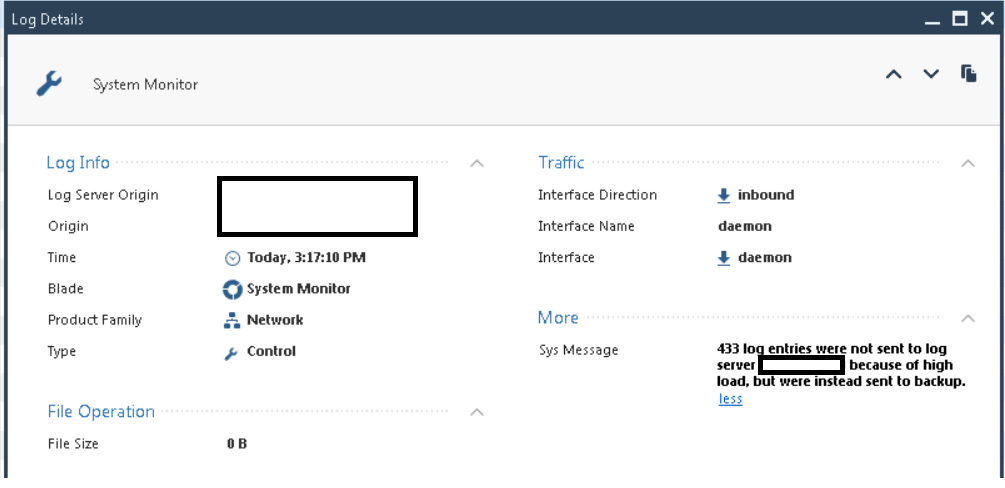
* Multiple logs appear on the SmartConsole with the following message: xxx log entries were not sent to log server x.x.x.x because of high load, but were instead sent to backup.
## Cause
```
The issue may occur due to network latency between the Security Gateway and the defined Log Server or frequent disconnections.
```
## Solution
This problem was fixed. The fix is included in:
* [Jumbo Hotfix Accumulator for R80.30](https://supportcenter.checkpoint.com/supportcenter/portal?eventSubmit_doGoviewsolutiondetails=&solutionid=sk153152) since Take 135
* [Jumbo Hotfix Accumulator for R80.20](https://supportcenter.checkpoint.com/supportcenter/portal?eventSubmit_doGoviewsolutiondetails=&solutionid=sk137592) since Take 134
* [Jumbo Hotfix Accumulator for R80.10](https://supportcenter.checkpoint.com/supportcenter/portal?eventSubmit_doGoviewsolutiondetails=&solutionid=sk116380) since Take 270
For **other [supported](http://www.checkpoint.com/support-services/support-life-cycle-policy/index.html) versions** , Check Point can supply a **Hotfix** . [Contact Check Point Support](https://www.checkpoint.com/support-services/contact-support/) to get a Hotfix for this issue.
A Support Engineer will make sure the Hotfix is compatible with your environment before providing the Hotfix.
For faster resolution and verification, please collect [CPinfo files](http://supportcontent.checkpoint.com/solutions?id=sk92739) from the Security Management Server and Security Gateways involved in the case.
Also, as a workaround restart the fwd process on the gateway.
---
# Agent Instructions
This content is from the Check Point Support Center (https://support.checkpoint.com), the official knowledge base for Check Point cybersecurity products.
## Navigating This Knowledge Base
- **Complete index**: [llms.txt](https://support.checkpoint.com/llms.txt)
- **All SK articles**: [SecureKnowledge Sitemap](https://support.checkpoint.com/sitemaps/secureknowledge-sitemap-index.xml)
- **SK article URL pattern**: `https://support.checkpoint.com/results/sk/{skId}`
- **Markdown responses**: AI bot User-Agents automatically receive `text/markdown` content