> Source: [sk164155](https://support.checkpoint.com/results/sk/sk164155)
# sk164155 - CoreXL Dynamic Balancing
| Property | Value |
|----------|-------|
| Solution ID | sk164155 |
| Date Created | 2020-01-30 |
| Last Modified | 2026-08-05 |
| Technical Level | General |
| Products | Security Gateway, Scalable Platforms |
| Versions | R82.10, R82, R81.20, R81.10 (EOS), R81 (EOS), R82.10, R82, R81.20, R81.10 (EOS), R81 (EOS) |
| OS | Gaia |
## Solution
**Table of Contents**
* Introduction
* Key Features
* System Requirements
* CLI Syntax
* Advanced Configuration Parameters
* Monitoring
* SmartConsole Extension
* Super Instance Feature
* Turbo Boost Feature
* "Green" Feature
* HyperFlow Resource Allocation
* FAQ
* Notes
* Known Limitations
Click Here to Show the Entire Article
Introduction {#Introduction}
----------------------------
CoreXL Dynamic Balancing is a performance-enhancing daemon that balances the load between CoreXL SND instances and CoreXL Firewall instances. It dynamically changes the split between CoreXL SND instances and CoreXL Firewall instances and does not require a reboot or cause an outage.
Each Check Point Security Gateway's CPU belongs to one of two groups, each of which performs a different task:
* CoreXL Firewall Instance
* CoreXL SND (with the exception of a single CPU running FWD in large User-Space appliances).
The distribution of jobs across a Security Gateway's CPU cores is referred to as the Security Gateway's split. As the distribution of work across these groups depends on your security policy and traffic, we highly recommend that you configure your split to fit your specific needs.
CoreXL's Out-of-the-Box Dynamic Balancing performs a dynamic change of the split. It monitors the Security Gateway performance and makes changes as needed.
**Default State:**
* CoreXL Dynamic Balancing is enabled by default in the versions R81 and higher.
**Note:** If you manually changed CoreXL or Multi-Queue affinity settings in the R80.40 version, then after an upgrade from R80.40 to R81 (or higher), CoreXL Dynamic Balancing is disabled by default.
* CoreXL Dynamic Balancing is disabled by default in the R80.40 version.
|--------------------------------------------------------------------------------------------------------------------------------------------------------------------------------------------------------------------------------------------------------------------------------------------------------------------------------------------------------------------------------------------------------------|
| **Important Note:** The CoreXL Dynamic Balancing feature applies to IPv4 and IPv6 CoreXL Firewall instances. To balance the load between IPv6 CoreXL instances, you can manually increase the number of IPv6 CoreXL Firewall instances with the "`cpconfig`" command (in the menu, select the **Check Point CoreXL** option \> configure the applicable number of IPv6 CoreXL Firewall instances \> reboot). |
Key Features {#Key_Features}
----------------------------
* Out-of-the-box optimization
* A flexible split to suit your profile
System Requirements {#System_Requirements}
------------------------------------------
|---------------------------------------|---------------------------------------------------------------------------------------------------------------------------------------------------------------------------------------------------------------------------------------------------------------------------------------------------------------------------------------------------------------------------------------------------------------------------------------------------------------------------------------------------------------------------------------------------------------------------------------------------------------------------------------------------------------------------------------------------------------------------------------------------------------------------------------------------------------------------------------------------------------------------------------------------------------------------------------------------------------------------------------------------------------------------------------------------------------------------------------------------------------------------|
| Category | Information |
| Supported Platforms | CoreXL Dynamic Balancing is supported only on Check Point Appliances. (CoreXL Dynamic Balancing is not supported on Virtual Machines and is not supported on Open Servers.) |
| Supported Appliance Models | CoreXL Dynamic Balancing is supported on these models (non-Maestro configuration): * All models in these series: 7000, 9000, 15000, 16000, 19000, 23000, 26000, 28000, 29000 * 5000 series: 5600, 5800, 5900 * 6000 series: 6200T, 6400, 6500, 6600, 6700, 6800, 6900 * 3900 series: 3920, 3950, 3970, 3980 * 3000 series: 3100, 3200, 3600, 3800 * Quantum LightSpeed QLS and MLS Appliances with SecureXL in the KPPAK mode * Quantum LightSpeed QLS and MLS Appliances with SecureXL in the UPPAK mode (starting in the R81.20 Jumbo Hotfix Take 38). Notes: * On appliance models with fewer than 8 CPU cores, you must enable the GNAT port allocation feature as described in [sk165153](https://support.checkpoint.com/results/sk/sk165153). **Note:** On the 3920 appliance, GNAT port allocation and dynamic split are enabled by default. If CoreXL Dynamic Balancing was enabled before or is enabled by default, then after you enable GNAT and reboot, CoreXL Dynamic Balancing starts running automatically. * R80.40 is the last supported version for the 2200 / 4000 / 12000 / 13000 / 21000 appliances. |
| Supported Configurations and Versions | * Security Gateway (Kernel FW mode and User Space FW mode): * R81 and higher * Starting in R81, the CoreXL Dynamic Balancing feature is enabled by default * R80.40 Jumbo Hotfix, Take 25 and higher * StandAlone Server: * R81 and higher * Starting in R81, the CoreXL Dynamic Balancing feature is enabled by default * R80.40 Jumbo Hotfix, Take 25 and higher * VSX * R81.10 and higher versions * Starting in R81.20, the VSX support is enabled by default * Starting in R81.10, the CoreXL Dynamic Balancing feature is enabled by default * R81 Jumbo Hotfix, Take 58 and higher * R80.40 Jumbo Hotfix, Take 126 and higher * ElasticXL Security Group * R82 and higher * The CoreXL Dynamic Balancing feature is enabled by default * Maestro Security Group * R81.20 and higher * Starting in R81.20, the CoreXL Dynamic Balancing feature is enabled by default * Including Security Groups with mixed appliance models * Security Group on Scalable Chassis 44000 / 64000 (only with SGM440) * R81.20 and higher * Starting in R81.20, the CoreXL Dynamic Balancing feature is enabled by default |
| Supported Features | * Only IPv4 CoreXL instances are balanced automatically. Balancing of IPv6 CoreXL instances requires manual configuration with the "`fw6 ctl affinity -s`" command. * Management Data Plane Separation (MDPS, [sk138672](https://support.checkpoint.com/results/sk/sk138672)) is supported. * Bridge mode is supported. |
CLI Syntax {#CLI_Syntax}
------------------------
Show / Hide this section
For the complete procedures, refer to the [Performance Tuning Administration Guide](https://support.checkpoint.com/product/530#f-commonsource=C.%20Documentation) for your version \> Chapter "**CoreXL** " \> Section "**Performance Tuning** " \> Section "**Dynamic Balancing of CoreXL Instances**".
**Important** - In ClusterXL, you must configure all cluster members in the same way. In High Availability mode, start with the Standby members.
**Syntax**
|-------------|----------------------------------------------------------------------------------------------------------------------------------------------------------------------------------------------------------------------------------------------------------------------------------------------------------------------------|----------------------------------------------------------------------------------------------------------------------------------------------------------------------------------------------------------------------------------------------------------------------------------------------------------------------------|
| Shell | Security Gateway (each Cluster Member) | Scalable Platform Security Group |
| Gaia Clish | |------------------------------------------------------------------------------------------------------| | ``` set dynamic-balancing config value state disable enable reset start stop ``` | | ``` show dynamic-balancing state ``` | | N / A |
| Gaia gClish | N / A | |------------------------------------------------------------------------------------------------------| | ``` set dynamic-balancing config value state disable enable reset start stop ``` | | ``` show dynamic-balancing state ``` | |
| Expert Mode | |-------------------------------------------------------------------------------------------------| | ``` dynamic_balancing -h -o disable -o enable -o start -o stop -p -r -v ``` | | |-------------------------------------------------------------------------------------------------------------------------------------------------------| | ``` g_dynamic_balancing -h -o disable -o enable -o start [member_ids ] -o stop [member_ids ] -p -r -v ``` | |
**Parameters**
|----------------------------------------------------------------|-----------------------------------------------------------------------------------------------------------------------------------------------------------------------------------------------------------------------------------------------------------------------------------------------------------------------------------------------------------------------------------------------------------------------------------------------------------------------------------------------------------------------------------------------------------------------------------------------------------------------------------------------------------------------------------------------------------------------|
| Parameter | Description |
| `-h`, No Parameters | Shows the applicable built-in help. |
| `disable` | Disables the CoreXL Dynamic Balancing. **Important:** * When you disable this feature, the CoreXL configuration returns to the default. * After you disable this feature, the Security Gateway / Scalable Platform Security Group requires a reboot. The command shows the applicable message. **Best Practice** - To keep the Scalable Platform Security Group active, we recommended to reboot the Security Group Members gradually (in two groups). |
| `enable` | Enables the CoreXL Dynamic Balancing. **Important:** * After you enable this feature, the Security Gateway / Scalable Platform Security Group requires a reboot. The command shows the applicable message. * After you enable this feature for the first time, the Security Gateway / Scalable Platform Security Group may require a reboot in these cases: * The current CoreXL configuration is not the default * More CoreXL SND instances are required for the current CPU load * After the boot, you can stop, start, and this feature without a reboot. **Best Practice** - To keep the Scalable Platform Security Group active, we recommended to reboot the Security Group Members gradually (in two groups). |
| `reset` or `-r` | Resets the CoreXL configuration to the default and keeps the CoreXL Dynamic Balancing enabled. This command is equivalent to the "`disable`" command followed by the "`enable`" command. **Important:** * After this feature resets, the CoreXL configuration returns to the default. This change does **not** require a reboot. |
| `stop` | Stops the CoreXL Dynamic Balancing. **Important:** * When you stop this feature, the Security Gateway / Scalable Platform Security Group uses the last CoreXL Balancing configuration. * This change does **not** require a reboot. * This change survives the reboot. |
| `start` | Starts the CoreXL Dynamic Balancing after it was stopped manually. **Important:** * When you start this feature, the Security Gateway / Scalable Platform Security Group continues to change the CoreXL Balancing configuration automatically based on the CPU utilization. * This change does **not** require a reboot. * This change survives the reboot. |
| `show dynamic-balancing state` or `-p` | Shows the current state of the CoreXL Dynamic Balancing ("On", "Stopped", or "Off"). |
| `config value ` or `-v ` | Configures advanced parameters. See the section "Advanced Configuration Parameters". Availability: * R81.20 and higher * R81.10 Jumbo Hotfix, from Take 79 * R81 Jumbo Hotfix, from Take 77 * R80.40 Jumbo Hotfix, from Take 180 |
Advanced Configuration Parameters {#Advanced_Configuration_Parameters}
----------------------------------------------------------------------
Show / Hide this section
CoreXL Dynamic Balancing has various configuration parameters that you can change during the run-time.
**CLI Syntax:**
|----------------------------------------|------------------------------------------------------------------------------|----------------------------------------------|
| Configuration | Gaia Clish / Gaia gClish | Expert Mode |
| Security Gateway (each Cluster Member) | 1. `set dynamic-balancing config value ` 2. `save config` | `dynamic_balancing -v ` |
| Scalable Platform Security Group | `set dynamic-balancing config value ` | `g_dynamic_balancing -v ` |
**Availability:**
* R81.20 and higher
* R81.10 Jumbo Hotfix, Take 79 or higher
* R81 Jumbo Hotfix, Take 77 or higher
* R80.40 Jumbo Hotfix, Take 180 or higher
**Notes:**
* You can see the configured advanced parameters and their values in these files:
* `$FWDIR/conf/dynamic_split.conf`
* `$FWDIR/log/dsc.elg`
* To return a parameter to its default value, use the value "`default`" in the CLI syntax.
* Parameter names are case-sensitive. Write them exactly as they appear in the table below.
Enter the string to filter this table:
|----------------------------------------|---------------------------------------------------------------------------------------------------------------------------------------------------------------------------------------------------------------------------------------------------------------------------------------------------------------------------------------------------------------------------------------------------------------------------------------------|----------------------------------------------|--------------------------------------------|--------------|
| Advanced Configuration Parameter | Description | Unit | Default Value | Valid Values |
| **`ALPHA`** | Specifies the balancing decision sensitivity - the minimal difference between the CoreXL Firewall CPU cores and CoreXL SNDs CPU cores to perform a change. | N/A | 10 | 0 - 100 |
| **`EMERGENCY_CPU_HANDLING_THRESHOLD`** | Specifies the threshold for the average CPU utilization of CoreXL Firewall instances - if the average CPU utilization is greater than this value, then CoreXL SND instances must work harder by a factor of "`EMERGENCY_CPU_HANDLING_FACTOR`". | % | 50 | 0 - 100 |
| **`EMERGENCY_CPU_HANDLING_FACTOR`** | Specifies the factor by which the CoreXL SND instances must work harder if the average CPU utilization is greater than "`EMERGENCY_CPU_HANDLING_THRESHOLD`". Example: value of 70 means a factor of 1.7 | N/A | 70 | 0 - 100 |
| **`VERBOSE_DEBUG`** | Enables verbose debugs. | BOOLEAN | 0 | 0 and 1 |
| **`VERIFY_INTERVAL`** | Specifies the state verification interval. Every verification interval, CoreXL Dynamic Balancing makes sure its internal state is in sync with the system's state. Use the value 0 to disable the state verification checks. | Loop Cycles (300 cycles take approx. 5 mins) | 300 | 0 - 1000 |
| **`RECOVERY_ATTEMPTS`** | Specifies the number of attempts to recover after a state verification failure. Use the value 0 to disable this mechanism. | N/A | 0 | 0 - 100 |
| **`SUPER_INST_ENABLED`** | Enables the "Super Instance" feature. See the section "Super Instance Feature". | BOOLEAN | 1 | 0 and 1 |
| **`SUPER_INST_ADD_FW_LOAD`** | Super Instances can be added if the average utilization of CoreXL Firewall instances is below this threshold. See the section "Super Instance Feature". | % | 60 | 0 - 100 |
| **`SUPER_INST_REMOVE_FW_LOAD`** | Specifies the threshold for the average CPU utilization of CoreXL Firewall instances - if the average CPU utilization is greater than this value, then CoreXL removes the Super Instances. See the section "Super Instance Feature". | % | 70 | 0 - 100 |
| **`DMD_WAKEUP_FW_LOAD`** | Specifies the threshold for the average CPU utilization of CoreXL Firewall instances - if the average CPU utilization is lower than this value, and an Elephant Connection was detected, then CoreXL "wakes up" the HyperFlow PPE threads. See the [Performance Tuning Administration Guide](https://support.checkpoint.com/product/530#f-commonsource=C.%20Documentation) for your version (R81.20 and higher) \> Chapter "**HyperFlow**". | % | 60 | 0 - 100 |
| **`DMD_SLEEP_FW_LOAD`** | Specifies the threshold for the average CPU utilization of CoreXL Firewall instances - if the average CPU utilization is greater than this value, then CoreXL "puts asleep" the HyperFlow PPE threads. See the [Performance Tuning Administration Guide](https://support.checkpoint.com/product/530#f-commonsource=C.%20Documentation) for your version (R81.20 and higher) \> Chapter "**HyperFlow**". | % | 70 | 0 - 100 |
| **`ENABLE_TURBO`** | Enables the "Turbo Boost" feature. See the section "Turbo Boost Feature". | BOOLEAN | Depends on the appliance model and version | 0 and 1 |
| `PREVENT_TURBO_ON_EF` | If enabled, then during an Elephant Connection (a large file transfer): * CoreXL Firewall instances will continue to work at a Stable-Turbo Frequency. * The HyperFlow PPE instances will work at the Base Frequency. See the section "Turbo Boost Feature". |
|
|
|
{#Advanced_ParametersTable}
Monitoring {#Monitoring}
------------------------
Show / Hide this section
* You can see the CoreXL Dynamic Balancing status in CPView ([sk101878](https://support.checkpoint.com/results/sk/sk101878)) \> **SysInfo** tab.
Example:
```
|--------------------------------------------------------------------------
| CPVIEW.SysInfo
|--------------------------------------------------------------------------
| Overview SysInfo Network CPU I/O Software-blades Hardware-Health Advanced
|--------------------------------------------------------------------------
| Configuration Information:
|
| Platform Gaia 64Bit
| Configuration Check Point Security Gateway
| CoreXL Status On
| CoreXL instances 28
| Dynamic Balancing Status On
```
* You can monitor the CoreXL Dynamic Balancing performance in CPView \> **CPU** tab.
Example:
```
|--------------------------------------------------------------------------
| CPVIEW.CPU.Overview.Host
|--------------------------------------------------------------------------
| Overview SysInfo Network CPU I/O Software-blades Hardware-Health Advanced
|--------------------------------------------------------------------------
| Overview Top-Protocols Top-Connections Spikes Processes
|--------------------------------------------------------------------------
| Host
|--------------------------------------------------------------------------
| Overview:
|
| CPU type CPUs Avg utilization
| CoreXL_SND 2 0%
| CoreXL_FW 2 6%
| -------------------------------------------------------------------------
| CPU:
|
| CPU Type User System Idle I/O wait Interrupts
| 0 CoreXL_SND 0% 0% 100% 0% 10,406
| 1 CoreXL_SND 3% 5% 92% 0% 10,404
| 2 CoreXL_FW 2% 3% 95% 0% 10,404
| 3 CoreXL_FW 2% 4% 94% 0% 10,401
```
* You can monitor the CoreXL Dynamic Balancing actions in these log files on the Security Gateway / Scalable Platform Security Group:
* `$FWDIR/log/dynamic_split.elg`
* `$FWDIR/log/dsd.elg`
SmartConsole Extension {#SME}
-----------------------------
Show / Hide this section
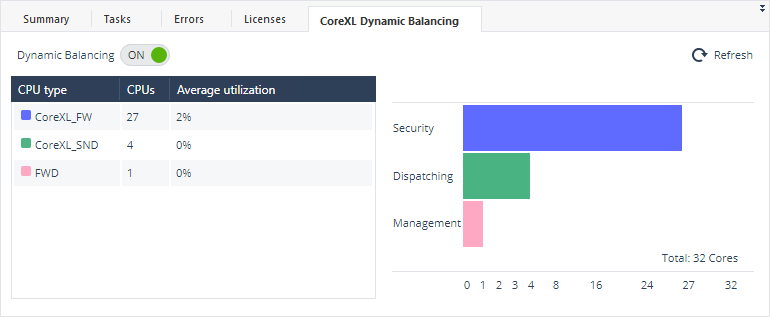
You install the SmartConsole Extension "**CoreXL Dynamic Balancing**" to monitor and control CoreXL Dynamic Balancing.
In SmartConsole:
1. From the left navigation panel, click **Manage \& Settings**.
2. Click **Preferences**.
3. In the **SmartConsole Extensions** section, click **\[+\]** (**Import**).
4. Paste this URL and click OK:
`https://dannyjung.de/ds.json`
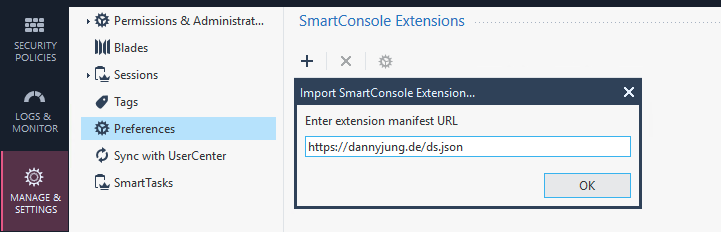
5. Click **OK** to confirm.
6. From the left navigation panel, click **Gateways \& Servers**.
7. In the top pane, click the relevant Security Gateway / Cluster object.
8. In the bottom pane, click the tab **CoreXL Dynamic Balancing**.
For more information, refer to this [CheckMates](https://community.checkpoint.com/t5/SmartConsole-Extensions/CoreXL-Dynamic-Balancing/m-p/87503) discussion.
Example:
Super Instance Feature {#Super_Instance_Feature}
------------------------------------------------
Show / Hide this section
The Super Instance feature is supported in these versions (**not** supported in the VSX mode):
* R81.20 and higher
* R81.10 Jumbo Hotfix Take 79 or higher
* R81 Jumbo Hotfix Take 77 or higher
* R80.40 Jumbo Hotfix Take 180 or higher
The Super Instance feature (enabled by default) introduces improvements in the CPU resource utilization during Elephant Flows (refer to [sk164215 - How to Detect and Handle Heavy Connections](https://support.checkpoint.com/results/sk/sk164215)).
CoreXL Dynamic Balancing detects Elephant Flows (Connections) and dedicates available CPU resources to the CoreXL Firewall instance that handles the connection.
**How Super Instance works:**
1. When CoreXL Dynamic Balancing detects an Elephant Flow, it stops the CoreXL Firewall instance that handles the connection, and its logical sibling CoreXL Firewall instance (on appliances with enabled SMT HyperThreading).
* New connections are not dispatched to either one of the CoreXL Firewall instances
* The Elephant Flow gradually benefits from the free CPU processing power of the entire physical core.
Note - The CPView \> **CPU** tab shows the logical sibling core as **CoreXL_FW_RESERVED**.
2. When the Elephant Flow terminates, or high overall system utilization occurs, CoreXL Dynamic Balancing removes the Super Instance by starting the two CoreXL Firewall instances back.
Turbo Boost Feature {#Turbo_Boost_Feature}
------------------------------------------
Show / Hide this section
**Only these software versions support Intel Turbo Boost:**
* R82.10 and higher:
Turbo Boost is enabled by default.
* R82 Jumbo Hotfix Take 25 or higher:
Turbo Boost is supported.
* R82 without the Jumbo Hotfix, or R82 Jumbo Hotfix Takes 10, 12, 14, 18, 19:
Turbo Boost is **not** supported.
**Only these Check Point appliances support Intel Turbo Boost:**
Enter the string to filter this table:
|-----------------|------------------------------------------------------------------------------------------------------------------------------------------------------------------------------------------------------------------------------------------------------------------------------------------------------------------------------------------------------------------------------------------------------------------------------------------------------------------------------------------------------------------------------------------------------------------------------------------------------------------------------------------------------------------------------------------------------------------------------------------------------------------------------------------------------------------------------------------------------------------------------------------------------------------------------------------------------------------------------------------------|
| Appliance Model | Default Status of Intel Turbo Boost |
| 29200 | Turbo Boost is disabled by default. The default value of the advanced configuration parameter "`ENABLE_TURBO = 0`". To enable Turbo Boost on this model, configure the value "`ENABLE_TURBO = 1`" (see the section "Advanced Configuration Parameters"). The default status of Turbo Boost depends on the software version: **R82.10 and higher:** Turbo Boost is enabled by default. The default values of the advanced configuration parameters: `ENABLE_TURBO = 1` `PREVENT_TURBO_ON_EF = 1` **R82 Jumbo Hotfix Take 25 or higher:** Turbo Boost is supported, but disabled by default. The default values of the advanced configuration parameters: `ENABLE_TURBO = 0` `PREVENT_TURBO_ON_EF = 0` To enable Turbo Boost in this version, configure these values of the advanced configuration parameters (see the section "Advanced Configuration Parameters"): `ENABLE_TURBO = 1` `PREVENT_TURBO_ON_EF = 1` (if additional processing speed is required during a transfer of large files) |
| 29100 | Turbo Boost is disabled by default. The default value of the advanced configuration parameter "`ENABLE_TURBO = 0`". To enable Turbo Boost on this model, configure the value "`ENABLE_TURBO = 1`" (see the section "Advanced Configuration Parameters"). The default status of Turbo Boost depends on the software version: **R82.10 and higher:** Turbo Boost is enabled by default. The default values of the advanced configuration parameters: `ENABLE_TURBO = 1` `PREVENT_TURBO_ON_EF = 1` **R82 Jumbo Hotfix Take 25 or higher:** Turbo Boost is supported, but disabled by default. The default values of the advanced configuration parameters: `ENABLE_TURBO = 0` `PREVENT_TURBO_ON_EF = 0` To enable Turbo Boost in this version, configure these values of the advanced configuration parameters (see the section "Advanced Configuration Parameters"): `ENABLE_TURBO = 1` `PREVENT_TURBO_ON_EF = 1` (if additional processing speed is required during a transfer of large files) |
| 19100 | Turbo Boost is disabled by default. The default value of the advanced configuration parameter "`ENABLE_TURBO = 0`". To enable Turbo Boost on this model, configure the value "`ENABLE_TURBO = 1`" (see the section "Advanced Configuration Parameters"). The default status of Turbo Boost depends on the software version: **R82.10 and higher:** Turbo Boost is enabled by default. The default values of the advanced configuration parameters: `ENABLE_TURBO = 1` `PREVENT_TURBO_ON_EF = 1` **R82 Jumbo Hotfix Take 25 or higher:** Turbo Boost is supported, but disabled by default. The default values of the advanced configuration parameters: `ENABLE_TURBO = 0` `PREVENT_TURBO_ON_EF = 0` To enable Turbo Boost in this version, configure these values of the advanced configuration parameters (see the section "Advanced Configuration Parameters"): `ENABLE_TURBO = 1` `PREVENT_TURBO_ON_EF = 1` (if additional processing speed is required during a transfer of large files) |
| 9800 | Turbo Boost is disabled by default. The default value of the advanced configuration parameter "`ENABLE_TURBO = 0`". To enable Turbo Boost on this model, configure the value "`ENABLE_TURBO = 1`" (see the section "Advanced Configuration Parameters"). The default status of Turbo Boost depends on the software version: **R82.10 and higher:** Turbo Boost is enabled by default. The default values of the advanced configuration parameters: `ENABLE_TURBO = 1` `PREVENT_TURBO_ON_EF = 1` **R82 Jumbo Hotfix Take 25 or higher:** Turbo Boost is supported, but disabled by default. The default values of the advanced configuration parameters: `ENABLE_TURBO = 0` `PREVENT_TURBO_ON_EF = 0` To enable Turbo Boost in this version, configure these values of the advanced configuration parameters (see the section "Advanced Configuration Parameters"): `ENABLE_TURBO = 1` `PREVENT_TURBO_ON_EF = 1` (if additional processing speed is required during a transfer of large files) |
| 9700 | Turbo Boost is disabled by default. The default value of the advanced configuration parameter "`ENABLE_TURBO = 0`". To enable Turbo Boost on this model, configure the value "`ENABLE_TURBO = 1`" (see the section "Advanced Configuration Parameters"). The default status of Turbo Boost depends on the software version: **R82.10 and higher:** Turbo Boost is enabled by default. The default values of the advanced configuration parameters: `ENABLE_TURBO = 1` `PREVENT_TURBO_ON_EF = 1` **R82 Jumbo Hotfix Take 25 or higher:** Turbo Boost is supported, but disabled by default. The default values of the advanced configuration parameters: `ENABLE_TURBO = 0` `PREVENT_TURBO_ON_EF = 0` To enable Turbo Boost in this version, configure these values of the advanced configuration parameters (see the section "Advanced Configuration Parameters"): `ENABLE_TURBO = 1` `PREVENT_TURBO_ON_EF = 1` (if additional processing speed is required during a transfer of large files) |
| 9400 | Turbo Boost is enabled by default. The default value of the advanced configuration parameter "`ENABLE_TURBO = 1`". |
| 9300 | Turbo Boost is enabled by default. The default value of the advanced configuration parameter "`ENABLE_TURBO = 1`". |
| 9200 | Turbo Boost is disabled by default. The default value of the advanced configuration parameter "`ENABLE_TURBO = 0`". To enable Turbo Boost on this model, configure the value "`ENABLE_TURBO = 1`" (see the section "Advanced Configuration Parameters"). The default status of Turbo Boost depends on the software version: **R82.10 and higher:** Turbo Boost is enabled by default. The default values of the advanced configuration parameters: `ENABLE_TURBO = 1` `PREVENT_TURBO_ON_EF = 1` **R82 Jumbo Hotfix Take 25 or higher:** Turbo Boost is supported, but disabled by default. The default values of the advanced configuration parameters: `ENABLE_TURBO = 0` `PREVENT_TURBO_ON_EF = 0` To enable Turbo Boost in this version, configure these values of the advanced configuration parameters (see the section "Advanced Configuration Parameters"): `ENABLE_TURBO = 1` `PREVENT_TURBO_ON_EF = 1 ` (if additional processing speed is required during a transfer of large files) |
{#Appliance_ModelTable}
**Definitions for Intel Turbo Boost Frequencies:**
* Base Frequency
The standard operating speed of the CPU when frequency scaling is disabled.
* Stable-Turbo Frequency
The frequency has been tested and confirmed to remain stable under 100% CPU utilization.
It ensures that the CPU maintains optimal performance and has sufficient power and thermal headroom.
* Max-Turbo Frequency
The maximum frequency that a specific CPU can achieve according to its specifications.
**How Intel Turbo Boost works in supported Check Point appliances:**
> The Turbo Boost feature improves performance by increasing the CPU's clock speed beyond its Base Frequency, using available thermal and power headroom.
>
> Dynamic Balancing manages Turbo Boost frequencies by boosting CoreXL Firewall instances to the Stable-Turbo Frequency whenever the feature is active, regardless of CPU utilization. When an Elephant Connection is detected, an additional boost is applied (if "`PREVENT_TURBO_ON_EF = 1`"), allowing the HyperFlow PPE instances and CoreXL Firewall instances that are handling heavy connections to reach the Max-Turbo Frequency.
>
> Workflow:
>
> 1. Dynamic Balancing sets active CoreXL Firewall instances to the Stable-Turbo Frequency, regardless of CPU utilization.
>
> 2. If "`PREVENT_TURBO_ON_EF = 1`", then when Dynamic Balancing identifies an Elephant Connection, it temporarily boosts the HyperFlow PPE instances and CoreXL Firewall instances that are managing the heavy connection up to the CPU's Max-Turbo Frequency. When the Elephant Connection ends, the frequencies revert to their Stable-Turbo Frequency.
>
> 3. Dynamic Balancing continuously monitors the CPU's thermal and power parameters, adjusting frequencies as necessary to maintain stable and optimal performance levels.
>
> 4. If the CPU's thermal or power constraints are encountered, frequencies are gradually reduced to preserve stability.
**Monitoring of Intel Turbo Boost:**
1. To see the current status of the Turbo Boost feature, run in the Expert mode:
`cpupower frequency-info`
In the output, refer to the section "`boost state support`".
Example output:
`
analyzing CPU 30:`
`
driver: intel_cpufreq`
`
CPUs which run at the same hardware frequency: 30`
`
CPUs which need to have their frequency coordinated by software: 30`
`
maximum transition latency: 20.0 us`
`
hardware limits: 800 MHz - 3.40 GHz`
`
available cpufreq governors: conservative ondemand userspace powersave performance schedutil`
`
current policy: frequency should be within 800 MHz and 3.40 GHz.`
`
The governor "performance" may decide which speed to use.`
`
within this range.`
`
current CPU frequency: Unable to call hardware`
`
current CPU frequency: 2.70 GHz (asserted by call to kernel)`
`
`boost state support:
`
`Supported: yes
`
`Active: yes`
`
2. To see the current CPU frequencies:
1. Run:
`cpview`
2. At the top, click **CPU** \> **Overview** \> **Host**.
"Green" Feature {#Green}
------------------------
Show / Hide this section
The "Green" feature reduces power consumption on Check Point Appliances during low-load conditions by dynamically applying power-saving optimizations. See [sk184700](https://support.checkpoint.com/results/sk/sk184700).
HyperFlow Resource Allocation {#HyperFlow}
------------------------------------------
Show / Hide this section
In R81.20 and higher, alongside the regular CoreXL split decisions, CoreXL Dynamic Balancing is responsible for activation of HyperFlow cores (refer to [sk178070 - HyperFlow in R81.20 and higher](https://support.checkpoint.com/results/sk/sk178070)).
**How HyperFlow resource allocation works:**
1. When CoreXL Dynamic Balancing detects an Elephant Flow, it allocates CPI cores for the HyperFlow Parallel Processing Engine (PPE) threads at the expense of CoreXL Firewall or CoreXL SND cores (whichever yields a more balanced state).
2. CoreXL Dynamic Balancing decides to allocate more PPE threads depending on the Elephant Flow throughput.
3. When the Elephant Flow terminates, or high overall system utilization occurs, CoreXL Dynamic Balancing deactivates the PPE threads and returns the removed CoreXL Firewall / CoreXL SND cores to their initial state.
4. CoreXL Dynamic Balancing prevents an activation that interferes with preserving the balanced state of the system. It always prioritizes total throughput (CoreXL Firewall and CoreXL SND instances) over a single connection (PPEs).
5. The Super Instance feature works seamlessly on top of HyperFlow and provides an additional boost to the Elephant Flow.
FAQ {#FAQ}
----------
Click Here to Show all FAQ
* Who should use Dynamic Balancing?
> Dynamic Balancing is especially beneficial for:
> * Customers who use non-default splits
> * Customers with environment bottle-necks by Secure Network Distributors (SNDs)
> * Customers with environments that may change usage over time - you can "auto tune" your Security Gateway with no outages, no reboots, no need for any skills!
* Why don't I get more Secure Network Distributors (SNDs)?
> There are few possible reasons:
> * Average utilization of CoreXL SND instances vs. CoreXL Firewall instances is relatively close (the default required difference is 10%).
> * CoreXL Firewalls are utilized more than 50%. ("`EMERGENCY_CPU_HANDLING_THRESHOLD`"), and CoreXL SND instances are not working harder, by a factor of 1.7 ("`EMERGENCY_CPU_HANDLING_FACTOR`").
> This is done to prevent a situation where more than one heavily utilized CoreXL Firewall instance works on a single CPU.
> * All eligible SND CPU cores are already used as CoreXL SND instances.
* Why don't I get more Firewalls?
> There are few possible reasons:
> * Average utilization of CoreXL SND instances vs. CoreXL Firewall instances is relatively close (the default required difference is 10%).
> * All loaded CoreXL Firewall instances are already active.
* How does it work with Cluster?
> In Cluster High Availability mode, changes the Active cluster member makes are synchronized to the Standby cluster members.
>
> This does not apply to VRRP clusters.
* Feature enablement on one cluster member only - any sync related issues?
> No, as at any given time, all cluster members will have the same number of CoreXL Firewall instances.
>
> CoreXL Dynamic Balancing will merely "stop" the CoreXL Firewall instance, meaning new connections are not to be dispatched to it.
* How does it work with VSX?
> CoreXL Dynamic Balancing in the VSX mode is similar to Security Gateways - it aims to balance the CoreXL Firewall cores and CoreXL SND cores.
>
> As opposed to Security Gateways, in the VSX mode, CoreXL Firewall instances do not have static CPU core affinity, and their number does not determine the number of CoreXL SND instances.
>
> As a result, CoreXL Dynamic Balancing does not require a certain number of CoreXL Firewall instances to be configured, and only adjusts their CPU core affinity.
>
> When adding a CoreXL SND instance, the feature configured the affinity of the FWK processes in all Virtual Systems to the list of new CPU cores (rather than move a CoreXL Firewall instance from one CPU core to a different CPU core, as done in Security Gateways).
>
> The maximum number of SND cores will be according to the NIC driver, with the highest number of queues in all Virtual Systems.
>
> When you add a new Virtual System, the feature configures the affinity of the new FWK process as the affinity of the current FWK processes.
>
> **Notes:**
> * When you enable CoreXL Dynamic Balancing in a VSX Gateway, the current FWK allocation for each Virtual System is preserved and does not change.
> * When you create a new Virtual System in SmartConsole, you can configure the number of CoreXL Firewall instances.
* Why requiring a reboot upon 1st enablement of the feature?
> CoreXL Dynamic Balancing requires several configuration changes that can only be set upon boot, to allow best performance in all splits (mostly relevant when more CoreXL SND instances are needed vs. the default split).
* What are the scenarios in which the feature is to automatically turn itself off?
> CoreXL Dynamic Balancing monitors the system periodically for manual changes that might conflict with its own actions (such as: state of CoreXL Firewall instances, CPU affinity changes, interfaces affinity changes etc.), and will stop itself if such action is detected.
>
> For more information, refer to [sk163815](https://support.checkpoint.com/results/sk/sk163815).
* Can excessive split changes impact production environment?
> CoreXL Dynamic Balancing has mechanisms within its logic aimed to prevent unwanted changes (uses threshold to not be over sensitive, detects frequent conflicting changes and more).
>
> Essentially, it uses existing, established Firewall / Linux commands, that were used in Check Point devices for years, while automating their use to be as effective as possible.
* Where do I monitor feature is enabled?
> In CPview \> "`SysInfo`" tab.
>
> In R81 and higher, refer to "`Dynamic Balancing Status`":
> >
> > ```
> > [Expert@MyGW:0]# cpview
> > |----------------------------------------------------------------------------------------------------------------------------------|
> > | CPVIEW.SysInfo 26Mar2024 18:32:39 |
> > |----------------------------------------------------------------------------------------------------------------------------------|
> > | Overview SysInfo Network CPU I/O Software-blades Hardware-Health Management Advanced |
> > |----------------------------------------------------------------------------------------------------------------------------------|
> > | Configuration Information: |
> > | |
> > | Platform Gaia 64Bit |
> > | Configuration Check Point Security Gateway |
> > | CoreXL Status On |
> > | CoreXL instances 28 |
> > | Dynamic Balancing Status On |
> > | SecureXL Status On
> > ... ... (truncated) ... ...
> > ```
>
> In R80.40, refer to "`Dynamic Split Status`":
> >
> > ```
> > [Expert@MyGW:0]# cpview
> > |----------------------------------------------------------------------------------------------------------------------------------|
> > | CPVIEW.SysInfo 26Mar2024 18:32:39 |
> > |----------------------------------------------------------------------------------------------------------------------------------|
> > | Overview SysInfo Network CPU I/O Software-blades Hardware-Health Management Advanced |
> > |----------------------------------------------------------------------------------------------------------------------------------|
> > | Configuration Information: |
> > | |
> > | Platform Gaia 64Bit |
> > | Configuration Check Point Security Gateway |
> > | CoreXL Status on |
> > | CoreXL instances 28 |
> > | Dynamic Balancing Status On |
> > | SecureXL Status On
> > ... ... (truncated) ... ...
> > ```
* Do I need to perform reboot once I want to disable/stop Dynamic Balancing?
> Stopping the CoreXL Dynamic Balancing does not require a reboot.
>
> Disabling CoreXL Dynamic Balancing requires a reboot, because it is necessary to revert the configuration to the default, which includes several settings that can only be set on boot (mainly due to memory allocations performed at a system initialization).
* If Dynamic Balancing is enabled, is the CoreXL setting in '*cpconfig*' disabled? Will I not be able to change CoreXL numbers?
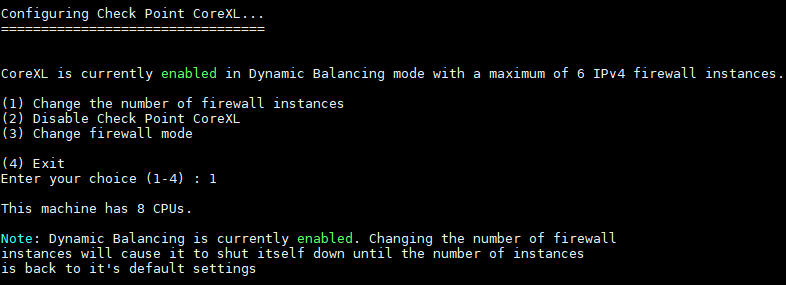
> No, but changes made in the "`cpconfig`" menu \> CoreXL only take effect after a reboot. Note that on a non-VSX Gateway, rebooting with a non-default number of CoreXL Firewall instances (that is, a user made manual changes) prevents CoreXL Dynamic Balancing from starting in order not to overwrite the users' actions.
>
> The "`cpconfig`" menu shows the corresponding message:
>
> 
* Why do I see more than one Firewall instance on a single CPU, in non-VSX environments?
> When CoreXL Dynamic Balancing adds additional IPv4 CoreXL SND instances:
> 1. It stops the IPv4 CoreXL Firewall instance(s) of the physical CPU that is going to become an IPv4 CoreXL SND instance.
>
> This means that new connections are no longer dispatched to this IPv4 CoreXL Firewall instance, but it will continue to handle its existing connections.
>
> The "`fw ctl multik stat`" command shows these IPv4 CoreXL Firewall instances as not active:
>
> 
> 2. It sets the affinity of the stopped IPv4 CoreXL Firewall instance(s) to the affinity of the active IPv4 CoreXL Firewall instances that belongs to the same NUMA node.
>
> * The "`fw ctl affinity -l -r`" command shows these IPv4 CoreXL Firewall instances on all (active) IPv4 CoreXL Firewall instances' CPU cores.
>
> Note that CPU 20 has different inactive IPv4 CoreXL Firewall instances on it because it is on a different NUMA node than CPU cores 7-17.
>
> 
> 3. It turns the free CPU to start working as an IPv4 CoreXL SND instance.
* Why in some scenarios, I can still see the connections being opened on the stopped instances?
> Although the CoreXL Dynamic Dispatcher excludes the stopped CoreXL Firewall instance from its dispatching calculations, in cases where a VPN tunnel was previously created on this CoreXL Firewall instance, some connections, such as NAT-T or those that belong to a non-accelerated VPN tunnel, may be opened on this CoreXL Firewall instance to allow a certain performance optimization.
* What does the "CPU Type" column mean on the CPView \> "CPU" tab?
> These are the types of CoreXL CPU cores:
>
> |----------------------|----------------------------------------------------------------------------------------------------------------------------------------------------------------------------------------------------------------------------------------------------------------------------------|
> | CPU Type | Description |
> | `CoreXL_FW` | This CPU core currently operates as a CoreXL Firewall instance. |
> | `CoreXL_FW_RESERVED` | This CPU core is currently reserved to be used for a CoreXL Firewall instance. This is a temporary state. This state is available in R81.20 and higher |
> | `CoreXL_SND` | This CPU core currently operates as a CoreXL SND instance. |
> | `MDPS` | This CPU core currently operates as a dedicated MDPS core ([sk138672](https://support.checkpoint.com/results/sk/sk138672)). |
> | `FWD` | This CPU core is dedicated to run the FWD daemon when the Firewall is configured to run in the User-Space mode (USFW, [sk167052](https://support.checkpoint.com/results/sk/sk167052)). |
> | `BOTH` | This CPU core currently operates as **both** a CoreXL Firewall instance **and** as a CoreXL SND instance. In most scenarios, this is an expected, temporary state, caused by a CPU role change. If this is not a temporary state, it could imply an affinity misconfiguration. |
> | `OTHER` | This CPU core currently does **not** operate as a CoreXL Firewall instance **or** as a CoreXL SND instance. In most scenarios, this is an expected, temporary state, caused by a CPU role change. If this is not a temporary state, it could imply an affinity misconfiguration. |
>
> Example:
> >
> > ```
> > [Expert@MyGW:0]# cpview
> > |----------------------------------------------------------------------
> > | CPVIEW.CPU
> > |----------------------------------------------------------------------
> > | Overview SysInfo Network CPU I/O Software-blades Hardware-Health
> > |----------------------------------------------------------------------
> > | Overview Top-Protocols Top-Connections Spikes Processes
> > |----------------------------------------------------------------------
> > | Host
> > |----------------------------------------------------------------------
> > | Overview:
> > |
> > | CPU type CPUs Avg utilization
> > | CoreXL_SND 4 1%
> > | MDPS 4 8%
> > | CoreXL_FW 39 2%
> > | FWD 1 0%
> > | ---------------------------------------------------------------------
> > | CPU:
> > |
> > | CPU Type User System Idle I/O wait Interrupts
> > | 0 CoreXL_SND 0% 1% 99% 0% 14,241
> > | 1 CoreXL_SND 0% 0% 100% 0% 14,240
> > | 2 MDPS 1% 0% 99% 0% 14,255
> > | 3 MDPS 1% 0% 99% 0% 14,261
> > | 4 CoreXL_FW 4% 5% 91% 0% 14,263
> > | 5 CoreXL_FW 1% 0% 99% 0% 14,264
> > ... (truncated) ...
> > | 47 FWD 1% 0% 99% 0% 14,262
> > ... (truncated) ...
> > ```
> >
Notes {#Notes}
--------------
CoreXL Dynamic Balancing manages network card ports that have Multi-Queue enabled.
The "`mq_mng --show`" command shows such ports as "Dynamic".
While Dynamic Balancing is active, it assumes control over several resources (listed below). Manual changes may not work, or cause Dynamic Balancing to stop its work (refer to [sk163815](https://support.checkpoint.com/results/sk/sk163815) for more details):
* Changes in affinity of CoreXL Firewall instances, starting or stopping CoreXL Firewall instances, and changing the number of CoreXL Firewall instances.
* Changes in Multi-Queue affinity or Multi-Queue mode (automatic / manual), or changes in the number of RxTx queue weights.
Known Limitations {#Known Limitations}
--------------------------------------
|--------------|--------------------------------------------------------------------------------------------------------------------------------------------------------------------------------------------------------------------------------------------------------------------------------------------------------------------------------------------------------------------------------------------------------------------------------------------------------------------------------------------------------------------------------------------------------------------------------------------------------------------------------------------------------------------------------------------------------------------------------------------------------------------------------------------------------------------------------------------------------------------------------------------------------------------------------------------------------------------------------------------------------------------------------------------------------------------------------------------------------------------------------------------------------------------------------------------------------------------------------------------------------------------------------------------------------------------------------------------------------------------------------------------------------------------------------------------------------------------------------------------------------------------------------------------------------------------------------------------------------------------------------------------------------------------------------------------------------------------------------------------------------------------------------------------------------------------------------------------------------------------------------------------------------------------------------------------------------------------------------------------------------------------------------------------------------------------|
| Issue ID | Description |
| PMTR-114499 | This is the behavior when you upgrade VSX Gateways / VSX Cluster Members R80.40 - R81.10, on which CoreXL Dynamic Balancing was **not** disabled explicitly, to R81.20 (or higher) and then install a Jumbo Hotfix Accumulator: 1. CoreXL Dynamic Balancing will be enabled by default. 2. Any previously configured manual affinity settings for interfaces / daemons will be overridden. As a workaround, follow this upgrade action plan to make sure CoreXL Dynamic Balancing stays disabled by default, and manual affinity settings are not overridden (if they exist): 1. Upgrade the VSX Gateway / each VSX Cluster Member from R80.40 - R81.10 to R81.20 (or higher) and reboot. 2. Connect to the command line on the VSX Gateway / each VSX Cluster Member. 3. Log in to the Expert mode. 4. Back up the *$FWDIR/conf/dynamic_split.conf* file: `cp -v $FWDIR/conf/dynamic_split.conf{,_BKP}` 5. Edit the *$FWDIR/conf/dynamic_split.conf* file: `vi $FWDIR/conf/dynamic_split.conf` 6. In this parameter, configure the value "1" (one): `OFF_BY_DEFAULT_ON_VSX=1` 7. Save the changes in the file and exit Vi editor. 8. Install the Jumbo Hotfix Accumulator on the VSX Gateway / each VSX Cluster Member and reboot. |
| VSECPC-10367 | Dynamic Balancing / Dynamic Split is not supported on CloudGuard Network public cloud. |
| PRJ-15874 | In R80.40, CoreXL Dynamic Balancing is supported only in R80.40 Jumbo Hotfix Take 25 (or higher). If you uninstall the R80.40 Jumbo Hotfix Take 25, CoreXL Dynamic Balancing remains enabled. In this case, the CoreXL affinity of the Security Gateway will be configured incorrectly. **Workaround** - Disable CoreXL Dynamic Balancing **before** you uninstall the R80.40 Jumbo Hotfix Take 25. |
| PMTR-73771 | On Scalable Platforms (ElasticXL, Maestro, Chassis), it is not supported to enable CoreXL Dynamic Balancing and MDPS ([sk138672](https://support.checkpoint.com/results/sk/sk138672)) at the same time. You can enable only one of these features. Note: To enable the CoreXL Dynamic Balancing, you must disable the MDPS feature. **Resolved In:** * R82 and higher * R81.20 Jumbo Hotfix starting from Take 70 * R81.10 Jumbo Hotfix starting from Take 152 |
| PMTR-74532 | On Scalable Platforms (ElasticXL, Maestro, Chassis), to make sure there is connectivity after changing the number of instances in the CoreXL configuration, follow these steps: 1. Reboot all Security Group Members one by one, **except the SMO**. **IMPORTANT: Traffic capacity is greatly reduced after you reboot all Security Group Members except the SMO, because only the SMO handles traffic until it is rebooted.** **Examples:** In a Dual Site deployment with four Security Group Members (two on each Site), where the SMO is "1_1", reboot the Security Group Members in this order: 1. Reboot the Security Group Member 2_2 on Site 2 and wait for it to finish the reboot. 2. Reboot the Security Group Member 2_1 on Site 2 and wait for it to finish the reboot. 3. Reboot the Security Group Member 1_2 on Site 1 and wait for it to finish the reboot. In a Single Site deployment with four Security Group Members, where the SMO is "1_1", reboot the Security Group Members in this order: 1. Reboot the Security Group Member 1_4 and wait for it to finish the reboot. 2. Reboot the Security Group Member 1_3 and wait for it to finish the reboot. 3. Reboot the Security Group Member 1_2 and wait for it to finish the reboot. 2. When a Security Group Member finishes the reboot, it enters the "DOWN" state because of a mismatch in the number of CoreXL Firewall instances with other Security Group Members. All other Security Group Members that were not rebooted yet, including the SMO, are in the "ACTIVE!" state (Active Attention) and handle traffic. 3. When all Security Group Members except the SMO have finished the reboot, you must reboot the SMO Security Group Member. A failover occurs immediately, and one of the other Security Group Members becomes the SMO. All other Security Group Members become "ACTIVE" and start to handle traffic. 4. When the last Security Group Member, which was the SMO, finishes the reboot, all Security Group Members become "ACTIVE" and full capacity is restored. |
---
# Agent Instructions
This content is from the Check Point Support Center (https://support.checkpoint.com), the official knowledge base for Check Point cybersecurity products.
## Navigating This Knowledge Base
- **Complete index**: [llms.txt](https://support.checkpoint.com/llms.txt)
- **All SK articles**: [SecureKnowledge Sitemap](https://support.checkpoint.com/sitemaps/secureknowledge-sitemap-index.xml)
- **SK article URL pattern**: `https://support.checkpoint.com/results/sk/{skId}`
- **Markdown responses**: AI bot User-Agents automatically receive `text/markdown` content