> Source: [sk138672](https://support.checkpoint.com/results/sk/sk138672)
# sk138672 - Management Data Plane Separation (MDPS)
| Property | Value |
|----------|-------|
| Solution ID | sk138672 |
| Date Created | 2018-11-01 |
| Last Modified | 2026-07-21 |
| Technical Level | General |
| Products | Security Gateway, Scalable Platforms |
| Versions | R82.10, R82, R81.20, R81.10 (EOS), R81 (EOS), R82.10, R82, R81.20, R81.10 (EOS), R81 (EOS) |
| OS | Gaia |
## Solution
**Table of Contents:**
* Introduction
* Minimum Requirements for Security Gateways
* How It Works
* Configuration
* List of Default Tasks
* Best Practices
* Known Limitations
* Debug
### Introduction {#Introduction}
> **Management Data Plane Separation** (MDPS) allows a Security Gateway to have isolated Management and Data networks.
>
> The network system of each domain (plane) is independent and includes interfaces, routes, sockets, and processes.
>
> The Management Plane is a domain that accesses, provisions, and monitors the Security Gateway. This includes:
>
> * **Access** : SSH, FTP, and more. See the "Best Practices" section for details about DNS and NTP services.
> * **Provisioning** : Policy installation, Gaia Portal, REST API, see the "List of Default Tasks" section .
> * **Monitoring** : Logs, SNMP, see the "List of Default Tasks" section .
>
> Any Service, Process, or Port used by the above is considered a part of the Management Plane. Everything else is considered a part of the Data Plane.
>
> MDPS is supported on all hardware platforms and virtual platforms (unless there is a specific limitation that is described in the "Limitations" section ):
>
> * All Check Point appliances that run Gaia OS (does not apply to Spark appliances)
> * All Open Servers
> * All Virtual Machines
Click Here to Show the Entire Article
### Minimum Requirements for Security Gateways {#Minimum Requirements}
Show / Hide this section
|-------------------------------------|-------------------------------------------------------------------------------------------------------------------------------------------------------------------------------------------------------------------------------------------------------------------------------------------------------------------------------------------------------------------------------------------------------------------------------------------------------------------------------------------------------------------------------------------------------------------------------------|
| Platform | Requirements |
| Security Gateways, ClusterXL | * R80.40 or higher * A minimum of four CPU cores. * A minimum of three CoreXL Firewall instances. |
| Security Group on ElasticXL | * R82 and higher |
| Security Groups on Maestro | * R81.20 and higher * [R81.10 Jumbo Hotfix Accumulator](https://sc1.checkpoint.com/documents/Jumbo_HFA/R81.10/Default.htm), Take 95 and higher * [R80.30SP Jumbo Hotfix Accumulator](https://support.checkpoint.com/results/sk/sk165312), Take 73 and higher * A minimum of four CPU cores. * A minimum of three CoreXL Firewall instances. * Network interfaces that use a `mlx4`, `mlx5`, or `i40e` driver. For the list of supported network interfaces, see the datasheet for your Maestro appliance (refer to [Check Point Product Catalog](https://catalog.checkpoint.com/)). |
| Security Groups on Scalable Chassis | * [R81.20 Jumbo Hotfix Accumulator](https://sc1.checkpoint.com/documents/Jumbo_HFA/R81.20/Default.htm), Take 26 and higher * [R81.10 Jumbo Hotfix Accumulator](https://sc1.checkpoint.com/documents/Jumbo_HFA/R81.10/Default.htm), Take 95 and higher * [R80.20SP Jumbo Hotfix Accumulator](https://support.checkpoint.com/results/sk/sk155832), Take 210 and higher (Routing Separation only) * A minimum of three CoreXL Firewall instances. |
| Maestro Orchestrators | * [R81.20 Jumbo Hotfix Accumulator](https://sc1.checkpoint.com/documents/Jumbo_HFA/R81.20/Default.htm), Take 26 and higher * [R81.10 Jumbo Hotfix Accumulator](https://sc1.checkpoint.com/documents/Jumbo_HFA/R81.10/Default.htm), Take 95 and higher |
### How It Works {#How does it work}
Show / Hide this section
> For commands in Gaia Clish / Gaia gClish, see the section "Configuration".
>
> The solution is implemented in software, and can be used on a physical server or a virtual machine. It includes these capabilities, which can be used independently:
>
> * Routing Separation
> * Resource Separation
>
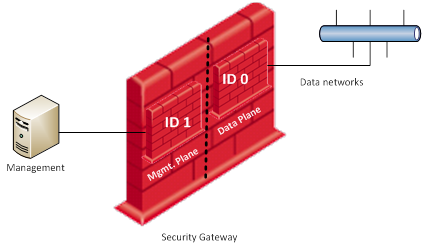
> **Routing Separation** Routing Separation creates a routing domain (ID 1) that includes an interface that the Security Gateway uses to communicate with Management, and an interface used for the synchronization of cluster members (when using ClusterXL). This domain has its own routing table, in which routing decisions are made. It is not connected with the Data Plane through any virtual adapter. This means that any packet that enters the Security Gateway, on the Management plane or the Data plane, cannot go from one plane to the other.
> > > **Note** - Do **not** configure non-Management operations on the Management plane network. Examples of non-Management operations: DNS, Proxy, DHCP, and Software Blade web portals.
> >
> > 
> >
> > To switch the context to the Management Plane or the Data Plane in the Expert mode (Bash), use these commands:
> >
> > |-------------------------|--------------------------|-------------------------------|
> > | **Plane** | **Shell** | **Command** |
> > | Management Plane (ID 1) | Expert Mode | `mplane` |
> > | Management Plane (ID 1) | Gaia Clish / Gaia gClish | `set mdps environment mplane` |
> > | Data Plane (ID 0) | Expert Mode | `dplane` |
> > | Data Plane (ID 0) | Gaia Clish / Gaia gClish | `set mdps environment dplane` |
> >
> > **MDPS Tunnel Interface ("mdps_tun")** - Planes are isolated, and traffic cannot cross between them. The MDPS Tunnel interface (`mdps_tun`) allows **only** packets that originated from the Security Gateway itself to be sent to selected destinations through the Management plane, regardless of the plane where the connection was initiated.
> >
> > When you enable MDPS routing separation, the MDPSD daemon automatically creates the MDPS Tunnel Interface and configures the required static routes.
> >
> > The MDPS Tunnel Interface is available in:
> >
> > * R81.10 and higher (PMTR-61684)
> > * [R81 Jumbo Hotfix Accumulator](https://sc1.checkpoint.com/documents/Jumbo_HFA/R81/Default.htm) - Take 34 and higher (PRJ-20961)
> > * [R80.40 Jumbo Hotfix Accumulator](https://sc1.checkpoint.com/documents/Jumbo_HFA/R80.40/Default.htm) - Take 114 and higher (PRJ-20960)
> >
> > Example:
> >
> > 1. PDPD needs to get identities from Identity Server that is accessible only through the interface `eth0`.
> > 2. The interface `eth0` is attached to the Management plane.
> > 3. The MDPSD daemon creates the IP Tunnel device and in the Data plane it configures the route to the Identity Server.
> > 4. The PDPD daemon sends the packet.
> > 5. The MDPSD daemon receives this packet through the `mdps_tun` interface.
> > 6. The MDPSD daemon creates a new socket in the Management plane and sends the packet through the interface `eth0`.
> >
> > 
>
> **Resource Separation**
> > When Resource Separation is configured, a dedicated CPU core is allocated for joint use by the Management NIC and a single CoreXL FireWall instance.
> > **Note** - If Hyper-Threading is enabled, then Resource Separation uses two CoreXL FireWall instances.
> >
> > The CoreXL Firewall instance does not receive any traffic from the CoreXL SND, except for packets that are inbound or outbound to the Management NIC. Because the number of connections is usually small, the Security Gateway usually remains accessible through the Management NIC regardless of how busy the other CoreXL Firewall instances and NICs are.
> >
> > Consider a Security Gateway with 8 CPU cores and a CoreXL 2-6 split (2 CPU cores work as CoreXL SND instances and 6 CPU cores work as CoreXL Firewall instances).
> >
> > The distribution of CPU cores in a Security Gateway looks like this:
> >
> > |-------------|-------------|--------------|--------------|--------------|--------------|--------------|--------------|
> > | NICs || CoreXL ||||||
> > | CoreXL SND | CoreXL SND | CoreXL FW #5 | CoreXL FW #4 | CoreXL FW #3 | CoreXL FW #2 | CoreXL FW #1 | CoreXL FW #0 |
> > | CPU Core #0 | CPU Core #1 | CPU Core #2 | CPU Core #3 | CPU Core #4 | CPU Core #5 | CPU Core #6 | CPU Core #7 |
> >
> > When the Resource Separation is enabled, the distribution of CPU cores in a Security Gateway looks like this:
> >
> > |-------------|-------------|----------------------|--------------|--------------|--------------|--------------|--------------|
> > | NICs || | CoreXL |||||
> > | CoreXL SND | CoreXL SND | Management Interface | CoreXL FW #4 | CoreXL FW #3 | CoreXL FW #2 | CoreXL FW #1 | CoreXL FW #0 |
> > | CPU Core #0 | CPU Core #1 | CPU Core #2 | CPU Core #3 | CPU Core #4 | CPU Core #5 | CPU Core #6 | CPU Core #7 |
> >
> > For more information about CoreXL, refer to [sk98737](https://support.checkpoint.com/results/sk/sk98737) and [Performance Tuning Administration Guide](https://support.checkpoint.com/product/73#f-commonsource=C.%20Documentation) for your version.
> > **Notes:**
> >
> > * When routing separation is enabled, traffic from the management plane cannot be routed to or through the data plane.
> >
> > * To enable the Routing and Resource Separation, at least 4 CPU cores and 3 CoreXL FireWall instances are required.
> >
> > * When using Routing and Resource Separation, the affinity for the Management Plane processes is **not** automatically set to a dedicated CPU core.
> >
> > * Because the Routing and Resource Separation uses a dedicated CPU core, fewer CPU cores are available for Data Plane inspection.
> >
> > * In Maestro Security Groups, Routing and Resource Separation is supported when Security Group Members are connected with network interfaces that use a `mlx4`, `mlx5`, or `i40e` driver.
> >
> > For the list of supported network interfaces, see the datasheet for your Maestro appliance (refer to [Check Point Product Catalog](https://catalog.checkpoint.com/)).
> >
> > One of the NIC queues is dedicated for Management traffic and the rest of the queues handle data traffic. If more than one CPU core is assigned to Management, then one CPU core handles traffic for the management queue and the others are free for user space applications.
### Configuration {#Configuration}
> **Syntax in Gaia Clish / Gaia gClish:**
> >
> > |------------------------------------------------------------------------------------------------------------------------------------------------------------------------------------|
> > | ``` set mdps environment {mplane | dplane} interface management {on | off} sync {on | off} mgmt plane {on | off} resource {on | off} resource cpus <1 - 4> ``` |
> > | ``` add mdps task address port <1-65535> protocol {tcp | udp} process service ``` |
> > | ``` show mdps state tasks ``` |
> > | ``` delete mdps task address port <1-65535> protocol {tcp | udp} process service ``` |
>
> **Configuration on a Security Gateway / each ClusterXL Member:**
> Show / Hide this section
> > **Important Notes:**
> >
> > * **You must connect to Security Gateway / each ClusterXL Member through the serial console port because connectivity through the Gaia Management interface is lost for a short time.**
> >
> > **You must reboot the Security Gateway / each ClusterXL Member to complete the operation.**
> >
> > **Therefore, we recommend that you enable/disable routing separation / resource separation during a maintenance window.**
> > * You must configure all settings in Gaia Clish.
> >
> > * In a cluster, you must configure the same MDPS settings on all cluster members.
> >
> > * Each plane has its configuration.
> >
> > Therefore, when you back up and load the Gaia OS configuration, you must run these commands in **each** plane:
> > * `save configuration //`
> >
> > * `load configuration //`
> >
> > This applies to (PMTR-61684):
> > * R81.10 and higher
> > * [R81 Jumbo Hotfix Accumulator](https://sc1.checkpoint.com/documents/Jumbo_HFA/R81/Default.htm) starting from Take 34
> > * [R80.40 Jumbo Hotfix Accumulator](https://sc1.checkpoint.com/documents/Jumbo_HFA/R80.40/Default.htm) starting from Take 114
> >
> > **Configuration Procedure:**
> >
> > 1. Configure the required network interfaces that you need to use in the Management Plane and in the Data Plane.
> >
> > 2. Get all the static routes through the current Gaia Management interface:
> >
> > 1. Get all the static routes:
> >
> > `show configuration static-route`
> > 2. Copy the commands you see in the output that use the **Gaia Management interface**.
> >
> > 3. Connect to the Security Gateway / each Cluster Member through the serial console port.
> >
> > 4. If your default shell is the Expert mode, go to Gaia Clish:
> >
> > `clish`
> > 5. Configure the MDPS Management interface:
> >
> > `set mdps interface management on`
> >
> > Explanation:
> > > When you use Routing Separation or Resource Separation, you must configure the MDPS Management interface:
> > > * You connect to the Security Gateway / each ClusterXL Member through this interface.
> > > * The Security Gateway / each ClusterXL Member uses this interface to communicate with the Management Server.
> > 6. Configure the MDPS ClusterXL Sync interface:
> >
> > `set mdps interface sync on`
> >
> > Explanation:
> > > When you use Routing Separation or Resource Separation, you must configure the MDPS ClusterXL Sync interface.
> > >
> > > The ClusterXL Members use this interface to synchronize with each other.
> > 7. Enable Routing Separation:
> >
> > `set mdps mgmt plane on`
> > 8. Enable the resource separation:
> >
> > `set mdps mgmt resource on`
> > 9. Save the changes:
> >
> > `save config`
> > 10. Configure the number of CPU cores for the resource separation:
> >
> > `set mdps resource cpus <1-4>`
> > 11. Only in R80.40 and lower:
> >
> > Configure the required static routes:
> >
> > `add mdps route nexthop `
> > 12. Save the changes:
> >
> > `save config`
> > 13. Configure the required settings in the Management Plane (mplane):
> >
> > 1. Go to the Management Plane:
> >
> > `set mdps environment mplane`
> > 2. Configure the static routes in the Management Plane that used the former **Gaia Management interface**.
> >
> > Run the Gaia Clish commands you copied earlier from the output of the "`show configuration static-route`" command.
> > 3. R81 and higher: Configure other required static routes in the Management Plane.
> >
> > Run the required "`set static-route `" commands.
> >
> > See the [Gaia Administration Guide](https://support.checkpoint.com/product/73#f-commonsource=C.%20Documentation) for your version \> Chapter "Network Management" \> Section "IPv4 Static Routes" \> Section "Configuring IPv4 Static Routes in Gaia Clish".
> >
> > Explanation:
> > > When you enable the MDPS, all static routes through the current Gaia Management interface become obsolete, because this interface moves to the Management plane (`mplane`).
> > >
> > > You must add all the required static routes through Gaia Management interface again in the Management plane.
> > 4. Add the required tasks in the Management Plane:
> >
> > ```
> > add mdps task
> > ```
> >
> > Explanation:
> > > With this option, it is possible to choose where to place tasks that the Security Gateway / ClusterXL Members run - in the Management plane or the Data plane.
> > >
> > > When enabling Routing Separation, a set of default tasks is bound to the Management plane.
> > >
> > > All other tasks remain in the Data plane.
> > >
> > > A task cannot be bound to both planes.
> > >
> > > For more information, see the section "List of Default Tasks".
> > 5. Save the changes in the Management Plane (mplane):
> >
> > `save config`
> > 14. Configure the required settings in the Data Plane (dplane):
> >
> > 1. Go to the Data Plane:
> >
> > `set mdps environment dplane`
> > 2. Configure the required settings in the Data Plane.
> >
> > 3. Save the changes in the Data Plane:
> >
> > `save config`
> > 15. Reboot the Security Gateway / each Cluster Member:
> >
> > `reboot`
> > * In ClusterXL Load Sharing mode:
> >
> > > You can reboot the cluster members in any order.
> > * In ClusterXL High Availability mode:
> >
> > 1. Reboot all Standby cluster members.
> >
> > 2. On the Active cluster member, fail over to a Standby cluster member:
> >
> > `clusterXL_admin down`
> > 3. Reboot the formerly Active cluster member.
> >
> > 16. Connect to the command line on the Security Gateway / each Cluster Member over SSH.
> >
> > 17. Log in.
> >
> > 18. Go to the required plane:
> >
> > |-------------------------|-------------|-------------------------------|
> > | **Plane** | **Shell** | **Command** |
> > | Management Plane (ID 1) | Expert Mode | `mplane` |
> > | Management Plane (ID 1) | Gaia Clish | `set mdps environment mplane` |
> > | Data Plane (ID 0) | Expert Mode | `dplane` |
> > | Data Plane (ID 0) | Gaia Clish | `set mdps environment dplane` |
>
>
>
>
>
> **Configuration on a Scalable Platform Security Group (ElasticXL / Maestro / Scalable Chassis):**
> Show / Hide this section
> > **Important Notes:**
> >
> > * **You must connect to a Security Group Member / Scalable Chassis through the serial console port because connectivity through the Gaia Management interface is temporarily lost.**
> >
> > **You must reboot all Security Group Members / Scalable Chassis to complete the operation.**
> >
> > **Therefore, we recommend that you enable/disable Routing Separation / resource separation during a maintenance window.**
> > * You must configure all settings in Global Clish (`gclish`) of the Security Group (except for static routes).
> >
> > * In a Dual Scalable Chassis environment, you must configure the same MDPS settings on both Scalable Chassis.
> >
> > * Each plane has its configuration.
> >
> > Therefore, when you back up and load the Gaia OS configuration, you must run these commands in **each** plane:
> > * `save configuration //`
> >
> > * `load configuration //`
> >
> > This applies to (PMTR-61684):
> > * R81.10 and higher
> > * [R81 Jumbo Hotfix Accumulator](https://sc1.checkpoint.com/documents/Jumbo_HFA/R81/Default.htm) starting from Take 34
> > * [R80.40 Jumbo Hotfix Accumulator](https://sc1.checkpoint.com/documents/Jumbo_HFA/R80.40/Default.htm) starting from Take 114
> >
> > **Configuration Procedure:**
> >
> > 1. Configure the required network interfaces that you need to use in the Management Plane and in the Data Plane.
> >
> > 2. Connect to the command line on the Security Group.
> >
> > 3. If your default shell is the Expert mode, then go to Gaia gClish:
> >
> > `gclish`
> > 4. Get all the static routes through the current Security Group's Gaia Management interface:
> >
> > 1. Get all the static routes:
> >
> > `show configuration static-route`
> > 2. Copy the commands you see in the output that use the **Gaia Management interface**.
> >
> > 5. Connect to one the Security Group Members through the serial console port.
> >
> > 6. If your default shell is Gaia gClish, then go to Expert mode:
> >
> > `expert`
> > 7. Make sure you are connected to the SMO:
> >
> > `asg stat -i tasks`
> > 8. If you are **not** connected to the SMO, then go to the Security Group Member with ID that appears in the line "`SMO`" (on the relevant ElasticXL Site / Maestro Site / Scalable Chassis):
> >
> > `member _`
> > 9. Go from the Expert mode to Gaia gClish:
> >
> > * If your default shell is the Expert mode:
> >
> > `gclish`
> > * If your default shell is Gaia gClish:
> >
> > `exit`
> > 10. Configure the MDPS Management interface:
> >
> > `set mdps interface management on`
> >
> > Explanation:
> > > When you use Routing Separation or Resource Separation, you must configure the MDPS Management interface:
> > > * You connect to the Security Group through this interface.
> > > * The Security Group uses this interface to communicate with the Management Server.
> > 11. Enable Routing Separation:
> >
> > `set mdps mgmt plane on`
> > 12. Enable the resource separation:
> >
> > `set mdps mgmt resource on`
> > 13. Configure the number of CPU cores for the resource separation:
> >
> > `set mdps resource cpus 4`
> > 14. Configure the required settings in the Management Plane (mplane):
> >
> > 1. Go to the Management Plane:
> >
> > `set mdps environment mplane`
> > 2. Add the required tasks in the Management Plane:
> >
> > `add mdps task `
> >
> > Explanation:
> > > With this option, it is possible to choose where to place tasks that the Security Group runs - in the Management plane or the Data plane.
> > >
> > > When enabling Routing Separation, a set of default tasks bounds to the Management plane.
> > >
> > > All other tasks remain in the Data plane.
> > >
> > > A task cannot be bound to both planes.
> > >
> > > For more information, see the section "List of Default Tasks".
> > 15. Only on R81.10 Scalable Chassis (not Maestro):
> >
> > If you configured Multi-Queue on the former Security Group's **Gaia Management interface**, then you must configure the required Multi-Queue settings on the MDPS Management interface in the Management Plane.
> > 16. Configure the required settings in the Data Plane (dplane):
> >
> > 1. Go to the Data Plane (dplane):
> >
> > `set mdps environment dplane`
> > 2. Configure the required settings.
> >
> > 17. Go from Gaia gClish to the Expert mode:
> >
> > * If your default shell is the Expert mode:
> >
> > `exit`
> > * If your default shell is Gaia gClish:
> >
> > `expert`
> > 18. Configure the required static routes (pay attention to single and double quotes):
> >
> > `gexec -b all --vs 1 -c "clish -c 'set static-route ...'"`
> >
> > See the [Gaia Administration Guide](https://support.checkpoint.com/product/73#f-commonsource=C.%20Documentation) for your version \> Chapter "Network Management" \> section "IPv4 Static Routes" \> Section "Configuring IPv4 Static Routes in Gaia Clish".
> >
> > This syntax also applies to the static routes that used the former Security Group's **Gaia Management interface**.
> >
> > Run the Gaia Clish commands you copied earlier from the output of the "`show configuration static-route`" command using this syntax.
> > > Example to add a route:
> > >
> > > `gexec -b all --vs 1 -c "clish -c 'set static-route 192.168.22.0 nexthop gateway address 192.168.22.1 on'"`
> > >
> > > To show all static routes:
> > >
> > > `gexec -b all --vs 1 -c "clish -c 'show configuration static-route'"`
> >
> > Explanation:
> > > When you enable the MDPS, all static routes through the current Gaia Management interface become obsolete, because this interface moves to the Management plane (`mplane`).
> > >
> > > You must add all the required static routes through Gaia Management interface again in the Management plane.
> > 19. Create a required temporary file on all Security Group Members (Known Limitation PRJ-47162):
> >
> > `g_all touch /tmp/unsync_xfer_files`
> > 20. Reboot the currently Standby Security Group Members / Standby Scalable Chassis:
> >
> > * Reboot the Security Group Members on the Standby Site / Standby Scalable Chassis:
> >
> > `g_reboot -b `
> > * Reboot the Standby Scalable Chassis:
> >
> > `g_reboot -b all`
> > 21. Temporarily disable the internal stability check:
> >
> > 1. Set the value of the relevant kernel parameter to "1":
> >
> > `g_fw ctl set int fwha_skip_stability_check_during_upgrade 1`
> > 2. Make sure the value of the relevant kernel parameter was updated to "1" on all Security Group Members:
> >
> > `g_fw ctl get int fwha_skip_stability_check_during_upgrade`
> > 22. On the currently Active Site / Active Scalable Chassis, fail over to the Standby Site / Standby Scalable Chassis:
> >
> > * On the Security Group Members on the Active Site:
> >
> > `g_clusterXL_admin -b down`
> > * On the Active Scalable Chassis:
> >
> > `g_clusterXL_admin -b all`
> > 23. Enable the internal stability check:
> >
> > 1. Set the value of the relevant kernel parameter to "0":
> >
> > `g_fw ctl set int fwha_skip_stability_check_during_upgrade 0`
> > 2. Make sure the value of the relevant kernel parameter was updated to "0" on all Security Group Members:
> >
> > `g_fw ctl get int fwha_skip_stability_check_during_upgrade`
> > 24. Reboot the formerly Active Security Group Members / formerly Active Scalable Chassis:
> >
> > * Reboot the Security Group Members on the formerly Active Site:
> >
> > `g_reboot -b `
> > * Reboot the formerly Active Scalable Chassis:
> >
> > `g_reboot -b all`
> > 25. Connect to the command line on the Security Group.
> >
> > 26. If your default shell is Gaia gClish, then go the Expert mode:
> >
> > `expert`
> > 27. Wait for all Security Group Members to boot and become active:
> >
> > `asg stat -v`
> > 28. Remove the temporary file from all Security Group Members:
> >
> > `g_all rm /tmp/unsync_xfer_files`
> > 29. Connect to the command line on the Security Group over SSH.
> >
> > 30. Log in.
> >
> > 31. Go to the required plane:
> >
> > |-------------------------|-------------|-------------------------------|
> > | **Plane** | **Shell** | **Command** |
> > | Management Plane (ID 1) | Expert Mode | `mplane` |
> > | Management Plane (ID 1) | Gaia gClish | `set mdps environment mplane` |
> > | Data Plane (ID 0) | Expert Mode | `dplane` |
> > | Data Plane (ID 0) | Gaia gClish | `set mdps environment dplane` |
### List of Default Tasks when Routing Separation is used {#List of default tasks}
Show / Hide this section
> **Tasks can have one of these parameters:**
>
> |-------------------|-------------------------------------------------------------------------------------------------------------------------------------------------------------------------------------------------------------------------------------------------------------------------------------------------------------------------------------------------------------------------------------------------------|
> | Parameter | Description |
> | Address | Address to use with the tunnel interface: * \\[@\\] * \\[/\\]\[@\\] * \@\<\[Destination Port\>\] Any outgoing packets to the configured addresses are sent based on the Management plane routing table. Note - The Security Gateway sends a DNS query every 5 minutes to resolve the hostnames. |
> | Port and Protocol | A specific port (1 - 65535) and protocol (TCP or UDP) from any process is bound to the Management plane. The process itself remains in the Data plane context. This option works only for Check Point known ports - refer to [sk52421](https://support.checkpoint.com/results/sk/sk52421). |
> | Process | A specific process name is bound to the Management plane, including all ports that the process opens. For more information about Check Point processes, refer to [sk97638](https://support.checkpoint.com/results/sk/sk97638). |
> | Service | Gaia OS service may include several processes, all of which are bound to the Management plane. See the output of this command: `chkconfig --list` To see only the process names, run: `chkconfig --list | awk '{print $1}'` |
>
> **Note** - Added and deleted tasks are applied during the next restart of the task.
>
> **List of default tasks when Routing Separation is used:**
>
> Enter the string to filter this table:
>
> |-----------------|---------------------------|
> | Type | Name, URL, Port Number |
> | Address | updates.checkpoint.com |
> | Address | te.checkpoint.com |
> | Address | teadv.checkpoint.com |
> | Address | cws.checkpoint.com |
> | Address | usercenter.checkpoint.com |
> | Address | avupdates.checkpoint.com |
> | Service | cpri_d |
> | Service | sshd |
> | Service | syslog |
> | Process | AutoUpdater |
> | Process | DAService |
> | Process | cloningd |
> | Process | confd |
> | Process | httpd2 |
> | Process | rest_api_docs |
> | Process | rest_api_run |
> | Process | snmpd |
> | Process | snmpmonitor |
> | Process | start_celery |
> | Process | start_redis |
> | Process | cprid |
> | Process | lldpd |
> | Port - Protocol | 256 - tcp |
> | Port - Protocol | 257 - tcp |
> | Port - Protocol | 263 - tcp |
> | Port - Protocol | 2010 - tcp |
> | Port - Protocol | 5432 - tcp |
> | Port - Protocol | 8989 - tcp |
> | Port - Protocol | 18181 - tcp |
> | Port - Protocol | 18183 - tcp |
> | Port - Protocol | 18184 - tcp |
> | Port - Protocol | 18187 - tcp |
> | Port - Protocol | 18191 - tcp |
> | Port - Protocol | 18192 - tcp |
> | Port - Protocol | 18195 - tcp |
> | Port - Protocol | 18210 - tcp |
> | Port - Protocol | 18211 - tcp |
> | Port - Protocol | 18264 - tcp |
> {#Default_TasksTable}
#### Note: those tasks are preset and applied only if the task is running.
Best Practices {#Best Practice}
Show / Hide this section
> **When using Routing Separation:**
>
> * Do not include Management Plane subnets in any Software Blade web portal.
>
> * By default, the Security Gateway connects to user authentication servers (LDAP, RADIUS, TACACS) through the Data plane. The MDSP Tunnel interface "**mdps_tun** " allows the Security Gateway to connect to these servers through the Management plane. See the explanation in the section "How It Works".
>
> * For the PEP process, connect through the Management Plane "mplane" to the PDP. You must add "`mdps address`" for the PDP IP address and "`mdps port`" 15105.
>
> * Run commands in the Expert mode or Gaia Clish in the context of the Data Plane (ID 0) except commands which are network-dependent, such as '`ip ...`', '`ifconfig`', '`netstat`', etc.
>
> * SNMP queries:
>
> * When using SNMP v2/v2c:
>
> To query the Security Gateway's Data plane OIDs, add the name suffix "**_dplane** " to the SNMP community name. For example, if the community name is "*test* ," then the Data plane community name is "*test**_dplane***".
> * When using SNMP v3:
>
> To query the Security Gateway's Data plane OIDs, you must add the context argument. The context name is "**dplane**".
> When the target is `localhost`:
> * Ensure that your session is in the Management Plane (`mplane`) context. Do not run the SNMPv3 query from the Data Plane context.
> * Run the snmpwalk command with the `-n dplane` argument. Use the appropriate SNMPv3 user name, authentication protocol, privacy protocol, and OID for your environment.
>
> **Example:**
> `[Expert@:mplane]# snmpwalk -v 3 -u '' -l authPriv -a -A '' -x -X '' -n dplane localhost `
> * When using a local license, the license must be issued for the IP address of the Management interface on the Security Gateway.
>
> * By default, when NTP is configured, the NTPD process is associated with the Management Plane.
>
> If needed, you can configure it to use the Data Plane by deleting the "*mdps*" task in Gaia Clish.
>
> On Scalable Platforms (ElasticXL, Maestro, Scalable Chassis), NTPD is always disabled. Instead, a specific process is used exclusively over the Management Plane.
>
> **When using Management Resource:**
>
> * **Do not** configure the CPU affinity for the Management interface.
### Known Limitations {#Limitations}
Show / Hide this section
> Enter the string to filter this table:
>
> |------------------------|----------------------------------------------------------------------------------------------------------------------------------------------------------------------------------------------------------------------------------------------------------------------------------------------------------------------------------------------------------------------------------------------------------------------------------------------------------------------------------------------------------------------------------------------------------------------------------------------------------------------------------------------------------------------------------------------------------------------------------------------------------------------------------------------------------------------------------------------------------------------------------------------------------------------------------------------------------------------------------------------------------------------------------------------------------------------------------------------------------------------------------------------------------------------------------------|
> | Issue ID | Description |
> |
| MDPS is not supported on a Standalone (MGMT \& GW) setting. |
> | PMTR-116515 | By design: * MDPS is not supported in the VSNext mode (R82 and higher). * MDPS is not supported in a Traditional VSX Gateway / Traditional VSX Cluster (all versions). |
> | - | MDPS is not supported in a VRRP cluster. |
> | - | MDPS is not supported in Quantum Spark / SMB appliances. |
> | - | When the MDPS Routing Separation is enabled, traffic from the Management Plane cannot be routed to, or through the Data Plane. |
> | PMTR-25369 | Configuration of the MDPS Routing Separation or Resource Separation can be performed only in Gaia Clish. |
> | PMTR-29698 | When MDPS is enabled, the use of logical interfaces is not supported on the Management interface (Alias, Bridge, VPN Tunnel, 6in4 Tunnel, PPPoE, Bond, VLAN). **Note** - This limitation was resolved in the latest Jumbo Hotfix Accumulator Takes for R80.40 and R81. It is supported in R81.10. |
> | - | "*Authentication failure: check your username and password*" message on a Security Gateway when raising the "TACP" privileges of a TACACS user in the following scenario: 1. Configured the Management Data Plane Separation (MDPS) as described in this article. 2. Configured Gaia OS roles with different privileges for TACACS users. 3. Configured a TACACS server. 4. Logged in with a TACACS user. 5. Raised the "TACP" privileges in the Gaia Portal (at the top of the "Overview" page, clicked "Enable") or in Gaia Clish (with the command "`tacacs_enable `") 6. Entered the TACACS user password. To resolve: 1. Connect to the command line on the Security Gateway. 2. Log in to Gaia Clish. 3. Add the Gaia OS "confd" process to the Management Plane: `add mdps task process confd` 4. Save changes: `save config` |
> | - | When the MDPS Routing Separation is enabled, configuring the same subnet for the Management and Data interface is not supported in ClusterXL. |
> | - | When MDPS is enabled on a Security Gateway / ClusterXL Members, in SmartConsole \> in the Security Gateway / ClusterXL object \> **Topology** page, "**Get interfaces with topology**" is not supported. "**Get interfaces without topology**" is supported. |
> | - | When MDPS is enabled, connections from the Security Gateway / Cluster Members to Check Point domains "checkpoint.com" might fail. Follow [sk180121](https://support.checkpoint.com/results/sk/sk180121). |
> | - | When the MDPS Routing Separation is enabled, you must collect a Gaia Backup / Gaia Snapshot on a remote host only through the Management plane. |
> | TM-13547 | When adding the loopback interface on SNMP Agent Interfaces in MDPS, this error message appears: "*The snmpd not listening - No Response*". To resolve the issue, remove the "*lo* " interface or add as "*Any*". |
> | PMTR-66296 | When MDPS is enabled in R81, the Gaia OS "LLDP" feature is not supported. |
> | TM-47678 | When MDPS is enabled, the maximum length of an SNMPv3 username is limited to 26 characters. See [sk182061](https://support.checkpoint.com/results/sk/sk182061). |
> | **Limitations in Quantum Scalable Platforms (ElasticXL, Maestro, Scalable Chassis)** ||
> | - | All Security Group Members must be "UP" and "ACTIVE" when enabling or disabling the MDPS. |
> | TM-92990 | Maestro Security Group R82 and below do not support MDPS Resource Separation with the network card driver "ICE". |
> | PMTR-81746 | When MDPS is enabled, Gaia Portal is not supported on a Security Group. |
> | PMTR-73771 | Before you enable MDPS, you **must** disable CoreXL Dynamic Balancing ([sk164155](https://support.checkpoint.com/results/sk/sk164155)). Resolved in: * R82 and higher * R81.20 Jumbo Hotfix, Take 70 and higher * R81.10 Jumbo Hotfix, Take 152 and higher |
> | MBS-14161, MBS-8255 | These Security Groups do **not** support MDPS (see the section "Minimum Requirements for Security Gateways"): * R81.20 Security Groups on Scalable Chassis * R81.10 Security Groups on Maestro * R81.10 Security Groups on Scalable Chassis * R81 Security Groups on Maestro * R81 Security Groups on Scalable Chassis * R80.30SP Security Groups on Maestro * R80.20SP Security Groups on Maestro |
> | PRHF-30344 | On a Security Group with MDPS enabled: * The "`asg perf`" command on a Security Group does not show any output - the Gaia OS prompt appears immediately after entering the command and pressing the Enter key. * When running the "`mac_verifier`" and other commands on a Security Group, the output may show the error message "`mount of /sys failed: device or resource busy`". * The "`distutil verify -v`" command on a Security Group returns "`verification failed`". See [sk182076](https://support.checkpoint.com/results/sk/sk182076). This problem was fixed. The fix is included starting from: * [Jumbo Hotfix Accumulator for R81.20](https://sc1.checkpoint.com/documents/Jumbo_HFA/R81.20/Default.htm) starting from Take 41 * [Jumbo Hotfix Accumulator for R81.10](https://sc1.checkpoint.com/documents/Jumbo_HFA/R81.10/Default.htm) starting from Take 131 **Important Note** - After installing these Jumbo Hotfixes, when MDPS plane separation is enabled, in the context of the Management plane, the directory */sys/class/net/* now shows interfaces that belong to the Data plane, although it should show interfaces that belong to the Management plane. |
> | PMTR-89257, PMTR-92734 | On Scalable Platforms (Maestro and Scalable Chassis) that run R81.20 and lower versions: You **must** follow these steps if it is necessary to modify the *fwkern.conf* file (to prevent a boot loop): 1. Update the *fwkern.conf* file. 2. Run this command in the Expert mode to create an empty*/tmp/unsync_xfer_files* file on all Security Group Members: `g_all touch /tmp/unsync_xfer_files` 3. Reboot all Security Group Members: `reboot -b {all | }` 4. Optional: Delete the empty file */tmp/unsync_xfer_files* : `g_all rm /tmp/unsync_xfer_files` |
> | - | Sync \& Chassis Internal Network (CIN) interfaces are not considered part of the Management Plane.
**Note - From R82 OS by default Sync and CIN interfaces are part of the Mplane.** |
> | - | Only Management interfaces and MAGG can be used as a Management interface in the MDPS. |
> | - | Before performing an upgrade or installing/uninstalling a Jumbo Hotfix Accumulator, make sure to disable the MDPS feature and enable it again after the Security Group Members reboot. Resolved in: * R81.20 for Scalable Platforms * R81.10 Jumbo Hotfix Accumulator - from Take 95 |
> | - | Configuration of Routing Separation can be done only in Gaia Global Clish (`gclish`). |
> | - | Starting from R81.10, you must use this command in the Expert mode of the Security Group to configure settings that are related to the Management interface - including the adding and removing of static routes (pay attention to single and double quotes): `gexec -b all --vs 1 -c "clish -c ''"` |
> {#LimitationsListTable}
### Debug {#Debug}
Show / Hide this section
> **Important Note** - Schedule a maintenance window.
>
> Follow these steps to collect the debug of the MDPS daemon:
>
> 1. Connect to the command line on the Security Gateway / each ClusterXL Member / Scalable Platform Security Group.
>
> 2. Log in to the Expert mode.
>
> 3. Start the debug:
>
> `fw debug mdpsd on`
> 4. Replicate the issue.
>
> 5. Stop the debug:
>
> `fw debug mdpsd off`
> 6. Examine these log files:
>
> `$FWDIR/log/mdpsd.elg*`
---
# Agent Instructions
This content is from the Check Point Support Center (https://support.checkpoint.com), the official knowledge base for Check Point cybersecurity products.
## Navigating This Knowledge Base
- **Complete index**: [llms.txt](https://support.checkpoint.com/llms.txt)
- **All SK articles**: [SecureKnowledge Sitemap](https://support.checkpoint.com/sitemaps/secureknowledge-sitemap-index.xml)
- **SK article URL pattern**: `https://support.checkpoint.com/results/sk/{skId}`
- **Markdown responses**: AI bot User-Agents automatically receive `text/markdown` content