> Source: [sk120558](https://support.checkpoint.com/results/sk/sk120558)
# sk120558 - "Firewall - Domain resolving error. Check DNS configuration on the gateway." log for blocked HTTP traffic although relevant Domain Object was configured
| Property | Value |
|----------|-------|
| Solution ID | sk120558 |
| Date Created | 2017-10-02 |
| Last Modified | 2023-05-03 |
| Technical Level | General |
| Products | Security Gateway |
| Versions | R82.10, R82, R81.20 |
| OS | Gaia |
## Symptoms
- * After configuring a Domain Object (e.g., for `akamaitechnologies.com`) in a rule and installing the Access Policy, the HTTP traffic to that domain is blocked with the following log in SmartConsole:
|----------------|----------------------------------------------------------------------------|
| Product Family | Access |
| Type | Connection |
| Service | http (TCP/80) |
| Action | Block |
| Action Reason | Blocking request as configured in engine settings of Firewall |
| Reason | Firewall - Domain resolving error. Check DNS configuration on the gateway. |
| Description | http Traffic Blocked from XXX to YYY |
*Example* :
[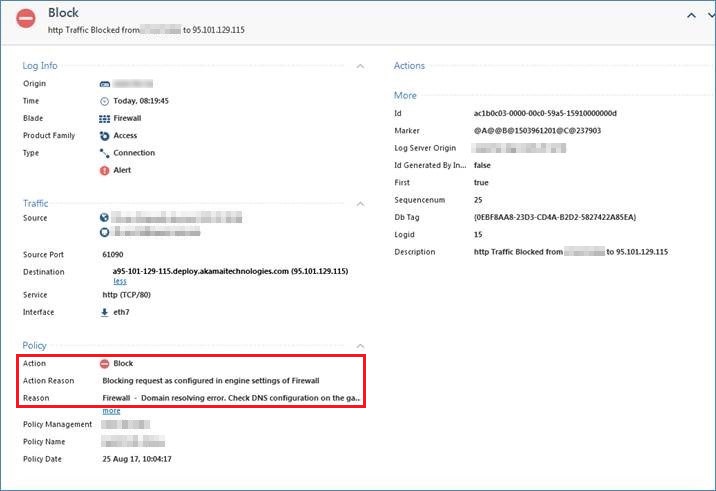](https://sc1.checkpoint.com/sc/SolutionsStatics/sk120558/Log_Example.jpg "Click the image to see it in full size in a new tab/window")
* Kernel debug on Security Gateway (\*) shows:
`
[SID: ...] {global} rad_kernel_dns_reverse_cache_get: dns cache ... look for IP '...';`
`
[SID: ...] {global} rad_kernel_dns_reverse_cache_get: dns_health_check_state = 0;`
`
[SID: ...] {global} rad_kernel_dns_reverse_cache_get: `***dns_health_check_state is not OK*** `. return.;`
`
[SID: ...] {global} dns_reverse_prepare_resolve_state_response: Inside;`
`
[SID: ...] {global} dns_reverse_prepare_resolve_state_response: `***health check state is NOK*** `;`
`
[SID: ...] {connection} network_classifiers_domain_handle_fail_action: `***health-check failed OR no response for IP lookups OR threshold enabled for domains trap failure, fail-action is: 0***`;
`
(\*) As the kernel debug command can stop the Security Gateway in rare circumstances, please advise Check Point support for the debug commands.
* *nslookup* on Security Gateway for `checkpoint.com` works correctly.
## Cause
Internal failure in DNS health check state of Domain Objects.
Also check DNS lookups are not blocked by policy or external factors. This will give the same symptoms and error messages in the logs, where dynamic objects are defined in the policy.
In Scalable Platform/Maestro (R80.20SP and higher), DNS response may be dropped on the cleanup rule which cause the same symptom.
## Solution
This problem was fixed. The fix is included in:
* [Check Point R80.20](https://supportcenter.checkpoint.com/supportcenter/portal?eventSubmit_doGoviewsolutiondetails=&solutionid=sk122485)
* [Jumbo Hotfix Accumulator for R80.10](http://supportcontent.checkpoint.com/solutions?id=sk116380) - starting from Take 42
---
# Agent Instructions
This content is from the Check Point Support Center (https://support.checkpoint.com), the official knowledge base for Check Point cybersecurity products.
## Navigating This Knowledge Base
- **Complete index**: [llms.txt](https://support.checkpoint.com/llms.txt)
- **All SK articles**: [SecureKnowledge Sitemap](https://support.checkpoint.com/sitemaps/secureknowledge-sitemap-index.xml)
- **SK article URL pattern**: `https://support.checkpoint.com/results/sk/{skId}`
- **Markdown responses**: AI bot User-Agents automatically receive `text/markdown` content