> Source: [sk118539](https://support.checkpoint.com/results/sk/sk118539)

# sk118539 - How to disable and remove Kaspersky Lab components from Check Point Security Gateway R80.10 and R77.30

| Property | Value |
|----------|-------|
| Solution ID | sk118539 |
| Date Created | 2017-07-16 |
| Last Modified | 2024-06-25 |
| Technical Level | General |
| OS | Gaia |

## Solution

**Important Note - If you are using the Threat Emulation Cloud mode, you must refer to sk178688 "[How to disable and remove Kaspersky Lab components when using Threat Emulation in Cloud mode](https://supportcenter.checkpoint.com/supportcenter/portal?eventSubmit_doGoviewsolutiondetails=&solutionid=sk178688)" applies to all Check Point versions.**

**Other than that, this article applies to Check Point versions that are no longer supported.** **Kaspersky Lab components were removed from all versions delivered since 2018.**   

Check Point Security Gateway uses some 3rd party code in several features. One of the 3rd party vendors is Kaspersky Lab.  
Customers who wish to remove Kaspersky Lab components from the Security Gateway can use one of several options.

**Table of Contents:**

1. Action plan for R80.10 (Clean Installation)
2. Action plan for R80.10 with Jumbo Hotfix Accumulator and above (Remove only)
3. Action plan for R77.30 and above (Disable \& Remove)
4. Action plan for R76SP.X on 60000 / 40000 Security Systems
5. Action plan for 600 / 700 / 1100 / 1200R / 1400 Appliances
6. How to disable Anti-Virus Deep Scan, Anti-Virus Archive Scanning, and Traditional Anti-Virus
7. How to disable and remove Kaspersky Lab components when using Threat Emulation in Cloud mode
8. Revision History

### (1) For R80.10 (Clean Installation) {#For version R80.10 (Clean Installation)}

* Kaspersky Labs Anti-Virus components were replaced in[**R80.10 image Take 462**](https://supportcenter.checkpoint.com/supportcenter/portal/role/supportcenterUser/page/default.psml/media-type/html?action=portlets.DCFileAction&eventSubmit_doGetdcdetails=&fileid=54509).

  > **Note** : This image contains a suitable *replacement* for the Kaspersky Lab Anti-Virus components.  
  > This replacement might, in some cases, miss files that were otherwise caught by Kaspersky Lab code and in some cases, prevent malicious files that were otherwise missed.
* For customers who wish to use Anti-Virus Deep Scan / Anti-Virus Archive Scanning / Traditional Anti-Virus and for*Security Gateway / VSX Gateway* with enabled Threat Emulation blade:

  * Make sure to install the latest Threat Emulation engine.  
    Or follow [sk92509](https://supportcenter.checkpoint.com/supportcenter/portal?eventSubmit_doGoviewsolutiondetails=&solutionid=sk92509#Procedure) to install the ***Basic Package*** (released on 26 Sep 2017 (version 6.9 or later).

* For customers who use Endpoint Anti-Malware:

  * With Check Point R80.10 new image (Take 462), Endpoint Security Clients acquire their Anti-Malware signature updates directly from an external Check Point signature server or other external Anti-Malware signature resources, as allowed by your organization's Endpoint Anti-Malware policy.

    If your organization wants to continue using the Kaspersky Lab signature updates from the Endpoint Management Server, [contact Check Point Support](https://www.checkpoint.com/support-services/contact-support/) for a Hotfix.

### (2) For R80.10 with Jumbo Hotfix Accumulator and above (Remove only) {#For R80.10 with JHFA}

Follow these steps:

1. If *Anti-Virus Deep Scan* , *Anti-Virus Archive Scanning* , or *Traditional Anti-Virus* are enabled on your Security Gateway, then disable those features according to the summary table in section 6.

2. Remove the 3rd party components by installing a relevant CPUSE package.

   Show / Hide the instructions  
   **Important Note:** This procedure does *not* require a reboot or restart of Check Point services.

   **Notes:**
   * This CPUSE package should be installed on all Gaia OS machines in your environment - Security Gateway / VSX Gateway / StandAlone / Management Server / Endpoint Security Management Server.
   * You can use the [sk111158 - Central Deployment Tool (CDT)](https://supportcenter.checkpoint.com/supportcenter/portal?eventSubmit_doGoviewsolutiondetails=&solutionid=sk111158) to automate the deployment of this CPUSE package to the managed Security Gateways running on Gaia OS.

   <br />

   |---------------------------------------------|-------------|----------------------|----------------------------------------------------------------------------------------------------------------------------------------------------------------------------------------------------------------------------------------------------------------------------------------------------------------------------------------------------------------------------------------------------------------------------------------------------------------------------------------------------------------------------------------------------------------------------------------------------------------------------------------------------------------------------------------------------------------------------------------------------------------------------------------------------------------------------------------------------------------------------------------------------------------------------------------------------------------------------------------------------------------------------------------------------------------------------------------------------------------------------------------------------------------------------------------------------------------------------------------------------------------------------------------------------------------------------------------------------------------------------------------------------------------------------------------------------------------------------------------------------------------------------------------------------------------------------------------------------------------------------------------------------------------------------------------------------------------------------------------------------------------------------------------------------------------------------------------------------------------------------------------------------------------------------------------------------------------------------------------------------------------------------------------------------------------------------------------------------------------------------------------------------------------------------------------------------------------------------------------------------------------------------------------------------------------------|
   | Which machine?                              | Where?      | Installation type    | Instructions                                                                                                                                                                                                                                                                                                                                                                                                                                                                                                                                                                                                                                                                                                                                                                                                                                                                                                                                                                                                                                                                                                                                                                                                                                                                                                                                                                                                                                                                                                                                                                                                                                                                                                                                                                                                                                                                                                                                                                                                                                                                                                                                                                                                                                                                                                         |
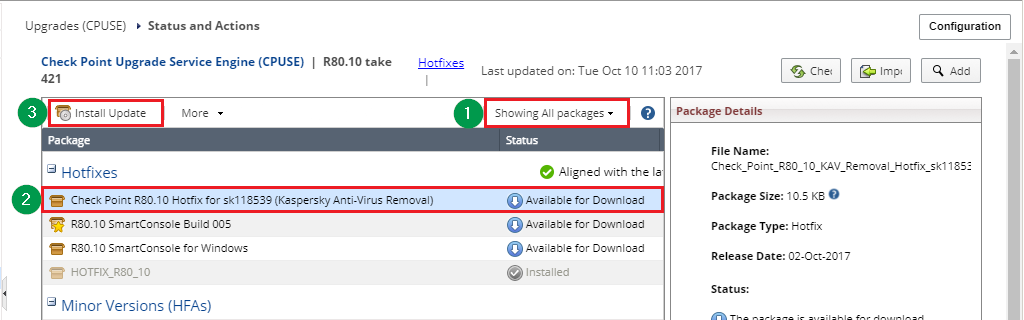
   | Any Gaia machine ***except*** R77.30 VSX    | Gaia Portal | Online installation  | 1. [CPUSE Software Updates Policy](https://supportcenter.checkpoint.com/supportcenter/portal?eventSubmit_doGoviewsolutiondetails=&solutionid=sk92449#How to work with CPUSE - Additional How To) should be configured to allow self-update of CPUSE Agent. Otherwise, users should manually install the latest build of CPUSE Agent from [sk92449](https://supportcenter.checkpoint.com/supportcenter/portal?eventSubmit_doGoviewsolutiondetails=&solutionid=sk92449#Latest build of CPUSE and What's New). 2. Connect to the Gaia Portal on your Check Point machine and navigate to ***Upgrades (CPUSE)*** section - click on the ***Status and Actions***. 3. On the toolbar, click on the ***Showing Recommended packages*** (near the help icon ![](https://sc1.checkpoint.com/sc/images/Gaia_Portal_icons/help.png)) and select ***All*** : *Example* : [![](https://sc1.checkpoint.com/sc/SolutionsStatics/sk118539/R80_10_Gaia_Portal_All_packages.png)](https://sc1.checkpoint.com/sc/SolutionsStatics/sk118539/R80_10_Gaia_Portal_All_packages.png "Click the image to see it in full size in a new tab/window") 4. In the ***Hotfixes*** section, click on the ***Check Point \<VERSION\> Hotfix for sk118539 (Kaspersky Anti-Virus Removal)*** - click on the ***Install Update*** button on the toolbar. *Example* : [![](https://sc1.checkpoint.com/sc/SolutionsStatics/sk118539/R80_10_Gaia_Portal_Hotfix_Hotfixes_section.png)](https://sc1.checkpoint.com/sc/SolutionsStatics/sk118539/R80_10_Gaia_Portal_Hotfix_Hotfixes_section.png "Click the image to see it in full size in a new tab/window")                                                                                                                                                                                                                                                                                                                                                                                                                                                                                                                                                                                                                                                                                                 |
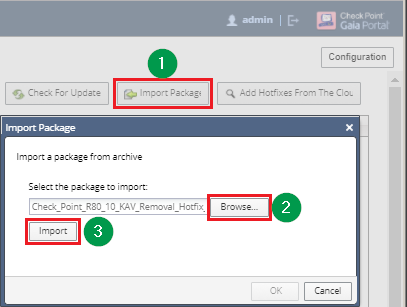
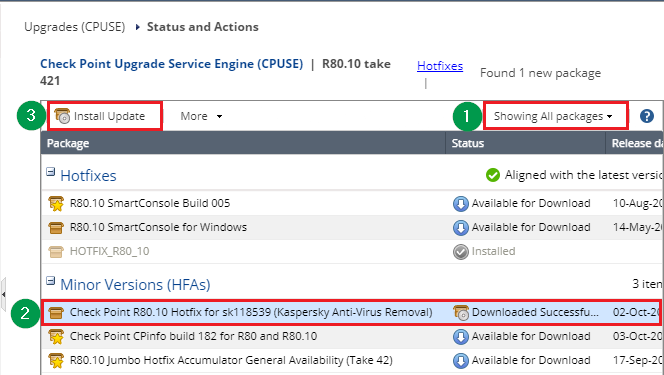
   | Any Gaia machine ***except*** R77.30 VSX    | Gaia Portal | Offline installation | 1. Download the CPUSE package to your computer: * [*CPUSE package for R77.30*](https://supportcenter.checkpoint.com/supportcenter/portal/role/supportcenterUser/page/default.psml/media-type/html?action=portlets.DCFileAction&eventSubmit_doGetdcdetails=&fileid=58312) * [*CPUSE package for R80.10*](https://supportcenter.checkpoint.com/supportcenter/portal/role/supportcenterUser/page/default.psml/media-type/html?action=portlets.DCFileAction&eventSubmit_doGetdcdetails=&fileid=58314) 2. Install the [latest build of the CPUSE Agent](https://supportcenter.checkpoint.com/supportcenter/portal?eventSubmit_doGoviewsolutiondetails=&solutionid=sk92449#Latest build of CPUSE and What's New). 3. Connect to the Gaia Portal on your Check Point machine and navigate to ***Upgrades (CPUSE)*** section - click on the ***Status and Actions***. 4. In the upper right corner, click on the ***Import Package*** button. 5. In the ***Import Package*** window, click on the ***Browse...*** - select the downloaded CPUSE package - click on the ***Import*** . *Example* : [![](https://sc1.checkpoint.com/sc/SolutionsStatics/sk118539/R80_10_Gaia_Portal_Import_Hotfix.png)](https://sc1.checkpoint.com/sc/SolutionsStatics/sk118539/R80_10_Gaia_Portal_Import_Hotfix.png "Click the image to see it in full size in a new tab/window") 6. On the toolbar, click on the ***Showing Recommended packages*** (near the help icon ![](https://sc1.checkpoint.com/sc/images/Gaia_Portal_icons/help.png)) and select ***All*** : *Example* : [![](https://sc1.checkpoint.com/sc/SolutionsStatics/sk118539/R80_10_Gaia_Portal_All_packages.png)](https://sc1.checkpoint.com/sc/SolutionsStatics/sk118539/R80_10_Gaia_Portal_All_packages.png "Click the image to see it in full size in a new tab/window") 7. In the ***Minor Versions (HFAs)*** section, click on the ***Check Point \<VERSION\> Hotfix for sk118539 (Kaspersky Anti-Virus Removal)*** - click on the ***Install Update*** button on the toolbar. *Example* : [![](https://sc1.checkpoint.com/sc/SolutionsStatics/sk118539/R80_10_Gaia_Portal_Hotfix_HFAs_section.png)](https://sc1.checkpoint.com/sc/SolutionsStatics/sk118539/R80_10_Gaia_Portal_Hotfix_HFAs_section.png "Click the image to see it in full size in a new tab/window") |
   | Any Gaia machine ***including*** R77.30 VSX | Gaia Clish  | Online installation  | 1. [CPUSE Software Updates Policy](https://supportcenter.checkpoint.com/supportcenter/portal?eventSubmit_doGoviewsolutiondetails=&solutionid=sk92449#How to work with CPUSE - Additional How To) should be configured to allow self-update of CPUSE Agent. Otherwise, users should manually install the latest build of CPUSE Agent from [sk92449](https://supportcenter.checkpoint.com/supportcenter/portal?eventSubmit_doGoviewsolutiondetails=&solutionid=sk92449#Latest build of CPUSE and What's New). 2. Connect to the command line on Gaia OS. 3. Log in to Clish. 4. Acquire the lock over Gaia configuration database: ***lock database override*** 5. Download and Install the CPUSE package from Check Point Cloud: * On R77.30: ***installer download-and-install Check_Point_R77_30_KAV_Removal_Hotfix_sk118539_FULL.tgz*** * On R80.10: ***installer download-and-install Check_Point_R80_10_KAV_Removal_Hotfix_sk118539_FULL.tgz***                                                                                                                                                                                                                                                                                                                                                                                                                                                                                                                                                                                                                                                                                                                                                                                                                                                                                                                                                                                                                                                                                                                                                                                                                                                                                                                                                                  |
   | Any Gaia machine ***including*** R77.30 VSX | Gaia Clish  | Offline installation | 1. Download the CPUSE package to your computer: * [*CPUSE package for R77.30*](https://supportcenter.checkpoint.com/supportcenter/portal/role/supportcenterUser/page/default.psml/media-type/html?action=portlets.DCFileAction&eventSubmit_doGetdcdetails=&fileid=58312) * [*CPUSE package for R80.10*](https://supportcenter.checkpoint.com/supportcenter/portal/role/supportcenterUser/page/default.psml/media-type/html?action=portlets.DCFileAction&eventSubmit_doGetdcdetails=&fileid=58314) 2. Transfer the downloaded CPUSE package to the Gaia machine (into some directory, e.g., */some_path_to_jumbo/*). 3. Install the [latest build of the CPUSE Agent](https://supportcenter.checkpoint.com/supportcenter/portal?eventSubmit_doGoviewsolutiondetails=&solutionid=sk92449#Latest build of CPUSE and What's New). 4. Connect to the command line on Gaia OS. 5. Log in to Clish. 6. Acquire the lock over Gaia configuration database: ***lock database override*** 7. Import the CPUSE package from the hard disk: **Note:** When import completes, this package might be deleted from the original location. ***installer import local \<Full_Path\>/\<Package_File_Name\>.TGZ*** 8. Install the imported package: ***installer install*** \[press Space\]\[press Tab\] ***installer install \<Package_Number\>*** Note: In the top section "*Hotfixes* ", refer to "*\<Package_File_Name\>*"                                                                                                                                                                                                                                                                                                                                                                                                                                                                                                                                                                                                                                                                                                                                                                                                                                                                                                          |

3. Re-enable Anti-Virus Deep Scan / Anti-Virus Archive scan / Threat Emulation Configuration.

Prevention will now be based on a suitable replacement for the removed Kaspersky Lab components.   

Notes:

* For customers who wish to use Anti-Virus Deep Scan / Anti-Virus Archive Scanning / Traditional Anti-Virus and for *Security Gateway / VSX Gateway* with enabled Threat Emulation blade:

  * Make sure to install the latest Threat Emulation engine.  
    Or follow [sk92509](https://supportcenter.checkpoint.com/supportcenter/portal?eventSubmit_doGoviewsolutiondetails=&solutionid=sk92509#Procedure) to install the ***Basic Package*** (released on 26 Sep 2017 (version 6.9) or later).

### (3) For R77.30 and above (Disable \& Remove) {#For versions R77.30 and above (Disable & Remove)}

Follow these steps:

1. If *Anti-Virus Deep Scan* , *Anti-Virus Archive Scanning* , or *Traditional Anti-Virus* are enabled on your Security Gateway, then disable those features according to the summary table in section 6.

2. Remove the 3rd party components by installing a relevant CPUSE package.

   Show / Hide the instructions  
   **Important Note:** This procedure does *not* require a reboot or restart of Check Point services.

   **Notes:**
   * This CPUSE package should be installed on all Gaia OS machines in your environment - Security Gateway / VSX Gateway / StandAlone / Management Server / Endpoint Security Management Server.
   * You can use the [sk111158 - Central Deployment Tool (CDT)](https://supportcenter.checkpoint.com/supportcenter/portal?eventSubmit_doGoviewsolutiondetails=&solutionid=sk111158) to automate the deployment of this CPUSE package to the managed Security Gateways running on Gaia OS.

   <br />

   |---------------------------------------------|-------------|----------------------|----------------------------------------------------------------------------------------------------------------------------------------------------------------------------------------------------------------------------------------------------------------------------------------------------------------------------------------------------------------------------------------------------------------------------------------------------------------------------------------------------------------------------------------------------------------------------------------------------------------------------------------------------------------------------------------------------------------------------------------------------------------------------------------------------------------------------------------------------------------------------------------------------------------------------------------------------------------------------------------------------------------------------------------------------------------------------------------------------------------------------------------------------------------------------------------------------------------------------------------------------------------------------------------------------------------------------------------------------------------------------------------------------------------------------------------------------------------------------------------------------------------------------------------------------------------------------------------------------------------------------------------------------------------------------------------------------------------------------------------------------------------------------------------------------------------------------------------------------------------------------------------------------------------------------------------------------------------------------------------------------------------------------------------------------------------------------------------------------------------------------------------------------------------------------------------------------------------------------------------------------------------------------------------------------------------------|
   | Which machine?                              | Where?      | Installation type    | Instructions                                                                                                                                                                                                                                                                                                                                                                                                                                                                                                                                                                                                                                                                                                                                                                                                                                                                                                                                                                                                                                                                                                                                                                                                                                                                                                                                                                                                                                                                                                                                                                                                                                                                                                                                                                                                                                                                                                                                                                                                                                                                                                                                                                                                                                                                                                         |
   | Any Gaia machine ***except*** R77.30 VSX    | Gaia Portal | Online installation  | 1. [CPUSE Software Updates Policy](https://supportcenter.checkpoint.com/supportcenter/portal?eventSubmit_doGoviewsolutiondetails=&solutionid=sk92449#How to work with CPUSE - Additional How To) should be configured to allow self-update of CPUSE Agent. Otherwise, users should manually install the latest build of CPUSE Agent from [sk92449](https://supportcenter.checkpoint.com/supportcenter/portal?eventSubmit_doGoviewsolutiondetails=&solutionid=sk92449#Latest build of CPUSE and What's New). 2. Connect to the Gaia Portal on your Check Point machine and navigate to ***Upgrades (CPUSE)*** section - click on the ***Status and Actions***. 3. On the toolbar, click on the ***Showing Recommended packages*** (near the help icon ![](https://sc1.checkpoint.com/sc/images/Gaia_Portal_icons/help.png)) and select ***All*** : *Example* : [![](https://sc1.checkpoint.com/sc/SolutionsStatics/sk118539/R80_10_Gaia_Portal_All_packages.png)](https://sc1.checkpoint.com/sc/SolutionsStatics/sk118539/R80_10_Gaia_Portal_All_packages.png "Click the image to see it in full size in a new tab/window") 4. In the ***Hotfixes*** section, click on the ***Check Point \<VERSION\> Hotfix for sk118539 (Kaspersky Anti-Virus Removal)*** - click on the ***Install Update*** button on the toolbar. *Example* : [![](https://sc1.checkpoint.com/sc/SolutionsStatics/sk118539/R80_10_Gaia_Portal_Hotfix_Hotfixes_section.png)](https://sc1.checkpoint.com/sc/SolutionsStatics/sk118539/R80_10_Gaia_Portal_Hotfix_Hotfixes_section.png "Click the image to see it in full size in a new tab/window")                                                                                                                                                                                                                                                                                                                                                                                                                                                                                                                                                                                                                                                                                                 |

   | Any Gaia machine ***except*** R77.30 VSX    | Gaia Portal | Offline installation | 1. Download the CPUSE package to your computer: * [*CPUSE package for R77.30*](https://supportcenter.checkpoint.com/supportcenter/portal/role/supportcenterUser/page/default.psml/media-type/html?action=portlets.DCFileAction&eventSubmit_doGetdcdetails=&fileid=58312) * [*CPUSE package for R80.10*](https://supportcenter.checkpoint.com/supportcenter/portal/role/supportcenterUser/page/default.psml/media-type/html?action=portlets.DCFileAction&eventSubmit_doGetdcdetails=&fileid=58314) 2. Install the [latest build of the CPUSE Agent](https://supportcenter.checkpoint.com/supportcenter/portal?eventSubmit_doGoviewsolutiondetails=&solutionid=sk92449#Latest build of CPUSE and What's New). 3. Connect to the Gaia Portal on your Check Point machine and navigate to ***Upgrades (CPUSE)*** section - click on the ***Status and Actions***. 4. In the upper right corner, click on the ***Import Package*** button. 5. In the ***Import Package*** window, click on the ***Browse...*** - select the downloaded CPUSE package - click on the ***Import*** . *Example* : [![](https://sc1.checkpoint.com/sc/SolutionsStatics/sk118539/R80_10_Gaia_Portal_Import_Hotfix.png)](https://sc1.checkpoint.com/sc/SolutionsStatics/sk118539/R80_10_Gaia_Portal_Import_Hotfix.png "Click the image to see it in full size in a new tab/window") 6. On the toolbar, click on the ***Showing Recommended packages*** (near the help icon ![](https://sc1.checkpoint.com/sc/images/Gaia_Portal_icons/help.png)) and select ***All*** : *Example* : [![](https://sc1.checkpoint.com/sc/SolutionsStatics/sk118539/R80_10_Gaia_Portal_All_packages.png)](https://sc1.checkpoint.com/sc/SolutionsStatics/sk118539/R80_10_Gaia_Portal_All_packages.png "Click the image to see it in full size in a new tab/window") 7. In the ***Minor Versions (HFAs)*** section, click on the ***Check Point \<VERSION\> Hotfix for sk118539 (Kaspersky Anti-Virus Removal)*** - click on the ***Install Update*** button on the toolbar. *Example* : [![](https://sc1.checkpoint.com/sc/SolutionsStatics/sk118539/R80_10_Gaia_Portal_Hotfix_HFAs_section.png)](https://sc1.checkpoint.com/sc/SolutionsStatics/sk118539/R80_10_Gaia_Portal_Hotfix_HFAs_section.png "Click the image to see it in full size in a new tab/window") |


   | Any Gaia machine ***including*** R77.30 VSX | Gaia Clish  | Online installation  | 1. [CPUSE Software Updates Policy](https://supportcenter.checkpoint.com/supportcenter/portal?eventSubmit_doGoviewsolutiondetails=&solutionid=sk92449#How to work with CPUSE - Additional How To) should be configured to allow self-update of CPUSE Agent. Otherwise, users should manually install the latest build of CPUSE Agent from [sk92449](https://supportcenter.checkpoint.com/supportcenter/portal?eventSubmit_doGoviewsolutiondetails=&solutionid=sk92449#Latest build of CPUSE and What's New). 2. Connect to the command line on Gaia OS. 3. Log in to Clish. 4. Acquire the lock over Gaia configuration database: ***lock database override*** 5. Download and Install the CPUSE package from Check Point Cloud: * On R77.30: ***installer download-and-install Check_Point_R77_30_KAV_Removal_Hotfix_sk118539_FULL.tgz*** * On R80.10: ***installer download-and-install Check_Point_R80_10_KAV_Removal_Hotfix_sk118539_FULL.tgz***                                                                                                                                                                                                                                                                                                                                                                                                                                                                                                                                                                                                                                                                                                                                                                                                                                                                                                                                                                                                                                                                                                                                                                                                                                                                                                                                                                  |
   | Any Gaia machine ***including*** R77.30 VSX | Gaia Clish  | Offline installation | 1. Download the CPUSE package to your computer: * [*CPUSE package for R77.30*](https://supportcenter.checkpoint.com/supportcenter/portal/role/supportcenterUser/page/default.psml/media-type/html?action=portlets.DCFileAction&eventSubmit_doGetdcdetails=&fileid=58312) * [*CPUSE package for R80.10*](https://supportcenter.checkpoint.com/supportcenter/portal/role/supportcenterUser/page/default.psml/media-type/html?action=portlets.DCFileAction&eventSubmit_doGetdcdetails=&fileid=58314) 2. Transfer the downloaded CPUSE package to the Gaia machine (into some directory, e.g., */some_path_to_jumbo/*). 3. Install the [latest build of the CPUSE Agent](https://supportcenter.checkpoint.com/supportcenter/portal?eventSubmit_doGoviewsolutiondetails=&solutionid=sk92449#Latest build of CPUSE and What's New). 4. Connect to the command line on Gaia OS. 5. Log in to Clish. 6. Acquire the lock over Gaia configuration database: ***lock database override*** 7. Import the CPUSE package from the hard disk: **Note:** When import completes, this package might be deleted from the original location. ***installer import local \<Full_Path\>/\<Package_File_Name\>.TGZ*** 8. Install the imported package: ***installer install*** \[press Space\]\[press Tab\] ***installer install \<Package_Number\>*** Note: In the top section "*Hotfixes* ", refer to "*\<Package_File_Name\>*"                                                                                                                                                                                                                                                                                                                                                                                                                                                                                                                                                                                                                                                                                                                                                                                                                                                                                                          |

Notes:

* For *Security Gateway / VSX Gateway* with enabled Threat Emulation blade:

  * Make sure to install the latest Threat Emulation engine.  
    Or follow [sk92509](https://supportcenter.checkpoint.com/supportcenter/portal?eventSubmit_doGoviewsolutiondetails=&solutionid=sk92509#Procedure) to install the ***Basic Package*** (released on 11 Sep 2017 or later).

### (4) For R76SP.X on 60000 / 40000 Security Systems {#For versions R76SP.X on 60000 / 40000 Security Systems}

1. If *Anti-Virus Deep Scan* , *Anti-Virus Archive Scanning* , or *Traditional Anti-Virus* are enabled on your 60000 / 40000 Security System, then disable those features according to the summary table in section 6.

2. Remove the 3rd party components on your 60000 / 40000 Security System from all SGMs using the following procedure in the Expert mode:

   Show / Hide the instructions  
   1. Download [this shell script](https://supportcenter.checkpoint.com/supportcenter/portal/role/supportcenterUser/page/default.psml/media-type/html?action=portlets.DCFileAction&eventSubmit_doGetdcdetails=&fileid=58043) to your computer (*asg_remove_kav.tar*).
   2. Transfer the shell script to the 60000 / 40000 Security System (into some directory, e.g., */some_path_to_script/*).
   3. Connect to the command line on the 60000 / 40000 Security System.
   4. Log in to the Expert mode.
   5. Go to the directory, to which you transferred the shell script:  
      *\[Expert@HostName:0\]# cd /some_path_to_script/*
   6. Unpack the shell script:  
      *\[Expert@HostName:0\]# tar -xvf asg_remove_kav.tar*
   7. Assign the execute permissions:  
      *\[Expert@HostName:0\]# chmod -v u+x asg_remove_kav.sh*
   8. Execute the shell script:  
      *\[Expert@HostName:0\]# ./asg_remove_kav.sh*

### (5) For 600 / 700 / 1100 / 1200R / 1400 Appliances {#For 600 / 700 / 1100 / 1200R / 1400 Appliances}

* Appliances running Gaia Embedded OS do *not* contain any Kaspersky Labs code. No action is required.

### (6) How to disable Anti-Virus Deep Scan, Anti-Virus Archive Scanning, and Traditional Anti-Virus {#Summary table about 3rd party components}

Show / Hide this section  

|-------------------------------|-------------------------------------------------------------------------------|--------------------------------------------------------------------------------------------------------------------------------------------------------------------------------------------------------------------------------------------------------------------------------------------------------------------------------------------------------------------------------------------------------------------------------------------------------------------------------------------------------------------------------------------------------------------------------------------------------------------------------------------------------------------------------------------------------------------------------------------------------------------------------------------------------------------------------------------------------------------------------------------------------------------------------------------------------------------------------------------------------------------------------------------------------------------------------------------------------------------------------------------------------------------------------------------------------------------------------------------------------------------------------------------------------------------------------------------------------------------------------------------------------------------------------------------------------------------------------------------------------------------------------------------------------------------------------------------------------------------------------------------------------------------------------------------------------------------------------------------------------------------------------------------------------------------------------------------------------------------------------------------------------------------------------------------------------------------------------------------------------------------------------------------------------------------------------------------------------------------------------------------------------------------------------------------------------------------------------------------------------------------------------------------------------------------------------------------------------------------------------------------------------------------------------------------------------------------------------------------------------------------------------------------------------------------------------------------------------------------------------------------------------------------------------------------------------------------------------------------------------------------------------------------------------------------------------------------------------------------------------------------------------------------------------------------------------------------------------------------------------------------------------------------------------------------------------------------------------------------------------------------------------------------------------------------------------------------------------------------------------------------------------------------------------------------------------------------------------------------------------------------------------------------|---------------------------------------------------------------------------------------------------------------------------------------------------------------------------------------------------------------------------------------------------------------------------------------------------------------------------------------------------------------------------------------------------------------------------------------------------------------------------------------------------------------------------------------------------------------------------------------------------------------------------------------------------------------------------------------------------------------------------------------------------------------------------------------------------------------------------------------------------------------------------------------------------------------------------------------------------------------------------------------------------------------------------------------------------------------------------------------------------------------------------------------------------------------------------------------------------------------------------------------------------------------------------------------------------------------------------------------------------------------------------------------------------------------------------------------------------------------------------------------------------------------------------------------------------------------------------------------------------------------------------------------------------------------------------------------------------------------------------------------------------------------------------------------------------------------------------------------------------------------------------------------------------------------------------------------------------------------------------------------------------------------------------------------------------------------------------------------------------------------------------------------------------------------------------------------------------|
| Blade / Feature               | 3rd party Anti-Virus vendor                                                   | How to disable 3rd party Anti-Virus components                                                                                                                                                                                                                                                                                                                                                                                                                                                                                                                                                                                                                                                                                                                                                                                                                                                                                                                                                                                                                                                                                                                                                                                                                                                                                                                                                                                                                                                                                                                                                                                                                                                                                                                                                                                                                                                                                                                                                                                                                                                                                                                                                                                                                                                                                                                                                                                                                                                                                                                                                                                                                                                                                                                                                                                                                                                                                                                                                                                                                                                                                                                                                                                                                                                                                                                                                                                                                                                                                                                                                                                                                                                                                                                                                                                                                                                                                                                                                                                                                                                                                                                                                                                                                                                                                                                                                                                                                                                                                                                                                                                                                                                                                                                                                                                                                                                                                                                                                                                                                                                                                                                                                                                                                                                                                                                                                                                                                                                                                                                                                                        ||
| Anti-Virus - Deep Scan        | The Deep Inspection Scanning feature utilizes components from Kaspersky Labs. | Instructions for SmartConsole R80 (and above)                                                                                                                                                                                                                                                                                                                                                                                                                                                                                                                                                                                                                                                                                                                                                                                                                                                                                                                                                                                                                                                                                                                                                                                                                                                                                                                                                                                                                                                                                                                                                                                                                                                                                                                                                                                                                                                                                                                                                                                                                                                                                                                                                                                                                                                                                                                                                                                                                                                                                                                                                                                                                                                                                                                                                                                                                                                                                                                                                                                                                                                                                                                                                                                                                                                                                                                                                                      | Instructions for SmartDashboard R77.30                                                                                                                                                                                                                                                                                                                                                                                                                                                                                                                                                                                                                                                                                                                                                                                                                                                                                                                                                                                                                                                                                                                                                                                                                                                                                                                                                                                                                                                                                                                                                                                                                                                                                                                                                                                                                                                                                                                                                                                                                                                                                                                                                            |
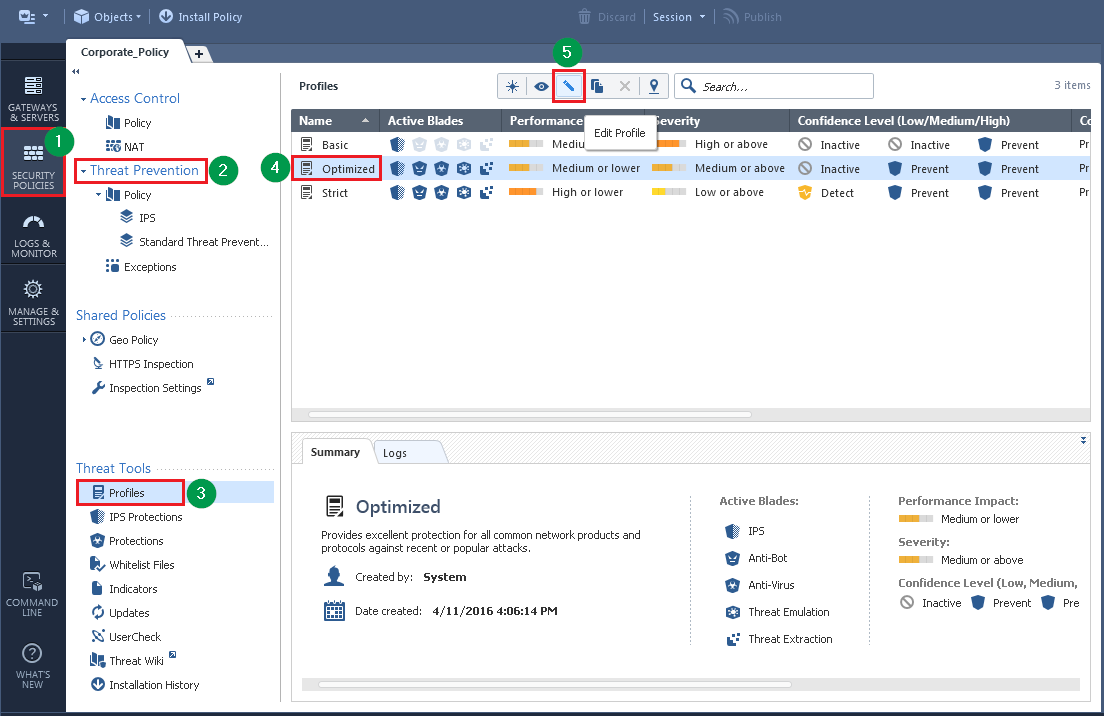
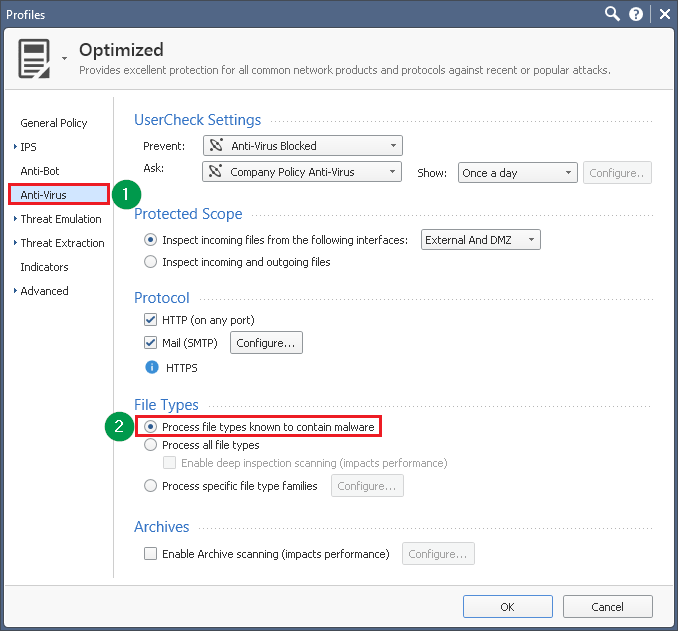
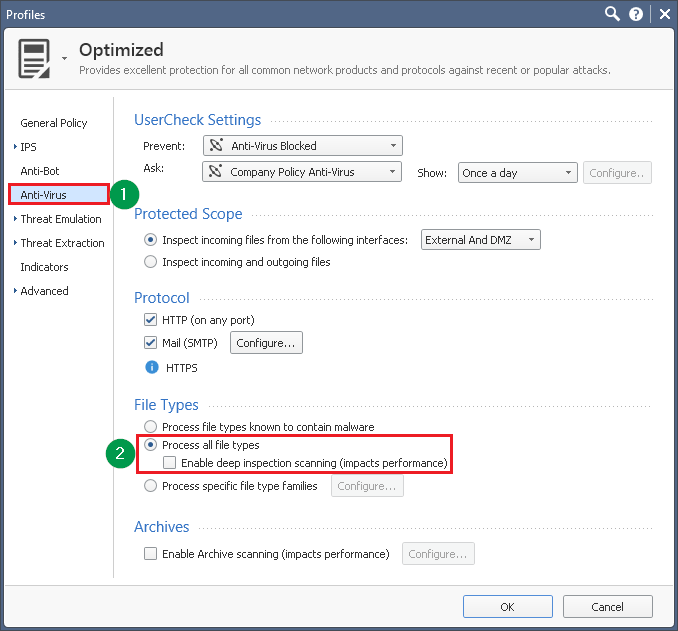
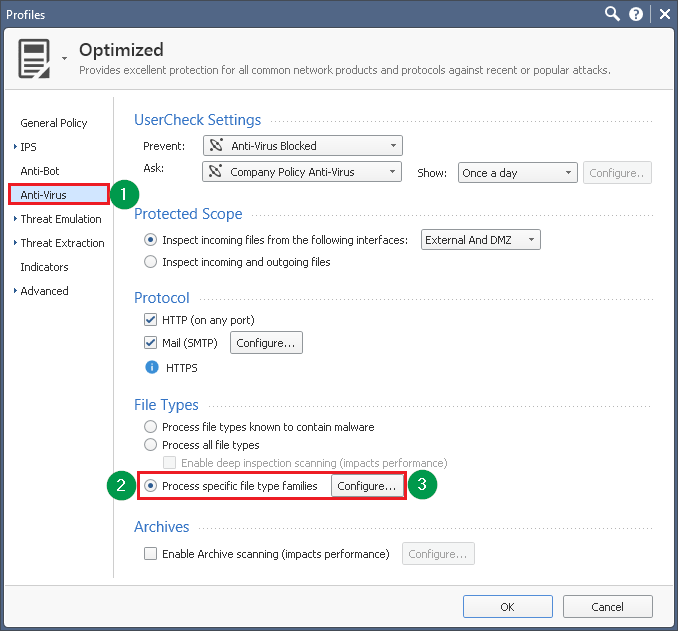
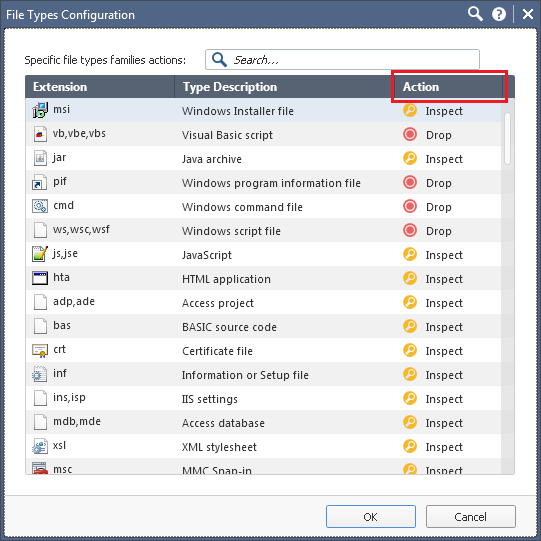
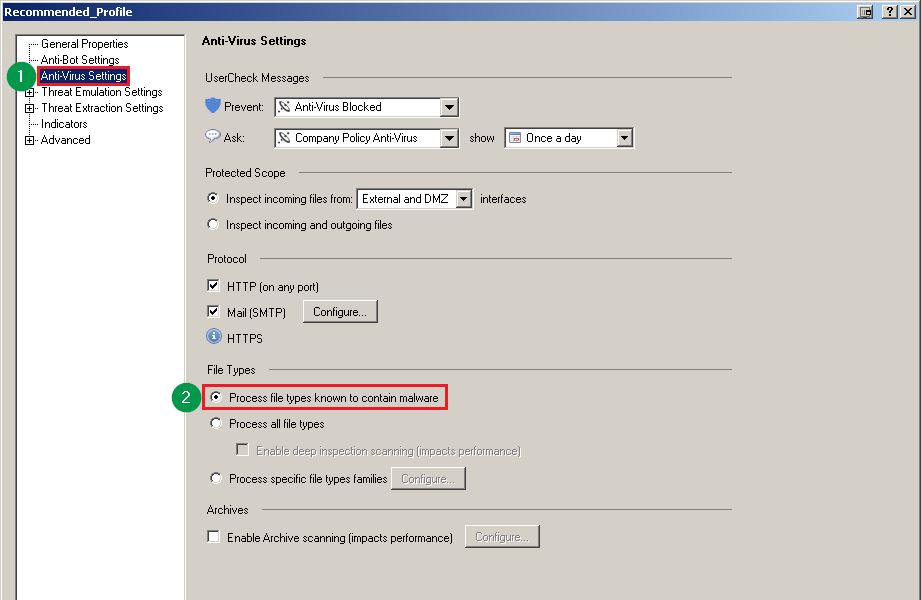
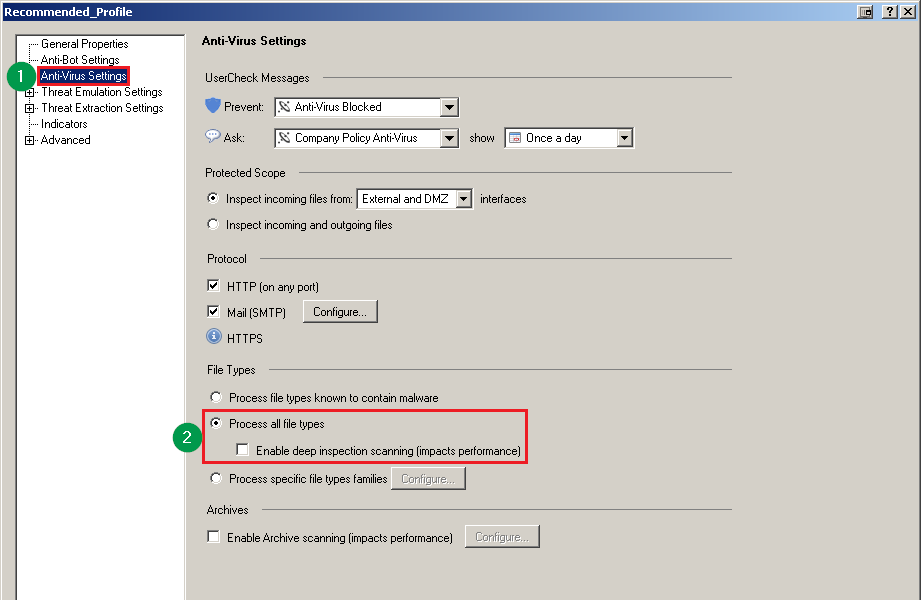
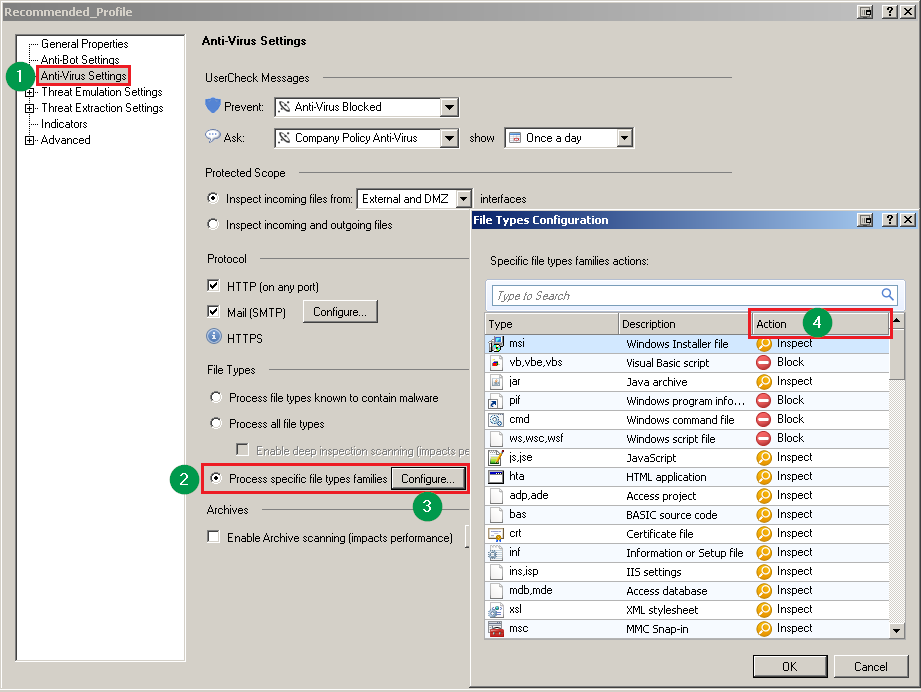
| Anti-Virus - Deep Scan        | The Deep Inspection Scanning feature utilizes components from Kaspersky Labs. | Note: Deep Scan feature is disabled by default (Anti-Virus will search for fewer virus signatures inside files). Follow these steps in SmartConsole R80 (and above): 1. In SmartConsole Navigation Toolbar, click on the ***SECURITY POLICIES***. 2. In the upper left section, click on the ***Threat Prevention*** headline. 3. In the bottom left section, click on the ***Profiles***. 4. Edit the profile that is assigned to the relevant Security Gateway / Cluster. Example: [![](https://sc1.checkpoint.com/sc/SolutionsStatics/sk118539/R8x_SmartConsole_Threat_Prevention.png)](https://sc1.checkpoint.com/sc/SolutionsStatics/sk118539/R8x_SmartConsole_Threat_Prevention.png "Click the image to see it in full size in a new tab/window") 5. In the left tree, click on the ***Anti-Virus Settings***. 6. In the ***File Types*** section, select *one* of the desired options: * Select the "***Process file types known to contain malware***" option. Example: [![](https://sc1.checkpoint.com/sc/SolutionsStatics/sk118539/R8x_Deep_Scan_1.png)](https://sc1.checkpoint.com/sc/SolutionsStatics/sk118539/R8x_Deep_Scan_1.png "Click the image to see it in full size in a new tab/window") * Select the "***Process all file types*** " option and clear the box "***Enable deep inspection scanning (impacts performance)***". Example: [![](https://sc1.checkpoint.com/sc/SolutionsStatics/sk118539/R8x_Deep_Scan_2.png)](https://sc1.checkpoint.com/sc/SolutionsStatics/sk118539/R8x_Deep_Scan_2.png "Click the image to see it in full size in a new tab/window") * Select the "***Process specific file type families***" option. 1. Click on the "***Configure...***" button. Example: [![](https://sc1.checkpoint.com/sc/SolutionsStatics/sk118539/R8x_Deep_Scan_3a.png)](https://sc1.checkpoint.com/sc/SolutionsStatics/sk118539/R8x_Deep_Scan_3a.png "Click the image to see it in full size in a new tab/window") 2. In the "***Action*** " column, make sure that "***Deep Scan*** " is *not* set for any of the file types. Example: [![](https://sc1.checkpoint.com/sc/SolutionsStatics/sk118539/R8x_Deep_Scan_3b.png)](https://sc1.checkpoint.com/sc/SolutionsStatics/sk118539/R8x_Deep_Scan_3b.png "Click the image to see it in full size in a new tab/window") 7. Click on OK. 8. Install the Threat Prevention policy on this Security Gateway / Cluster.                                                                                                                                                                                                                                                                                                                                                                                                                                                                                                                                                                                                                                                                                                                                                                                                                                                                                                                                                                                                                      | Note: Deep Scan feature is disabled by default (Anti-Virus will search for fewer virus signatures inside files). Follow these steps in SmartDashboard R77.30: 1. In SmartDashboard, go to the ***Threat Prevention*** tab. 2. In the left tree, click on the ***Profiles***. 3. Edit the profile that is assigned to the relevant Security Gateway / Cluster. 4. In the left tree, click on the ***Anti-Virus Settings***. 5. In the ***File Types*** section, select *one* of the desired options: * Select the "***Process file types known to contain malware***" option. Example: [![](https://sc1.checkpoint.com/sc/SolutionsStatics/sk118539/R77x_Deep_Scan_1.png)](https://sc1.checkpoint.com/sc/SolutionsStatics/sk118539/R77x_Deep_Scan_1.png "Click the image to see it in full size in a new tab/window") * Select the "***Process all file types*** " option and clear the box "***Enable deep inspection scanning (impacts performance)***". Example: [![](https://sc1.checkpoint.com/sc/SolutionsStatics/sk118539/R77x_Deep_Scan_2.png)](https://sc1.checkpoint.com/sc/SolutionsStatics/sk118539/R77x_Deep_Scan_2.png "Click the image to see it in full size in a new tab/window") * Select the "***Process specific file type families*** " option - click on the "***Configure...*** " button - in the "***Action*** " column, make sure that "***Deep Scan*** " is *not* set for any of the file types. Example: [![](https://sc1.checkpoint.com/sc/SolutionsStatics/sk118539/R77x_Deep_Scan_3.png)](https://sc1.checkpoint.com/sc/SolutionsStatics/sk118539/R77x_Deep_Scan_3.png "Click the image to see it in full size in a new tab/window") 6. Click on OK. 7. Install the Threat Prevention policy on this Security Gateway / Cluster.                                                                                                                                                                                                                                                                                                                                                                                                                                     |
| Anti-Virus - Archive Scanning | The Archive Scanning feature utilizes components from Kaspersky Labs.         | Instructions for SmartConsole R80 (and above)                                                                                                                                                                                                                                                                                                                                                                                                                                                                                                                                                                                                                                                                                                                                                                                                                                                                                                                                                                                                                                                                                                                                                                                                                                                                                                                                                                                                                                                                                                                                                                                                                                                                                                                                                                                                                                                                                                                                                                                                                                                                                                                                                                                                                                                                                                                                                                                                                                                                                                                                                                                                                                                                                                                                                                                                                                                                                                                                                                                                                                                                                                                                                                                                                                                                                                                                                                      | Instructions for SmartDashboard R77.30                                                                                                                                                                                                                                                                                                                                                                                                                                                                                                                                                                                                                                                                                                                                                                                                                                                                                                                                                                                                                                                                                                                                                                                                                                                                                                                                                                                                                                                                                                                                                                                                                                                                                                                                                                                                                                                                                                                                                                                                                                                                                                                                                            |
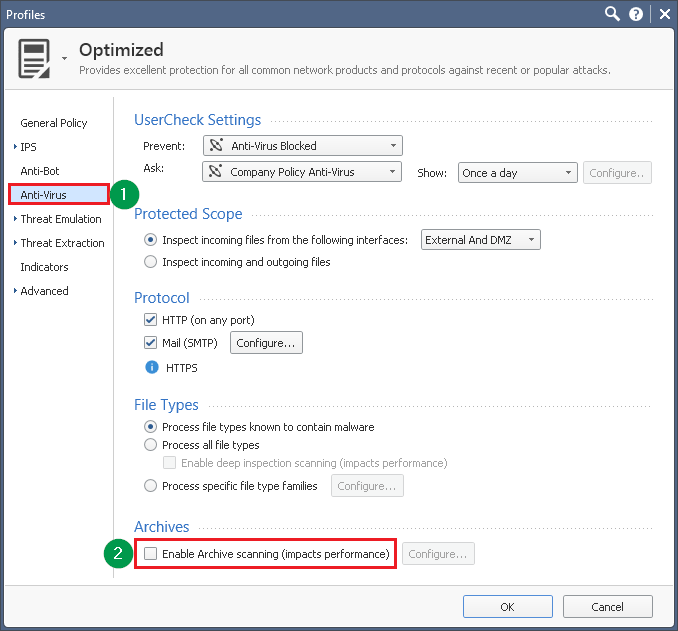
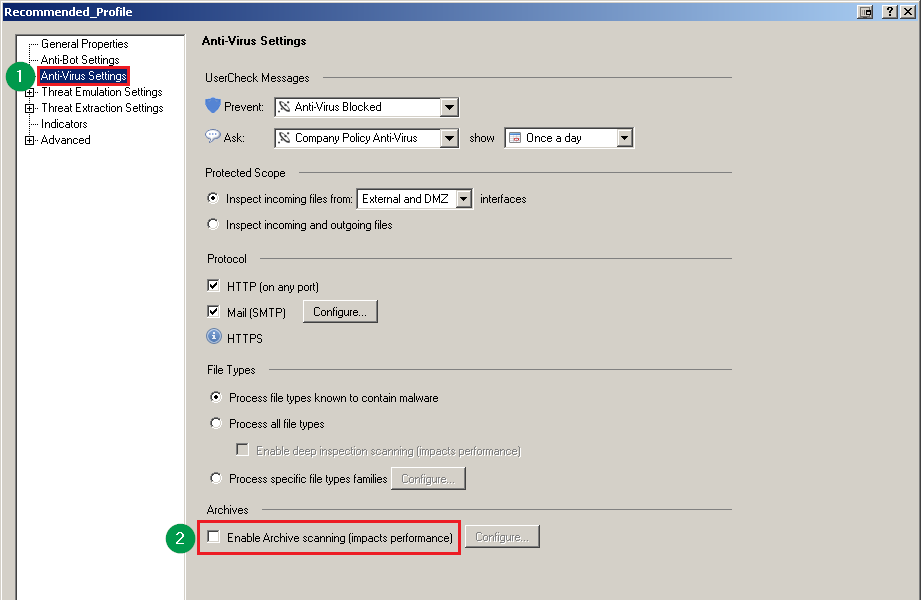
| Anti-Virus - Archive Scanning | The Archive Scanning feature utilizes components from Kaspersky Labs.         | Note: The Archive Scanning feature is disabled by default. Follow these steps in SmartConsole R80 (and above): 1. In SmartConsole Navigation Toolbar, click on the ***SECURITY POLICIES***. 2. In the upper left section, click on the ***Threat Prevention*** headline. 3. In the bottom left section, click on the ***Profiles***. 4. Edit the profile that is assigned to the relevant Security Gateway / Cluster. Example: [![](https://sc1.checkpoint.com/sc/SolutionsStatics/sk118539/R8x_SmartConsole_Threat_Prevention.png)](https://sc1.checkpoint.com/sc/SolutionsStatics/sk118539/R8x_SmartConsole_Threat_Prevention.png "Click the image to see it in full size in a new tab/window") 5. In the left tree, click on the ***Anti-Virus Settings***. 6. In the ***Archives*** section, clear the box "***Enable Archive Scanning (impact performance)***". Example: [![](https://sc1.checkpoint.com/sc/SolutionsStatics/sk118539/R8x_Archive_Scanning.png)](https://sc1.checkpoint.com/sc/SolutionsStatics/sk118539/R8x_Archive_Scanning.png "Click the image to see it in full size in a new tab/window") 7. Click on OK. 8. Install the Threat Prevention policy on this Security Gateway / Cluster.                                                                                                                                                                                                                                                                                                                                                                                                                                                                                                                                                                                                                                                                                                                                                                                                                                                                                                                                                                                                                                                                                                                                                                                                                                                                                                                                                                                                                                                                                                                                                                                                                                                                                                                                                                                                                                                                                                                                                                                                                                                                                                                                                                                                   | Note: The Archive Scanning feature is disabled by default. Follow these steps in SmartDashboard R77.30: 1. In SmartDashboard, go to the ***Threat Prevention*** tab. 2. In the left tree, click on the ***Profiles***. 3. Edit the profile that is assigned to the relevant Security Gateway / Cluster. 4. In the left tree, click on the ***Anti-Virus Settings***. 5. In the ***Archives*** section, clear the box "***Enable Archive Scanning (impact performance)***". Example: [![](https://sc1.checkpoint.com/sc/SolutionsStatics/sk118539/R77x_Archive_Scanning.png)](https://sc1.checkpoint.com/sc/SolutionsStatics/sk118539/R77x_Archive_Scanning.png "Click the image to see it in full size in a new tab/window") 6. Click on OK. 7. Install the Threat Prevention policy on this Security Gateway / Cluster.                                                                                                                                                                                                                                                                                                                                                                                                                                                                                                                                                                                                                                                                                                                                                                                                                                                                                                                                                                                                                                                                                                                                                                                                                                                                                                                                                                          |

| Traditional Anti-Virus        | The Traditional Anti-Virus feature utilizes components from Kaspersky Labs.   | Instructions for SmartConsole R80 (and above)                                                                                                                                                                                                                                                                                                                                                                                                                                                                                                                                                                                                                                                                                                                                                                                                                                                                                                                                                                                                                                                                                                                                                                                                                                                                                                                                                                                                                                                                                                                                                                                                                                                                                                                                                                                                                                                                                                                                                                                                                                                                                                                                                                                                                                                                                                                                                                                                                                                                                                                                                                                                                                                                                                                                                                                                                                                                                                                                                                                                                                                                                                                                                                                                                                                                                                                                                                      | Instructions for SmartDashboard R77.30                                                                                                                                                                                                                                                                                                                                                                                                                                                                                                                                                                                                                                                                                                                                                                                                                                                                                                                                                                                                                                                                                                                                                                                                                                                                                                                                                                                                                                                                                                                                                                                                                                                                                                                                                                                                                                                                                                                                                                                                                                                                                                                                                            |
| Traditional Anti-Virus        | The Traditional Anti-Virus feature utilizes components from Kaspersky Labs.   | Follow these steps in SmartConsole R80 (and above): * Either disable the ***Proactive Mode***. 1. In SmartConsole Navigation Toolbar, click on the ***MANAGE \& SETTINGS***. 2. In the upper left section, click on the ***Blades***. 3. In the middle section, scroll to the bottom. 4. In the ***Anti-Spam \& Mail*** section, click on the ***Configure in SmartDashboard...*** link. Example: [![](https://sc1.checkpoint.com/sc/SolutionsStatics/sk118539/R8x_SmartConsole_Anti_Spam_Mail.png)](https://sc1.checkpoint.com/sc/SolutionsStatics/sk118539/R8x_SmartConsole_Anti_Spam_Mail.png "Click the image to see it in full size in a new tab/window") 5. In the Legacy SmartDashboard, go to the ***Anti-Spam \& Mail*** tab. 6. In the left tree, expand on the ***Traditional Anti-Virus***. 7. Expand the ***Security Gateway***. 8. Expand the ***Mail Protocols***. 9. Disable the *Proactive Mode* for SMTP: Click on the ***SMTP*** page - clear the box "***Activate Proactive Detection (impacts performance)***" Example: [![](https://sc1.checkpoint.com/sc/SolutionsStatics/sk118539/R8x_SmartDashboard_SMTP.png)](https://sc1.checkpoint.com/sc/SolutionsStatics/sk118539/R8x_SmartDashboard_SMTP.png "Click the image to see it in full size in a new tab/window") 10. Disable the *Scan POP3 traffic with Anti-Virus...* for POP3: Click on the ***POP3*** page - clear the box "***Scan POP3 traffic with Anti-Virus engine...***" Example: [![](https://sc1.checkpoint.com/sc/SolutionsStatics/sk118539/R8x_SmartDashboard_POP3.png)](https://sc1.checkpoint.com/sc/SolutionsStatics/sk118539/R8x_SmartDashboard_POP3.png "Click the image to see it in full size in a new tab/window") 11. Disable the Traditional Anti-Virus for FTP: Click on the ***FTP*** page - move the slider to the leftmost position (it should show ***Off***) Example: [![](https://sc1.checkpoint.com/sc/SolutionsStatics/sk118539/R8x_SmartDashboard_FTP.png)](https://sc1.checkpoint.com/sc/SolutionsStatics/sk118539/R8x_SmartDashboard_FTP.png "Click the image to see it in full size in a new tab/window") 12. Disable the *Proactive Mode* for HTTP: Click on the ***HTTP*** page - clear the box "***Activate Proactive Detection (impacts performance)***" Example: [![](https://sc1.checkpoint.com/sc/SolutionsStatics/sk118539/R8x_SmartDashboard_HTTP.png)](https://sc1.checkpoint.com/sc/SolutionsStatics/sk118539/R8x_SmartDashboard_HTTP.png "Click the image to see it in full size in a new tab/window") 13. Go to the ***File*** menu - click on the ***Update***. [![](https://sc1.checkpoint.com/sc/SolutionsStatics/sk118539/R8x_SmartDashboard_Update.png)](https://sc1.checkpoint.com/sc/SolutionsStatics/sk118539/R8x_SmartDashboard_Update.png "Click the image to see it in full size in a new tab/window") 14. Close the Legacy SmartDashboard. 15. In SmartConsole, install the Threat Prevention policy on this Security Gateway / Cluster. * Or use the Anti-Virus blade instead of the Traditional Anti-Virus. Note: The Anti-Virus blade has different supported features than the Traditional Anti-Virus (refer to the Threat Prevention Administration Guide ([R80](http://downloads.checkpoint.com/dc/download.htm?ID=46525), [R80.10](http://downloads.checkpoint.com/dc/download.htm?ID=54828) / [R80.10](http://downloads.checkpoint.com/dc/download.htm?ID=54806))). | Follow these steps in SmartDashboard R77.30: * Either disable the ***Proactive Mode***. 1. In SmartDashboard, go to the ***Threat Prevention*** tab. 2. In the left tree, expand on the ***Traditional Anti-Virus***. 3. Expand the ***Security Gateway***. 4. Expand the ***Mail Protocols***. 5. Disable the *Proactive Mode* for SMTP: Click on the ***SMTP*** page - clear the box "***Activate Proactive Detection (impacts performance)***" Example: [![](https://sc1.checkpoint.com/sc/SolutionsStatics/sk118539/R77x_SMTP.png)](https://sc1.checkpoint.com/sc/SolutionsStatics/sk118539/R77x_SMTP.png "Click the image to see it in full size in a new tab/window") 6. Disable the *Scan POP3 traffic with Anti-Virus...* for POP3: Click on the ***POP3*** page - clear the box "***Scan POP3 traffic with Anti-Virus engine...***" Example: [![](https://sc1.checkpoint.com/sc/SolutionsStatics/sk118539/R77x_POP3.png)](https://sc1.checkpoint.com/sc/SolutionsStatics/sk118539/R77x_POP3.png "Click the image to see it in full size in a new tab/window") 7. Disable the Traditional Anti-Virus for FTP: Click on the ***FTP*** page - move the slider to the leftmost position (it should show ***Off***) Example: [![](https://sc1.checkpoint.com/sc/SolutionsStatics/sk118539/R77x_FTP.png)](https://sc1.checkpoint.com/sc/SolutionsStatics/sk118539/R77x_FTP.png "Click the image to see it in full size in a new tab/window") 8. Disable the *Proactive Mode* for HTTP: Click on the ***HTTP*** page - clear the box "***Activate Proactive Detection (impacts performance)***" Example: [![](https://sc1.checkpoint.com/sc/SolutionsStatics/sk118539/R77x_HTTP.png)](https://sc1.checkpoint.com/sc/SolutionsStatics/sk118539/R77x_HTTP.png "Click the image to see it in full size in a new tab/window") 9. Install the Threat Prevention policy on this Security Gateway / Cluster. * Or use the Anti-Virus blade instead of the Traditional Anti-Virus. Note: The Anti-Virus blade has different supported features than the Traditional Anti-Virus (refer to the [R77.x Threat Prevention Administration Guide](http://downloads.checkpoint.com/dc/download.htm?ID=24834)). |
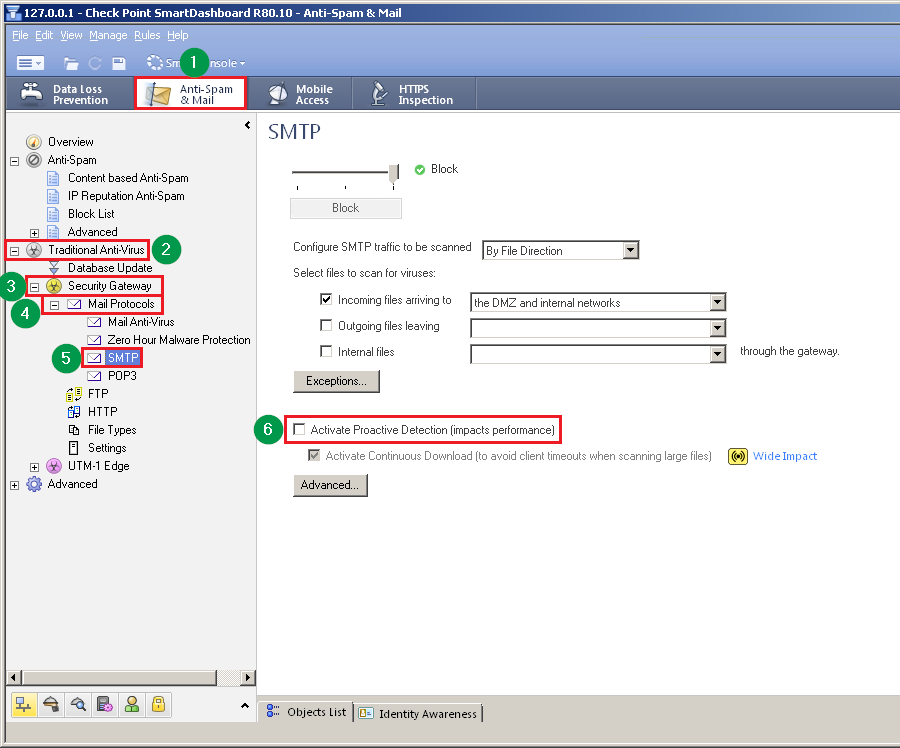
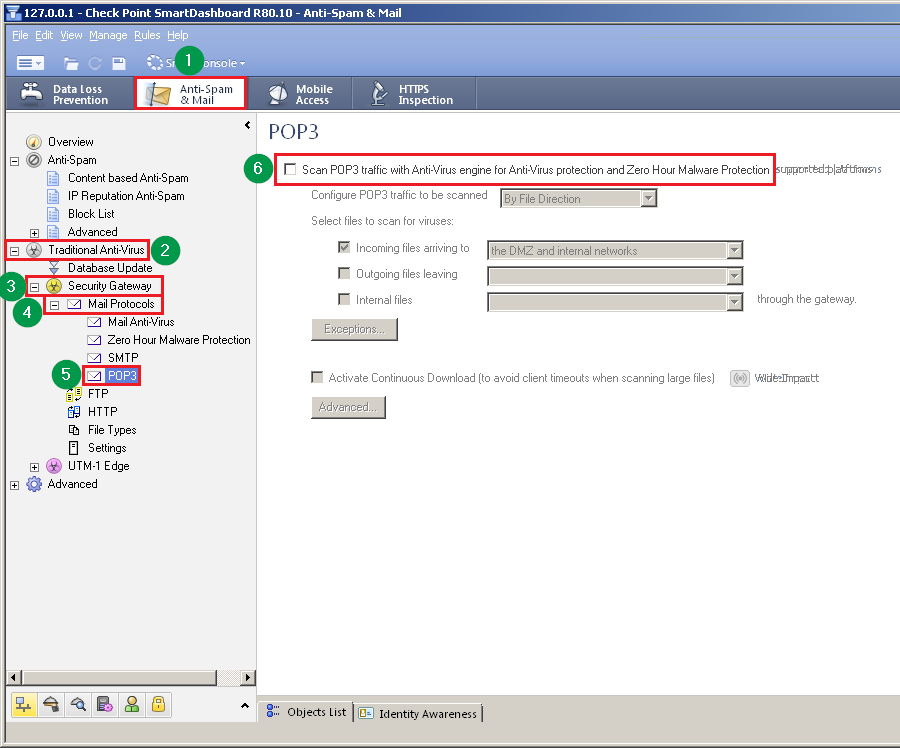
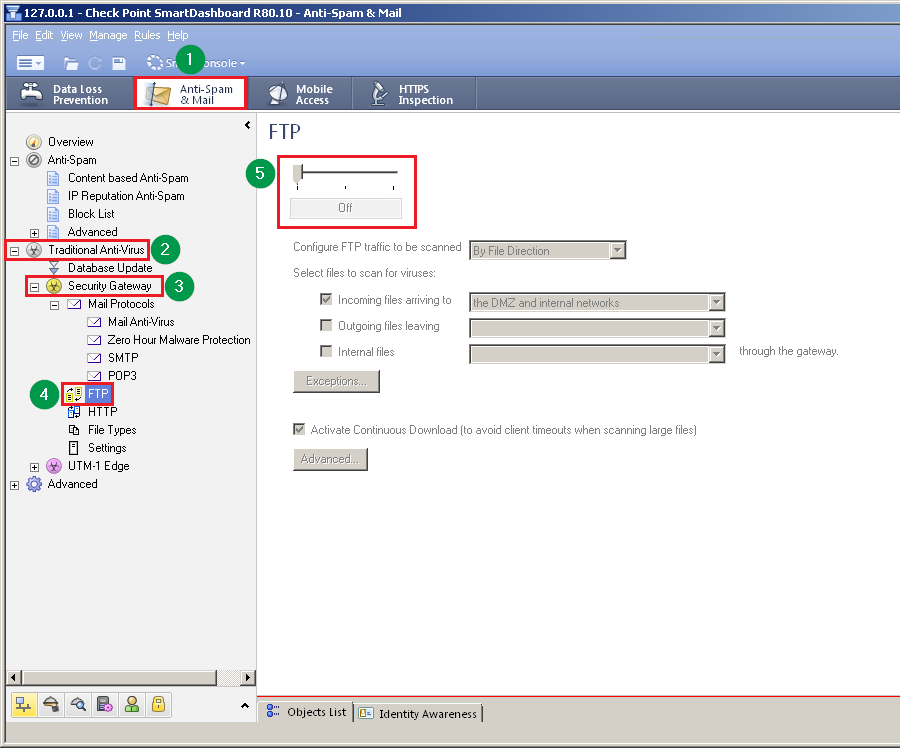
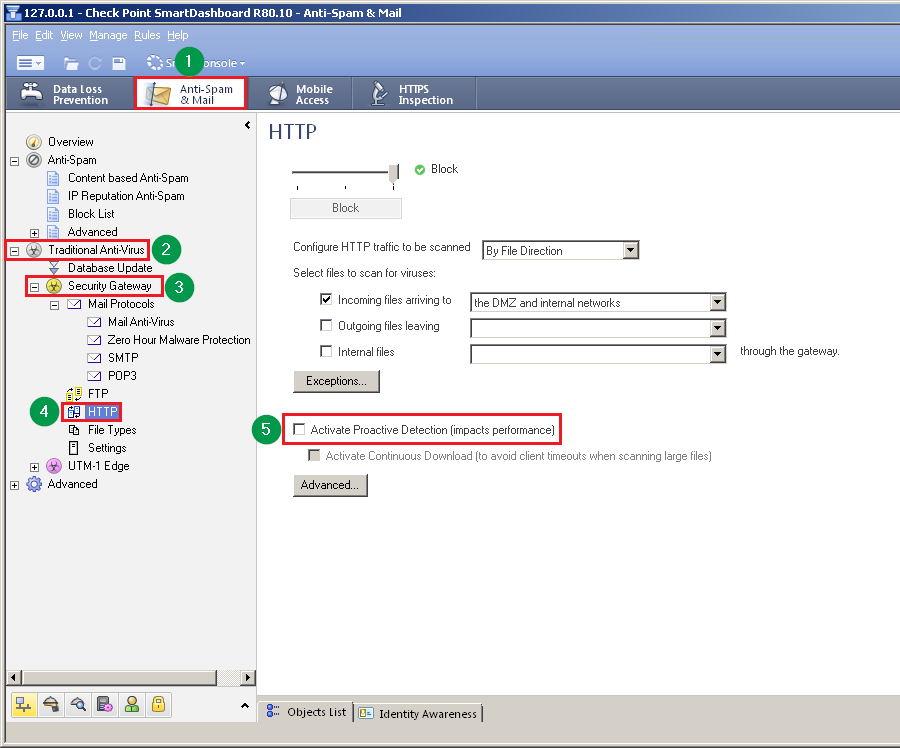
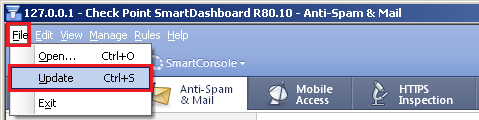
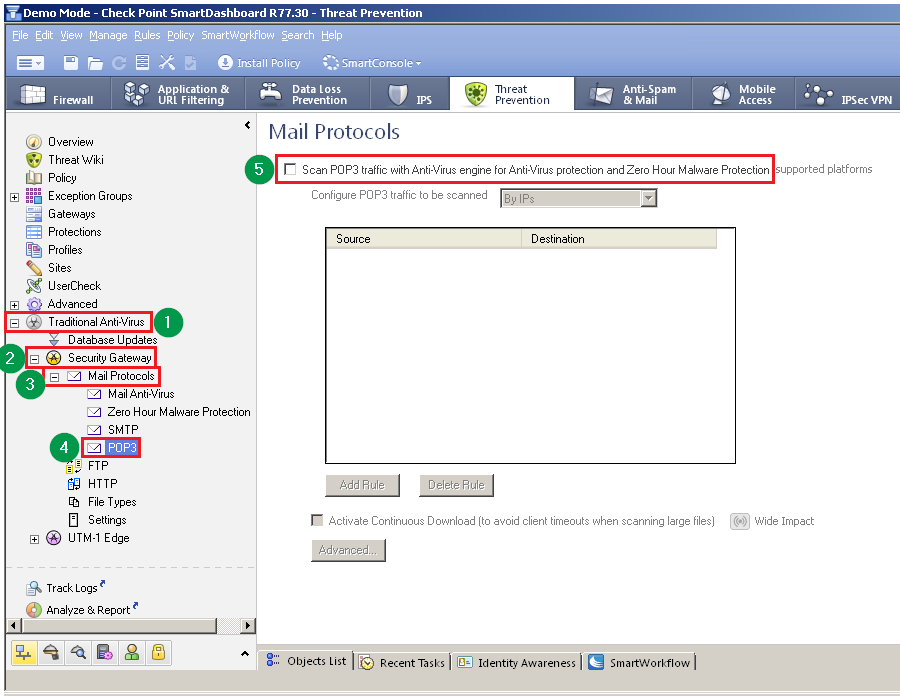
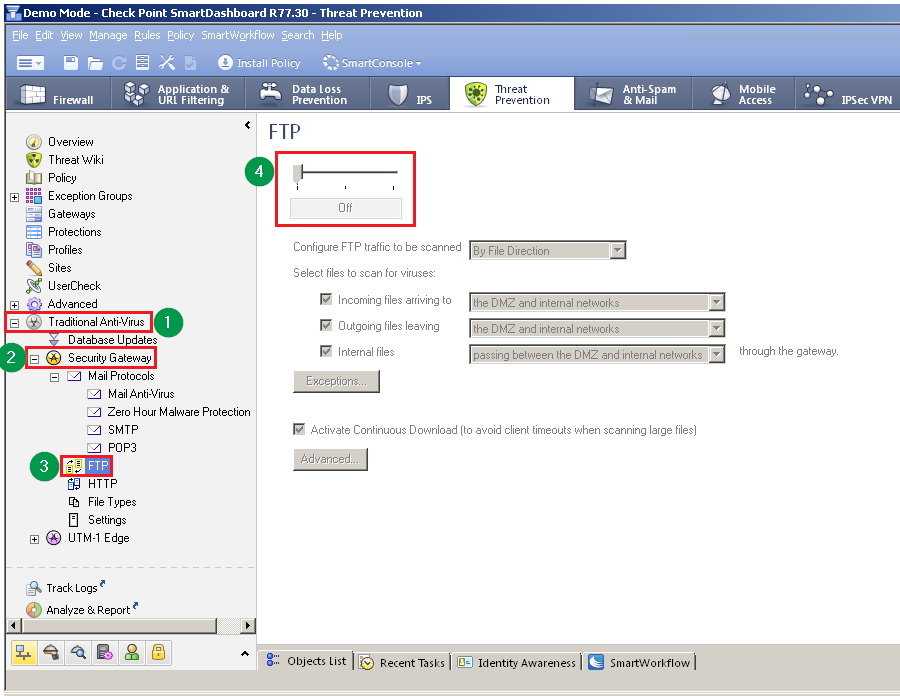
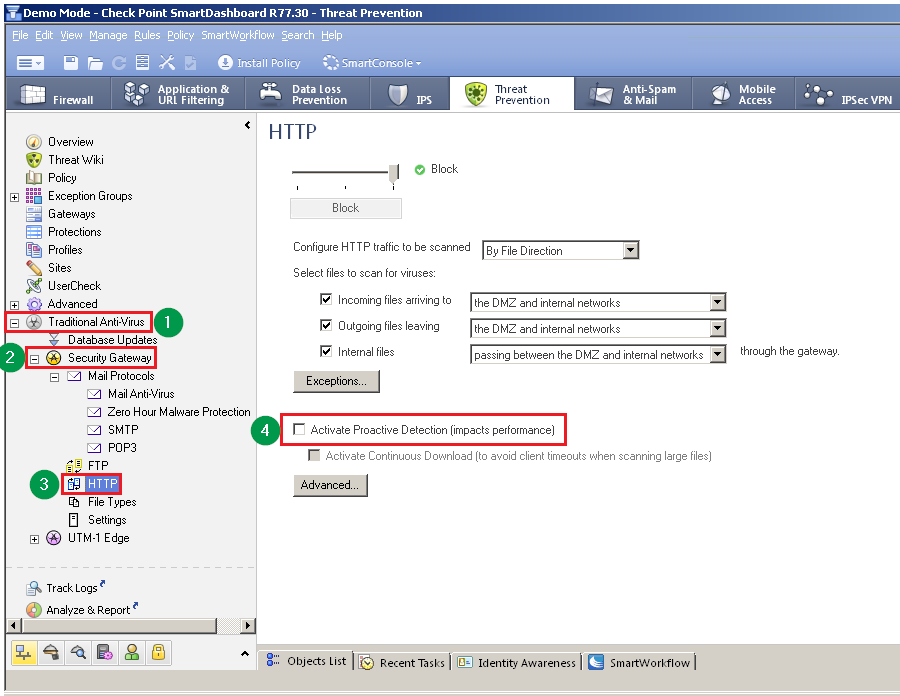
### (7) How to disable and remove Kaspersky Lab components when using Threat Emulation in Cloud mode {#Cloud mode}

If you are using the Threat Emulation Cloud mode, you must refer to [sk178688](https://supportcenter.checkpoint.com/supportcenter/portal?eventSubmit_doGoviewsolutiondetails=&solutionid=sk178688) applies to all Check Point versions.  

### (8) Revision History {#Revision History}

Show / Hide revision history  

|-------------|---------------------------------------------------------------------------------------------------------------------------------------------------------------------------------------------------------------------------------------------------------------------------------------------------------------------------------------------------------------------------------------------------------------------------------------------------------------------------------------------------------------------------------------------------------------------------------------------------------------------------------------------------------------------------------------------------------------------------------------------------------------------------------------------------------------------------------|
| Date        | Description                                                                                                                                                                                                                                                                                                                                                                                                                                                                                                                                                                                                                                                                                                                                                                                                                     |
| 07 Apr 2022 | * Added the note: If you are using the Threat Emulation Cloud mode, you must refer to section "(7) How to disable and remove Kaspersky Lab components when using Threat Emulation in Cloud mode" * Updated the instructions in this section (7)                                                                                                                                                                                                                                                                                                                                                                                                                                                                                                                                                                                 |
| 18 Mar 2020 | * Added the "How to disable and remove Kaspersky Lab components when using Threat Emulation in Cloud mode" section                                                                                                                                                                                                                                                                                                                                                                                                                                                                                                                                                                                                                                                                                                              |
| 12 Jun 2018 | * CPUSE packages were replaced with fix for Endpoint Management server files deletion.                                                                                                                                                                                                                                                                                                                                                                                                                                                                                                                                                                                                                                                                                                                                          |
| 18 Jan 2018 | * Added section "For R80.10 with Jumbo Hotfix Accumulator and above (Remove only)" * Updated the "For R80.10 (Clean Installation)" section                                                                                                                                                                                                                                                                                                                                                                                                                                                                                                                                                                                                                                                                                      |
| 21 Oct 2017 | * Added a link to Check Point statement and FAQ (*www.checkpoint.com/kaspersky*)                                                                                                                                                                                                                                                                                                                                                                                                                                                                                                                                                                                                                                                                                                                                                |
| 10 Oct 2017 | * "For versions R77.30 and above (Disable \& Remove)" section - added CPUSE package that automatically runs the special shell script to remove the Kaspersky Labs components. * "For versions R77.30 and above (Disable \& Remove)" section - added a note that running the special shell script to remove the Kaspersky Labs components does *not* require a reboot or restart of Check Point services.                                                                                                                                                                                                                                                                                                                                                                                                                        |
| 02 Oct 2017 | * "For version R80.10 (Clean Installation)" section - "Limitations for this customized installation" subsection: * changed from "Traditional Anti-Virus is not supported yet" to "Traditional Anti-Virus compatible ISO image can be requested from Check Point Support * changed from "Anti-Virus Deep Scan and Archive Scanning features are not supported yet in VSX mode" to "Anti-Virus Deep Scan and Archive Scanning features on VSX requires additional engine, which can be requested from Check Point Support"                                                                                                                                                                                                                                                                                                        |
| 01 Oct 2017 | * "For versions R77.30 and above (Disable \& Remove)" section - replaced the current shell script with improved shell script that can be executed on a Security Management Server with enabled Endpoint Management.                                                                                                                                                                                                                                                                                                                                                                                                                                                                                                                                                                                                             |
| 17 Sep 2017 | * "R77.30 and above (Disable \& Remove)" section - added a shell script for removing Kaspersky Labs code on Endpoint Security Management Server * Added "Related Solutions" section                                                                                                                                                                                                                                                                                                                                                                                                                                                                                                                                                                                                                                             |
| 16 Sep 2017 | * Added "Table of Contents" * "For version R80.10 (Clean Installation)" section - added a note that this ISO image is intended to be installed as Security Gateway (not Standalone or Security Management Server) * "R77.30 and above (Disable \& Remove)" section - added a shell script for removing Kaspersky Labs code on Security Gateways and VSX Gateways * "R77.30 and above (Disable \& Remove)" section - improved manual instructions for removing Kaspersky Labs code on Security Gateways and VSX Gateways * "R77.30 and above (Disable \& Remove)" section - added instructions for removing Kaspersky Labs code on Security Management Server if Endpoint Management is enabled * Added section for "R76SP.X on 60000 / 40000 Security Systems" * Added section for "600 / 700 / 1100 / 1200R / 1400 Appliances" |
| 14 Sep 2017 | * "For version R80.10 (Clean Installation)" section - added a note that if Threat Emulation blade is enabled, then it is necessary to follow the removal instructions of KAV from Threat Emulation blade as provided in the summary table * "R77.30 and above (Disable \& Remove)" section - added a note that an Offline Update for the Threat Emulation engine is also required * "R77.30 and above (Disable \& Remove)" section - added a note that if Threat Emulation blade is enabled, then it is necessary to follow the removal instructions of KAV from Threat Emulation blade as provided in the summary table                                                                                                                                                                                                        |
| 12 Sep 2017 | * First public release of this article                                                                                                                                                                                                                                                                                                                                                                                                                                                                                                                                                                                                                                                                                                                                                                                          |

---

# Agent Instructions

This content is from the Check Point Support Center (https://support.checkpoint.com), the official knowledge base for Check Point cybersecurity products.

## Navigating This Knowledge Base

- **Complete index**: [llms.txt](https://support.checkpoint.com/llms.txt)
- **All SK articles**: [SecureKnowledge Sitemap](https://support.checkpoint.com/sitemaps/secureknowledge-sitemap-index.xml)
- **SK article URL pattern**: `https://support.checkpoint.com/results/sk/{skId}`
- **Markdown responses**: AI bot User-Agents automatically receive `text/markdown` content
