> Source: [sk116772](https://support.checkpoint.com/results/sk/sk116772)
# sk116772 - ISP Redundancy "Apply settings for VPN traffic" is not working with 3rd party vendors
| Property | Value |
|----------|-------|
| Solution ID | sk116772 |
| Date Created | 2017-04-09 |
| Last Modified | 2018-10-15 |
| Technical Level | General |
| Products | Security Gateway |
| Versions | R82.10, R82, R81.20 |
## Symptoms
- ISP redundancy does not work with 3rd party vendors when "Apply settings for VPN traffic" is checked.
## Cause
**The ISP Redundancy feature:**
ISP redundancy enables a script on the Check Point Security Gateway to switch the default gateway and routes automatically. This will take place once a link failure was detected on the primary external link.
The feature uses port 259 for probing the external links and to determine the state of the link, once a link has been detected as down the mechanism will switch to the next available link configured under the "ISP Links".
The feature is only supported between managed Check Point Security Gateways.
**Link Selection with non-Check Point Devices:**
RDP probing, the probing method used for certain Link Selection features, is **proprietary** to Check Point and only works between Check Point entities. It is not supported with non-Check Point devices.
Since RDP probing is not active on non-Check Point gateways, the following results apply if a Check Point Security Gateway sends VPN traffic to a non-Check Point gateway:
* **Use probing** cannot be used by locally managed Check Point Security Gateways to determine the IP address of non-Check Point devices. Any of the other methods available from the IP Selection by Remote Peer section can be used.
* **Load Sharing** and Service Based Link Selection do not work with non-Check Point gateways. If Load Sharing or Service Based Link Selection is enabled on the local Security Gateway, but the peer is a non-Check Point device, the local Security Gateway will only use one link to the non-Check Point device: the best match (highest prefix length) link with the lowest metric.
* **If Route based probing** is selected as the Outgoing Route Selection method, for VPN traffic to a non-Check Point device, the local Security Gateways will always use the best match (highest prefix length) link with the lowest metric."
**ISP Redundancy over VPN:**
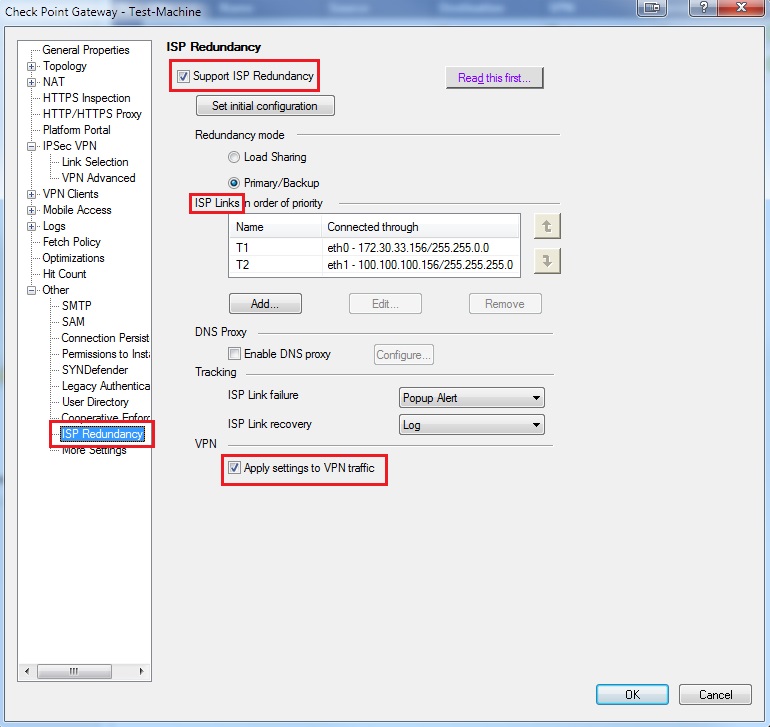
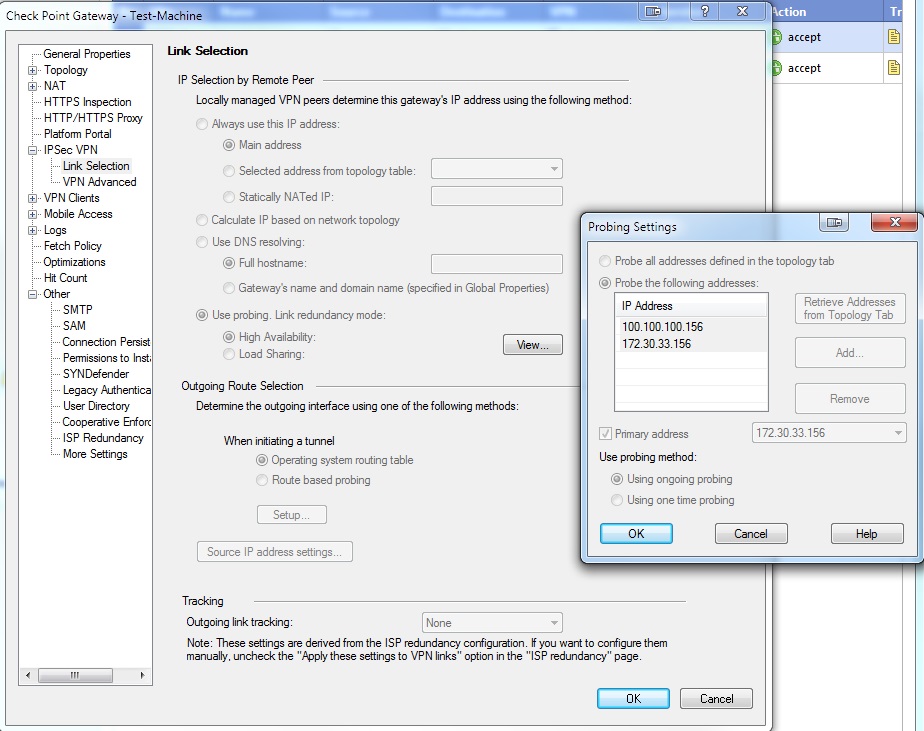
When enabling the ISP redundancy over VPN the Link selection tab will be grayed out and the probing method will be selected automatically.
Probing is not supported with 3rd party vendors thus the feature will not work in this type of design.
## Solution
No fix is required; the system is functioning as designed.
Refer to the "Visual Guide" below for validating a basic configuration of the feature:
**ISP Redundancy(With "Apply settings to VPN traffic") configuration:**
**Link selection state, after applying the settings to VPN traffic:**
**Example for probing(UDP port 259) packets when tunnel is created:**
****
For more information see [R77 Security Gateway Technical Administration Guide](https://sc1.checkpoint.com/documents/R77/CP_R77_SecurityGatewayTech_WebAdmin/html_frameset.htm).
---
# Agent Instructions
This content is from the Check Point Support Center (https://support.checkpoint.com), the official knowledge base for Check Point cybersecurity products.
## Navigating This Knowledge Base
- **Complete index**: [llms.txt](https://support.checkpoint.com/llms.txt)
- **All SK articles**: [SecureKnowledge Sitemap](https://support.checkpoint.com/sitemaps/secureknowledge-sitemap-index.xml)
- **SK article URL pattern**: `https://support.checkpoint.com/results/sk/{skId}`
- **Markdown responses**: AI bot User-Agents automatically receive `text/markdown` content