> Source: [sk114834](https://support.checkpoint.com/results/sk/sk114834)
# sk114834 - Troubleshooting the "no proposal chosen" error
| Property | Value |
|----------|-------|
| Solution ID | sk114834 |
| Date Created | 2016-12-05 |
| Last Modified | 2025-10-29 |
| Technical Level | General |
| Products | Security Gateway |
| Versions | R81.20, R81.10 (EOS), R81 (EOS) |
## Solution
**Table of Contents**
* Scenario 1: Site-to-Site VPN fails at Quick Mode Packet 1 with "NO PROPOSAL CHOSEN" error when using IPSEC AH
* Scenario 2: SmartView Tracker shows "No proposal chosen" error even though VPN connects successfully
* Scenario 3: VPN Tunnel encryption negotiation with third-party gateway fails with when using AES-GCM
Click Here to Show the Entire Article
### Scenario 1: Site-to-Site VPN fails at Quick Mode Packet 1 with "NO PROPOSAL CHOSEN" error when using IPSEC AH {#Scenario 1}
**Symptoms:**
* The *$FWDIR/log/ike.elg* file contains:
"*Quick Mode fails in packet 1 with notification from Check Point gateway: NO-PROPOSAL-CHOSEN*"
* The *$FWDIR/log/vpnd.elg* file contains:
`[vpnd PID...]@Host[DATE TIME] processPropPayload: received proposal with DEPRECATED AH protocol.`
`[vpnd PID...]@Host[DATE TIME] payload_list_destroy: return a list of 1 payload`
`[vpnd PID...]@Host[DATE TIME] processPropPayloadList: ignoring proposal 1`
`[vpnd PID...]@Host[DATE TIME] payload_list_destroy: return a list of 1 payload`
`[vpnd PID...]@Host[DATE TIME] processPropPayloadList: ignoring proposal 1, since last prop was ignored.`
`[vpnd PID...]@Host[DATE TIME] processSAPayload: No valid proposal found.`
Show / Hide this section
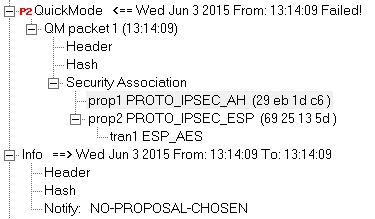
> **Cause:**
>
> 
>
> Peer is proposing an unencrypted AH only tunnel in Quick Mode packet 1 as opposed to an ESP tunnel.
**Solution:**
Check Point does not support an unencrypted AH-only tunnel. Use an encrypted tunnel that is supported.
### Scenario 2: SmartView Tracker shows "No proposal chosen" error even though VPN connects successfully {#Scenario_2}
**Symptoms:**
* SmartView Tracker log shows the log "No proposal chosen" error, even though the VPN connection is actually successful and traffic passes between VPN peers.
Show / Hide this section
**Cause:**
To overcome old routers' packet handling limitations, the default proposal packet size configuration on VPN-1 Power/UTM is set to **small packets**. This setting also causes the client application to use an encryption method that does not include advanced packets.
**When using an advanced packet encryption algorithm, the connection is eventually successful, but a false error appears because of the default packet size setting.**
**Solution:**
There are two possible solutions for this issue. Do**one** of these:
**Solution 1: Set an older encryption method, such as AES-128 instead of AES-256**
1.
1. Open SmartConsole for the Management Server that manages the Remote Access VPN Gateway.
2. Click the upper left menu button \> **Global Properties** .
The **Global Properties** window opens.
3. From the left menu, expand **Remote Access**.
4. Click **VPN - Authentication**.
5. In the **Encryption algorithms** section, click **Edit.** The **Encryption Properties** window opens.
6. In the **IKE Security Association (Phase 1)** tab, select the desired algorithms and clear undesired algorithms.
7. In the **IKE Security Association (Phase 2)** tab, select the desired algorithms and clear undesired algorithms.
8. Click **OK** .
The **Encryption Properties** window closes.
9. In the **Global Properties** window, click **OK** .
The **Global Propertie**s window closes.
10. Install the Security Policy.
11. Reconnect the Remote Access VPN clients.
**Solution 2: Change the parameter that controls the size of the proposal group to be used by the VPN client to "large"**
1. Open SmartConsole for the Management Server that manages the Remote Access VPN Gateway.
2. Click the upper left menu button \> **Global Properties** .
The **Global Properties** window opens.
3. From the left menu, click **Advanced**.
4. In the **Advanced Configuration** section, click **Configure** .
The **AdvancedConfiguration** window opens.
5. From the left menu, expand **SecuRemote/SecureClient**.
6. Click **IKE/IPSec Settings**.
7. Set the value of the **desktop_ike_p2_prop_size** to **large**.
8. Click **OK** .
The **Advanced Configuration** window closes.
9. In the **Global Properties** window, click **OK**.
10. Install the Security Policy.
11. Reconnect the Remote Access VPN clients.
### Scenario 3: VPN Tunnel encryption negotiation with third-party gateway fails with when using AES-GCM {#Scenario_3}
**Symptoms:**
* Site-to-Site VPN based on IKEv2 fails.
* AES-GCM-128 or AES-GCM-256 is configured in the VPN Community encryption settings (SmartConsole \> Objects tab \> VPN Communities \> the relevant VPN Community object \> Encryption tab)
* IKE debugs show that the Check Point VPN Gateway proposed another integrity algorithm (example:SHA2) in addition to AES-GCM. See the See the [Site to Site VPN Administration Guide](https://support.checkpoint.com/product/446#f-commonsource=C.%20Documentation) for your version \> Command Line Reference section \> ike debug page..
Show / Hide this section
> **Cause:**
>
> AES-GCM encryption algorithms do not work with additional integrity algorithms. By design, they include a built-in integrity check.
>
> **Solution:**
>
> This problem was fixed. The fix is included in:
>
> * [Jumbo Hotfix Accumulator for R81.20](https://sc1.checkpoint.com/documents/Jumbo_HFA/R81.20/Default.htm) starting from Take 53
> * [Jumbo Hotfix Accumulator for R81.10](https://sc1.checkpoint.com/documents/Jumbo_HFA/R81.10/Default.htm) starting from Take 139
> * [Jumbo Hotfix Accumulator for R81](https://sc1.checkpoint.com/documents/Jumbo_HFA/R81/Default.htm) starting from Take 99
> * [Jumbo Hotfix Accumulator for R80.40](https://sc1.checkpoint.com/documents/Jumbo_HFA/R80.40/Default.htm) starting from Take 211
>
> If you choose not to upgrade, Check Point can supply a **Hotfix** . [Contact Check Point Support](https://www.checkpoint.com/support-services/.contact-support/) to get a Hotfix for this issue.
> A Support Engineer will make sure the Hotfix is compatible with your environment before providing the Hotfix.
> For faster resolution and verification, please collect [CPinfo files](http://supportcontent.checkpoint.com/solutions?id=sk92739) from the Security Management Server and Security Gateways involved in the case.
>
> **Hotfix installation instructions:**
> Refer to [sk168597 - How to install a Hotfix](https://supportcenter.checkpoint.com/supportcenter/portal?eventSubmit_doGoviewsolutiondetails=&solutionid=sk168597).
>
>
>
> **Workaround**
>
> If you do not want to download a hotfix, configure an encryption setting that is not AES-GCM. For example, on the Check Point VPN Gateway and the third-party gateway, configure AES-256 + SHA2.
**Related solutions:**
* [sk89940 - How to debug VPND daemon](https://supportcenter.checkpoint.com/supportcenter/portal?eventSubmit_doGoviewsolutiondetails=&solutionid=sk89940)
* [sk180488 - How to collect a debug for VPN issues](https://supportcenter.checkpoint.com/supportcenter/portal?eventSubmit_doGoviewsolutiondetails=&solutionid=sk180488)
---
# Agent Instructions
This content is from the Check Point Support Center (https://support.checkpoint.com), the official knowledge base for Check Point cybersecurity products.
## Navigating This Knowledge Base
- **Complete index**: [llms.txt](https://support.checkpoint.com/llms.txt)
- **All SK articles**: [SecureKnowledge Sitemap](https://support.checkpoint.com/sitemaps/secureknowledge-sitemap-index.xml)
- **SK article URL pattern**: `https://support.checkpoint.com/results/sk/{skId}`
- **Markdown responses**: AI bot User-Agents automatically receive `text/markdown` content