> Source: [sk110338](https://support.checkpoint.com/results/sk/sk110338)
# sk110338 - SSL Network Extender (SNX) fails to download topology and gets stuck on connecting
| Property | Value |
|----------|-------|
| Solution ID | sk110338 |
| Date Created | 2016-03-02 |
| Last Modified | 2025-08-26 |
| Technical Level | General |
| Products | Security Gateway |
| Versions | R82, R81.20, R81.10 (EOS), R81 (EOS) |
| OS | Gaia |
## Symptoms
- * After clicking "Connect", the SSL Network Extender (SNX) is authenticated and then gets stuck on connecting status.
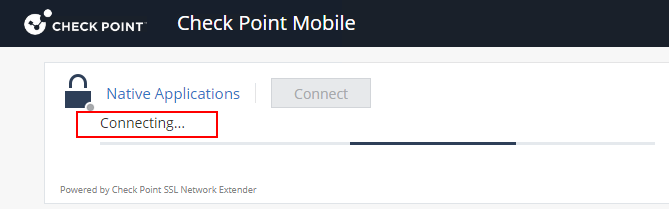
* *vpnd.elg* shows the following log:
```
[ 14552][28 Jan 11:05:55][slim] slim_rpc_connect_async_cb: applications were set on state
[ 14552][28 Jan 11:05:55][slim] send_slim_hello_reply: Sending Hello Reply
[ 14552][28 Jan 11:05:55][slim] send_slim_hello_reply: Using snx protocol
[ 14552][28 Jan 11:05:55][slim] slim_topo_get: getting Connectra based topology
[ 14552][28 Jan 11:05:55][slim] slim_connectra_topo_get: snx_enc_domain_per_user_group = false
[ 14552][28 Jan 11:05:55][slim] send_slim_hello_reply: got an application set
[ 14552][28 Jan 11:05:55][slim]
[ 14552][28 Jan 11:05:55][slim] send_slim_proto_packet: len 29695 (instance: 0, tunnel ID: 56, disconnect: 0)
[ 14552][28 Jan 11:05:55][slim] sslt_send_data: tunnel ID 56 exists in hash
[ 14552][28 Jan 11:05:55][slim] sslt_send_data: VPN_CPAS_SENDF ioctl returned 0
[ 14552][28 Jan 11:05:55][slim] send_slim_hello_reply: calling 'connected' callback
[ 14552][28 Jan 11:05:55][slim] slim_connection_established: tunnel ID 56 on instance 0 is established
[ 14552][28 Jan 11:05:55][SLP] SLP_Manager::notify_login: feature disabled
[ 14552][28 Jan 11:05:55][slim] slim_rpc_connect_async_cb Successfully updated Connectra (result 0) with connected user: session uid 0x7e2ef761, tunnel id 56
[ 14552][28 Jan 11:05:55][fwasync] fwasync_do_mux_in: 114: rc=0, next: f7b354b0 with 15, req: 0r, 0w
[ 14552][28 Jan 11:05:55][fwasync] fwasync_do_mux_in: 114: handler closed connection
[ 14552][28 Jan 11:05:55][fwasync] fwasync_end_conn: scheduling the end of connection 114
```
* or *vpnd.elg* may show the following log:
```
[ 8236][21 Jun 17:02:00][slim] slim_cpas_trap: got SSLT_FROM_CPAS trap from instance 0: type [1], id [68], len [72]
[ 8236][21 Jun 17:02:00][slim]
slim_cpas_trap: got SSLT_FROM_CPAS trap: ifnum [7]
[ 8236][21 Jun 17:02:00][slim] handle_slim_protocol_packet: SLIM protocol packet (at 0 of 64)
(disconnect
:code (28)
:message ("User has disconnected.")
)
[ 8236][21 Jun 17:02:00][verifier] SetVerifier::check: Attribute code seen for the first time
[ 8236][21 Jun 17:02:00][verifier] SetVerifier::check: Attribute message seen for the first time
[ 8236][21 Jun 17:02:00][slim] slim_disconnected: close connection for tunnel ID 68 on instance 0
[ 8236][21 Jun 17:02:00][slim] slim_disconnected: message: User has disconnected. (reason code 28)
[ 8236][21 Jun 17:02:00][slim] sslt_send_data: tunnel ID 68 exists in hash
[ 8236][21 Jun 17:02:00][slim] sslt_send_data: VPN_CPAS_SENDF ioctl returned -1
```
* In *vpnd.elg* can see that the topology size is larger than the 16KB buffer allowed:
`send_slim_proto_packet: len `K.
No other errors are seen in log files or SmartView Tracker.
* Error: SSL Network Extender is taking a long time to connect. Try to connect again
* The SSL network extender disconnects after a few minutes.
## Cause
If Mobile Access blade has a large topology (many native applications that access different locations), then a large encryption domain topology is automatically generated.
Currently, the limitation for sending topology is a 16KB buffer.
## Solution
[Contact Check Point Support](https://www.checkpoint.com/support-services/contact-support/) to get a Hotfix for this issue.
A Support Engineer will make sure the Hotfix is compatible with your environment before providing it.
For faster resolution and verification, collect these files:
1. [CPinfo](https://support.checkpoint.com/results/sk/sk92739) file from the Management Server involved in the case.
2. [CPinfo](https://support.checkpoint.com/results/sk/sk92739) file from the Security Gateway / each Cluster Member involved in the case.
**Hotfix installation instructions:**
Refer to [sk168597 - How to install a Hotfix](https://support.checkpoint.com/results/sk/sk168597).
**As a workaround** , follow [sk32111](https://supportcenter.checkpoint.com/supportcenter/portal?eventSubmit_doGoviewsolutiondetails=&solutionid=sk32111), configure a specific IP address range which will be considered as the SSL Network Extender (SNX) encryption domain and consequently only this range will be injected into the SNX client upon connection.
Choosing a smaller IP range than the default for SNX Encryption Domain, may result in a smaller topology being injected into the SNX client.
---
# Agent Instructions
This content is from the Check Point Support Center (https://support.checkpoint.com), the official knowledge base for Check Point cybersecurity products.
## Navigating This Knowledge Base
- **Complete index**: [llms.txt](https://support.checkpoint.com/llms.txt)
- **All SK articles**: [SecureKnowledge Sitemap](https://support.checkpoint.com/sitemaps/secureknowledge-sitemap-index.xml)
- **SK article URL pattern**: `https://support.checkpoint.com/results/sk/{skId}`
- **Markdown responses**: AI bot User-Agents automatically receive `text/markdown` content