> Source: [sk109360](https://support.checkpoint.com/results/sk/sk109360)
# sk109360 - Check Point Reference Architecture for Azure
| Property | Value |
|----------|-------|
| Solution ID | sk109360 |
| Date Created | 2015-12-30 |
| Last Modified | 2026-09-15 |
| Technical Level | General |
| Products | Cloud Firewall |
| Versions | R82.10, R81 (EOS), R81.10 (EOS), R81.20, R82 |
| OS | Gaia |
| Platform | Azure |
## Solution
This article describes a reference architecture of a Check Point Security Gateway protecting assets in an Azure virtual network.
**Table of Contents**
* Network Diagram
* Traffic Flow
* Management
* Deployment through the Azure portal
* Setting up the route tables of the Frontend and Backend gateway subnets
* Setting up backend subnets and their route tables
* Setting up routes to the Internal subnets
* Configuration in SmartConsole
* Best Practices
* Licensing
* Pricing in Azure Marketplace
* Supported Azure VMs
* Known Limitations
* Additional Resources
Click Here to Show the Entire Article
Network Diagram {#Network Diagram}
----------------------------------
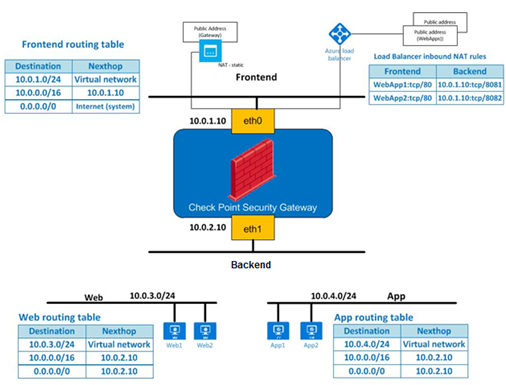
In this architecture the Azure virtual network consists of 4 subnets:
* A gateway frontend subnet - 10.0.1.0/24
* A gateway backend subnet - 10.0.2.0/24
* Two backend subnets:
* A web tier subnet - 10.0.3.0/24
* An application tier subnet - 10.0.4.0/24
This environment consists of 2 separate web applications. Each web application consists of:
* A separate public IP address through which the web application can be accessed
* A web server on a web tier subnet - Web1, Web2
* An application server on an application tier subnet - App1, App2
The Security Gateway inspects:
* Traffic arriving from the Internet to each of the web applications
* Traffic between the web and application tiers
* Traffic originating from the backend subnets to the Internet
In addition Security Gateway provides the following services:
* Performs Network Address Translation (NAT) to hide outgoing connections behind the gateway's address.
* Provides site to site VPN connectivity to on-premises networks.
* Provides remote access VPN services to roaming users.
**Public Addresses**
We have allocated 3 public addresses:
* A public address directly associated with the Security Gateway's external interface. This address can be used to manage the gateway as well as for site to site VPN and remote access VPN.
* Two public IP addresses (WebApp1, WebApp2), one for each web application. These public addresses are associated with an Azure load balancer.
Traffic Flow {#Traffic Flow}
----------------------------
|--------------------------------------------------|----------------------------------------------------------------------------------------------------------------------------------------------------------------------------------------------------------------------------------------------------------------------------------------------------------------------------------------------------------------------------------------------------------------------------------------------------------------------------------------------------------------------------------------------------------------------------------------------------------------------------------------------------------------------------------------------------------------------------------------------------------------------------------------------------------------------|
| FROM | TO |
| Traffic arriving from the Internet | * Traffic for WebApp1 is sent to the public IP address allocated for that web application. * The Azure load balancer is set up with an inbound NAT rule that forwards all HTTP (port 80) traffic arriving at that public address to the Check Point gateway's external private address (10.0.1.10) on port 8081 * Traffic for WebApp2 is sent to the public IP address allocated for that web application. * The Azure load balancer is set up with an inbound NAT rule that forwards all HTTP (port 80) traffic arriving at that public address to the Check Point gateway's external private address (10.0.1.10) on port 8083
The Check Point Security Gateway uses NAT to: * Forward traffic arriving on TCP port 8081 to Web1 on port 80. * Forward traffic arriving on TCP port 8083 to Web2 on port 80. |
| Traffic between the web and application tiers | This traffic is routed through the Check Point gateway through the use of User Defined Routes (UDR). For more information on UDR, see the [User Defined Routes and IP Forwarding](https://azure.microsoft.com/en-us/documentation/articles/virtual-networks-udr-overview/) article. |
| Traffic from the backend subnets to the Internet | This traffic is routed through the Check Point gateway through the use of User Defined Routes (UDR). The Gateway uses NAT to hide this type of traffic behind its external private address (10.0.1.10). As the traffic leaves the virtual network, Azure replaces this private address with the gateway's public address. |
| Site-to-site VPN | Encrypted IPsec traffic is sent to the gateway's public IP address. The gateway decrypts the traffic and sends it into the virtual network. Outgoing traffic that needs to be encrypted is routed to the Check Point gateway through the use of User Defined Routes (UDR). The gateway encrypts this traffic and sends it over a site to site VPN tunnel to a Check Point gateway on the perimeter of the on-premises network. |
| Remote access traffic | Remote access users connect to the Security Gateway using its public IP address. The gateway decrypts the traffic and sends it into the virtual network. Returning packets are routed back to the gateway through the use of User Defined Routes (UDR). |
Management {#Management}
------------------------
Note: We recommend the Smart-1 Cloud (Check Point's Management Server as a Service) for managing Cloud Firewall Gateways.
The Security Gateway can be managed in several ways including:
* Centrally managed from Smart-1 Cloud.
* Centrally managed where the Management server is located on-premises outside the virtual network.
* Centrally managed where the Management server is located in the same virtual network.
* A standalone configuration in which the Security Gateway acts as its own Management.
Deployment through the Azure portal {#Deployment}
-------------------------------------------------
To deploy this solution through the Azure portal use **[Standard Azure](https://portal.azure.com/#create/checkpoint.vsecsingle)** or **[Azure US Government](https://portal.azure.us/#create/checkpoint.vsecsingle)** .
**Notes:**
* This template can create a new virtual network or allow you to deploy into an existing virtual network
* The template does not create the Web and App subnets - you will need to add these subnets yourself.
* The template does not deploy any web or application VMs
* VMs launched in the backend subnets might require Internet access in order to finalize their provisioning. You should launch these VMs only after you have applied NAT hide rules on the gateway to support this type of connectivity.
* After you deploy the template, the gateway will automatically execute the Check Point First Time Configuration Wizard based on the parameters provided. Once the First Time Configuration Wizard completes, the gateway is expected to reboot
* By default, every Check Point Security Gateway and Security Management Server's WebUI is accessible from the internet by browsing to `http://`.
Restricting access to the WebUI is possible by configuring a Network Security Group, or by configuring the Check Point Gateway and Management Server settings.
Setting up the route tables of the Frontend and Backend gateway subnets {#Setting up the route tables}
------------------------------------------------------------------------------------------------------
In this section we will ensure that the route tables associated with the gateway frontend and backend subnets are set up correctly.
You need to follow this section only if you have deployed the gateway into an existing virtual network. If you have opted to let the template create a new virtual network you should skip this step.
The route table associated with the frontend subnet should consist of the following routes:
```
- name: frontend-local
address-prefix: frontend-subnet-prefix (e.g. 10.0.1.0/24)
next-hop-type: Virtual network
- name: frontend-to-other-subnets
address-prefix: Virtual Network address prefix (e.g. 10.0.0.0/16)
next-hop-type: Virtual Appliance
next-hop-address: GATEWAY-EXTERNAL-ADDRESS (e.g. 10.0.1.10)
```
The route table associated with the gateway backend subnet should consist of the following routes:
```
- name: internal-default
address-prefix: 0.0.0.0/0
next-hop-type: Virtual Appliance
next-hop-address: GATEWAY-INTERNAL-ADDRESS (e.g. 10.0.2.10)
```
Setting up backend subnets and their route tables {#Setting up backend subnets}
-------------------------------------------------------------------------------
Use the Azure portal or CLI to add backend subnets such as the Web and App subnets to the virtual network.
For each such backend subnet, create an Azure routing table with the following user defined routes:
```
- name: SUBNET-NAME-local (e.g. web-local)
address-prefix: SUBNET-PREFIX (e.g. 10.0.3.0/24)
next-hop-type: Virtual network
- name: SUBNET-NAME-to-other-subnets (e.g. web-to-other-subnets)
address-prefix: Virtual Network address prefix (e.g. 10.0.0.0/16)
next-hop-type: Virtual Appliance
next-hop-address: GATEWAY-INTERNAL-ADDRESS (e.g. 10.0.2.10)
- name: SUBNET-NAME-default (e.g. web-default)
address-prefix: 0.0.0.0/0
next-hop-type: Virtual Appliance
next-hop-address: GATEWAY-INTERNAL-ADDRESS (e.g. 10.0.2.10)
```
With reference to the diagram above, here is a routing table that can be used by the Web subnet:
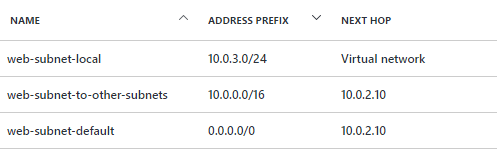
Associate the newly created routing table with the subnet.
Setting up routes to the Internal subnets {#Setting up routes to the Internal subnets}
--------------------------------------------------------------------------------------
1. SSH into the gateway and add the following route:
`clish -c 'set static-route VIRTUAL-NETWORK-PREFIX nexthop gateway address ETH1-ROUTER on' -s`
Where:
* *VIRTUAL-NETWORK-PREFIX* is the prefix of the entire virtual network (e.g. 10.0.0.0/16)
* *ETH1-ROUTER* is the first unicast IP address on the subnet to which eth1 is connected (e.g. 10.0.2.1)
For example: `clish -c 'set static-route 10.0.0.0/16 nexthop gateway address 10.0.2.1 on' -s`
**Note** : If the virtual network is comprised of several non-contiguous address prefixes, repeat the above for each prefix.
2. If you have selected *sshPublicKey* as the authentication method and would like to use the Gaia WebUI, connect to the gateway using SSH and run the following commands:
```
clish
set user admin password
[enter the password x2]
save config
exit
```
3. Using the WebUI or SSH, review the configuration of all network interfaces.
Configuration in SmartConsole {#Configuration}
----------------------------------------------
Show / Hide this Section
1. Connect to the Security Management server with SmartConsole.
In Stand-Alone configuration, use the following credentials:
User: *admin*
Password: *the adminPassword provided to the template*
2. Create an network object representing the VNET:

3. Create a network group object containing the VNET network:

4. Create a network object representing the frontend subnet:

5. Create a network group object containing the Frontend subnet:

6. Create a "Group with Exclusions..." object to represent all VNET subnets with the exception of the Frontend subnet:

7. Name the object: ***VNET-internal***
Use the VNET-group and Frontend-group objects you created above, thus:

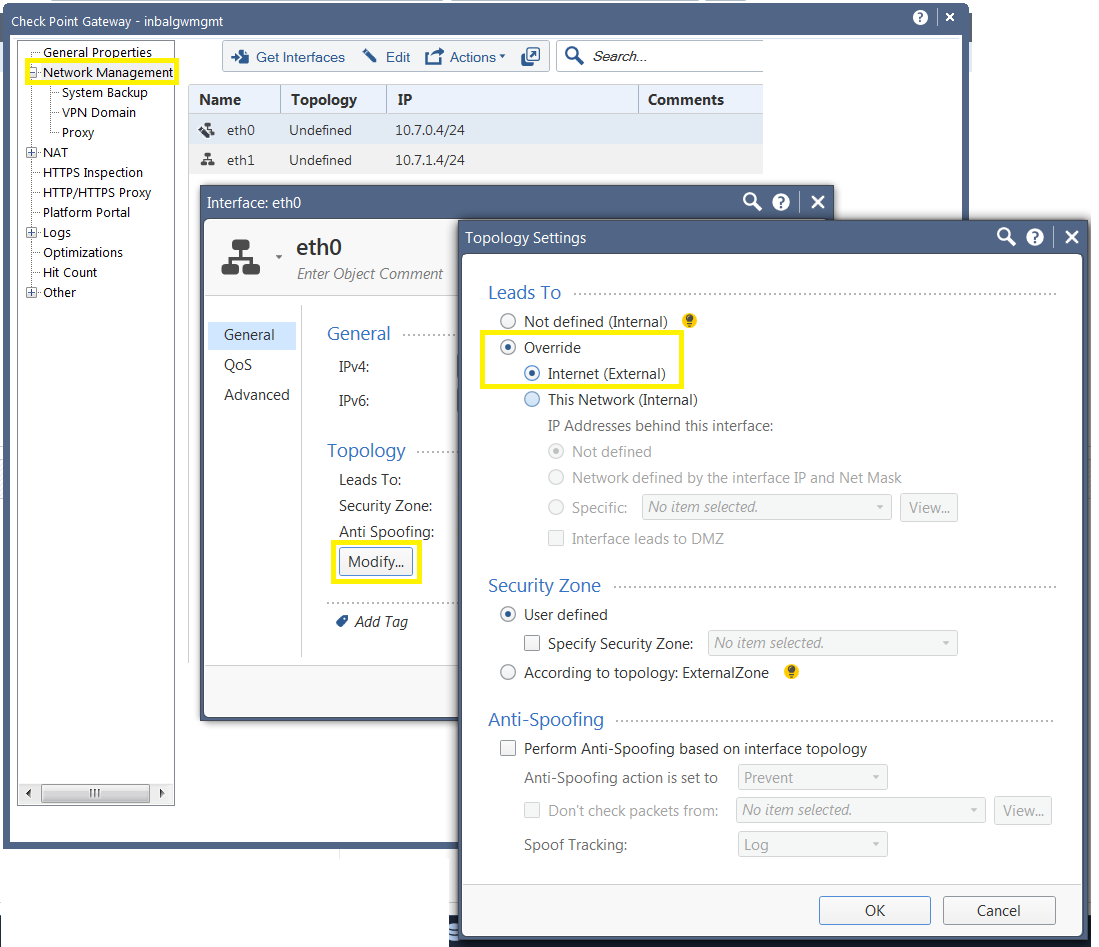
8. Open the gateway object, click on the "Network Management" tab.
Click on ***eth0*** .
The topology for the first interface (eth0) should be set to External:
[](../SolutionsStatics/sk109360/sk109360-71711280441.png)
9. Click on ***eth1***
Select the "This Network (Internal)" option
Select Specific and choose the "***VNET-internal*** " object:
[](../SolutionsStatics/sk109360/sk109360-81711280444.png)
10. Create a network object representing the ***Web tier*** :
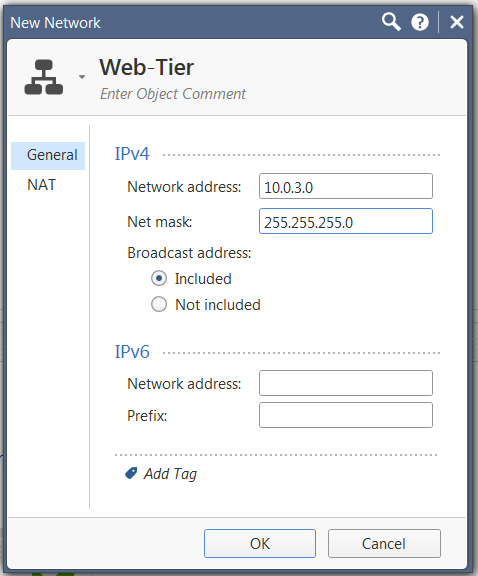
11. Add Automatic Address Translation (hide)

12. Create a network object representing the ***App tier*** :

13. Add Automatic Address Translation (hide):

14. Create a service object for WebApp1 on TCP:
Protocol Type HTTP , port 8081:

15. Create a service object for WebApp2 on TCP:
Protocol HTTP, port 8083:

16. Create a host object representing Web1:

17. Create a host object representing Web2:
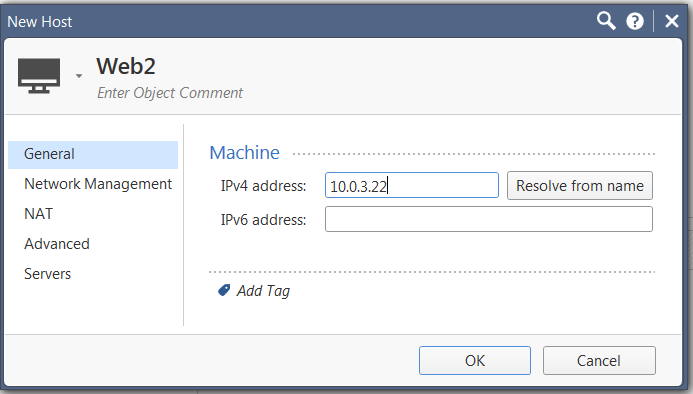
18. Create the following NAT rules:

**Note**: If the Security Gateway object is configured with a public IP address, create a "host" network object with the gateway's private IP of the frontend subnet and use it in rules 1 and 2 instead of "Azure-gw".
Best Practices: Site-to-Site VPN between Azure Check Point Gateway and Check Point (on-premises) Security Gateway {#Best Practices}
-----------------------------------------------------------------------------------------------------------------------------------
Show / Hide this Section
Whenever setting up a Site-to-Site VPN between a Check Point (on-premises) Security Gateway and a Check Point Gateway in an Azure cloud, check the following:
**Assuming both gateways are managed by the same (on-premises) Security Management Server:**
1. There should be no need to set up NAT-T in order to make Site-to-Site VPN work in this deployment.
2. The gateway in Azure cloud is behind Static NAT.
**Procedure**
1. Configure the gateway object representing the Check Point Gateway in Azure cloud, as follows:
1. In**IPv4 Address:** Enter the Public IP address of the gateway (this is the Azure public IP address that the Check Point Gateway is behind). If the device is a standalone, then use the private IP otherwise internal communication will break.
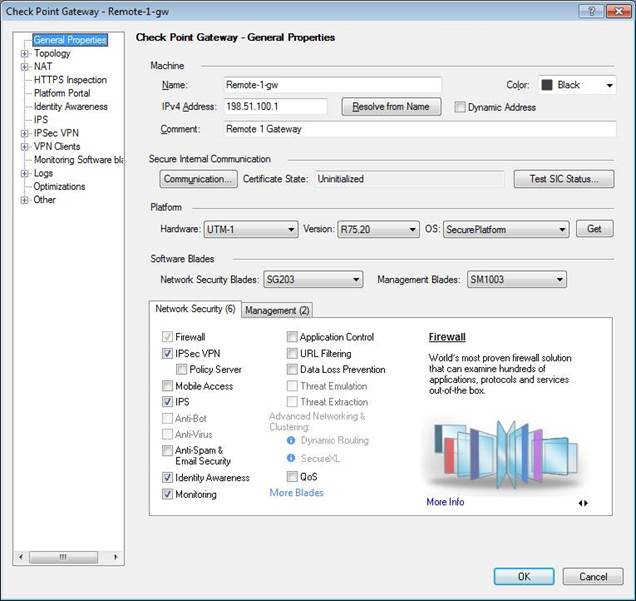
2. In **IPsec VPN, Link Selection:** Select "Always use this IP address" and then "Main address".
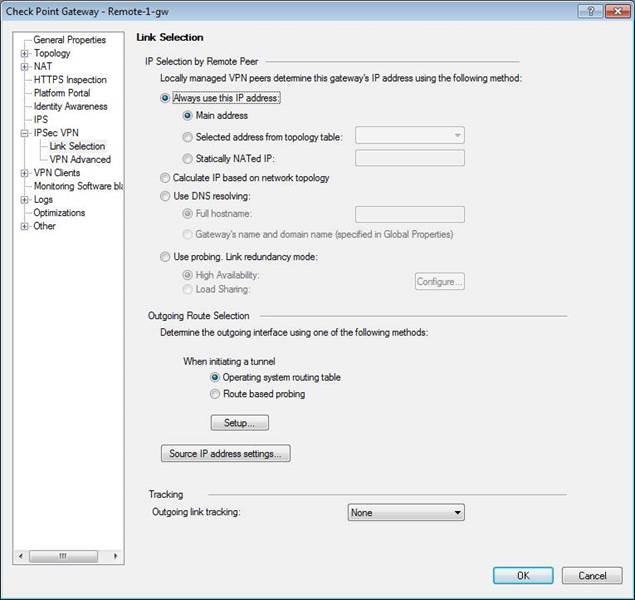
2. The above two settings ensures that the Security Management and (on-premises) Security Gateways send traffic to the gateway in Azure cloud over its public IP address.
3. In the *Link Selection* settings of the same object, under Source IP address settings: Select 'Manual \> Selected address from topology table:' and then select the private IP address of the external interface of the Check Point Gateway on the Azure side.
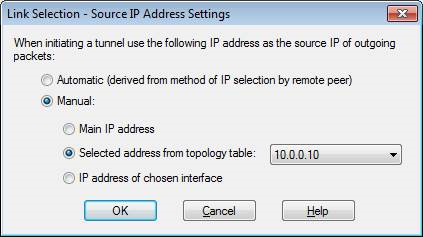
These settings will ensure that the Gateway in the Azure cloud sends encrypted traffic with the source address set to its private IP address.
This IP address is then translated by Azure to the public IP address before it reaches the (on-premises) Security Gateway.
More information about the Azure side:
* A public IP address in Azure can be either dynamic or static. For the deployment being discussed here, only Static is supported.
* More importantly, a public IP address in Azure can be associated with one of two objects:
* A load balancer
* A network interface
*
* Therefore, the gateway's public IP address should be:
* Static
* Associated directly **with the network interface of the gateway only** and not with load balancer.
**Note:** You can use both Route Based and Domain based VPN for a Site-to-Site between an on-Premises Check Point Security Gateway and Cloud Firewall Gateway, and also for Site-to-Site between an on-Premises Check Point Security Gateway and an Azure VPN Gateway.
Licensing {#Licensing}
----------------------
The Gateway can be licensed in two ways:
* **Bring-Your-Own-License (BYOL)**
* **Pay-As-You-Go (PAYG)** - The Cloud Firewall Gateway is pre-licensed. PAYG is only available in Standard Azure and is not available in Azure US Government.
**Note:** The **Pay As You Go (MGMT25)** license for Check Point Security Management is to manage up to 25 Security Gateways.
PAYG is only available in these countries:
Show / Hide the list
|-------------|------------------------|--------------------|---------------|---------------|---------------|-------------|-----------------------|-----------------------|---------------------|----------------------|
| Afghanistan | Belarus | Cayman Islands | El Salvador | Hong Kong SAR | Kenya | Mauritius | North Macedonia | Romania | Sweden | United Arab Emirates |
| Albania | Belgium | Chile | Estonia | Hungary | Korea | Mexico | Norway | Russia | Switzerland | United Kingdom |
| Algeria | Belize | Colombia | Ethiopia | Iceland | Kuwait | Moldova | Oman | Rwanda | Taiwan | United States |
| Andorra | Bermuda | Costa Rica | Faroe Islands | India | Kyrgyzstan | Monaco | Pakistan | Saint Kitts and Nevis | Tajikistan | Uruguay |
| Angola | Bolivia | C�te d'Ivoire | Fiji | Indonesia | Latvia | Mongolia | Palestinian Authority | Saudi Arabia | Tanzania | Uzbekistan |
| Argentina | Bosnia and Herzegovina | Croatia | Finland | Iraq | Lebanon | Montenegro | Panama | Senegal | Thailand | Vatican City |
| Armenia | Botswana | Cura�ao | France | Ireland | Libya | Morocco | Paraguay | Serbia | Trinidad and Tobago | Venezuela |
| Australia | Brazil | Cyprus | Georgia | Israel | Liechtenstein | Namibia | Peru | Singapore | Tunisia | Vietnam |
| Austria | Brunei | Czechia | Germany | Italy | Lithuania | Nepal | Philippines | Slovakia | Turkey | Yemen |
| Azerbaijan | Bulgaria | Denmark | Ghana | Jamaica | Luxembourg | Netherlands | Poland | Slovenia | Turkmenistan | Zambia |
| Bahrain | Cabo Verde | Dominican Republic | Greece | Japan | Macao SAR | New Zealand | Portugal | South Africa | U.S. Virgin Islands | Zimbabwe |
| Bangladesh | Cameroon | Ecuador | Guatemala | Jordan | Malaysia | Nicaragua | Puerto Rico | Spain | Uganda | |
| Barbados | Canada | Egypt | Honduras | Kazakhstan | Malta | Nigeria | Qatar | Sri Lanka | Ukraine | |
Pricing in Azure Marketplace {#Pricing in Azure Marketplace}
------------------------------------------------------------
|----------------|---------|--------|--------|---------|---------|---------|---------|
| USD price/hour | 2 vCPUs | 4 CPUs | 8 CPUs | 16 CPUs | 20 CPUs | 32 CPUs | 64 CPUs |
| **NGTP** | $0.8 | $0.91 | $1.5 | $3 | $3.75 | $6 | $9.22 |
| **NGTX** | $1.06 | $1.27 | $1.92 | $3.64 | $4.47 | $6.96 | $13.39 |
| **Management** | $0.52 | $0.52 | $0.52 | $1.5 | $1.5 | $1.5 | $1.5 |
**Note** : Microsoft is responsible for all Azure Marketplace pricing. Microsoft charges may vary as a result of country, taxation, and other factors
Supported Azure VM Instances (Gen1 and Gen2) {#Supported Azure VMs}
-------------------------------------------------------------------
|-------------------|---------|---------|---------|----------|---------|----------|---------|---------|
| | 2 vCPUs | 4 CPUs | 8 CPUs | 16 CPUs | 20 CPUs | 32 CPUs | 48 CPUs | 64 CPUs |
| **D-v5-series** | D2 v5 | D4 v5 | D8 v5 | D16 v5 | | D32 v5 | | |
| **DS-v5-series** | D2s v5 | D4s v5 | D8s v5 | D16s v5 | | | | |
| **Dd-v5-series** | D2d v5 | D4d v5 | D8d v5 | D16d v5 | | D32d v5 | | |
| **DdS-v5-series** | D2ds v5 | D4ds v5 | D8ds v5 | D16ds v5 | | D32ds v5 | | |
| **D-v4-series** | | D4 v4 | D8 v4 | D16 v4 | | D32 v4 | D48 v4 | D64 v4 |
| **Ds-v4-series** | | D4s v4 | D8s v4 | D16s v4 | | D32s v4 | D48s v4 | D64s v4 |
**Notes:**
* The Azure VM instances listed above are supported in both Gen1 and Gen2 deployments.
* Gen1 deployments are supported in all Check Point versions.
* Gen2 deployments are supported starting from R82.10 and higher.
* Gen2 is supported for Cloud Firewall Gateways, Standalone, Security Management Server, and Multi-Domain Security Management Server.
* Azure V6 and V7 VM series are not supported.
* The following solutions are supported for Gen2 deployments:
* Cloud Firewall for Azure VMSS
* Cloud Firewall for Azure High Availability Cluster
* Cloud Firewall for a Single Azure Gateway
For any questions regarding the list of supported VMs, contact your Check Point account manager, your Check Point channel partner, or [contact us](https://www.checkpoint.com/about-us/contact-us/).
Known Limitations {#Known Limitations}
--------------------------------------
* VSX is not supported
* Azure Linux extensions are not supported (including Azure Diagnostics, Custom Script, VM Access, VMSnapshotLinux)
* Azure Site Recovery (DRaaS) is not supported
* Azure Disk Encryption is not supported
* Automatic updates of Azure Linux Agent are disabled and not supported
* Azure Backup of Virtual Machines is not supported
* Adding additional interfaces to Cloud Firewall solutions is not supported
Additional Resources {#Additional Resources}
--------------------------------------------
---
# Agent Instructions
This content is from the Check Point Support Center (https://support.checkpoint.com), the official knowledge base for Check Point cybersecurity products.
## Navigating This Knowledge Base
- **Complete index**: [llms.txt](https://support.checkpoint.com/llms.txt)
- **All SK articles**: [SecureKnowledge Sitemap](https://support.checkpoint.com/sitemaps/secureknowledge-sitemap-index.xml)
- **SK article URL pattern**: `https://support.checkpoint.com/results/sk/{skId}`
- **Markdown responses**: AI bot User-Agents automatically receive `text/markdown` content