> Source: [sk106334](https://support.checkpoint.com/results/sk/sk106334)
# sk106334 - Memory consumption on Security Gateway with enabled Anti-Virus blade increases during inspection of CIFS traffic
| Property | Value |
|----------|-------|
| Solution ID | sk106334 |
| Date Created | 2015-06-04 |
| Last Modified | 2016-03-28 |
| Technical Level | General |
| Products | Security Gateway |
| Versions | R82.10, R82, R81.20 |
| OS | Gaia |
## Symptoms
- * Anti-Virus inspection of CIFS traffic is enabled on the Security Gateway (per [sk101606](http://supportcontent.checkpoint.com/solutions?id=sk101606)).
* Memory consumption on Security Gateway increases during inspection of CIFS traffic
(as can be seen in SmartView Monitor, output of "*fw ctl pstat* " command, "*cat /proc/meminfo*" command, etc.).
* Output of memory leak detection procedure (per [sk35496](http://supportcontent.checkpoint.com/solutions?id=sk35496)) shows:
`
;fw_drv_fini: `*N*` bytes allocated by 'range_create' leaked at ... allocation time ...`
`
;Starting SMEM allocations report`
`
;FW-1: Leak in: range_create: hmem_bytes ...`
`
;Ended SMEM allocations report
`
## Solution
Check Point offers a hotfix for this issue for R77.30 Security Gateway on Gaia OS, SecurePlatform OS, and X-Series XOS.
**Note:** Anti-Virus inspection of CIFS traffic is disabled by default and requires manual configuration (per [sk101606](http://supportcontent.checkpoint.com/solutions?id=sk101606)).
Click Here to Show Entire Article
Installation instructions
-------------------------
* **Hotfix package for R77.30 - Gaia OS using CPUSE (Check Point Update Service Engine)**
* **Online installation**
1. Connect to the Gaia Portal on your Check Point machine and navigate to ***Upgrades (CPUSE)*** pane - click on ***Status and Actions***.
2. Select the hotfix package ***R77.30 Hotfix for sk106334 (Memory consumption during Anti-Virus inspection of CIFS traffic)*** - click on ***Install Update*** button on the toolbar.
3. The machine will automatically reboot. There is no need to reboot or run *cpstop* manually.
* **Offline installation**
|--------------|---------------------------------------------------------------------------------------------------------------------------------------------------------------|
| OS | R77.30 |
| Gaia - CPUSE | [](http://supportcontent.checkpoint.com/file_download?id=42537) |
**Notes:**
* For detailed installation instructions, refer to [sk92449: CPUSE - Gaia Software Updates (including Gaia Software Updates Agent)](https://supportcenter.checkpoint.com/supportcenter/portal?eventSubmit_doGoviewsolutiondetails=&solutionid=sk92449#How to work with CPUSE) - section "*(4) How to work with CPUSE*".
* Make sure to take a snapshot of your Check Point machine before installing this hotfix.
* In cluster environment, this procedure must be performed on *all* members of the cluster.
* **Hotfix package for R77.30 - Gaia OS (manual installation in Command Line)**
[Click here](https://supportcenter.checkpoint.com//supportcenter/portal?eventSubmit_doGoviewsolutiondetails=&solutionid=sk106334#CLI_anchor_for_Mobile_App_Gaia_CLI) to see the available downloads.
>
> |------------|---------------------------------------------------------------------------------------------------------------------------------------------------------|
> | OS | R77.30 |
> | Gaia - CLI | [](http://supportcontent.checkpoint.com/file_download?id=42541) |
**Procedure:**
1. Hotfix has to be installed on **R77.30 Security Gateway running on Gaia OS**.
2. Download the relevant hotfix package from the table, transfer the hotfix package to the machine and unpack it:
**`[Expert@HostName]# tar -zxvf Check_Point_Hotfix_R77.30_Gaia_sk106334.tgz`**
3. Install the hotfix:
**`[Expert@HostName]# ./UnixInstallScript`**
Note: The script will stop all of Check Point services ('*cpstop*') - read the output on the screen.
4. Reboot is required.
Notes:
* Make sure to take a snapshot of your Check Point machine before installing this hotfix.
* In cluster environment, this procedure must be performed on *all* members of the cluster.
{#CLI_anchor_for_Mobile_App_Gaia_CLI}
{#CLI_anchor_for_Mobile_App_Gaia_CLI}
* **Hotfix package for R77.30 - SecurePlatform OS / X-Series XOS**
[Click here](https://supportcenter.checkpoint.com//supportcenter/portal?eventSubmit_doGoviewsolutiondetails=&solutionid=sk106334#CLI_anchor_for_Mobile_App_SPLAT_Linux_XOS_CLI) to see the available downloads.
>
> |----------------------------|---------------------------------------------------------------------------------------------------------------------------------------------------------|
> | OS | R77.30 |
> | SecurePlatform / XOS - CLI | [](http://supportcontent.checkpoint.com/file_download?id=42555) |
**Procedure:**
1. Download the relevant hotfix package from the table, transfer the hotfix package to the machine and unpack it:
**`[Expert@HostName]# tar -zxvf Check_Point_Hotfix_R77.30_Linux_sk106334.tgz`**
2. Install the hotfix:
**`[Expert@HostName]# ./UnixInstallScript`**
Note: The script will stop all of Check Point services ('*cpstop*') - read the output on the screen.
3. Reboot is required.
Notes:
* Make sure to take a snapshot of your Check Point machine running on SecurePlatform OS before installing this hotfix.
* In cluster environment, this procedure must be performed on *all* members of the cluster.
{#CLI_anchor_for_Mobile_App_SPLAT_Linux_XOS_CLI}
{#CLI_anchor_for_Mobile_App_SPLAT_Linux_XOS_CLI}
Uninstall instructions
----------------------
* **On Gaia OS using CPUSE (Check Point Update Service Engine)**
1. Connect to the Gaia Portal on your Check Point machine and navigate to ***Upgrades (CPUSE)*** pane - click on ***Status and Actions***.
2. Select ***Installed*** in the menu near the Help icon.
3. Select the hotfix package ***R77.30 Hotfix for sk106334 (Memory consumption during Anti-Virus inspection of CIFS traffic)*** - click on ***More*** button on the toolbar - click on ***Uninstall*** .
*Example* :
[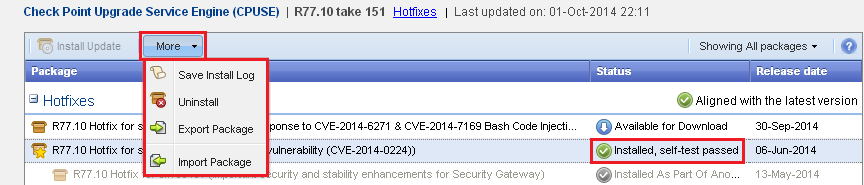](https://sc1.checkpoint.com/sc/SolutionsStatics/sk92449/sk92449_v705_More_button_for_Installed_package.png "Click the image to see it in full size in a new tab/window")
4. Reboot is required.
Notes:
* For detailed uninstall instructions, refer to [sk92449: CPUSE - Gaia Software Updates (including Gaia Software Updates Agent)](https://supportcenter.checkpoint.com/supportcenter/portal?eventSubmit_doGoviewsolutiondetails=&solutionid=sk92449#How to work with CPUSE) - section "*(4) How to work with CPUSE*".
* In cluster environment, this procedure must be performed on *all* members of the cluster.
* **On Gaia OS, SecurePlatform OS, and X-Series XOS**
1. Download and unpack the hotfix package (refer to the "*Installation instructions* " *(manual installation in Command Line)* above).
2. Run the installation script with "-u" flag:
***# ./UnixInstallScript -u***
3. Reboot is required.
Note: In cluster environment, this procedure must be performed on *all* members of the cluster.
---
# Agent Instructions
This content is from the Check Point Support Center (https://support.checkpoint.com), the official knowledge base for Check Point cybersecurity products.
## Navigating This Knowledge Base
- **Complete index**: [llms.txt](https://support.checkpoint.com/llms.txt)
- **All SK articles**: [SecureKnowledge Sitemap](https://support.checkpoint.com/sitemaps/secureknowledge-sitemap-index.xml)
- **SK article URL pattern**: `https://support.checkpoint.com/results/sk/{skId}`
- **Markdown responses**: AI bot User-Agents automatically receive `text/markdown` content