> Source: [sk102989](https://support.checkpoint.com/results/sk/sk102989)
# sk102989 - Check Point response to the POODLE Bites vulnerability (CVE-2014-3566)
| Property | Value |
|----------|-------|
| Solution ID | sk102989 |
| Date Created | 2014-10-14 |
| Last Modified | 2020-07-09 |
| Technical Level | General |
| Products | Security Gateway, Security Management Server, Multi-Domain Security Management Server |
| Versions | R82.10, R82, R81.20, R82.20 |
## Symptoms
- This attack ([CVE-2014-3566](http://cve.mitre.org/cgi-bin/cvename.cgi?name=CVE-2014-3566)), called POODLE, is similar to the [BEAST attack](https://en.wikipedia.org/wiki/Transport_Layer_Security#BEAST_attack) and also allows a network attacker to extract the plaintext of targeted parts of an SSL connection, usually cookie data.
Attacker tricks the web browser into downgrading and connecting with SSLv3 protocol. This relies on a behavior of web browsers called insecure fallback, where web browsers attempt to negotiate lower versions of TLS or SSL when connections fail.
Full Report published by Google: [https://www.openssl.org/\~bodo/ssl-poodle.pdf](https://www.openssl.org/~bodo/ssl-poodle.pdf)
## Solution
**Table of Contents:**
1. Background
2. IPS protection
3. Configuration recommendations for Check Point Portals and OS
* Multi Portal (software blades portals)
* Mobile Access Blade
* HTTPS Inspection
* Gaia Portal
* SecurePlatform WebUI
* IPSO Network Voyager
* Client Authentication Portal
* Management Portal (SmartPortal)
* Internal CA (ICA) Portal
* Mail Transfer Agent (MTA)
* Endpoint Security Server
* LOM card WebUI
* 61000 / 41000 Security Systems
* 600 / 1100 / Security Gateway 80 appliances running R75.20.X
* 600 / 1100 / 1200R Locally Managed appliances - SNX Portal
* Edge / Safe@Office devices
* X-Series Appliances (Blue Coat)
4. General best practice
5. Revision History
Click Here to Show the Entire Article
(I) Background {#Background}
----------------------------
1. Check Point products **are *not* vulnerable** to the "POODLE Bites" vulnerability (CVE-2014-3566) with the following exceptions:
* **Inbound HTTPS Inspection** - when HTTPS Inspection is set to protect an internal server, web browsers under certain conditions may use SSLv3 to connect to the Security Gateway.
Notes:
1. Enabling the IPS protection "***Secure Socket Layer (SSL) v3.0*** " as described below will prevent a web browsers from using SSLv3 when connecting to a Security Gateway with Inbound HTTPS Inspection enabled.
2. Follow the configuration steps for HTTPS Inspection as listed below.
* **Mobile Access Blade** - When using the Mobile Access Portal to access an application server (usually, internal server) over an HTTPS connection, SSLv3 might be used between the Mobile Access Gateway and the application server.
Connections between the Mobile Access Gateway and the application server will usually be within the corporate LAN, which makes these connections less likely to be exposed to this vulnerability.
Follow the configuration steps as listed below.
* **Other Check Point products** require configuration steps as listed below to prevent web browsers from connecting to a Check Point machine using SSLv3:
* Multi Portal (software blades portals)
* Outbound HTTPS Inspection
* Gaia Portal
* SecurePlatform WebUI
* IPSO Network Voyager
* Client Authentication Portal
* Management Portal (Smart Portal)
* X-Series XOS Web Server
* LOM card WebUI
* 61000 / 41000 Security Systems
* 600 / 1100 / Security Gateway 80 appliances running *R75.20.X*
* Edge / Safe@Office devices
* X-Series Appliances (Blue Coat)
2. This is a *browser side* vulnerability. Check Point recommends that customers update their web browsers to use the latest version and follow the browsers' vendors recommendations for disabling SSLv3 support in browsers.
For example:
* Microsoft Internet Explorer on Windows OS:
In the '*Tools* ' menu - '*Internet Options* ' - '*Advanced* ' tab, clear '*Use SSL 3.0* ' and check '*Use TLS 1.0* ', '*Use TLS 1.1* ', and '*Use TLS 1.2* ' (if available).
* Google Chrome on Windows OS:
Use the *--ssl-version-min=tls1* switch when running Chrome.
* Mozilla Firefox (23 and later) on Windows OS:
[http://forums.mozillazine.org/viewtopic.php?f=23\&t=2722163](http://forums.mozillazine.org/viewtopic.php?f=23&t=2722163)
Set the value of *security.tls.version.min* to 1 in the *about:config*
* Opera on Windows OS:
In the '*Tools* ' menu - '*Preferences* ' - '*Advanced* ' tab - '*Security* ' - '*Security Protocols...* ', clear '*Enable SSL 3* ' and check '*Enable TLS 1* ', '*Enable TLS 1.1* ', and '*Enable TLS 1.2*'.
3. To disable SSLv3 in versions **R70 and lower** , upgrade to a supported version ([R75 and higher](http://www.checkpoint.com/services/lifecycle/support-periods.html)) and follow the instructions in this solution.
(II) IPS protection {#IPS protection}
-------------------------------------
On 15 Oct 2014, Check Point released "***Secure Socket Layer (SSL) v3.0*** " IPS protection that protects customer environments.
SSL v3.0 \[RFC 6101\] is considered an obsolete and insecure protocol.
This protection blocks SSL v3.0 protocol and may be used to prevent attacks that exploit the "POODLE Bites" vulnerability (CVE-2014-3566) through Check Point Security Gateway.
1. **CVEs**
The IPS protection covers the following CVE:
* [CVE-2014-3566](http://cve.mitre.org/cgi-bin/cvename.cgi?name=CVE-2014-3566)
2. **How can IPS best protect my environment?**
1. The IPS protection "***Secure Socket Layer (SSL) v3.0***" is inactive by default and must be enabled manually.
Enable this IPS protection in ***Prevent*** mode (right-click on this protection, click on '*Prevent on All Profiles*', and install policy).
Note: Customers who wish to verify whether SSL v3.0 is being used in their environment, can first activate this protection in ***Detect*** mode (followed by installing the policy), and review the SmartView Tracker logs before switching the IPS protection mode to ***Prevent***.
2. In addition, to block SSLv2 connections, enable the IPS protection "***Secure Sockets Layer Version 2.0*** " in ***Prevent*** mode (right-click on this protection, click on '*Prevent on All Profiles*', and install policy).
3. In addition, to block SSLv2 connections on TCP port 25, enable the IPS protection "***Non Compliant SSL*** " in ***Prevent*** mode in the following way:
1. In SmartDashboard, go to *IPS* tab
2. In the left upper pane, click on *Protections*
3. Search for *Non Compliant SSL*
4. Double-click on this protection
5. Double-click on the IPS profile
6. Select *Override IPS Policy with* - select *Prevent*
7. Check the box *Protect SMTPS over SMTP Port (TCP/25)*
8. Click on OK
9. Repeat Steps *V - VIII* for each IPS Profile
10. Click on OK
11. Install policy
(III) Configuration recommendations for Check Point Portals and OS {#Configuration recommendations}
---------------------------------------------------------------------------------------------------
To prevent web browsers using SSLv3 from connecting to a machine running Check Point products, the following steps are recommended:
**Note:** By enforcing TLS as the standard, some older web browsers may not be able to connect to web sites.
* **Recommendations for Multi Portal (software blades portals)**
* **Instructions for versions R76, R77 and higher**
Configure Multi Portal *not* to use SSLv3.
Multi Portal is used to run software blades' portals on TCP port 443. Software blades that can be configured with such portal are: Mobile Access Blade, VPN (Remote Access), Identity Awareness, DLP or when UserCheck is configured to use port 443.
1. In SmartDashboard, go to '*Policy* ' menu - click on '*Global Properties...* '.
2. Go to '*SmartDashboard Customization* ' pane - in the '*Advanced Configuration* ' section, click on '*Configure...* ' button.
3. Go to '*Portal Properties* ' page.
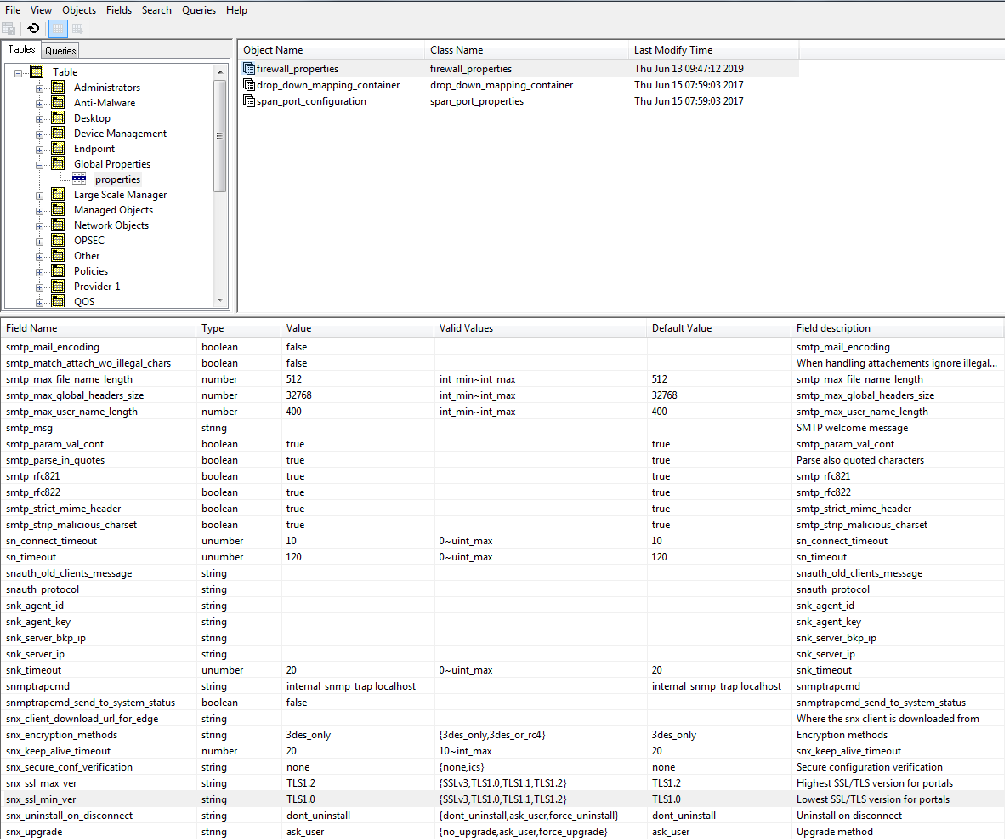
4. In the '***snx_ssl_min_ver*** ' field (Lowest SSL/TLS version for portals), change from ***SSLv3*** (default) to ***TLS1.0*** .
5. Click '*OK* ' to apply the changes.
6. Install policy on all managed Security Gateways.
**Note: For R80.x, use GuiDBedit:**
* **Instructions for versions R75.47 and lower**
**Note:** Most of the software blades' portals that use Multi Portal are intended for internal users via internal networks, in which the scenario described in this attack is not likely. The portals that are usually open to external networks and accessible via web browsers, are Mobile Access blade portal and SNX VPN blade portal.
Check Point released a hotfix that configures both Multi Portal and HTTPS Inspection (both Outbound and Inbound) *not* to use SSLv3.
Refer to the "Summary table with recommended hotfixes" below for the download links and installation instructions.
Show / Hide instructions for re-enabling the use of SSLv3 by Multi Portal and HTTPS Inspection blade after installing the hotfix
In case you decide to re-enable the use of SSLv3 by Multi Portal and HTTPS Inspection blade after installing the hotfix, follow these steps:
1. **On Gaia / SecurePlatform / Linux OS:**
Edit the ***$CPDIR/tmp/.CPprofile.sh*** script in Vi editor:
Add this line:
***CPTLS_SUPPORT_SSLv3=1 ; export CPTLS_SUPPORT_SSLv3***
Under this line
*INFODIR=/opt/CPinfo-10 ; export INFODIR*
2. **On Gaia / SecurePlatform / Linux OS:**
Edit the ***$CPDIR/tmp/.CPprofile.csh*** script in Vi editor:
Add this line:
***setenv CPTLS_SUPPORT_SSLv3 1***
Under this line:
*setenv INFODIR "/opt/CPinfo-10"*
3. **On Windows OS:**
Go to Start menu - '*Run...* ' - paste ***"%WINDIR%\\system32\\rundll32.exe" sysdm.cpl,EditEnvironmentVariables*** - click on OK.
Alternatively:
1. Desktop - right-click on the '*My Computer* ' icon - click on '*Properties*'
2. Go to '*Advanced*' tab.
3. At the bottom, click on '*Environment Variables...*' button.
Under '*System Variables* ' - click on '*New...*'
* name: ***CPTLS_SUPPORT_SSLv3***
* value: **1**
* and click '*OK* ' to close the '*New System Variable*' window.
Click on '*OK* ' to close these windows.
4. Reboot the machine.
5. **Important Note:** To disable the use of SSLv3 after the above changes (adding the '*CPTLS_SUPPORT_SSLv3* ' variable):
* On Gaia / SecurePlatform / Linux OS:
Simply delete the lines with '*CPTLS_SUPPORT_SSLv3* ' variable from both "*CPprofile.\**" shell scripts and reboot the machine.
* On Windows OS:
Under '*System Variables* ', click on the '*CPTLS_SUPPORT_SSLv3* ' variable - click on '*Delete*' and reboot the machine.
{#Multi Portal}
{#Multi Portal}
* **Recommendations for Mobile Access Blade**
1. Configure Multi Portal *not* to use SSLv3 as described in the "Multi Portal" section.
2. An additional hotfix is recommended to prevent Mobile Access Blade from using SSLv3 when connecting to application servers.
Refer to the "Summary table with recommended hotfixes" below for the download links and installation instructions.
**Note:** This hotfix is integrated in:
* R77.30
* R77.20 and higher for 600/700/1110/1200R
* Take 50 of Jumbo Hotfix Accumulator for R77.20 (R77_20_jumbo_hf)
* Take 50 of Jumbo Hotfix Accumulator for R77.10 (gypsy_hf_base_021)
* Take 37 of Jumbo Hotfix Accumulator for R77 (gulli_hf_base_008)
* Take 50 of Jumbo Hotfix Accumulator for R76 (gizmo_hf_041_050)
* Take 67 of Jumbo Hotfix Accumulator for R75.47 (fiat_hf_base_026)
{#Mobile Access Blade}
{#Mobile Access Blade}
* **Recommendations for HTTPS Inspection**
* **Instructions for versions R76, R77 and higher**
If '*HTTPS Inspection* ' blade is enabled on a Security Gateway, then configure it *not* to use SSLv3.
**Important Note:** Some servers on the Internet still use SSLv3. Once this step is performed, there will be *no* connectivity to these servers through the Security Gateway.
1. Connect with SmartDashboard to Security Management Server / Domain Management Server.
2. Go to '*File* ' menu - click on '*Database Revision Control...* ' - create a revision snapshot.
3. Close all SmartConsole windows (SmartDashboard, SmartView Tracker, SmartView Monitor, etc.).
4. Connect with [GuiDBedit Tool](http://supportcontent.checkpoint.com/solutions?id=sk13009) to Security Management Server / Domain Management Server.
5. In the upper left pane, go to '***Table*** ' - '***Other*** ' - '***ssl_inspection*** '.
6. In the upper right pane, select the ***general_confs_obj*** .
7. Press CTRL+F (or go to '*Search* ' menu - '*Find* ') - paste ***ssl_min_ver*** - click on '*Find Next* '.
8. In the lower pane, right-click on the '***ssl_min_ver*** ' - '*Edit...* ' - choose "***TLS1.0*** " - click on '*OK* '.
9. Save the changes: go to '*File* ' menu - click on '*Save All* '.
10. Close the GuiDBedit Tool.
11. Connect with SmartDashboard to Security Management Server / Domain Management Server.
12. Install the policy onto the relevant Security Gateways.
13. Additional instructions for **Inbound HTTPS Inspection**:
* If Inbound HTTPS Inspection is enabled for internal servers, then enable the IPS Protection "***Secure Socket Layer (SSL) v3.0*** " as described in the "IPS protection" section.
* If IPS blade can *not* be enabled on the Security Gateway, then an additional hotfix is required to prevent web browsers from connecting with SSLv3 to internal servers through the Security Gateway with Inbound HTTPS Inspection enabled.
Refer to the "Summary table with recommended hotfixes" below for the download links and installation instructions.
* **Instructions for versions R75.47 and lower**
Check Point released a hotfix that configures both Multi Portal and HTTPS Inspection (both Outbound and Inbound) *not* to use SSLv3.
Refer to the "Summary table with recommended hotfixes" below for the download links and installation instructions.
{#HTTPS Inspection}
{#HTTPS Inspection}
* **Recommendations for Gaia Portal**
On each machine that runs Gaia OS (versions from R75.40 to R77.20), configure Gaia Portal *not* to use SSLv3.
**Note:** In *R77.30* , SSLv3 support for Gaia Portal is *disabled* by default (no action is needed).
**Important Note:** Before implementing the steps below, save the current Gaia database - log in to Clish and run ***save config*** command.
1. Connect to command line on Gaia OS machine.
2. Log in to Expert mode.
3. Backup the current configuration template:
***\[Expert@HostName:0\]# cp /web/templates/httpd-ssl.conf.templ /web/templates/httpd-ssl.conf.templ_BKP***
4. Assign the "write" permission to the current configuration template:
***\[Expert@HostName:0\]# ls -l /web/templates/httpd-ssl.conf.templ***
***\[Expert@HostName:0\]# chmod u+w /web/templates/httpd-ssl.conf.templ***
***\[Expert@HostName:0\]# ls -l /web/templates/httpd-ssl.conf.templ***
5. Edit the current configuration template in Vi editor:
***\[Expert@HostName:0\]# vi /web/templates/httpd-ssl.conf.templ***
6. Search for "***SSLProtocol*** " line.
7. Change the line
from ***SSLProtocol -ALL +SSLv3 +TLSv1***
to ***SSLProtocol -ALL +TLSv1***
8. Save the changes and exit from Vi editor.
9. Remove the "write" permission from the current configuration template:
***\[Expert@HostName:0\]# ls -l /web/templates/httpd-ssl.conf.templ***
***\[Expert@HostName:0\]# chmod u-w /web/templates/httpd-ssl.conf.templ***
***\[Expert@HostName:0\]# ls -l /web/templates/httpd-ssl.conf.templ***
10. Update the current configuration of HTTPD daemon based on the modified configuration template:
***\[Expert@HostName:0\]# /bin/template_xlate : /web/templates/httpd-ssl.conf.templ /web/conf/extra/httpd-ssl.conf \< /config/active***
11. Restart the HTTPD daemon:
***\[Expert@HostName:0\]# tellpm process:httpd2
\[Expert@HostName:0\]# tellpm process:httpd2 t***
12. If the POODLE test shows that Gaia machine is still vulnerable, then restart the Gaia machine.
{#Gaia Portal}
{#Gaia Portal}
* **Recommendations for SecurePlatform WebUI**
If SecurePlatfrom WebUI uses Multi Portal (runs on TCP port 443 together with other software blades' portals), then there is *no* need to take any further steps.
In addition, Check Point released a hotfix that completely prevents SecurePlatform WebUI from using SSLv3.
Refer to the "Summary table with recommended hotfixes" below for the download links and installation instructions.
**Note:** This hotfix is integrated (SSLv3 support for SecurePlatform WebUI is disabled by default - no action is needed) in:
* R77.30
* Take 36 of Jumbo Hotfix Accumulator for R77.20 (R77_20_jumbo_hf)
* Take 72 of Jumbo Hotfix Accumulator for R77.10 (gypsy_hf_base_021)
* Take 24 of Jumbo Hotfix Accumulator for R77 (gulli_hf_base_008)
* Take 50 of Jumbo Hotfix Accumulator for R76 (gizmo_hf_041_050)
* Take 59 of Jumbo Hotfix Accumulator for R75.47 (fiat_hf_base_026)
{#SecurePlatform WebUI}
{#SecurePlatform WebUI}
* **Recommendations for IPSO Network Voyager**
**Note:** This fix is already integrated into *[IPSO 6.2 MR5 (Build GA100)](https://supportcenter.checkpoint.com/supportcenter/portal?eventSubmit_doGoviewsolutiondetails=&solutionid=sk42645)* image.
On each machine that runs IPSO 6.2 OS / IPSO 4.2 OS, configure IPSO Network Voyager *not* to use SSLv3.
* **Instructions for IPSO 6.2 *Disk-based* Systems and for IPSO 4.2 *Disk-based* Systems**
1. Save the current configuration (either in Network Voyager, or in Clish).
2. Connect to command line.
3. Change the file system to "read-write" mode:
***\[admin\]# mount -u /***
4. Backup the current configuration template:
***\[admin\]# cp /web/conf/httpd.conf.templ /web/conf/httpd.conf.templ_BKP***
5. Edit the current configuration template in Vi editor:
***\[admin\]# vi /web/conf/httpd.conf.templ***
6. Search for "***SSL Support*** " section.
7. Add the following line in this section:
***SSLProtocol +TLSv1***
> The section should look like this:
>
> ```
> ##
> ## SSL Support
> ##
> ## When we also provide SSL we have to listen to the
> ## standard HTTP port (see above) and to the HTTPS port
> ##
>
> SSLProtocol +TLSv1
> ```
8. Save the changes and exit from Vi editor.
9. Change the file system back to "read-only" mode:
***\[admin\]# mount -u -r /***
10. Update the current configuration of HTTPD daemon based on the modified configuration template:
***\[admin\]# template_xlate ':' /web/conf/httpd.conf.templ /var/etc/httpd.conf \< /config/active***
11. Restart the HTTPD daemon:
***\[admin\]# tellpm process:httpd
\[admin\]# tellpm process:httpd t***
* **Instructions for IPSO 6.2 *Diskless* Systems and for IPSO 4.2 *Diskless* Systems**
**Note:** This fix is already integrated into *[IPSO 6.2 MR5 (Build GA100)](https://supportcenter.checkpoint.com/supportcenter/portal?eventSubmit_doGoviewsolutiondetails=&solutionid=sk42645)* image.
The above procedure for *Disk-based Systems* can also be used on Diskless (Flash-based) Systems. However, the configuration change will *not* be preserved in the event of a reboot.
Check Point released new IPSO images (IPSO 6.2 and IPSO 4.2) for Diskless (Flash-based) Systems, which incorporate the necessary change in the configuration file.
**Important Note:** These new images for IPSO 6.2 also contain the improved Bash shell to resolve [sk102673 (Check Point Response to CVE-2014-6271 and CVE-2014-7169 Bash Code Injection vulnerability)](http://supportcontent.checkpoint.com/solutions?id=sk102673).
Download the relevant IPSO image with improved Bash shell to your Windows computer. Unpack the ZIP file. Copy the IPSO image to an FTP server or to the appliance to be upgraded.
[Click here](https://supportcenter.checkpoint.com//supportcenter/portal?eventSubmit_doGoviewsolutiondetails=&solutionid=sk102989#IPSO Network Voyager) to see the available downloads.
|----------|-------|------------------------------------------------------------------------------------------------------------------------------------------------------------------------------------------------------------|
| IPSO | Build | Link |
| IPSO 6.2 | MR4a | [](http://supportcontent.checkpoint.com/file_download?id=36537) (ZIP) |
| IPSO 6.2 | MR3a2 | [](http://supportcontent.checkpoint.com/file_download?id=36538) (ZIP) |
| IPSO 6.2 | MR2a | [](http://supportcontent.checkpoint.com/file_download?id=36539) (ZIP) |
| IPSO 4.2 | MR9a | [](http://supportcontent.checkpoint.com/file_download?id=36540) (ZIP) |
To install:
1. Login as admin, and make sure that you are in */var/emhome/admin* directory (run '*pwd* ' command).
2. Run ***newimage -ik***
Note: If you add a new version of IPSO by using the *newimage* command and the "*-k* " (keep) option, your previous packages are active with the new IPSO version.
3. Specify where the IPSO image is located (*ipso-6.2.tgz* for IPSO 6.2; *ipso-4.2.tgz* for IPSO 4.2), selecting one of the following options:
Install from FTP server with user and password (You will be prompted for FTP server location and credentials)
or
Install from local filesystem (You will be prompted for pathname to the packages, or enter "." for the current directory).
4. Enter the name of the IPSO package (*ipso-6.2.tgz* for IPSO 6.2; *ipso.tgz* for IPSO 4.2), and press 'Enter'.
5. After the upgrade process completes, choose the image to run:
Choose '*Newly Installed* ' image.
6. Reboot the machine by typing ***reboot*** at the prompt.
7. Verify the current image. Type ***uname -a*** . The output will contain the following strings:
IPSO 6.2 MR4a: *6.2-GAMR4A204*
IPSO 6.2 MR3a2: *6.2-GAMR3A304*
IPSO 6.2 MR2a: *6.2-GAMR2A03*
IPSO 4.2 MR9: *BLD111MR9A02*
{#IPSO Network Voyager}
{#IPSO Network Voyager}
* **Recommendations for Client Authentication Portal**
Client Authentication Portal is configured by default to work only in clear HTTP, and in such configuration it is *not* vulnerable to the "POODLE Bites" vulnerability.
In case Client Authentication Portal is configured to use SSL (works over HTTPS), which requires the IPSec VPN blade and installing Security Gateway's certificates on end-clients to be trusted, the following steps should be performed in order to block SSLv3:
**Note:** There are *three* different procedures: (A) for *Gaia / SecurePlatform OS* R75.47, R77 and higher; (B) for *Gaia / SecurePlatform OS* R76, R75.46 and lower; (C) for *IPSO OS*.
* **Instructions for version R77.30 - Gaia / SecurePlatform OS**
[Contact Check Point Support](https://www.checkpoint.com/support-services/contact-support/) to get a Hotfix for this issue.
* **Instructions for versions R80.10 and higher - Gaia OS**
1. Connect to command line on Security Gateway / each cluster member.
2. Stop Check Point services:
***\[Expert@HostName\]# cpstop***
3. Permanently disable the SSLv2 and SSLv3 using the relevant environment variables:
Note: These commands will make the necessary changes in the Check Point start-up scripts (*$CPDIR/tmp/.CPprofile.sh* and *$CPDIR/tmp/.CPprofile.csh* ), so that these environment variables are set during *every boot*.
***\[Expert@HostName\]# cd /opt/CPsuite-\/CPinstall/
\[Expert@HostName\]# ./XInstall AddToCPprofile ASSL_NO_SSLV2 "1" 0 0
\[Expert@HostName\]# ./XInstall AddToCPprofile ASSL_NO_SSLV3 "1" 0 0***
4. Reboot the machine.
5. Verify that the relevant environment variables were set:
***\[Expert@HostName\]# env \| grep ASSL_NO_SSL*** Output should show:
> ***ASSL_NO_SSLV2=1
> ASSL_NO_SSLV3=1***
* **Instructions for versions R76, R75.46 and lower - Gaia / SecurePlatform OS**
[Contact Check Point Support](http://www.checkpoint.com/services/contact/index.html) to get a Hotfix for this issue.
A Support Engineer will make sure the Hotfix is compatible with your environment before providing the Hotfix.
For faster resolution and verification, please collect [CPinfo files](http://supportcontent.checkpoint.com/solutions?id=sk92739) from the Security Management Server and Security Gateways / Cluster Members involved in the case.
1. Install the hotfix on Security Gateway / each cluster member:
***\[Expert@HostName\]# tar -zxvf fw1_wrapper_\.tgz
\[Expert@HostName\]# ./fw1_wrapper_\***
Note: Do NOT reboot yet.
2. Permanently disable the SSLv2 and SSLv3 using the '*XInstall AddToCPprofile* ' command as described in the section "*Instructions for versions R75.47, R77 and higher* ".
3. Reboot the machine.
* **Instructions for IPSO OS**
1. Connect to command line on Security Gateway / each cluster member.
2. Create a plain-text file (in any directory) with the following IPSO OS configuration:
1. Create a file:
***HostName\[admin\]# touch /some_path_to/disable_ssl.txt***
2. Edit the file:
***HostName\[admin\]# vi /some_path_to/disable_ssl.txt***
3. Add the following lines:
* On R77.X versions:
```
dynamic:pkgadd:CPsuite-R77-00:env:ASSL_NO_SSLV2 t
dynamic:pkgadd:CPsuite-R77-00:env:ASSL_NO_SSLV2:opern overwrite
dynamic:pkgadd:CPsuite-R77-00:env:ASSL_NO_SSLV2:value 1
dynamic:pkgadd:CPsuite-R77-00:env:ASSL_NO_SSLV3 t
dynamic:pkgadd:CPsuite-R77-00:env:ASSL_NO_SSLV3:opern overwrite
dynamic:pkgadd:CPsuite-R77-00:env:ASSL_NO_SSLV3:value 1
```
* On R76 version:
```
dynamic:pkgadd:CPsuite-R76-00:env:ASSL_NO_SSLV2 t
dynamic:pkgadd:CPsuite-R76-00:env:ASSL_NO_SSLV2:opern overwrite
dynamic:pkgadd:CPsuite-R76-00:env:ASSL_NO_SSLV2:value 1
dynamic:pkgadd:CPsuite-R76-00:env:ASSL_NO_SSLV3 t
dynamic:pkgadd:CPsuite-R76-00:env:ASSL_NO_SSLV3:opern overwrite
dynamic:pkgadd:CPsuite-R76-00:env:ASSL_NO_SSLV3:value 1
```
* On R75.4X versions:
```
dynamic:pkgadd:CPsuite-R75.40-00:env:ASSL_NO_SSLV2 t
dynamic:pkgadd:CPsuite-R75.40-00:env:ASSL_NO_SSLV2:opern overwrite
dynamic:pkgadd:CPsuite-R75.40-00:env:ASSL_NO_SSLV2:value 1
dynamic:pkgadd:CPsuite-R75.40-00:env:ASSL_NO_SSLV3 t
dynamic:pkgadd:CPsuite-R75.40-00:env:ASSL_NO_SSLV3:opern overwrite
dynamic:pkgadd:CPsuite-R75.40-00:env:ASSL_NO_SSLV3:value 1
```
* On R75.20/R75.30 versions:
```
dynamic:pkgadd:CPsuite-R75.20-00:env:ASSL_NO_SSLV2 t
dynamic:pkgadd:CPsuite-R75.20-00:env:ASSL_NO_SSLV2:opern overwrite
dynamic:pkgadd:CPsuite-R75.20-00:env:ASSL_NO_SSLV2:value 1
dynamic:pkgadd:CPsuite-R75.20-00:env:ASSL_NO_SSLV3 t
dynamic:pkgadd:CPsuite-R75.20-00:env:ASSL_NO_SSLV3:opern overwrite
dynamic:pkgadd:CPsuite-R75.20-00:env:ASSL_NO_SSLV3:value 1
```
* On R75/R75.10 versions:
```
dynamic:pkgadd:CPsuite-R75-00:env:ASSL_NO_SSLV2 t
dynamic:pkgadd:CPsuite-R75-00:env:ASSL_NO_SSLV2:opern overwrite
dynamic:pkgadd:CPsuite-R75-00:env:ASSL_NO_SSLV2:value 1
dynamic:pkgadd:CPsuite-R75-00:env:ASSL_NO_SSLV3 t
dynamic:pkgadd:CPsuite-R75-00:env:ASSL_NO_SSLV3:opern overwrite
dynamic:pkgadd:CPsuite-R75-00:env:ASSL_NO_SSLV3:value 1
```
4. Save the changes in the file and exit from Vi editor.
Note: If you created this file on a Windows OS and then transferred it to IP Series Appliance, then convert it from DOS format to UNIX format:
***HostName\[admin\]# dos2unix /some_path_to/disable_ssl.txt***
3. Load the IPSO OS configuration from the plain-text file:
***HostName\[admin\]# dbset -f /some_path_to/disable_ssl.txt***
4. Save the current IPSO configuration:
***HostName\[admin\]# dbset :save***
5. Reboot the IP Series Appliance:
***HostName\[admin\]# reboot***
6. Verify that the relevant environment variables were set:
1. Get the Process ID (PID) of FWD daemon:
***HostName\[admin\]# ps ax \| grep fwd***
*Example output* :
```
291 ?? I 0:00.01 /bin/csh -fb /opt/CPsuite-R77/fw1/bin/fwd
```
2. Use the PID ("291" in our example) to check whether the environment variables loaded for FWD daemon contain the configured variables that disable the SSLv2 and SSLv3 - "ASSL_NO_SSLV2=1" and "ASSL_NO_SSLV3=1":
***HostName\[admin\]# ps eww 291 \| grep -o -E "ASSL_NO_SSLV2=1\|ASSL_NO_SSLV3=1"*** Output should show:
> ***ASSL_NO_SSLV2=1
> ASSL_NO_SSLV3=1***
{#Client Authentication Portal}
{#Client Authentication Portal}
* **Recommendations for Management Portal (SmartPortal)**
Check Point released a hotfix that prevents Management Portal (SmartPortal) from using SSLv3.
Refer to the "Summary table with recommended hotfixes" below for the download links and installation instructions.
**Note:** This hotfix is integrated in:
* R77.30
* Take 36 of Jumbo Hotfix Accumulator for R77.20 (R77_20_jumbo_hf)
* Take 72 of Jumbo Hotfix Accumulator for R77.10 (gypsy_hf_base_021)
* Take 24 of Jumbo Hotfix Accumulator for R77 (gulli_hf_base_008)
* Take 50 of Jumbo Hotfix Accumulator for R76 (gizmo_hf_041_050)
* Take 59 of Jumbo Hotfix Accumulator for R75.47 (fiat_hf_base_026)
{#Management Portal (SmartPortal)}
{#Management Portal (SmartPortal)}
* **Recommendations for Internal CA (ICA) Portal**
Check Point released a hotfix that prevents Internal CA portal from using SSLv3.
Refer to the "Summary table with recommended hotfixes" section below for the download links and installation instructions.
**Note:** This hotfix is integrated in:
* R77.30
* Take 115 of Jumbo Hotfix for R77.20 (R77_20_jumbo_hf)
* Take 131 of Jumbo Hotfix Accumulator for R77.10 (gypsy_hf_base_021)
* Take 38 of Jumbo Hotfix Accumulator for R77 (gulli_hf_base_008)
* Take 61 of Jumbo Hotfix Accumulator for R76 (gizmo_hf_041_050)
* Take 86 of Jumbo Hotfix Accumulator for R75.47 (fiat_hf_base_026)
{#Internal CA (ICA) Portal}
{#Internal CA (ICA) Portal}
* **Recommendations for Mail Transfer Agent (MTA)**
1. Configure Security Gateway per [sk101870 - How to change Postfix configuration for Threat Emulation MTA](http://supportcontent.checkpoint.com/solutions?id=sk101870).
2. To disable SSLv2 and SSLv3 (and use only TLSv1), add the following Postfix configuration options to the *$FWDIR/conf/mta_postfix_options.cf* file (notice the spaces):
```
smtpd_tls_mandatory_protocols = TLSv1
smtp_tls_mandatory_protocols = TLSv1
smtpd_tls_protocols = TLSv1
smtp_tls_protocols = TLSv1
smtpd_enforce_tls = yes
smtp_enforce_tls = yes
```
3. In SmartDashboard, install the Threat Prevention policy.
**Notes:**
* This change has wide impact - it will also block reception of clear text e-mails over SMTP.
* You have to use the Postfix legacy syntax above because Check Point is running Postfix lower than v2.5.
* If you change either of the Postfix configuration options above to exclude SSLv3 (i.e., to use only TLSv1), then your servers may fail to receive data from certain delivery agents that support only SSLv3.
* Mail Transfer Agent (MTA) is supported only by Threat Emulation blade, Threat Extraction blade, Data Loss Prevention blade, and Anti-Spam \& Email Security blade.
{#Mail Transfer Agent (MTA)}
{#Mail Transfer Agent (MTA)}
* **Recommendations for Endpoint Security Server**
Endpoint Security Servers (E80.30, E80.40, E80.50, E80.60, R76, R77.x) use TLSv1 only.
No additional steps are required.
{#Endpoint Security Server}
{#Endpoint Security Server}
* **Recommendations for LOM card WebUI**
LOM firmware images were updated. Refer to the relevant solutions:
* [sk97621 - LOM firmware versions for Check Point 4000, 12000 and TE appliances](http://supportcontent.checkpoint.com/solutions?id=sk97621)
* [sk101241 - LOM firmware versions for Check Point 13500, 13800, 21600, 21700, 21800, Smart-1 225, Smart-1 3050 \& Smart-1 3150 appliances](http://supportcontent.checkpoint.com/solutions?id=sk101241)
* [sk88064 - Check Point Appliances LOM Firmware versions map](http://supportcontent.checkpoint.com/solutions?id=sk88064)
{#LOM card WebUI}
{#LOM card WebUI}
* **Recommendations for 61000 / 41000 Security Systems (Gaia OS)**
The relevant improvements were integrated into *Take_21* and *Take_62* of [sk103121 - Data Center Security Appliances R76SP.10 - Jumbo Hotfix Accumulator](http://supportcontent.checkpoint.com/solutions?id=sk103121).
{#61000 41000}
{#61000 41000}
* **Recommendations for 600 / 1100 / Security Gateway 80 appliances running R75.20.X (Gaia Embedded OS)**
SSLv3 was permanently disabled in the latest firmware R75.20 HFA67.
1. Download [R75.20 HFA67](http://supportcontent.checkpoint.com/solutions?id=sk103151).
**Note:** For appliances running R75.20.50 firmware version and managed by Check Point Cloud service, download [R75.20.51](http://supportcontent.checkpoint.com/solutions?id=sk103152).
2. Perform an upgrade using the Appliance's WebUI.
Notes:
* This firmware includes previous released hotfix [R75.20 HFA66](http://supportcontent.checkpoint.com/solutions?id=sk102731).
* To uninstall the improved firmware: go to '*Device* ' tab - go to '*System* ' section - click on '*System Operations* ' - click on the '*Revert to Previous image* ' button.
For detailed instructions, refer to [Check Point 600 Appliance Admin Guide](http://downloads.checkpoint.com/dc/download.htm?ID=24000) (page 43), and to [Check Point 1100 Appliance Admin Guide](http://downloads.checkpoint.com/dc/download.htm?ID=23999) (page 69).
{#600 1100 SG80}
{#600 1100 SG80}
* **Recommendations for Locally Managed 600 / 1100 / 1200R appliances (Gaia Embedded OS) - SNX Portal**
Follow these steps to disable SSLv3 in SNX Portal on Locally Managed 600 / 1100 / 1200R appliances:
1. Connect to command line over SSH.
2. Log in to Expert mode.
3. Backup the current *$FWDIR/conf/local.cfg.conv* file:
***\[Expert@HostName\]# cp $FWDIR/conf/local.cfg.conv $FWDIR/conf/local.cfg.conv_ORIGINAL***
4. Edit the current *$FWDIR/conf/local.cfg.conv* file:
***\[Expert@HostName\]# vi $FWDIR/conf/local.cfg.conv***
5. Find the section ***:global_props*** (it should be on line 1025).
6. Change
from
>
> ```
> ... ...
> :global_props (props
> :vpn_global_props (`vpnGlobalProps`)
> :merge_manual_local_arp (`get_merge_manual_local_arp`)
> ... ...
> ```
to
>
> ```
> ... ...
> :global_props (props
> :snx_ssl_min_ver (TLS1.0)
> :vpn_global_props (`vpnGlobalProps`)
> :merge_manual_local_arp (`get_merge_manual_local_arp`)
> ... ...
> ```
7. Save the changes and exit from Vi editor.
8. Run the following script:
***\[Expert@HostName\]# /pfrm2.0/bin/runAllFeatures.lua***
{#600 1100 SNX Portal}
{#600 1100 SNX Portal}
* **Recommendations for Edge / Safe@Office devices**
SSLv3 is disabled by default in Edge / Safe@Office Web GUI since [firmware 8.2.77](https://supportcenter.checkpoint.com/supportcenter/portal?eventSubmit_doShowproductpage&productTab=downloads&product=339&version=8.x).
It is still possible to enable SSLv3 by using the following CLI command:
***set enhanced allow-sslv3 true***
{#Edge Safe@Office}
{#Edge Safe@Office}
* **Recommendations for X-Series Appliances (Blue Coat)**
All XOS versions ship with an embedded Web server that is potentially vulnerable to the "POODLE Bites" vulnerability (CVE-2014-3566).
This issue will be addressed in XOS v11.0.0, 10.0.3, 9.7.6, 9.6.10.
**About the XOS Web Server**
* The embedded Web server is *disabled* by default. It only runs if it has been enabled via the CLI command ***configure web-server*** .
If enabled, the embedded Web server will communicate via SSLv3 when requested by a client.
To determine if the Web server is enabled on your chassis, use the CLI command ***show web-server*** .
* The embedded Web server is only used to host the Greenlight Element Manager (GEM) health monitoring application.
GEM displays primarily read-only health and statistical information for the chassis, and provides the ability to retrieve chassis log files.
The GEM application does *not* allow a user to reconfigure the chassis or modify the chassis state.
* The embedded Web server can only be accessed via the CPM management ports and can never be accessed via data ports on the NPM modules.
In a secure installation, it is expected that the CPM management ports are connected to a trusted management network and do not have direct access to the Internet.
Access to the Web server can be further restricted to trusted client devices or subnets by configuring access control lists on the CPM module.
* If you do not use GEM, you can disable the Web server by issuing the CLI command ***configure no web-server*** .
If you do use GEM, you can specifically disable SSLv3 by following the steps in the workaround below.
**Workaround:**
For X-Series XOS, disable SSLv3 by specifying the allowed TLS protocols in the *HTTP Connector* definition in the Tomcat *server.xml* configuration file:
***protocols="TLSv1,TLSv1.1,TLSv1.2"***
For more information on this issue and for configuration-based workaround, refer to the [Blue Coat Security Advisory SA83](https://bto.bluecoat.com/security-advisory/sa83).
{#Blue Coat}
{#Blue Coat}
### Summary table with recommended hotfixes: {#Summary table with recommended hotfixes}
**Important Note:** Effective **May 05, 2015** , ***all*** hotfix packages have been replaced with updated packages.
|------------|----------------------------------|--------------------------------------------------------------------------------------------------------------------------------------------------------------------------------|---------------------------|----------------------------------------------------------------------------------------------------------------------------------------------------------------------------------------------------------------------------------------------------------------------------------------------------------------------------------------------------------------------------------------------------------------------------------------------------------------------------------------------------------------------------------------------------------------------------------------------------------------------------------------------------------------------------------------------------------------------------------------------------------------------------------------------------------------------------------------------------------------------------------------------------------------------------------------------------------------------------------------------------------------------------------------------------------------------------------------------------------------------------------------------------------------|
| Version | Operating System | Link | Installation Instructions | Description of Hotfix |
| **R77.30** | All | - | - | All hotfixes were integrated. Refer to section "(III) Configuration recommendations for Check Point Portals and OS" above. |
| **R77.20** | Gaia | [](http://supportcontent.checkpoint.com/file_download?id=41597) | CPUSE | * **Mobile Access Blade** - prevents from using SSLv3 when connecting to application servers. * **Inbound HTTPS Inspection** - Enforces web browsers to connect with SSL/TLS version according to SmartDashboard configuration. * Needed if IPS protection is not applicable. * HTTPS Inspection needs to be configured according to Recommendations for HTTPS Inspection * **SecurePlatform WebUI** - prevents from using SSLv3. * **Management Portal (SmartPortal)** - prevents from using SSLv3. **Note:** Effective **May 05, 2015** , ***all*** hotfix packages have been replaced with updated packages. Refer to this list of improvements. **Note:** Effective **Nov 23, 2014**, the R77.20 Hotfix has been replaced with an updated package: * Resolving connectivity issue to Citrix server. * Resolving [sk101708 - Anti-Virus and Threat Emulation blades miss inspection](http://supportcontent.checkpoint.com/solutions?id=sk101708). * Adding ability for Mobile Access Blade to connect over HTTPS to a web server that uses an SHA-256 signed certificate (refer to [sk101541](http://supportcontent.checkpoint.com/solutions?id=sk101541)). |
| **R77.20** | Gaia, SecurePlatform, Linux, XOS | [](http://supportcontent.checkpoint.com/file_download?id=41596) | Manual | * **Mobile Access Blade** - prevents from using SSLv3 when connecting to application servers. * **Inbound HTTPS Inspection** - Enforces web browsers to connect with SSL/TLS version according to SmartDashboard configuration. * Needed if IPS protection is not applicable. * HTTPS Inspection needs to be configured according to Recommendations for HTTPS Inspection * **SecurePlatform WebUI** - prevents from using SSLv3. * **Management Portal (SmartPortal)** - prevents from using SSLv3. **Note:** Effective **May 05, 2015** , ***all*** hotfix packages have been replaced with updated packages. Refer to this list of improvements. **Note:** Effective **Nov 23, 2014**, the R77.20 Hotfix has been replaced with an updated package: * Resolving connectivity issue to Citrix server. * Resolving [sk101708 - Anti-Virus and Threat Emulation blades miss inspection](http://supportcontent.checkpoint.com/solutions?id=sk101708). * Adding ability for Mobile Access Blade to connect over HTTPS to a web server that uses an SHA-256 signed certificate (refer to [sk101541](http://supportcontent.checkpoint.com/solutions?id=sk101541)). |
| **R77.20** | IPSO | [](http://supportcontent.checkpoint.com/file_download?id=41599) | Manual | * **Mobile Access Blade** - prevents from using SSLv3 when connecting to application servers. * **Inbound HTTPS Inspection** - Enforces web browsers to connect with SSL/TLS version according to SmartDashboard configuration. * Needed if IPS protection is not applicable. * HTTPS Inspection needs to be configured according to Recommendations for HTTPS Inspection * **SecurePlatform WebUI** - prevents from using SSLv3. * **Management Portal (SmartPortal)** - prevents from using SSLv3. **Note:** Effective **May 05, 2015** , ***all*** hotfix packages have been replaced with updated packages. Refer to this list of improvements. **Note:** Effective **Nov 23, 2014**, the R77.20 Hotfix has been replaced with an updated package: * Resolving connectivity issue to Citrix server. * Resolving [sk101708 - Anti-Virus and Threat Emulation blades miss inspection](http://supportcontent.checkpoint.com/solutions?id=sk101708). * Adding ability for Mobile Access Blade to connect over HTTPS to a web server that uses an SHA-256 signed certificate (refer to [sk101541](http://supportcontent.checkpoint.com/solutions?id=sk101541)). |
| **R77.20** | Windows | [](http://supportcontent.checkpoint.com/file_download?id=41600) | Manual | * **Mobile Access Blade** - prevents from using SSLv3 when connecting to application servers. * **Inbound HTTPS Inspection** - Enforces web browsers to connect with SSL/TLS version according to SmartDashboard configuration. * Needed if IPS protection is not applicable. * HTTPS Inspection needs to be configured according to Recommendations for HTTPS Inspection * **SecurePlatform WebUI** - prevents from using SSLv3. * **Management Portal (SmartPortal)** - prevents from using SSLv3. **Note:** Effective **May 05, 2015** , ***all*** hotfix packages have been replaced with updated packages. Refer to this list of improvements. **Note:** Effective **Nov 23, 2014**, the R77.20 Hotfix has been replaced with an updated package: * Resolving connectivity issue to Citrix server. * Resolving [sk101708 - Anti-Virus and Threat Emulation blades miss inspection](http://supportcontent.checkpoint.com/solutions?id=sk101708). * Adding ability for Mobile Access Blade to connect over HTTPS to a web server that uses an SHA-256 signed certificate (refer to [sk101541](http://supportcontent.checkpoint.com/solutions?id=sk101541)). |
| **R77.10** | Gaia | [](http://supportcontent.checkpoint.com/file_download?id=41602) | CPUSE | * **Mobile Access Blade** - prevents from using SSLv3 when connecting to application servers. * Adding ability for Mobile Access Blade to connect over HTTPS to a web server that uses an SHA-256 signed certificate (refer to [sk101541](http://supportcontent.checkpoint.com/solutions?id=sk101541)). * **Inbound HTTPS Inspection** - Enforces web browsers to connect with SSL/TLS version according to SmartDashboard configuration. * Needed if IPS protection is not applicable. * HTTPS Inspection needs to be configured according to Recommendations for HTTPS Inspection * **SecurePlatform WebUI** - prevents from using SSLv3. * **Management Portal (SmartPortal)** - prevents from using SSLv3. **Note:** Effective **May 05, 2015** , ***all*** hotfix packages have been replaced with updated packages. Refer to this list of improvements. |
| **R77.10** | Gaia, SecurePlatform, Linux, XOS | [](http://supportcontent.checkpoint.com/file_download?id=41601) | Manual | * **Mobile Access Blade** - prevents from using SSLv3 when connecting to application servers. * Adding ability for Mobile Access Blade to connect over HTTPS to a web server that uses an SHA-256 signed certificate (refer to [sk101541](http://supportcontent.checkpoint.com/solutions?id=sk101541)). * **Inbound HTTPS Inspection** - Enforces web browsers to connect with SSL/TLS version according to SmartDashboard configuration. * Needed if IPS protection is not applicable. * HTTPS Inspection needs to be configured according to Recommendations for HTTPS Inspection * **SecurePlatform WebUI** - prevents from using SSLv3. * **Management Portal (SmartPortal)** - prevents from using SSLv3. **Note:** Effective **May 05, 2015** , ***all*** hotfix packages have been replaced with updated packages. Refer to this list of improvements. |
| **R77.10** | IPSO | [](http://supportcontent.checkpoint.com/file_download?id=41604) | Manual | * **Mobile Access Blade** - prevents from using SSLv3 when connecting to application servers. * Adding ability for Mobile Access Blade to connect over HTTPS to a web server that uses an SHA-256 signed certificate (refer to [sk101541](http://supportcontent.checkpoint.com/solutions?id=sk101541)). * **Inbound HTTPS Inspection** - Enforces web browsers to connect with SSL/TLS version according to SmartDashboard configuration. * Needed if IPS protection is not applicable. * HTTPS Inspection needs to be configured according to Recommendations for HTTPS Inspection * **SecurePlatform WebUI** - prevents from using SSLv3. * **Management Portal (SmartPortal)** - prevents from using SSLv3. **Note:** Effective **May 05, 2015** , ***all*** hotfix packages have been replaced with updated packages. Refer to this list of improvements. |
| **R77.10** | Windows | [](http://supportcontent.checkpoint.com/file_download?id=41605) | Manual | * **Mobile Access Blade** - prevents from using SSLv3 when connecting to application servers. * Adding ability for Mobile Access Blade to connect over HTTPS to a web server that uses an SHA-256 signed certificate (refer to [sk101541](http://supportcontent.checkpoint.com/solutions?id=sk101541)). * **Inbound HTTPS Inspection** - Enforces web browsers to connect with SSL/TLS version according to SmartDashboard configuration. * Needed if IPS protection is not applicable. * HTTPS Inspection needs to be configured according to Recommendations for HTTPS Inspection * **SecurePlatform WebUI** - prevents from using SSLv3. * **Management Portal (SmartPortal)** - prevents from using SSLv3. **Note:** Effective **May 05, 2015** , ***all*** hotfix packages have been replaced with updated packages. Refer to this list of improvements. |
| **R77** | Gaia | [](http://supportcontent.checkpoint.com/file_download?id=41607) | CPUSE | * **Mobile Access Blade** - prevents from using SSLv3 when connecting to application servers. * Adding ability for Mobile Access Blade to connect over HTTPS to a web server that uses an SHA-256 signed certificate (refer to [sk101541](http://supportcontent.checkpoint.com/solutions?id=sk101541)). * **Inbound HTTPS Inspection** - Enforces web browsers to connect with SSL/TLS version according to SmartDashboard configuration. * Needed if IPS protection is not applicable. * HTTPS Inspection needs to be configured according to Recommendations for HTTPS Inspection * **SecurePlatform WebUI** - prevents from using SSLv3. * **Management Portal (SmartPortal)** - prevents from using SSLv3. **Note:** Effective **May 05, 2015** , ***all*** hotfix packages have been replaced with updated packages. Refer to this list of improvements. |
| **R77** | Gaia, SecurePlatform, Linux | [](http://supportcontent.checkpoint.com/file_download?id=41606) | Manual | * **Mobile Access Blade** - prevents from using SSLv3 when connecting to application servers. * Adding ability for Mobile Access Blade to connect over HTTPS to a web server that uses an SHA-256 signed certificate (refer to [sk101541](http://supportcontent.checkpoint.com/solutions?id=sk101541)). * **Inbound HTTPS Inspection** - Enforces web browsers to connect with SSL/TLS version according to SmartDashboard configuration. * Needed if IPS protection is not applicable. * HTTPS Inspection needs to be configured according to Recommendations for HTTPS Inspection * **SecurePlatform WebUI** - prevents from using SSLv3. * **Management Portal (SmartPortal)** - prevents from using SSLv3. **Note:** Effective **May 05, 2015** , ***all*** hotfix packages have been replaced with updated packages. Refer to this list of improvements. |
| **R77** | IPSO | [](http://supportcontent.checkpoint.com/file_download?id=41609) | Manual | * **Mobile Access Blade** - prevents from using SSLv3 when connecting to application servers. * Adding ability for Mobile Access Blade to connect over HTTPS to a web server that uses an SHA-256 signed certificate (refer to [sk101541](http://supportcontent.checkpoint.com/solutions?id=sk101541)). * **Inbound HTTPS Inspection** - Enforces web browsers to connect with SSL/TLS version according to SmartDashboard configuration. * Needed if IPS protection is not applicable. * HTTPS Inspection needs to be configured according to Recommendations for HTTPS Inspection * **SecurePlatform WebUI** - prevents from using SSLv3. * **Management Portal (SmartPortal)** - prevents from using SSLv3. **Note:** Effective **May 05, 2015** , ***all*** hotfix packages have been replaced with updated packages. Refer to this list of improvements. |
| **R77** | Windows | [](http://supportcontent.checkpoint.com/file_download?id=41610) | Manual | * **Mobile Access Blade** - prevents from using SSLv3 when connecting to application servers. * Adding ability for Mobile Access Blade to connect over HTTPS to a web server that uses an SHA-256 signed certificate (refer to [sk101541](http://supportcontent.checkpoint.com/solutions?id=sk101541)). * **Inbound HTTPS Inspection** - Enforces web browsers to connect with SSL/TLS version according to SmartDashboard configuration. * Needed if IPS protection is not applicable. * HTTPS Inspection needs to be configured according to Recommendations for HTTPS Inspection * **SecurePlatform WebUI** - prevents from using SSLv3. * **Management Portal (SmartPortal)** - prevents from using SSLv3. **Note:** Effective **May 05, 2015** , ***all*** hotfix packages have been replaced with updated packages. Refer to this list of improvements. |
| **R76** | Gaia | [](http://supportcontent.checkpoint.com/file_download?id=41612) | CPUSE | * **Mobile Access Blade** - prevents from using SSLv3 when connecting to application servers. * Adding ability for Mobile Access Blade to connect over HTTPS to a web server that uses an SHA-256 signed certificate (refer to [sk101541](http://supportcontent.checkpoint.com/solutions?id=sk101541)). * **Inbound HTTPS Inspection** - Enforces web browsers to connect with SSL/TLS version according to SmartDashboard configuration. * Needed if IPS protection is not applicable. * HTTPS Inspection needs to be configured according to Recommendations for HTTPS Inspection * **SecurePlatform WebUI** - prevents from using SSLv3. * **Management Portal (SmartPortal)** - prevents from using SSLv3. **Note:** Effective **May 05, 2015** , ***all*** hotfix packages have been replaced with updated packages. Refer to this list of improvements. |
| **R76** | Gaia, SecurePlatform, Linux | [](http://supportcontent.checkpoint.com/file_download?id=41611) | Manual | * **Mobile Access Blade** - prevents from using SSLv3 when connecting to application servers. * Adding ability for Mobile Access Blade to connect over HTTPS to a web server that uses an SHA-256 signed certificate (refer to [sk101541](http://supportcontent.checkpoint.com/solutions?id=sk101541)). * **Inbound HTTPS Inspection** - Enforces web browsers to connect with SSL/TLS version according to SmartDashboard configuration. * Needed if IPS protection is not applicable. * HTTPS Inspection needs to be configured according to Recommendations for HTTPS Inspection * **SecurePlatform WebUI** - prevents from using SSLv3. * **Management Portal (SmartPortal)** - prevents from using SSLv3. **Note:** Effective **May 05, 2015** , ***all*** hotfix packages have been replaced with updated packages. Refer to this list of improvements. |
| **R76** | IPSO | [](http://supportcontent.checkpoint.com/file_download?id=41614) | Manual | * **Mobile Access Blade** - prevents from using SSLv3 when connecting to application servers. * Adding ability for Mobile Access Blade to connect over HTTPS to a web server that uses an SHA-256 signed certificate (refer to [sk101541](http://supportcontent.checkpoint.com/solutions?id=sk101541)). * **Inbound HTTPS Inspection** - Enforces web browsers to connect with SSL/TLS version according to SmartDashboard configuration. * Needed if IPS protection is not applicable. * HTTPS Inspection needs to be configured according to Recommendations for HTTPS Inspection * **SecurePlatform WebUI** - prevents from using SSLv3. * **Management Portal (SmartPortal)** - prevents from using SSLv3. **Note:** Effective **May 05, 2015** , ***all*** hotfix packages have been replaced with updated packages. Refer to this list of improvements. |
| **R76** | Windows | [](http://supportcontent.checkpoint.com/file_download?id=41615) | Manual | * **Mobile Access Blade** - prevents from using SSLv3 when connecting to application servers. * Adding ability for Mobile Access Blade to connect over HTTPS to a web server that uses an SHA-256 signed certificate (refer to [sk101541](http://supportcontent.checkpoint.com/solutions?id=sk101541)). * **Inbound HTTPS Inspection** - Enforces web browsers to connect with SSL/TLS version according to SmartDashboard configuration. * Needed if IPS protection is not applicable. * HTTPS Inspection needs to be configured according to Recommendations for HTTPS Inspection * **SecurePlatform WebUI** - prevents from using SSLv3. * **Management Portal (SmartPortal)** - prevents from using SSLv3. **Note:** Effective **May 05, 2015** , ***all*** hotfix packages have been replaced with updated packages. Refer to this list of improvements. |
| **R75.47** | Gaia | [](http://supportcontent.checkpoint.com/file_download?id=43881) | CPUSE | * **Multi Portal** - prevents from using SSLv3. * **Mobile Access Blade** - prevents from using SSLv3 when connecting to application servers. * **HTTPS Inspection** (both **Outbound** and **Inbound**) - configures not to use SSLv3. **Note:** Effective **Aug 11, 2015**, packages for Gaia (CPUSE \& Manual), SecurePlatform, and Linux have been replaced for installation improvement (no additional fixes were added). **Note:** Effective **May 05, 2015** , ***all*** hotfix packages have been replaced with updated packages. Refer to this list of improvements. **Note:** Effective **Dec 28, 2014**, the R75.47 Hotfix has been replaced with an updated package: * Resolving [sk103683 (Check Point response to TLS 1.x padding vulnerability)](http://supportcontent.checkpoint.com/solutions?id=sk103683). * Resolving connectivity issue to Citrix server. |
| **R75.47** | Gaia, SecurePlatform, Linux | [](http://supportcontent.checkpoint.com/file_download?id=43880) | Manual | * **Multi Portal** - prevents from using SSLv3. * **Mobile Access Blade** - prevents from using SSLv3 when connecting to application servers. * **HTTPS Inspection** (both **Outbound** and **Inbound**) - configures not to use SSLv3. **Note:** Effective **Aug 11, 2015**, packages for Gaia (CPUSE \& Manual), SecurePlatform, and Linux have been replaced for installation improvement (no additional fixes were added). **Note:** Effective **May 05, 2015** , ***all*** hotfix packages have been replaced with updated packages. Refer to this list of improvements. **Note:** Effective **Dec 28, 2014**, the R75.47 Hotfix has been replaced with an updated package: * Resolving [sk103683 (Check Point response to TLS 1.x padding vulnerability)](http://supportcontent.checkpoint.com/solutions?id=sk103683). * Resolving connectivity issue to Citrix server. |
| **R75.47** | IPSO | [](http://supportcontent.checkpoint.com/file_download?id=41619) | Manual | * **Multi Portal** - prevents from using SSLv3. * **Mobile Access Blade** - prevents from using SSLv3 when connecting to application servers. * **HTTPS Inspection** (both **Outbound** and **Inbound**) - configures not to use SSLv3. **Note:** Effective **Aug 11, 2015**, packages for Gaia (CPUSE \& Manual), SecurePlatform, and Linux have been replaced for installation improvement (no additional fixes were added). **Note:** Effective **May 05, 2015** , ***all*** hotfix packages have been replaced with updated packages. Refer to this list of improvements. **Note:** Effective **Dec 28, 2014**, the R75.47 Hotfix has been replaced with an updated package: * Resolving [sk103683 (Check Point response to TLS 1.x padding vulnerability)](http://supportcontent.checkpoint.com/solutions?id=sk103683). * Resolving connectivity issue to Citrix server. |
| **R75.47** | Windows | [](http://supportcontent.checkpoint.com/file_download?id=41620) | Manual | * **Multi Portal** - prevents from using SSLv3. * **Mobile Access Blade** - prevents from using SSLv3 when connecting to application servers. * **HTTPS Inspection** (both **Outbound** and **Inbound**) - configures not to use SSLv3. **Note:** Effective **Aug 11, 2015**, packages for Gaia (CPUSE \& Manual), SecurePlatform, and Linux have been replaced for installation improvement (no additional fixes were added). **Note:** Effective **May 05, 2015** , ***all*** hotfix packages have been replaced with updated packages. Refer to this list of improvements. **Note:** Effective **Dec 28, 2014**, the R75.47 Hotfix has been replaced with an updated package: * Resolving [sk103683 (Check Point response to TLS 1.x padding vulnerability)](http://supportcontent.checkpoint.com/solutions?id=sk103683). * Resolving connectivity issue to Citrix server. |
List of improvements effective May 05, 2015:{#List of improvements}
* Preventing Internal CA (ICA) Portal from using SSLv3
* Preventing SecurePlatform WebUI from using SSLv3 (improved fix)
* Resolving [sk103683 - Check Point response to TLS 1.x padding vulnerability (CVE-2014-8730)](http://supportcontent.checkpoint.com/solutions?id=sk103683)
* Resolving [sk103839 - Check Point update and online services migration to SHA-256 based certificates](http://supportcontent.checkpoint.com/solutions?id=sk103839)
* Resolving [sk105062 - Check Point response to TLS FREAK Attack (CVE-2015-0204)](http://supportcontent.checkpoint.com/solutions?id=sk105062) (in R77.10 and R77.20)
* Resolving [sk101708 - Anti-Virus and Threat Emulation blades miss inspection](http://supportcontent.checkpoint.com/solutions?id=sk101708) (in R77.20)
#### Installation Instructions: {#Installation Instructions}
* Hotfix installation instructions for **Gaia OS** using **CPUSE** (Check Point Update Service Engine)
1. Connect to the Gaia Portal and navigate to the '***Upgrades (CPUSE)*** ' pane / to the '***Software Updates*** ' pane - click on '*Status and Actions*'.
2. Select the hotfix package - ***\ Hotfix for sk102989 (Check Point response to the POODLE Bites vulnerability CVE-2014-3566)*** - and click on '*Install Update*' button on the toolbar.
**Notes:**
* For detailed installation instructions, refer to [sk92449: CPUSE - Gaia Software Updates (including Gaia Software Updates Agent)](https://supportcenter.checkpoint.com/supportcenter/portal?eventSubmit_doGoviewsolutiondetails=&solutionid=sk92449#How to work with CPUSE) - section "*(4) How to work with CPUSE*".
* Make sure to take a snapshot of your Check Point machine before installing this hotfix.
* In cluster environment, this procedure must be performed on *all* members of the cluster.
* In Management HA environment, this procedure must be performed on *both* Management Servers.
{#Hotfix_Installation_Instructions_Gaia_CPUSE}
{#Hotfix_Installation_Instructions_Gaia_CPUSE}
* Hotfix installation instructions for **Gaia / SecurePlatform / Linux OS** (manual installation in Command Line)
1. Hotfix has to be installed on **all Check Point machines running on Gaia / SecurePlatform / Linux OS** .
**Notes:**
* Make sure to take a snapshot of your Check Point machine before installing this hotfix (on Gaia / SecurePlatform OS).
* In cluster environment, this procedure must be performed on *all* members of the cluster.
* In Management HA environment, this procedure must be performed on *both* Management Servers.
2. Download the relevant hotfix package from the summary table above.
3. Transfer the hotfix package to the machine (into some directory) and unpack it:
***\[Expert@HostName\]# tar -zxvf Check_Point_Hotfix_\_Linux_sk102989.tgz***
4. Install the hotfix:
***\[Expert@HostName\]# ./UnixInstallScript***
Note: The script will stop all of Check Point services ('*cpstop* ') - read the output on the screen.
5. Reboot the machine.
{#Hotfix_Installation_Instructions_GAIA_SPLAT_Linux_Manual}
{#Hotfix_Installation_Instructions_GAIA_SPLAT_Linux_Manual}
* Hotfix installation instructions for **IPSO OS** (manual installation in Command Line)
1. Hotfix has to be installed on **all Check Point machines running on IPSO OS** .
**Notes:**
* Make sure to take a snapshot of your Check Point machine before installing this hotfix (on Gaia / SecurePlatform OS).
* In cluster environment, this procedure must be performed on *all* members of the cluster.
* In Management HA environment, this procedure must be performed on *both* Management Servers.
2. Download the relevant hotfix package from the summary table above.
3. Transfer the hotfix package to the machine (into some directory) and unpack it:
***\[Expert@HostName\]# tar -zxvf Check_Point_Hotfix_\_IPSO_sk102989.tgz***
4. Install the hotfix:
***\[Expert@HostName\]# ./fw1_wrapper_\***
Note: The script will stop all of Check Point services ('*cpstop* ') - read the output on the screen.
5. Reboot the machine.
{#Hotfix_Installation_Instructions_IPSO_Manual}
{#Hotfix_Installation_Instructions_IPSO_Manual}
* Hotfix installation instructions for **Windows OS**
1. Hotfix has to be installed on **all Check Point machines running on Windows OS** .
**Notes:**
* In cluster environment, this procedure must be performed on *all* members of the cluster.
* In Management HA environment, this procedure must be performed on *both* Management Servers.
2. Download the relevant hotfix package from the summary table above.
3. Transfer the hotfix package (***Check_Point_Hotfix_\_Win_sk102989.tgz*** ) to the machine (into some directory).
To unpack the hotfix package, use any application that works with archives (WinRAR, WinZIP, 7-zip, TUGZip, IZArc, etc.).
4. Install the hotfix:
1. Open the ***Disk_Images*** folder.
2. Open the ***Disk1*** folder.
3. Right-click on the ***setup.exe*** file - select '*Run as administrator*'.
Note: The installation will stop all of Check Point services ('*cpstop* ') - read the output on the screen.
5. Reboot the machine.
{#Hotfix_Installation_Instructions_Windows_Manual}
{#Hotfix_Installation_Instructions_Windows_Manual}
(IV) General best practice {#General best practice}
---------------------------------------------------
As a general best practice:
* Check Point recommends that customers allow access to their system administrator portals (Gaia Portal, SecurePlatform WebUI, and IPSO Network Voyager) only via *secured* networks.
* Check Point recommends that customers disable SSLv3 on all Web servers accessible via Check Point Security Gateway.
(V) Revision History {#Revision History}
----------------------------------------
Show / Hide the revision history
|--------------|-----------------------------------------------------------------------------------------------------------------------------------------------------------------------------------------------------------------------------------------------------------------------------------------------------------------------------------------------------------------------------------------------------------------------------------------------------------------------------------------------------------------------------------------------------------------------------------------|
| Date | Description |
| 04 Dec 2016 | * Improved instructions in the "Recommendations for Gaia Portal" section. |
| 16 Mar 2016 | * Clarified that vulnerable firmware on 600 / 1100 / Security Gateway 80 appliances is R75.20.X. |
| 13 Mar 2016 | * "IPS protection" - added recommendation to enable the IPS protection "Non Compliant SSL" to block SSLv2 connections. |
| 07 Mar 2016 | * "IPS protection" - added recommendation to enable the IPS protection "Secure Sockets Layer Version 2.0" to block SSLv2 connections. * "Recommendations for Mail Transfer Agent (MTA)" - added a note that disabling SSLv2 and SSLv3 (and using only TLSv1) will also block reception of clear text e-mails over SMTP. |
| 17 Dec 2015 | * "Recommendations for Edge / Safe@Office devices" - added a note that SSLv3 is disabled in Web GUI starting in firmware 8.2.77. |
| 15 Dec 2015 | * "Recommendations for IPSO Network Voyager" - added a note that the fix for disabling SSLv3 is already integrated into [IPSO 6.2 MR5 (Build GA100)](https://supportcenter.checkpoint.com/supportcenter/portal?eventSubmit_doGoviewsolutiondetails=&solutionid=sk42645) image. |
| 14 Nov 2015 | Added a list of versions and Jumbo Hotfix Accumulators, in which the relevant hotfix is already integrated in these sections: * "Recommendations for Mobile Access Blade" * "Recommendations for Gaia Portal" * "Recommendations for SecurePlatform WebUI" * "Recommendations for Management Portal (SmartPortal)" * "Recommendations for Internal CA (ICA) Portal" |
| 08 Nov 2015 | * "Summary table with recommended hotfixes" - added a note that all hotfixes were integrated into R77.30. |
| 15 Sep 2015 | * Updated recommendations for Client Authentication Portal on IPSO OS. |
| 13 Aug 2015 | * Added recommendations for Client Authentication Portal on IPSO OS (running R77 and higher). |
| 11 Aug 2015 | * Added a note that R75.47 hotfix packages for Gaia (CPUSE \& Manual), SecurePlatform, and Linux were replaced with updated packages for installation improvement (no additional fixes were added). |
| 03 Aug 2015 | * Updated hotfix installation instructions for Gaia / SecurePlatform / Linux / IPSO OS (manual installation in Command Line) |
| 21 June 2015 | * Added recommendations for disabling SSLv3 in SNX Portal on Locally Managed 600 / 1100 / 1200R appliances. |
| 27 May 2015 | * Added recommendations for Mail Transfer Agent (MTA). |
| 05 May 2015 | * Added a note that all hotfix packages were replaced with updated packages. |
| 01 Apr 2015 | * Added a note that R77.20 Hotfix also resolves [sk101708](http://supportcontent.checkpoint.com/solutions?id=sk101708). |
| 28 Jan 2015 | * Added a note in the "Recommendations for Gaia Portal" section to run Clish command "save config". |
| 07 Jan 2015 | * Updated recommendations for LOM card WebUI. |
| 28 Dec 2014 | * Added a note that the R75.47 hotfix package was replaced with an updated package. |
| 04 Dec 2014 | * Added R76 hotfixes (for Mobile Access Blade, HTTPS Inspection, SecurePlatform WebUI, Management Portal (SmartPortal)). * Added links to CPUSE Offline Packages for Gaia OS (R77.20, R77.10, R77, R76, R75.47). * Added "XOS" to "Gaia, SecurePlatform, Linux" in the list of Platforms for R77.20 hotfix and R77.10 hotfix. * Updated the "Inbound HTTPS Inspection" part in the description of hotfixes. |
| 27 Nov 2014 | * Added R77 hotfixes (for Mobile Access Blade, HTTPS Inspection, SecurePlatform WebUI, Management Portal (SmartPortal)). |
| 23 Nov 2014 | * Added a note that the R77.20 hotfix package was replaced with an updated package. * Added a note that the current R77.10 hotfix package also adds the ability for Mobile Access Blade to connect over HTTPS to a web server that uses an SHA-256 signed certificate (refer to [sk101541](http://supportcontent.checkpoint.com/solutions?id=sk101541)). * Updated the "61000 / 41000 Security Systems (Gaia OS)" section - added link to [sk103121 - Data Center Security Appliances R76SP.10 - Jumbo Hotfix Accumulator](http://supportcontent.checkpoint.com/solutions?id=sk103121). |
| 19 Nov 2014 | * Added R77.10 hotfixes (for Mobile Access Blade, HTTPS Inspection, SecurePlatform WebUI, Management Portal (SmartPortal)). * Added configuration steps for X-Series XOS. * Added recommendations for Endpoint Security Server. |
| 09 Nov 2014 | * Changed the design of the SK - created a summary table with all hotfixes. * Added R77.20 hotfixes (for Mobile Access Blade, HTTPS Inspection, SecurePlatform WebUI, Management Portal (SmartPortal)). * Added recommendations for 61000 / 41000 Security Systems. * Added recommendations for Edge / Safe@Office devices. * Added recommendations for X-Series Appliances (Blue Coat). |
| 02 Nov 2014 | * Added the "600 / 1100 / Security Gateway 80 appliances" section. |
| 31 Oct 2014 | * Updated the "Background" section. * Added recommendations for Mobile Access Blade. * Added recommendations for Inbound HTTPS Inspection (in the "HTTPS Inspection" section). |
| 24 Oct 2014 | * Added hotfixes for R75.47 to the "Recommendations for Multi Portal" section. * Added hotfixes for R75.47 to the "Recommendations for HTTPS Inspection" section. |
| 22 Oct 2014 | * Added links to IPSO images for Diskless Systems. * Updated the "General best practice" section. |
| 21 Oct 2014 | * Changed the design of the article. * Added the "Background" section. * Added recommendations for Client Authentication Portal (Gaia / SecurePlatform OS). |
| 20 Oct 2014 | * Added recommendations for Management Portal (SmartPortal). |
| 19 Oct 2014 | * Corrected recommendations for Gaia Portal. |
| 18 Oct 2014 | * Corrected recommendations for IPSO Network Voyager. |
| 17 Oct 2014 | * Added recommendations for IPSO Network Voyager. * Added recommendations LOM card WebUI. |
| 15 Oct 2014 | * Added the "IPS" section. * Added recommendations for Multi Portal. * Added recommendations for HTTPS Inspection. * Added recommendations for Gaia Portal. * Added recommendations for SecurePlatform WebUI. * Added recommendations for IPSO Network Voyager. * Added the "General best practice" section. |
| 14 Oct 2014 | * First release of this document. |
---
# Agent Instructions
This content is from the Check Point Support Center (https://support.checkpoint.com), the official knowledge base for Check Point cybersecurity products.
## Navigating This Knowledge Base
- **Complete index**: [llms.txt](https://support.checkpoint.com/llms.txt)
- **All SK articles**: [SecureKnowledge Sitemap](https://support.checkpoint.com/sitemaps/secureknowledge-sitemap-index.xml)
- **SK article URL pattern**: `https://support.checkpoint.com/results/sk/{skId}`
- **Markdown responses**: AI bot User-Agents automatically receive `text/markdown` content